• Which the release of FS2020 we see an explosition of activity on the forun and of course we are very happy to see this. But having all questions about FS2020 in one forum becomes a bit messy. So therefore we would like to ask you all to use the following guidelines when posting your questions:

    • Tag FS2020 specific questions with the MSFS2020 tag.
    • Questions about making 3D assets can be posted in the 3D asset design forum. Either post them in the subforum of the modelling tool you use or in the general forum if they are general.
    • Questions about aircraft design can be posted in the Aircraft design forum
    • Questions about airport design can be posted in the FS2020 airport design forum. Once airport development tools have been updated for FS2020 you can post tool speciifc questions in the subforums of those tools as well of course.
    • Questions about terrain design can be posted in the FS2020 terrain design forum.
    • Questions about SimConnect can be posted in the SimConnect forum.

    Any other question that is not specific to an aspect of development or tool can be posted in the General chat forum.

    By following these guidelines we make sure that the forums remain easy to read for everybody and also that the right people can find your post to answer it.

FS2004 Prop disapear when engine start on FS9 model

MCX 1.5 is very old, I don't even think the FS2004 export function was fully finished in that version.

But I have made a test case to test if an FS2004 aircraft exports correctly with variations of the modeldef.xml and makemdl.parts.xml set. And I do see some issues with animations when the modeldef.xml is not set. Need to look deeper what causes that.
 
Took antenna from the model and loaded to the original model under ModelconverterX 1.8 and exported.
Also fixed the prop material.

Result is as seen .
Gear moves , prop no problem.


For a test copied default King Air 350 and swapped the Model and changed model.cfg and copied the texture to the texture folder.

Just in case .. gear didnt work was from aircraft.cfg ??? base was a fixed gear plane ???
 

Attachments

  • Image2.jpg
    Image2.jpg
    194.9 KB · Views: 44
  • check.mdl
    check.mdl
    844.4 KB · Views: 64
Last edited:
When you export the model that has the gear issue, do you have the modeldef.xml set or only the makemdl.parts.xml?

I think I have found some bugs when only the makemdl.parts.xml is set, I'm going to check that later today.
 
I have just released a new development release that contains some fixes that hopefully solve your gear issue.
 
Hi,

I have modeldef.xml set and makemdl.parts.xml in the config.

The problem isn't with the model, nor with adding the antenna, but with ModelConverterX itself. And it's completely random.

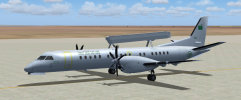
I just ran several tests with the TFS Saab 2000, the original model for FS2004. I opened it in ModelConverter and then exported it to FS2004 format, without adding my antennas. I did this five times.
I didn't change any of the ModelConverter options between the five tests.

The first time, I had no landing gear. The second time, I only had the nose gear. The third time, I had no landing gear at all. The fourth time, I only had the main landing gear. The fifth time was identical to the fourth.
 

Attachments

  • TFS SAAB 2000 FS2004 AFTER MDLCVRTX.png
    TFS SAAB 2000 FS2004 AFTER MDLCVRTX.png
    203 KB · Views: 49
I just make a test with your Check.MDL.

Result is the same... Only Main Gear visible. Not the Nose Gear.
 

Attachments

  • TFS SAAB 2000 FS2004 for Hiroshi.png
    TFS SAAB 2000 FS2004 for Hiroshi.png
    545.1 KB · Views: 77
It's strange that nose gear didn't appear , I think needs to check your plane set .
Why mine is showing up and yours don't even using same MDL.
 
Last edited:
I got the aircraft.cffg he is using and strange things happened.
When using his contact points.
After loaded the plane and show up on the sim , nose gear appears but just after that dissapears.
If change contact points back to king air , shows up.

Just may be will be a hint for Arno so reported.
 
I don't know enough about aircraft design to see how the cfg file would be involved in this.
 
Even just load the original and export to FS2004 MDL on ModelConverterX 1.8 nose gear will be lost.
So merge a model is not a problem.
Also when see the Hierarchy of the nose gear , it's different from the original.
May be something is there.
I'm guessing it's a kind of LOD's action.
 
When only compile the LOD320's .x file exported from Model ConverterX 1.8 .. gear is working stable ... just props are messing up.

When use Model Converter 1.9's exported .x file , LOD320 model gets huge .. larger then a terminal so becomes a useless .x file
 
Last edited:
Proper export of FS2004 aircraft has only been added in version 1.7. So any version before that you will loose most visibility conditions and mouse rectangles.

I'll check why the X file is different between 1.8 and the development release. There should not be major changes.
 
It was a problem with a scenery object library.
After replacing an emissive texture with Material Editor the output was wrong or MCX 1.9 even crashed

Guenther
 
If you have a sample object to test the issue with, I can have a look.
 
When use Model Converter 1.9's exported .x file , LOD320 model gets huge .. larger then a terminal so becomes a useless .x file
That's because you have the unlimited export tweak enabled. In that case the model is scaled up and in the ASM file the size is scaled down again. But good point that the X file is not really useful as an intermediate output in that case.
 
Back
Top