• Which the release of FS2020 we see an explosition of activity on the forun and of course we are very happy to see this. But having all questions about FS2020 in one forum becomes a bit messy. So therefore we would like to ask you all to use the following guidelines when posting your questions:

    • Tag FS2020 specific questions with the MSFS2020 tag.
    • Questions about making 3D assets can be posted in the 3D asset design forum. Either post them in the subforum of the modelling tool you use or in the general forum if they are general.
    • Questions about aircraft design can be posted in the Aircraft design forum
    • Questions about airport design can be posted in the FS2020 airport design forum. Once airport development tools have been updated for FS2020 you can post tool speciifc questions in the subforums of those tools as well of course.
    • Questions about terrain design can be posted in the FS2020 terrain design forum.
    • Questions about SimConnect can be posted in the SimConnect forum.

    Any other question that is not specific to an aspect of development or tool can be posted in the General chat forum.

    By following these guidelines we make sure that the forums remain easy to read for everybody and also that the right people can find your post to answer it.

FSXA Real flood in FSX!

Messages
520
Country
greece
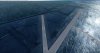
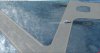
Look what a little mask glitch managed to do in a city I'm working on in FSX.....
Thought it would be nice to share the....funny results!
 

Attachments

  • 2013-2-7_15-2-7-53.jpg
    2013-2-7_15-2-7-53.jpg
    762.6 KB · Views: 581
  • 2013-2-7_15-1-27-48.jpg
    2013-2-7_15-1-27-48.jpg
    612.7 KB · Views: 543
  • 2013-2-7_13-56-39-544.jpg
    2013-2-7_13-56-39-544.jpg
    422.5 KB · Views: 632
Probably there is an alpha channel that is used as watermask. I have had this before when the blendmask and watermask were switched in some imagery I used.
 
Check Channel_BlendMask and Channel_LandWaterMask in your .inf file and ensure they are pointing to the correct files.
 
Thank you guys, I'm gonna check everything again.
Man, there are ships in my airport............
 
I was trying to limit pushbacks on Cargo parking and it looked like it worked, the aircraft started right up and taxied, only the pushback tug followed it all the way to the hold short line and pushed the aircraft over the line. It was hilarious.
 
Well it was the .TIF file I used. I was using an older version of Photoshop and I had no problem, but now with CS5 I always get this result.
Can anyone tell me how to save a TIFF file in CS5 without having this problem? :confused:

Thanks
 
Well it was the .TIF file I used. I was using an older version of Photoshop and I had no problem, but now with CS5 I always get this result.
Can anyone tell me how to save a TIFF file in CS5 without having this problem? :confused:

Thanks

I use CS2 but can you find a channels palette in CS5? Like "Window > Channels" if all else fails? See if you have an "Alpha 1" channel, and if you do is it all black? If so, drag it off into the trash bin. Save the .tif and recompile the PR. (compression doesn't matter BTW, I never use any compression, all it does is slow the resampling process down to a crawl)

Jim
 
Back
Top