• Which the release of FS2020 we see an explosition of activity on the forun and of course we are very happy to see this. But having all questions about FS2020 in one forum becomes a bit messy. So therefore we would like to ask you all to use the following guidelines when posting your questions:

    • Tag FS2020 specific questions with the MSFS2020 tag.
    • Questions about making 3D assets can be posted in the 3D asset design forum. Either post them in the subforum of the modelling tool you use or in the general forum if they are general.
    • Questions about aircraft design can be posted in the Aircraft design forum
    • Questions about airport design can be posted in the FS2020 airport design forum. Once airport development tools have been updated for FS2020 you can post tool speciifc questions in the subforums of those tools as well of course.
    • Questions about terrain design can be posted in the FS2020 terrain design forum.
    • Questions about SimConnect can be posted in the SimConnect forum.

    Any other question that is not specific to an aspect of development or tool can be posted in the General chat forum.

    By following these guidelines we make sure that the forums remain easy to read for everybody and also that the right people can find your post to answer it.

MSFS24 Remove Power Pole

Messages
95
Country
france
Hello
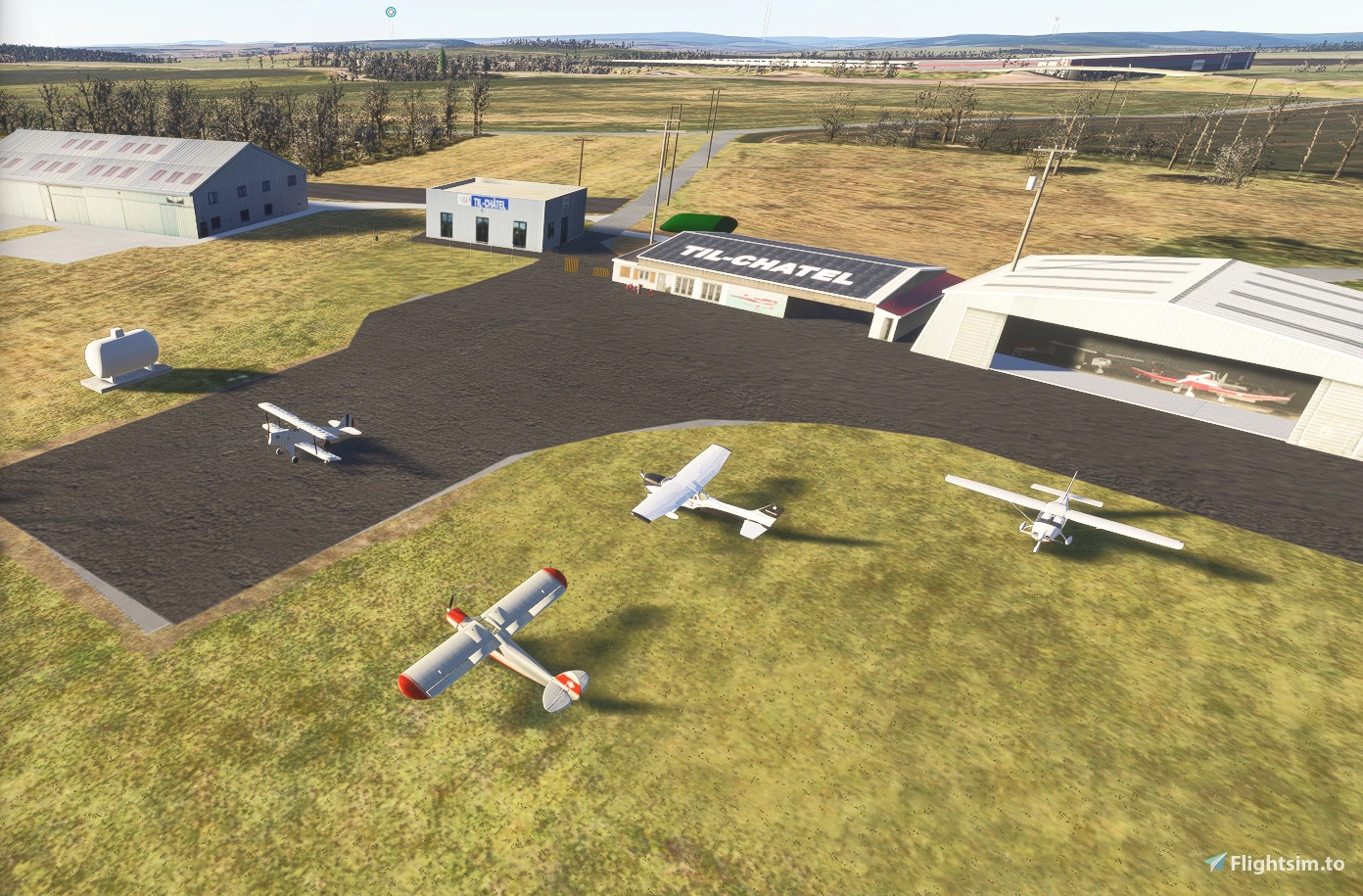
I have the same problem with the Tilchatel scenery (https://fr.flightsim.to/addon/103580/lfet-tilchatel-2024). There are electrical pylons in the middle of a hangar that I can't remove!

I've tried every possible polygon without success.
Perhaps I should report it to Asobo or Microsoft, but I don't know how.
If anyone has a solution, I'd be very grateful.

Regards
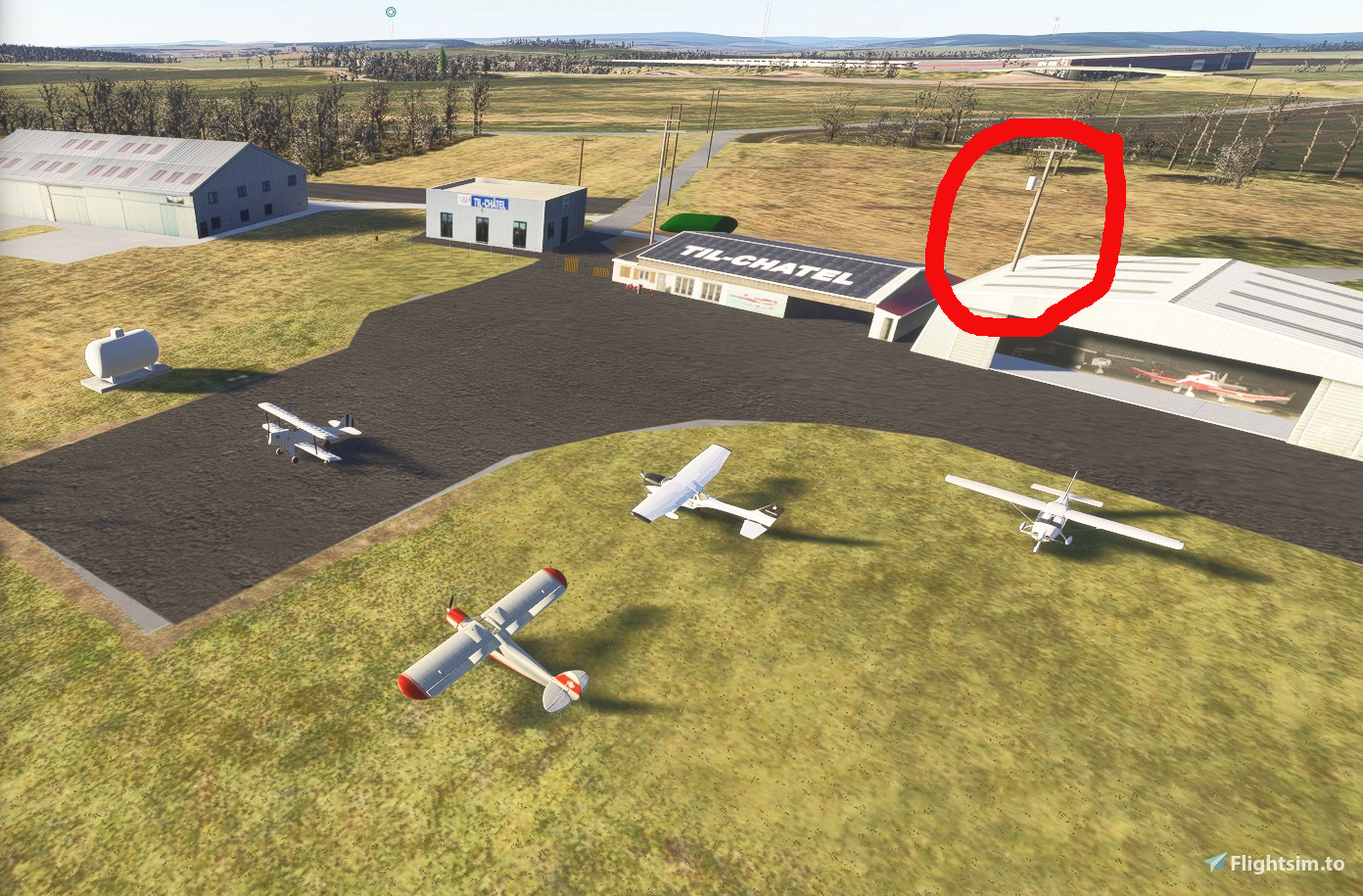
till.png
 
Hello
I have the same problem with the Tilchatel scenery (https://fr.flightsim.to/addon/103580/lfet-tilchatel-2024). There are electrical pylons in the middle of a hangar that I can't remove!

I've tried every possible polygon without success.
Perhaps I should report it to Asobo or Microsoft, but I don't know how.
If anyone has a solution, I'd be very grateful.

Hi Pat:

While technically this may best be addressed in a separate thread which can receive undivided attention, it is closely related to the OP topic.

The coordinates of the unwanted power pole (which may no longer exist IRL ?) is:

47.5452876337556,5.20682771333067 ...via FSUIPC7 data read from a user aircraft datum centered at the base of the unwanted power pole.


MSFS 2024 at LFET in DevMode Menu > Debug > Debug Model LODs mode shows:

fsdev_oldpat_lfet_rogue_powerpole_msfs24_debug_lod__display_full_name-jpg.100464


fsdev_oldpat_lfet_rogue_powerpole_msfs24_debug_lod__display_package_name-jpg.100465


fsdev_oldpat_lfet_rogue_powerpole_msfs24_debug_lod__display_guid-jpg.100466


MSFS 2024 at LFET in DevMode Menu > Debug > Terrain > Debug OSM Power Lines mode shows:

...no OSM vector placement of a power pole at that specific location.

fsdev_oldpat_lfet_rogue_powerpole_msfs24_debug_terrain_osm_powerline_display-jpg.100467


Note as well that in MSFS 2020 the unwanted powerpole does not show as part of either the default or custom scenery, so:

MSFS 2020 at LFET in DevMode Menu > Debug > Terrain > Debug OSM Power Lines mode shows:

...no OSM vector placement of a power pole at that specific location.


(NOTE: MSFS 2020 will not display the mapped LFET add-on *.KTX2 texture Materials, so we see the 3D models of Hangars as "untextured" checkerboard patterns)


fsdev_oldpat_lfet_rogue_powerpole_msfs20_debug_terrain_osm_powerline_display-jpg.100470


Furthermore, these are "minor" powerpole placements, and would not be included in the Mamudesign – Powerlines and Solar Farms add-on.


Thus, AFAIK in MSFS 2024 it was likely a 3D model Scenery Library Object placed via XML from \asobo_props.bgl.

And, AFAIK in MSFS 2024 it was likely placed via XML from a "streamed" BGL.


Did you attempt use of a small "ExclusionRectangle" at the base of the unwanted streetlamp_Wood02 Scenery Library Object ?


A ExclusionRectangle of a proper 'attribute' excludes by overlapping only the unwanted streetlamp_Wood02 Scenery Library Object base.


https://docs.flightsimulator.com/ms...Scenery_XML_Properties.htm#ExclusionRectangle

excludeLibraryObjectsSetting this will exclude any library objects within the rectangular area.


GaryGB
 

Attachments

  • FSDEV_oldpat_LFET_rogue_powerpole_MSFS24_Debug_LOD__Display_Full_Name.jpg
    FSDEV_oldpat_LFET_rogue_powerpole_MSFS24_Debug_LOD__Display_Full_Name.jpg
    293.9 KB · Views: 185
  • FSDEV_oldpat_LFET_rogue_powerpole_MSFS24_Debug_LOD__Display_Package_Name.jpg
    FSDEV_oldpat_LFET_rogue_powerpole_MSFS24_Debug_LOD__Display_Package_Name.jpg
    283.5 KB · Views: 176
  • FSDEV_oldpat_LFET_rogue_powerpole_MSFS24_Debug_LOD__Display_GUID.jpg
    FSDEV_oldpat_LFET_rogue_powerpole_MSFS24_Debug_LOD__Display_GUID.jpg
    287.9 KB · Views: 154
  • FSDEV_oldpat_LFET_rogue_powerpole_MSFS24_Debug_Terrain_OSM_Powerline_Display.jpg
    FSDEV_oldpat_LFET_rogue_powerpole_MSFS24_Debug_Terrain_OSM_Powerline_Display.jpg
    438.8 KB · Views: 157
  • FSDEV_oldpat_LFET_rogue_powerpole_MSFS20_Debug_Terrain_OSM_Powerline_Display.jpg
    FSDEV_oldpat_LFET_rogue_powerpole_MSFS20_Debug_Terrain_OSM_Powerline_Display.jpg
    423.4 KB · Views: 116
Last edited:
Hi Pat:

While technically this may best be addressed in a separate thread which can receive undivided attention, it is closely related to the OP topic.

The coordinates of the unwanted power pole (which may no longer exist IRL ?) is:

47.5452876337556,5.20682771333067 ...via FSUIPC7 data read from a user aircraft datum centered at the base of the unwanted power pole.


MSFS 2024 at LFET in Debug > Debug Model LODs mode shows:

fsdev_oldpat_lfet_rogue_powerpole_msfs24_debug_lod__display_full_name-jpg.100464


fsdev_oldpat_lfet_rogue_powerpole_msfs24_debug_lod__display_package_name-jpg.100465


fsdev_oldpat_lfet_rogue_powerpole_msfs24_debug_lod__display_guid-jpg.100466


MSFS 2024 at LFET in Debug > Terrain > Debug OSM Power Lines mode shows:

...no OSM vector placement of a power pole at that specific location.

fsdev_oldpat_lfet_rogue_powerpole_msfs24_debug_terrain_osm_powerline_display-jpg.100467


Furthermore, these are "minor" powerpole placements, and would not be included in the Mamudesign – Powerlines and Solar Farms add-on.


Thus, AFAIK in MSFS 2024 it was likely a 3D model Scenery Library Object placed via XML from \asobo_props.bgl.

And, AFAIK in MSFS 2024 it was likely a placed via XML from a "streamed" BGL.


Did you attempt use of a small "ExclusionRectangle" at the base of the unwanted streetlamp_Wood02 Scenery Library Object ?


A ExclusionRectangle of a proper 'attribute' excludes by overlapping only the unwanted streetlamp_Wood02 Scenery Library Object base.


https://docs.flightsimulator.com/ms...Scenery_XML_Properties.htm#ExclusionRectangle

excludeLibraryObjectsSetting this will exclude any library objects within the rectangular area.


GaryGB
Thanks for your quick reply.
I'll try all that and let you know how it goes.

Where can I find "Thus, AFAIK in MSFS 2024 it was likely a 3D model Scenery Library Object placed via XML from \asobo_props.bgl."
 
Where can I find "Thus, AFAIK in MSFS 2024 it was likely a 3D model Scenery Library Object placed via XML from \asobo_props.bgl."

Please note the path to the object seen in the screenshot taken in DevMode with Debug LODs and Full Name enabled:

MSFS 2024 at LFET in DevMode Menu > Debug > Debug Model LODs mode shows:

fsdev_oldpat_lfet_rogue_powerpole_msfs24_debug_lod__display_full_name-jpg.100464


Furthermore, these are "minor" powerpole placements, and would not be included in the Mamudesign – Powerlines and Solar Farms add-on.


Thus, AFAIK in MSFS 2024 it was likely a 3D model Scenery Library Object placed via XML from \asobo_props.bgl.

And, AFAIK in MSFS 2024 it was likely a placed via XML from a "streamed" BGL.

To find the MSFS path to \asobo_props.bgl, I suggest utilizing "Everything" search utility (version 1.5 Beta is quite well-vetted and useful) with this query string:

Code:
*asobo_props.bgl*

https://www.voidtools.com/forum/viewtopic.php?t=9787

https://www.voidtools.com/


As MSFS 2024 "streams" that content instead of providing the discrete ModelLib BGL, on my FS computer, I can only find that BGL in my MSFS 2020 installation:

C:\Users\[user name]\AppData\Local\Packages\Microsoft.FlightSimulator_8wekyb3d8bbwe\LocalCache\Packages\Official\OneStore\fs-base\scenery\Global\Asobo_Props


I suggest using Arno's ModelConverterX (aka "MCX") 3D model preview to ID the exact object you wish to place (Asobo_Props.bgl has 'true' streetlights to choose).

https://www.scenerydesign.org/development-releases/


Apparently, it is critical to also purchase and install MSFS 2020 to increase one's options for customizing MSFS 2024 default scenery :banghead:

At the least that may allow us to look up GUIDs for objects that (still ?) exist in MSFS 2024 to ID them for exclude / replace purposes etc..


Historically, OldPat (aka "G. Guichard), Michel Mangonnaux (Simaltitude), and Lehcim21 appear to have originally developed the entire airport scenery since FSX at LFET:

https://mega.nz/folder/gXBmUKxD#xoxbZJFN9s3kyhc9amCIyw

https://library.avsim.net/file/204914-version-3-1-to-five-terrains-around-dijon

https://fr.flightsim.to/addon/103580/lfet-tilchatel-2024

https://flightsim.to/addon/103580/lfet-tilchatel-2024

...so it seems likely 'OldPat' may opt to create the entire LFET airport for MSFS 2024 as well.


If one wished to exclude / replace the entire MSFS 2024 airport, one would not be able to access the 2024 native LFET "generic airport" in scenery/0601/apx49150.bgl, inside:

C:\XboxGames\Microsoft Flight Simulator 2024\Content\minimalcache\fs24-fs-base-genericairports\minimal.fsarchive

...so we must again use MSFS 2020 to gather required data sources to use in MSFS 2024. o_O


Other options to exclude / replace the entire MSFS 2024 airport may be found in these threads:

https://www.fsdeveloper.com/forum/threads/airport-bgl-file-format-msfs-2024.460474/post-937219

https://www.fsdeveloper.com/forum/t...-extract-xml-code-for-msfs-2024.461067/unread

https://devsupport.flightsimulator.com/t/default-airport-edits/14639/23


GaryGB
 
Last edited:
Hello
I have the same problem with the Tilchatel scenery (https://fr.flightsim.to/addon/103580/lfet-tilchatel-2024). There are electrical pylons in the middle of a hangar that I can't remove!

I've tried every possible polygon without success.
Perhaps I should report it to Asobo or Microsoft, but I don't know how.
If anyone has a solution, I'd be very grateful.

Regards

hello,

What kind of polygon did you use?

Since this is an actual scenery object you want to exclude, you most likely need a Rectangle along with an Exclusion Rectangle. I had similar issues before and Asobo explained how to solve in this thread:

 
A few comments. First, most, if not all of the objects you want to exclude are SimPropContainers. Next, you don't need multiple packages to exclude and then place objects... one package will do it. Next, this isn't an airport replacement. This is just scenery. You're not changing any of the airport elements... just the objects and adding some polygons. Your package order hint should probably be CUSTOM_SCENERY_PATCH. Leave out the airport stub in the XML.
I attached a zip file with just the necessary excludes. You could add your modellib, than add the placements, and you should be good to go with a single scenery package.
 

Attachments

Quelques remarques. Premièrement, la plupart, voire la totalité, des objets à exclure sont des SimPropContainers. Ensuite, un seul package suffit pour exclure puis placer les objets. Deuxièmement, il ne s'agit pas d'un remplacement d'aéroport, mais simplement d'un élément de décor. Vous ne modifiez aucun élément de l'aéroport, seulement les objets et ajoutez quelques polygones. L'indication d'ordre des packages devrait probablement être CUSTOM_SCENERY_PATCH. Omettez le stub de l'aéroport dans le fichier XML.
J'ai joint un fichier zip contenant uniquement les exclusions nécessaires. Vous pouvez ajouter votre bibliothèque de modèles, puis les emplacements, et vous devriez pouvoir utiliser un seul pack de scènes.

Thank you for your reply.

I'm going to restart the project, starting with a scene instead of an airport.

I tried adding a polygon (noTIN noBuilding), as in your example, but the pylon is still there!
I'm continuing my research and I'll keep you updated.
 
AFAIK, an ExclusionRectangle may merit testing for the 'streetlamp_Wood02' object, as it specifically can exclude that scenery library object placed, IIUC, from the \asobo_props.bgl ModelLib file (supplied via a MSFS "streamed" *.fsarchive file).

The ExclusionRectangle "excludeLibraryObjects" exclude attribute may be practical to test first, IMHO, for the unwanted 'streetlamp_Wood02' object.

https://docs.flightsimulator.com/ms...Scenery_XML_Properties.htm#ExclusionRectangle


UPDATE (later):

I had not yet loaded up Dick's project inside the attached ZIP above, into MSFS 2024 Scenery Editor.

Having done so now, I see it does indeed exclude ... via an ExclusionRectangle, the unwanted 'streetlamp_Wood02' object protruding from the hangar cited above. :wizard:

fsdev_oldpat_lfet_rogue_powerpole_msfs24_devmode_load_rhumbaflappy_my_lfet_project-1-jpg.100492


AFAIK, Dick granted permission to utilize this as a project 'primitive' to customize and add 3D scenery models etc., then Build / Compile a test version for inspection / use.


PS: I was better able to understand the basis for Dick's implemented code in his attached my_lfet_scenery-zip project via a Google search using this query string: :idea:

<CODE>

MSFS 2024 SDK Docs package order hint CUSTOM_SCENERY_PATCH

</CODE>


...and via a MSFS 2024 SDK Docs online search using this query string:

<CODE>

hint

</CODE>

https://docs.flightsimulator.com/msfs2024/html/1_Introduction/Introduction.htm?rhsearch=hint


...as well as a review of Dick's prior post on that process at FSDEV ...here:

https://www.fsdeveloper.com/forum/threads/package-order-hint-setting.460149/


GaryGB
 

Attachments

  • FSDEV_oldpat_LFET_rogue_powerpole_MSFS24_DevMode_load_rhumbaflappy_My_LFET_Project-1.jpg
    FSDEV_oldpat_LFET_rogue_powerpole_MSFS24_DevMode_load_rhumbaflappy_My_LFET_Project-1.jpg
    387.2 KB · Views: 94
Last edited:
A few comments. First, most, if not all of the objects you want to exclude are SimPropContainers.

When selecting the (multiple) 'attributes' to use for the ExclusionRectangle, how does one discern which MSFS24 default LFET objects are SimPropContainer objects ? :scratchch


I see that the streetlamp_Wood02 Object type is "Scenery" (but not 'SimPropContainer') ...in the Scenery Editor Objects dialog pick list.

And streetlamp_Wood02 is not found ...in the Scenery Editor Objects dialog pick list when 'SimPropContainer' is selected as the Object type


AFAIK, SimPropContainer attributes are assigned via MSFS24 Scenery Editor, so I wonder if they are conveyed to- / retained by- 3D models after compiled into a ModelLib BGL ?


I did see that your own custom BGL was able to show assigned SimPropContainer attributes via MSFS 2024 SDK BGLExplorer:

https://www.fsdeveloper.com/forum/threads/airport-bgl-file-format-msfs-2024.460474/post-937239


But what if a FS Developer does not have MSFS 2020 and also cannot access 3D models inside MSFS 2024 "streamed" files ?


Or is one otherwise able to find the other cited "SimPropContainer" objects placed at LFET ...inside a MSFS 2024 *.SPB fie ?


UPDATE: (later)

Thanks to Dick's reply below in this same thread:

https://www.fsdeveloper.com/forum/threads/remove-power-pole.461070/post-941421


...I can now see that there are indeed multiple SimPropContainers at MSFS 2024 LFET ...revealed via DevMode menu > Debug > SimPropContainer dialog:

fsdev_oldpat_lfet_rogue_powerpole_msfs24_devmode_load_rhumbaflappy_my_lfet_project_simpropcont-jpg.100510


...And I can now also see that there are indeed multiple SimObjects at MSFS 2024 LFET ...revealed via DevMode menu > Debug > SimObjects > Containers dialog:

fsdev_oldpat_lfet_rogue_powerpole_msfs24_devmode_load_rhumbaflappy_my_lfet_project_simpropcont-jpg.100508


fsdev_oldpat_lfet_rogue_powerpole_msfs24_devmode_load_rhumbaflappy_my_lfet_project_simpropcont-jpg.100509


As a 'streetlamp_Wood02' object at LFET is not a SimPropContainer or SimObject, it may only require an ExclusionRectangle with a excludeLibraryObjects attribute.

GaryGB
 

Attachments

  • FSDEV_oldpat_LFET_rogue_powerpole_MSFS24_DevMode_load_rhumbaflappy_My_LFET_Project_SimPropCont...jpg
    FSDEV_oldpat_LFET_rogue_powerpole_MSFS24_DevMode_load_rhumbaflappy_My_LFET_Project_SimPropCont...jpg
    434.8 KB · Views: 66
  • FSDEV_oldpat_LFET_rogue_powerpole_MSFS24_DevMode_load_rhumbaflappy_My_LFET_Project_SimPropCont...jpg
    FSDEV_oldpat_LFET_rogue_powerpole_MSFS24_DevMode_load_rhumbaflappy_My_LFET_Project_SimPropCont...jpg
    485.3 KB · Views: 69
  • FSDEV_oldpat_LFET_rogue_powerpole_MSFS24_DevMode_load_rhumbaflappy_My_LFET_Project_SimPropCont...jpg
    FSDEV_oldpat_LFET_rogue_powerpole_MSFS24_DevMode_load_rhumbaflappy_My_LFET_Project_SimPropCont...jpg
    478.4 KB · Views: 64
Last edited:
Thank you for all your helpful advice and assistance.
I'm restarting the entire project, and the initial results are encouraging.

Once completed, an update will be posted at:
 
The Exclusion rectangles I used were to take out the windsock and another to get rid of the SimPropContainers and any other debris. After the SimPropContainers are gone, then you are still going to see whatever was placed in the generic LFET by Asobo. So the polygons eliminate those leftover old buildings. Now you have a blank slate for making a custom scenery.

Identifying the SimPropContainers was a guess based on the gliders indicating this was part of the Microsoft glider addon package, and looking at the LODs... dozens of objects like doors and windows and fuse boxes. SimPropContainers makes sense rather than individually placed models. In Devmode, Debug menu, there is SimPropContainers... clicking that confirms they are there.

There's hundreds (thousands?) of SimPropContainers in the sim, and no guide as to what they look like so a dev could easily choose to use them.
 
Last edited:
Hello.
So I used a rectangle exclude sim prop container to remove those pylons and all the other objects I didn't want, and polygons to exclude the MSFS buildings, and it's working now.
Visit my website and flightsim.to for the update

Thanks for all your advice.
 
Hi Pat:

I just downloaded / installed / tested oldpat-airport-lfet-tilchatel_5M834 at https://flightsim.to/addon/103580/lfet-tilchatel-2024 ...dated August 06, 2026:

oldpat-airport-lfet-tilchatel_5m834_august_06_2026-jpg.100540


As you can see, on my MSFS 2024 install (which has no local customization of Package layer order or load priorities that I know of), the rogue PowerPole still shows. :oops:


The LFET update does not show vectors for a anticipated exclusion of the rogue PowerPole object if DevMode Menu > Debug > Terrain > Debug Exclusion Rectangles is enabled.

oldpat-airport-lfet-tilchatel_5m834_august_06_2026_exclusion_debug-jpg.100545


Curiously, this is what I see in MSFS 2024 when I also load rhumbaflappy's My_LFET_Scenery with the excludes seen above in this same thread:

NOTE: Both DevMode Menu > Debug > Terrain > Debug Shapes and Debug Exclusion Rectangles is enabled

oldpat-airport-lfet-tilchatel_5m834_august_06_2026-rhumbaflappy_my_lfet_scenery_exclusion_debu-jpg.100547


rhumbaflappy's My_LFET_Scenery with the excludes (click the ['spoiler'] button)

fsdev_oldpat_lfet_rogue_powerpole_msfs24_devmode_load_rhumbaflappy_my_lfet_project-1-jpg.100492


Your personal website at:

https://oldpat-e--monsite-com.trans...tr_sl=fr&_x_tr_tl=en&_x_tr_hl=en&_x_tr_pto=sc

...shows no rogue Powerpole at LFET adjacent to the large hangar in your screenshot: (click the ['spoiler'] button)

lfet01.png


Has there been a delay- or an error- in copying your new LFET build from your personal website over to the updated page on flightsim.to ?


As this is a MSFS 2024 package, I have not attempted to derive a package folder chain and XML from the latest update posted to flightsim.to dated August 06, 2026.


Would you consider attaching / linking your Package folder chain sources to be reviewed and to see if there is advise to be offered for XML fine-tuning of this ? :scratchch


GaryGB
 

Attachments

  • oldpat-airport-lfet-tilchatel_5M834_August_06_2026.jpg
    oldpat-airport-lfet-tilchatel_5M834_August_06_2026.jpg
    442.8 KB · Views: 59
  • oldpat-airport-lfet-tilchatel_5M834_August_06_2026_Exclusion_Debug.jpg
    oldpat-airport-lfet-tilchatel_5M834_August_06_2026_Exclusion_Debug.jpg
    449.4 KB · Views: 53
  • oldpat-airport-lfet-tilchatel_5M834_August_06_2026+rhumbaflappy_My_LFET_Scenery_Exclusion_Debu...jpg
    oldpat-airport-lfet-tilchatel_5M834_August_06_2026+rhumbaflappy_My_LFET_Scenery_Exclusion_Debu...jpg
    369.4 KB · Views: 47
Last edited:
Hi Pat:

I just downloaded / installed / tested oldpat-airport-lfet-tilchatel_5M834 at https://flightsim.to/addon/103580/lfet-tilchatel-2024 ...dated August 06, 2026:

oldpat-airport-lfet-tilchatel_5m834_august_06_2026-jpg.100540


As you can see, on my MSFS 2024 install (which has no local customization of Package layer order or load priorities that I know of), the rogue PowerPole still shows. :oops:


Also, when DevMode Menu > Debug > Terrain > Debug Exclusion Rectangles is enabled, I see not vectors on screen for the anticipated exclusion objects update at LFET.

oldpat-airport-lfet-tilchatel_5m834_august_06_2026_exclusion_debug-jpg.100545


Curiously, this is what I see in MSFS 2024 when I also load rhumbaflappy's My_LFET_Scenery with the excludes seen above in this same thread:

oldpat-airport-lfet-tilchatel_5m834_august_06_2026-rhumbaflappy_my_lfet_scenery_exclusion_debug-jpg.100546


rhumbaflappy's My_LFET_Scenery with the excludes (click the ['spoiler'] button)

fsdev_oldpat_lfet_rogue_powerpole_msfs24_devmode_load_rhumbaflappy_my_lfet_project-1-jpg.100492


Your personal website at:

https://oldpat-e--monsite-com.trans...tr_sl=fr&_x_tr_tl=en&_x_tr_hl=en&_x_tr_pto=sc

...shows no rogue Powerpole at LFET adjacent to the large hangar in your screenshot:

lfet01.png


Has there been a delay- or an error- in copying your new LFET build from your personal website over to the updated page on flightsim.to ?


As this is a MSFS 2024 package, I have not attempted to derive a package folder chain and XML from the latest update posted to flightsim.to dated August 06, 2026.


Would you consider attaching / linking your Package folder chain sources to be reviewed and to see if there is advise to be offered for XML fine-tuning of this ? :scratchch


GaryGB
Hi Gary
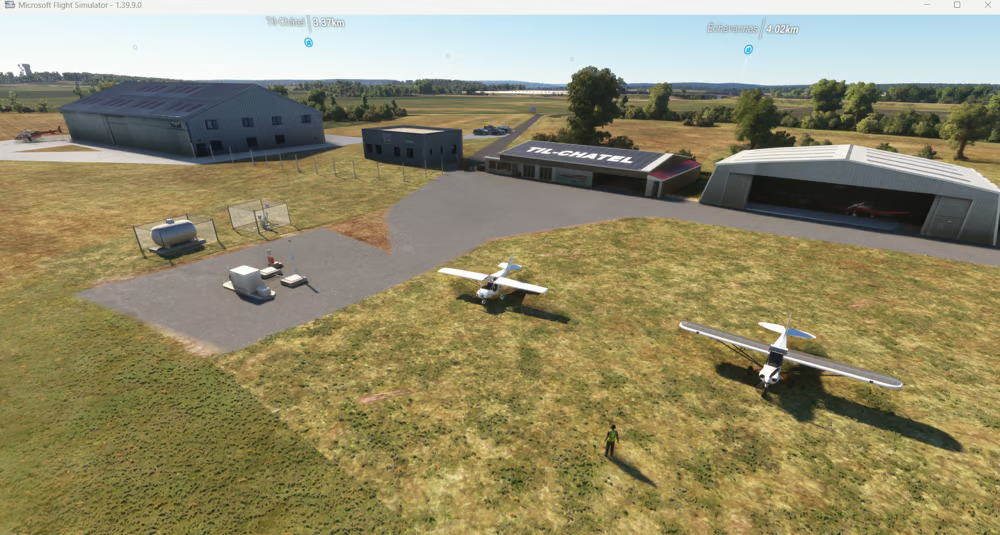
Here's a screenshot of the latest version (https://flightsim.to/addon/103580/lfet-tilchatel-2024 (V1.3)), which I just downloaded from Flightsim.to to be sure.
The pylon has indeed disappeared.
Capture d’écran 2026-08-07 230149.png

I send you the link of the project file by direct message.
Just a quick note: the graphics settings in MSFS 2024 are on medium because my PC is a bit old and not very powerful anymore. This might be causing some objects to disappear from the scene.
 
Hi Gary
Here's a screenshot of the latest version (https://flightsim.to/addon/103580/lfet-tilchatel-2024 (V1.3)), which I just downloaded from Flightsim.to to be sure.

The pylon has indeed disappeared.
I send you the link of the project file by direct message.

Just a quick note: the graphics settings in MSFS 2024 are on medium because my PC is a bit old and not very powerful anymore. This might be causing some objects to disappear from the scene.

I'll load up LFET_V1.3 in MSFS 2024 shortly. :)

UPDATE:

Here is the compiled Package you linked for LFET_V1.3 (curiously, it still shows the rogue PowerPole):

oldpat-airport-lfet-tilchatel_5m834_august_06_2026_v1_3_debug_shapes-debug_exclusion_rectangles-jpg.100549


It would seem I / we need to examine in more detail, just how Dick has excluded the unwanted 'streetlamp_Wood02' object via his code ...attached above here: :scratchch

https://www.fsdeveloper.com/forum/threads/remove-power-pole.461070/post-941391


GaryGB
 

Attachments

  • oldpat-airport-lfet-tilchatel_5M834_August_06_2026_V1_3_Debug_Shapes+Debug_Exclusion_Rectangles.jpg
    oldpat-airport-lfet-tilchatel_5M834_August_06_2026_V1_3_Debug_Shapes+Debug_Exclusion_Rectangles.jpg
    439.3 KB · Views: 55
Last edited:
Hi Pat:

Thanks for posting the results of your additional test.

Here is what shows on my MSFS 2024 installation with the only package in my active \Community2024 sub-folder being the airport-lfet-tilchatel_v1.3 you linked via DM:

oldpat-airport-lfet-tilchatel_5m834_august_06_2026_v1_3_only_debug_shapes-debug_exclusion_rect-jpg.100563


Display of the rogue Powerpole raises questions as to what loads from outside my MSFS 2024 active \Community2024 folder ...based on a Google search using this query string:

Code:
MSFS 2024 SDK "Exclude Rectangle" versus "ExclusionRectangle"


AFAIK, Asobo opted to not disclose via on-screen Debug display dialogs, how- and from where- some MSFS 2024 scenery content is 'placed'.

Asobo's disclosure of what files 'contain' actual scenery content is only up to a point, as content from MSFS 2020 may now be inside MSFS 2024 minimal.fsarchive and streamed files


IMHO, disclosing how some MSFS 2024 scenery content is 'placed' via on-screen Debug display dialogs may prove as important as what discrete files contain scenery content.


I shall consider further the dynamics of this curious exclusion scenario when I get more time free, as I intend to study / test manual control for loading / display of "Official" content in:

C:\Users\[user name]\AppData\Local\Packages\Microsoft.Limitless_8wekyb3d8bbwe\LocalCache\Packages

...and more specifically:

default, streamed, and Marketplace-purchased scenery in the MSFS 2024 protected Official folder chains

...for my MSFS 2024 install.


I am glad you seem to have a working result that you are satisfied with thus far on your MSFS 2024 install. :)

GaryGB
 

Attachments

  • oldpat-airport-lfet-tilchatel_5M834_August_06_2026_V1_3_ONLY_Debug_Shapes+Debug_Exclusion_Rect...jpg
    oldpat-airport-lfet-tilchatel_5M834_August_06_2026_V1_3_ONLY_Debug_Shapes+Debug_Exclusion_Rect...jpg
    391.7 KB · Views: 45
Last edited:
Hi Pat:

Thanks for posting the results of your additional test.

Here is what shows on my MSFS 2024 installation with the only package in my active \Community2024 sub-folder being the airport-lfet-tilchatel_v1.3 you linked via DM:

oldpat-airport-lfet-tilchatel_5m834_august_06_2026_v1_3_only_debug_shapes-debug_exclusion_rect-jpg.100563


Display of the rogue Powerpole raises questions as to what loads from outside my MSFS 2024 active \Community2024 folder ...based on a Google search using this query string:

Code:
MSFS 2024 SDK "Exclude Rectangle" versus "ExclusionRectangle"


Apparently Asobo opted to not disclose how- and from where- some MSFS 2024 scenery content is 'placed' via on-screen Debug display dialogs.

Asobo's disclosure of what files 'contain' actual scenery content is only up to a point, as content from MSFS 2020 may now be inside MSFS 2024 minimal.fsarchive and streamed files


IMHO, disclosing how some MSFS 2024 scenery content is 'placed' via on-screen Debug display dialogs may prove as important as what discrete files contain scenery content.


I shall consider further the dynamics of this curious exclusion scenario when I get more time free, as I intend to study / test manual control for loading / display of "Official" content in:

C:\Users\[user name]\AppData\Local\Packages\Microsoft.Limitless_8wekyb3d8bbwe\LocalCache\Packages

...and more specifically:

default, streamed, and Marketplace-purchased scenery in the MSFS 2024 protected Official folder chains

...for my MSFS 2024 install.


I am glad you seem to have a working result that you are satisfied with thus far on your MSFS 2024 install. :)

GaryGB
Hi Gary
Just to clarify, I have the basic version of MSFS 2024 without any external extensions.

Here's the content of my community folder; there are a few subfolders containing object libraries for my projects.
community,.png

I'm going to post a message on Flightsim.to to find out if the electric pylon has indeed disappeared for those who have downloaded the latest version.
I'm sending you my scene .xml file in a private message; perhaps you can compare it to yours.
 
Hi Pat:

The latter DM'd Scene.XML compared to the prior DM'd Scene.XML in NotePad++ with Plugins > XML Tools > PrettyPrint > Indent on ...show:

* Both have 3436 lines.

* I have not yet compared them further aside from confirming they do not place the rogue Powerpole by GUID


FYI: In MSFS 2020 that object is from:

C:\Users\[user_name]\AppData\Local\Packages\Microsoft.FlightSimulator_8wekyb3d8bbwe\LocalCache\Packages\Official\OneStore\fs-base\scenery\Global\Asobo_Props/Asobo_Props.BGL


MCX ID's the object as:

Friendly Name: Streetlamp_Wood02

GUID: {EC72F2F6-E120-689E-8693-B7C1D9F7F72C}


IIUC, one cannot confirm it is placed by the MSFS 2024 native LFET "generic airport" in scenery/0601/apx49150.bgl, inside:

C:\XboxGames\Microsoft Flight Simulator 2024\Content\minimalcache\fs24-fs-base-genericairports\minimal.fsarchive


My tests thus far suggest the rogue Powerpole: Streetlamp_Wood02 - GUID: {EC72F2F6-E120-689E-8693-B7C1D9F7F72C}

...is mistakenly placed by either MSFS 2024 default scenery, or an add-on in the Microsoft section of the MSFS 2024 'system' folder chains.


BTW: I had not yet mentioned that since 2025 there are reports of an ongoing unresolved issue with display priority of certain such content in MSFS.

https://devsupport.flightsimulator....rriding-with-my-streamed-airport-add-on/14590


A Google search using this query string:

Code:
microsoft-scenery-gliders-worldwide-part1 priority

...may help explain this (and other MSFS display priority scenarios).


Use of a XML Package "Hint" may help in 'some' situations, but reportedly one must still manually edit layer assignments in Content.XML. :banghead:


So, I also plan to test if DevMode Menu > Debug > Terrain > Debug Shapes > Vector Data Debug > Draw Package Name:

"microsoft-scenery-gliders-worldwide-part1"

...seen at LFET, has an actual impact on scenery display priority at LFET


https://www.fsdeveloper.com/forum/threads/microsoft-scenery-gliders-worldwide-part1-solved.459562/

I also plan to test manually editing \Community2024 add-on layer assignment positions down to the bottom (higher priority level) of Content.XML.


More to come as time permits. ;)

GaryGB
 
Last edited:
I downloaded version1.3 and placed in community. No Pole, as expected. Don't know what Gary's issue is...
 
Back
Top