
-
Which the release of FS2020 we see an explosition of activity on the forun and of course we are very happy to see this. But having all questions about FS2020 in one forum becomes a bit messy. So therefore we would like to ask you all to use the following guidelines when posting your questions:
- Tag FS2020 specific questions with the MSFS2020 tag.
- Questions about making 3D assets can be posted in the 3D asset design forum. Either post them in the subforum of the modelling tool you use or in the general forum if they are general.
- Questions about aircraft design can be posted in the Aircraft design forum
- Questions about airport design can be posted in the FS2020 airport design forum. Once airport development tools have been updated for FS2020 you can post tool speciifc questions in the subforums of those tools as well of course.
- Questions about terrain design can be posted in the FS2020 terrain design forum.
- Questions about SimConnect can be posted in the SimConnect forum.
Any other question that is not specific to an aspect of development or tool can be posted in the General chat forum.
By following these guidelines we make sure that the forums remain easy to read for everybody and also that the right people can find your post to answer it.
You are using an out of date browser. It may not display this or other websites correctly.
You should upgrade or use an alternative browser.
You should upgrade or use an alternative browser.
Reverse Order?
- Thread starter Aspireman
- Start date

dave hoeffgen
Resource contributor
- Messages
- 1,439
- Country

No.

tgibson
Resource contributor
- Messages
- 11,845
- Country

Hi,
Yes, it's quite simple. I use Sketchup 8; I assume later versions have the same capabilites.
1. Import the BGL file into ModelConveterX.
2. If there is more than one object in the file, use the green arrows to find the correct object.
3. Use Export Object and choose 3DS (old) in the drop down box. If there is no 3DS (old) in your version choose 3DS.
4. Move the texture file(s) for the object into the same folder as the new 3DS file. Convert these to a format Sketchup can read (I use 24 bit BMP).
5. In Sketchup, choose File/Import and then 3DS in the drop down box.
6. Load the new 3DS file and your object will be loaded complete with texturing.
Now you can use normal Sketchup editing tools:
7. It will probably be a Component, so use Edit/Component/Edit Component.
8. It will be divided into triangles, so using the selection tool choose the diagonal line dividing typical rectangle polygons and press Delete.
9. It may be very small, and need to be scaled up. Hold down the Shift key when using the Scale tool and choose a center green point.
You can also edit the texture mapping:
10. Once you have your desired area a single polygon, click it with the arrow tool to select it.
11. Switch to the Paint Bucket tool and right click on the polygon.
12. Choose Texture/Postion and edit the texture mapping.
Note! If you wish to release anything for other than your own personal use, you MUST get permission from the original author!
Hope this helps,
Yes, it's quite simple. I use Sketchup 8; I assume later versions have the same capabilites.
1. Import the BGL file into ModelConveterX.
2. If there is more than one object in the file, use the green arrows to find the correct object.
3. Use Export Object and choose 3DS (old) in the drop down box. If there is no 3DS (old) in your version choose 3DS.
4. Move the texture file(s) for the object into the same folder as the new 3DS file. Convert these to a format Sketchup can read (I use 24 bit BMP).
5. In Sketchup, choose File/Import and then 3DS in the drop down box.
6. Load the new 3DS file and your object will be loaded complete with texturing.
Now you can use normal Sketchup editing tools:
7. It will probably be a Component, so use Edit/Component/Edit Component.
8. It will be divided into triangles, so using the selection tool choose the diagonal line dividing typical rectangle polygons and press Delete.
9. It may be very small, and need to be scaled up. Hold down the Shift key when using the Scale tool and choose a center green point.
You can also edit the texture mapping:
10. Once you have your desired area a single polygon, click it with the arrow tool to select it.
11. Switch to the Paint Bucket tool and right click on the polygon.
12. Choose Texture/Postion and edit the texture mapping.
Note! If you wish to release anything for other than your own personal use, you MUST get permission from the original author!
Hope this helps,
Last edited:
dave hoeffgen
Resource contributor
- Messages
- 1,439
- Country
Hi,
Yes, it's quite simple. I use Sketchup 8; I assume later versions have the same capabilites.
1. Import the BGL file into ModelConveterX.
2. If there is more than one object in the file, use the green arrows to find the correct object.
3. Use Export Object and choose 3DS (old) in the drop down box. If there is no 3DS (old) in your version choose 3DS.
4. Move the texture file(s) for the object into the same folder as the new 3DS file.
5. In Sketchup, choose File/Import and then 3DS in the drop down box.
6. Load the new 3DS file and your object will be loaded complete with texturing.
Now you can use normal Sketchup editing tools:
7. It will probably be a Component, so use Edit/Component/Edit Component.
8. It will be divided into triangles, so using the selection tool choose the diagonal line dividing typical rectangle polygons and press Delete.
9. It may be very small, and need to be scaled up. Hold down the Shift key when using the Scale tool and choose a center green point.
You can also edit the texture mapping:
10. Once you have your desired area a single polygon, click it with the arrow tool to select it.
11. Switch to the Paint Bucket tool and right click on the polygon.
12. Choose Texture/Postion and edit the texture mapping.
Note! If you wish to release anything for other than your own personal use, you MUST get permission from the original author!
Hope this helps,
So you made it to import a 3DS into SketchUp 8 with the textures still applied including mapping?
The way you describe above never got me anything else than a mesh. No textures, no mapping. That will have to be redone and it depends on the model's complexity if it's worth it or even possible.


tgibson
Resource contributor
- Messages
- 11,845
- Country
Before I wrote this I tested it, and yes, complete with mapping.
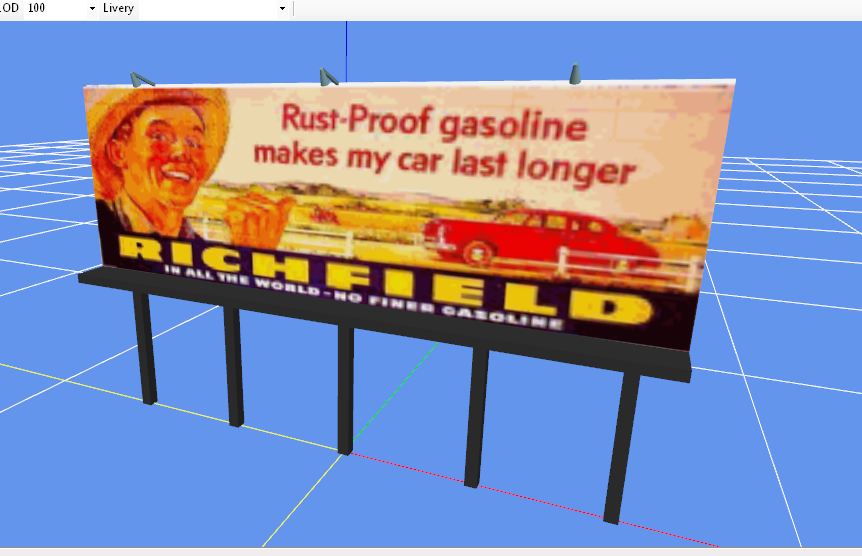
The object in ModelConverterX:
The object in Sketchup:
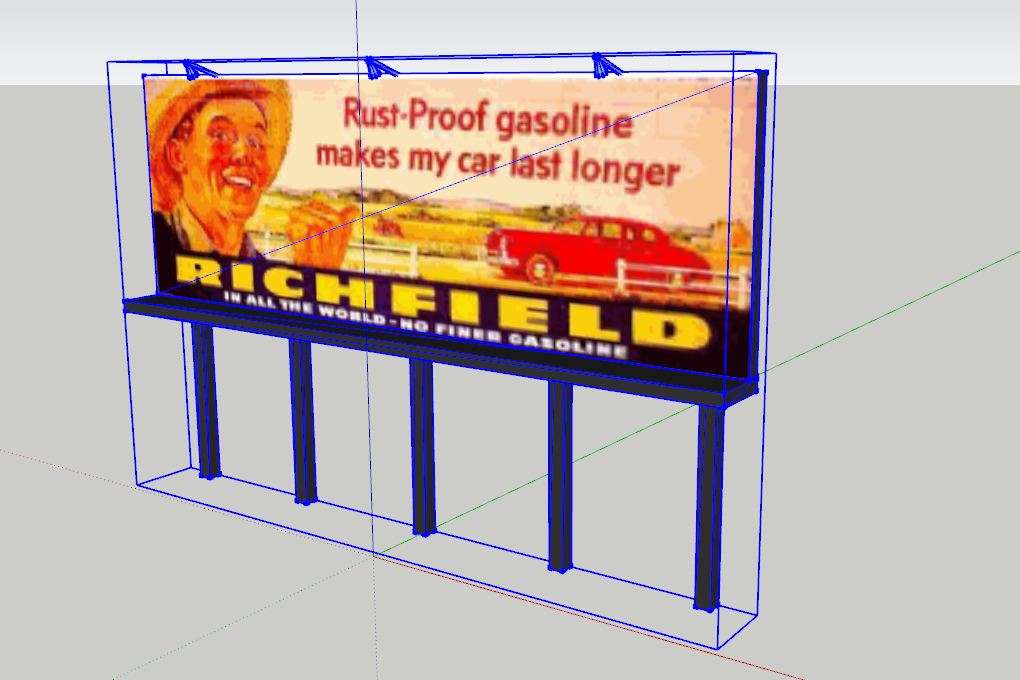
I did nothing more than export and import as I stated above.
Rick I'm sorry all this is making you payware guys lives more difficult, but this is only a hobby to me, and my objects are free to all (all I ask is credit is given). Note I did NOT say that he should pirate objects, and had to get the author's permission first.
The object in ModelConverterX:
The object in Sketchup:
I did nothing more than export and import as I stated above.
Rick I'm sorry all this is making you payware guys lives more difficult, but this is only a hobby to me, and my objects are free to all (all I ask is credit is given). Note I did NOT say that he should pirate objects, and had to get the author's permission first.

Hi Tom:
I doubt that "payware guys" need be concerned (except, perhaps, about risk of consequences for "cyber-bullying" ? ).
).
BTW: In MCX, did you first convert mapped textures of 3D MDLs in the source BGLs ...to Sketchup-displayable (not DXT or DDS) image file types ?
Thanks in advance for sharing further clarifications on the procedures for your "worked example" posted above.
GaryGB
I doubt that "payware guys" need be concerned (except, perhaps, about risk of consequences for "cyber-bullying" ?
).BTW: In MCX, did you first convert mapped textures of 3D MDLs in the source BGLs ...to Sketchup-displayable (not DXT or DDS) image file types ?
Thanks in advance for sharing further clarifications on the procedures for your "worked example" posted above.
GaryGB
Last edited:

- Messages
- 350
- Country

OK, yes and thank you for your help. I'm talking about in game BGL's. I can get some, but not the ones in the object library. Is there a way to get them? I have not found them. I would just like to bundle trees and be able to use in game texture trees around my models so I can see them in SketchUp without the guess work in ADE. Also is there a way to get the textures from the BGL's in the object library? I've looked and only found the textures in the texture folder in FSX. Is there more I don't know about?

- Messages
- 484
- Country

This thread is a perfect example of why FSDeveloper is one of my favorite places on the Internet. It reminds me of this classic Gary Larson cartoon...
https://s-media-cache-ak0.pinimg.com/736x/7a/2c/6c/7a2c6c15adc0770c14c4412b3d03ae67.jpg
(I hope that link works)
https://s-media-cache-ak0.pinimg.com/736x/7a/2c/6c/7a2c6c15adc0770c14c4412b3d03ae67.jpg
(I hope that link works)
tgibson
Resource contributor
- Messages
- 11,845
- Country
What do you mean "but not the ones in the object library"? Which library? All textures will either be in the texture subfolder alongside the BGL file's scenery subfolder, or in the main Texture folder.
AFAIK all default trees are autogen objects, but you might be able to use those. In FSX there are trees in the file vegetation.bgl. Just place them as usual.
The GUID codes for those trees are here:
http://lc0277.gratisim.fr/sceneobjects/
For FS2004 there have been addon libraries created that use the original autogen tree textures so you can add them with programs like ADE and Instant Scenery.
ag_tree_lib11.zip at AVSIM
AFAIK all default trees are autogen objects, but you might be able to use those. In FSX there are trees in the file vegetation.bgl. Just place them as usual.
The GUID codes for those trees are here:
http://lc0277.gratisim.fr/sceneobjects/
For FS2004 there have been addon libraries created that use the original autogen tree textures so you can add them with programs like ADE and Instant Scenery.
ag_tree_lib11.zip at AVSIM
Last edited:


- Messages
- 350
- Country
Alright, what I've got so far. Global/scenery brings me to what looks like the object library on ADE. Open up autogen and it opens up MCX and it's the first item on the autogen list. Where are the others? Also if I open up any of the numbered BGL's MCX comes up with this warning. I did find all the textures, so that's very helpful.
Attachments


In MCX when you open a library BGL with more than one object then you use the arrow keys in the upper left corner to scroll through them. The APX files that you tried to open are airport files. They have placement data. No object data. Therefore the warning in MCX.
- Messages
- 350
- Country

