• Which the release of FS2020 we see an explosition of activity on the forun and of course we are very happy to see this. But having all questions about FS2020 in one forum becomes a bit messy. So therefore we would like to ask you all to use the following guidelines when posting your questions:

    • Tag FS2020 specific questions with the MSFS2020 tag.
    • Questions about making 3D assets can be posted in the 3D asset design forum. Either post them in the subforum of the modelling tool you use or in the general forum if they are general.
    • Questions about aircraft design can be posted in the Aircraft design forum
    • Questions about airport design can be posted in the FS2020 airport design forum. Once airport development tools have been updated for FS2020 you can post tool speciifc questions in the subforums of those tools as well of course.
    • Questions about terrain design can be posted in the FS2020 terrain design forum.
    • Questions about SimConnect can be posted in the SimConnect forum.

    Any other question that is not specific to an aspect of development or tool can be posted in the General chat forum.

    By following these guidelines we make sure that the forums remain easy to read for everybody and also that the right people can find your post to answer it.

FS2004 Runway Guarding Light

jtanabodee

Resource contributor
Messages
3,924
Country
thailand
Hi,
I'm making runway guarding light. It flashes up alternately each side of light bulb. I was wondering how can I animate the light. I tried LIGHT_STROBE prefix in material but both of light bulbs flash together at the same time. I tried LIGHT_NAV and animated them. Each bulb will go through the ground about 30 m.with 18 frame The right bulb starts at the ground level and the left one starts from underground. But the last shot of animation which the left one will stop and the right one will suddenly appear from the beginning of the animation.
Do you have any lights that alternately flash side by side?
Here is the picture of runway guarding light:
guardinglight.jpg

and here is the video of guarding light on ytube: Watch to the 2:24 on the right side. The guarding light will flash like the video:
http://www.youtube.com/watch?v=25jIumRxTqY
Thanks for any help in advance.
Tic
 
Stupid me! :D
I got that solved. Just use only one light and animate it to go from left, then down to the ground and then go to the right side and back again to the left. I adjust the frames to suit the time need for each flashing. Actually, I'd like to delete my thread but I don't know how.:confused:
 
No leave the thread up! It's very useful for others to find and learn. People like me!

Can you elaborate a bit more on how you made this light, as it was the one light I never knew how to make/animate.
 
OK, I'll tell you how I did it, flyhalf.
This is how it looks in FS9. The flashing light is on 1 second and the out 1 second alternately side by side.
GuardingLight-1.gif

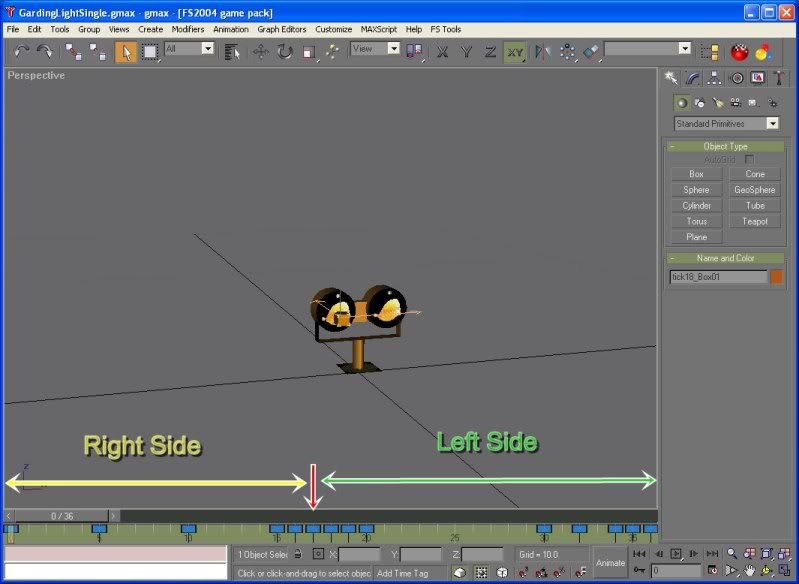
What I did in Gmax was LIGHT_NAV material apply to a box in front of guardlight. Then I made time frame to 36 frames (18frame/sec=2 second in FS9). I moved the box from the left to the right at 18th frame (red arrow in pic below). You need just only one frame to move unless you will see the light moving. If I use just only one frame, it is just 1/18 sec. Nobody can notice that fast movement. Then the rest of key frame you need to make it stay still. Just copy the coordinate in X axis to make the box stay in place from 1-17th frame and 19-36th frame. Like this pic:
GuardingLightGmax.jpg


Then I exported the whole thing and modified 0_asm code to make light visible (you can see in papi light tutorial in wiki) and make separation plane for each runway facing. I have runway 01 and 19. The heading is 15 and 195. The light is perpendicular to runway which is 105 and 285.

I'd like to share this model with you guys but I think this light in airports varies. There are a lot of models and catalogs in internet. You can google to see which one match you airport guard light in real life. Then model it in gmax and do animation light the way I did. It is fun!! Try it
 
Last edited:
HI,
Thanks for the post, i really appreciate for your instruction, Jtanabodee .
I have a question . I have done the model as your tutorial but i found a little difference when my light when moved from left to right, it glided smoothly instead of moving rapidly from left to right like your pic below
GuardingLight-1.gif


Is it right when i put the light at stable position from frame 1 to 17 for the left side, then moving it to the right side at frame 18th, the rest of frames (19 to 36) would be set for stable right position ??? :confused:

I'm confuse for that problem . Anyone please give me the answers, thanks ;)
 
Hi,

Yes, you are correct, stable right position. Try using Linear Movement as your Animation Controller in GMAX. If not quite right, try one of the other controllers - some move the light back and forth instantly.

Hope this helps,
 
Hi,

Yes, you are correct, stable right position. Try using Linear Movement as your Animation Controller in GMAX. If not quite right, try one of the other controllers - some move the light back and forth instantly.

Hope this helps,

Hi,
Stupid question, how can i find Linear Movement in Gmax ? I've just started using animation in the first time, so i didn't familiar with these tool in gmax :p

Here is my model in gmax .
gmax_guard.jpg


At frame 1-17th, the light is on X=-0.5 position, then i move it to X=0.5 at frame 18th, next i put it at stable position X=0.5 from frame 19-36th . is it right ?
 
Hi,
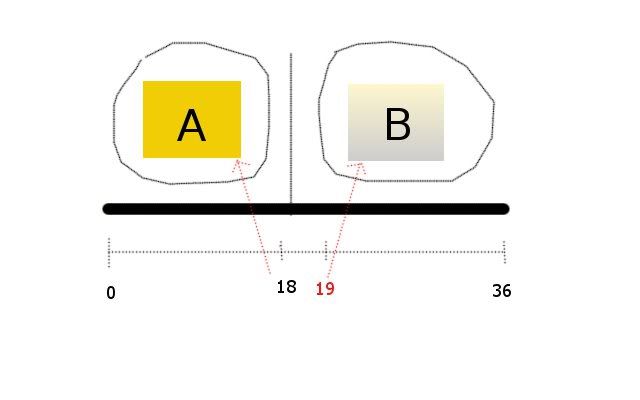
I think you have to focus at 18th frame and 19th frame only. Please take a look at the picture here.

gardinglight.jpg


You made your model and the click on Animation button then move the time slider to 19th frame. Now you move your light box from A to B position.
The light will travel slowly from frame 0 at A to frame 19th at B.

Now you just add more key frame to that animation.

Move time slider to 18th frame and move your box of which now by the program it might travel to almost to B. Move it back to the starting position on the A. Now you have the box that suddenly move from 18th frame at Left position to the Right position at 19th frame.

The program will provide some more keyframes that look insane like move far to the Left before toA and then to B.

Don't worry. You can add more key frame until it stays on A only. Then you add more key frame after 19th frame to make light at B position stay there.

Try it. It is fun. Use your imagination to do that.
 
HI there, thanks for your feedback .
Have you tweaked other codes such as animation in *_0.asm instead of bgl lights (separate plane) :confused:
I've tried a couple times but my light still ran slowly from A to B . Please check two attached images, the first on is the light at frame 18th with A pos, the following is B pos, frame 19th . Other key frames from 1 to 17 i set for A pos and from 20 to 36, i set at the same B pos as 19th frame
 

Attachments

  • gmax_guard_.jpg
    gmax_guard_.jpg
    51.1 KB · Views: 734
  • gmax_guard__.jpg
    gmax_guard__.jpg
    50.5 KB · Views: 668
I don't know either.
Would you mind if I take a look on your file?
Please attached with file attachments option on this thread.
 
Hi,
I think you file is OK.
I do need to tweak *_asm file to make separation plane to make it visible just only one side. If you don't tweak, it will be visible both side and while you are on the runway you will see this light. In real life it should be that way.
 
Hi,
I think you file is OK.
I do need to tweak *_asm file to make separation plane to make it visible just only one side. If you don't tweak, it will be visible both side and while you are on the runway you will see this light. In real life it should be that way.

Hi,
I surely tweak the *_0.asm file which the separation plane is located and it works fine . However, about the animated light, it runs smoothly from A to B, doesn't show the tick from A to B :mad:
How about the settings in Parameter section in Gmax ?
 
Oh I know what's the problem.:)

The photo you see is a giff file. It contains only two frame left and right position. It is not a video. So you see it suddenly move from A to B.
In FS I do see some slow movement too. But I think it is acceptable since I don't know how to do this by using effect (fx) file and it is easy to do too.
 
Hi,
I think you file is OK.
I do need to tweak *_asm file to make separation plane to make it visible just only one side. If you don't tweak, it will be visible both side and while you are on the runway you will see this light. In real life it should be that way.

Oh I know what's the problem.:)

The photo you see is a giff file. It contains only two frame left and right position. It is not a video. So you see it suddenly move from A to B.
In FS I do see some slow movement too. But I think it is acceptable since I don't know how to do this by using effect (fx) file and it is easy to do too.

So that was the same problem ?
I found this link : http://www.fsdeveloper.com/forum/showthread.php?t=1601&highlight=jump+light
I didnt think its perfect but you can try it your seft

Lets check out in the *_0.asm,
Code:
g_trans_1       label word
    dw           1       ; 1: Point (translation) 
    real4     -1.0       ; Previous panim value
    real4 16 dup (0.0)   ; Cached matrix 
    dw           2       ; number of entries
[B]    real4     0.0,  -0.500000,  0.000000, -0.300000 ; frame/x/y/z values
    real4     19.0,  0.500000,  0.000000, -0.300000 ; frame/x/y/z values[/B]

The bold lines are related to key frames which show off the movements from A to B position (frame 19th shows the different position to frame 0) . If you add one more line such as 18 above the line 19, it would make the movement run suddenly . Like this :

Code:
g_trans_1       label word
    dw           1       ; 1: Point (translation) 
    real4     -1.0       ; Previous panim value
    real4 16 dup (0.0)   ; Cached matrix 
    dw           3       ; number of entries
[B]    real4     0.0,  -0.500000,  0.000000, -0.300000 ; frame/x/y/z values
 real4     18.0,  -0.500000,  0.000000, -0.300000 ; frame/x/y/z values
    real4     19.0,  0.500000,  0.000000, -0.300000 ; frame/x/y/z values[/B]

So the light would jump swiftly from frame 18th to 19th . You can check in FS . I didn't satisfy with the result, however, at least it can move more quick than the last .
I'm figuring out to make it perfect and i also hope we can find out more discoveries :o
 
Hi,

I have a chase light animation that causes a plane (not aircraft) to jump instantly between two or more locations (different planes jump in front of each other). It's the animation controller that is the key. As I remember I used Linear Position, but you can try others.

To get to the movement animation controller for a part:

1. Select the part.
2. Click the moving tire tab on the panel at the right.
3. Click the little + next to Assign Controller
4. Click on the word Position:
5. Click the little button with a black arrow and a green arrow on it just below the words Assign Controller
6. Find your desired controller in the list. Click it.
7. Click OK.

You can also check the box to make this the Default Controller so any new part you create automatically uses that controller.

Hope this helps,
 
Hi Guy's,
I'm quite new to this modeling biz, anyway I made a Guard Light model, and did the animation per this post, now how do you get it to work in FSX do you have to use the FS9 game pack?

Thanks!
Dale Reitz
 
Yes, you need FS9 model and don't use any alpha channel.
You need to tweak .asm file. It is not possible in FSX.
 
Back
Top