

- Messages
- 62
- Country

Hi Folks,
I'm laying down a simple transparent grass runway with an offset threshold of 150m.
Firstly, I've had to manually edit the scenery.xml file because the controls for offsetting the threshold don't appear to be in the runway properties box of the SDK any more, I'm sure they were. The current setup of my runway code is below
The Google Earth satellite imagery already has the '^' arrow heads defining the offset threshold position so I've amended the Markings definition to add the noThresholdEndArrows=True.
This has removed the arrow heads adjacent to the threshold position BUT it hasn't removed the lead-in arrows before the threshold and it's also left the threshold line.
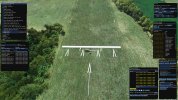
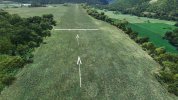
I have the runway set to transparent and I have all the markings turned off so I'm wondering what element I'm missing to turn off the remaining offset threshold markings?
I'm laying down a simple transparent grass runway with an offset threshold of 150m.
Firstly, I've had to manually edit the scenery.xml file because the controls for offsetting the threshold don't appear to be in the runway properties box of the SDK any more, I'm sure they were. The current setup of my runway code is below
The Google Earth satellite imagery already has the '^' arrow heads defining the offset threshold position so I've amended the Markings definition to add the noThresholdEndArrows=True.
This has removed the arrow heads adjacent to the threshold position BUT it hasn't removed the lead-in arrows before the threshold and it's also left the threshold line.
I have the runway set to transparent and I have all the markings turned off so I'm wondering what element I'm missing to turn off the remaining offset threshold markings?
<Runway parentGroupID="1" groupIndex="14" lat="44.45726795079488" lon="5.72715655149689" alt="708.16946202982217" heading="2.53692293167114" length="645.92779541015625" width="86.48887634277344" patternAltitude="304.79998779296875" surface="{8862C0D8-5ADB-4BA8-952F-7D2E199CE9AC}" transparent="TRUE" number="0" designator="NONE" primaryLanding="TRUE" primaryTakeoff="TRUE" primaryPattern="LEFT" secondaryLanding="TRUE" secondaryTakeoff="TRUE" secondaryPattern="LEFT" primaryMarkingBias="0.00000000000000" secondaryMarkingBias="0.00000000000000" groundMerging="TRUE" excludeVegetationAround="FALSE">
<Markings edges="FALSE" threshold="FALSE" alternateThreshold="FALSE" fixedDistance="FALSE" alternateFixedDistance="FALSE" touchdown="FALSE" alternateTouchdown="FALSE" dashes="FALSE" ident="FALSE" leadingZeroIdent="FALSE" precision="FALSE" alternatePrecision="FALSE" edgePavement="FALSE" singleEnd="FALSE" primaryClosed="FALSE" secondaryClosed="FALSE" primaryStol="FALSE" secondaryStol="FALSE" noThresholdEndArrows="TRUE"/>
<Lights center="NONE" edge="NONE"/>
<OffsetThreshold end="SECONDARY" surface="{0E12195B-4A50-42D1-B8C8-177B270F3AAB}" length="150.000000"/>
<RunwayStart end="PRIMARY" lat="44.45027235521373" lon="5.72658769341041" alt="708.20995606575161" heading="2.53692245483398"/>
<RunwayStart end="SECONDARY" lat="44.45891235680956" lon="5.72725616645847" alt="708.17048476636410" heading="182.53666687011719"/>
</Runway>


