
• Which the release of FS2020 we see an explosition of activity on the forun and of course we are very happy to see this. But having all questions about FS2020 in one forum becomes a bit messy. So therefore we would like to ask you all to use the following guidelines when posting your questions:

    • Tag FS2020 specific questions with the MSFS2020 tag.
    • Questions about making 3D assets can be posted in the 3D asset design forum. Either post them in the subforum of the modelling tool you use or in the general forum if they are general.
    • Questions about aircraft design can be posted in the Aircraft design forum
    • Questions about airport design can be posted in the FS2020 airport design forum. Once airport development tools have been updated for FS2020 you can post tool speciifc questions in the subforums of those tools as well of course.
    • Questions about terrain design can be posted in the FS2020 terrain design forum.
    • Questions about SimConnect can be posted in the SimConnect forum.

    Any other question that is not specific to an aspect of development or tool can be posted in the General chat forum.

    By following these guidelines we make sure that the forums remain easy to read for everybody and also that the right people can find your post to answer it.

MSFS20 Scenery editor disappears on some airports..

Messages
18
Country
ca-quebec
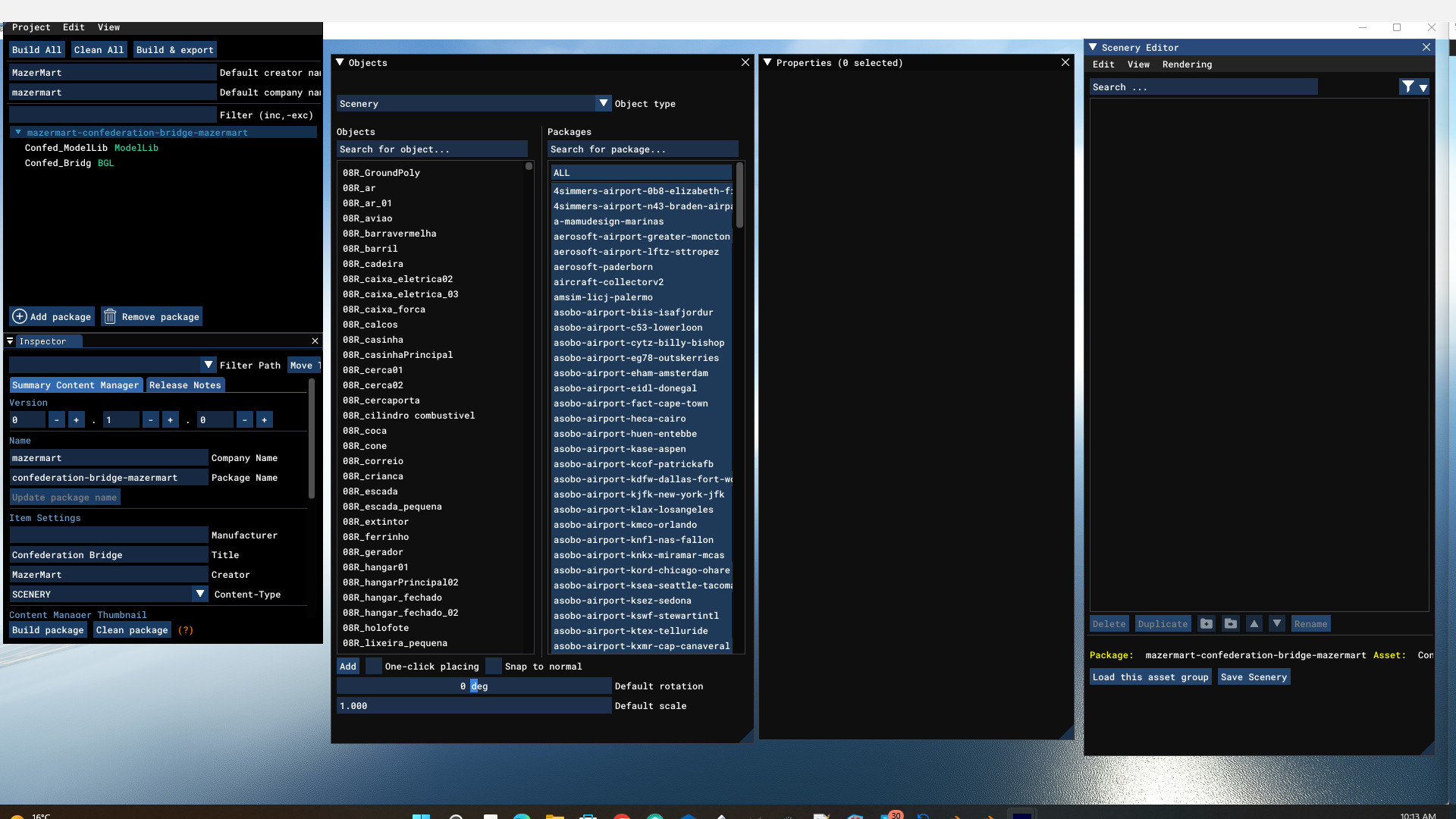
Here is a screen-shot of my problem. The Scenery Editor normally populates with all the objects, aprons, etc that are in the airport, but for this and a few other of my airports it does not. Same with Properties when I click on an item in objects the properties is empty too.

I noticed this problem while trying to update the latest version WU11. Some airports were no problem but with others, this happens. I thought it might have been having trouble finding the files/directories/ Perhaps someone out there can assist me.. Thanks
confed bridge empty.jpg
 
I find the windows must be within the main MSFS window border and transparency set
 
Hello:

IIUC, you are attempting to utilize MSFS SDK DevMode GUI Scenery Editor to access compiled scenery content in this scenery Package:

https://flightsim.to/file/35911/confederation-bridge-maritime-canada


Scenery Editor is intended to open and load the XML for a Project ...not a compiled scenery Package.

In most cases a add-on consists of a Package containing an airport, which often can be opened by ADE or Airport2Project.

One can then typically derive a working copy of that airport with source code as a part of a Project.

The Package cited above is scenery only, and does not contain an airport Project folder chain.

Accessing its scenery content source code would require that it be de-compiled ...which normally would require permission of the author.

If this is solely for use on your own computer and is not to be released to the public, you may opt to de-compile and mod the scenery.


But perhaps you instead want to create a mod for Summerside Airport ? :scratchch

https://en.wikipedia.org/wiki/Summerside_Airport


If so, you would need to use either ADE or Airport2Project; use this file as input to Copy / Exclude / Replace MSFS default CYSU airport:

[MSFS-2020_Packages]\Official\OneStore\fs-base-genericairports\scenery\0301\APX30150.bgl


If you use Airport2Project to derive a project, the XML for that project can be found in the root folder of the project folder chain.

That Project XML file can be opened in MSFS SDK DevMode GUI Scenery Editor ...or in ADE (via Create Project From XML).


GaryGB
 
Last edited:
Not quite .. I am the creator of the package and when I open the project file and click on the xml and then load the scenery, it doesn't populate the scenery editor like before. However I was able to redo the directories of Peterborough, which had the exact same problem, and the files became visible. So once I have finished with Peterborough, I will attempt again Confederation bridge.
Now I am being plagued by dark conifer forest vegetation that will not go away when I create a polygon around it and zero out vegetation. Not sure why.
Thanks for your speedy reply.

MazerMart
 
Hi Martin (aka "MazerMart"):

Sorry, I was in a rush and did not notice you were the author. :laughing:


As for the dark Vegetation, try leaving the Vegetation Exclusion Polygon Properties. slider for Brightness at the middle position.


There is at least (1) other obscure cause for the dark vegetation anomaly, which I would have to research again to provide some info.


AFAIK, one should remove the Package from Community folder when working to mod a Project from which the package was compiled.

I'm out of time for the moment, so perhaps others will reply on this sooner than I may be able to.

GaryGB
 
Now I am being plagued by dark conifer forest vegetation that will not go away when I create a polygon around it and zero out vegetation. Not sure why.
Thanks for your speedy reply.

MazerMart

Hi again, Martin:

Are you describing trees installed by:

☆ Bijan Habashi - 4 Season Pack

...or:

☆ REX AccuSeason

...add-ons ?

Or are you describing Black or near-black default trees ?

GaryGB
 
Last edited:
I have figured out the lost scenery editor problem.. moved and then relinked the files.
As for the vegitation, I do have one add on so thanks for that suggestion .. I will investigate.. I do have the Bijan Habashi 2 season pack. Here is a photo..
If I create an apron, the apron automatically removes the vegetation with the exception of this area.. Weird.. It didn't do that before but then it wasn't fall before.
Veg Prob 2.jpg


I removed the season add-on and rebooted.. no change.

prob veg.jpg
 
Last edited:
I still have a problem with the huge signpost at Nassau (Pindling) International.. can't get that to go away either. I heard it was a problem with the UK update.. Not sure what the fix is. But again I tried removing it.. purchased the add-on.. but still it remains..
 

Attachments

  • Sign 11 problem.jpg
    Sign 11 problem.jpg
    548.6 KB · Views: 236
As for the vegetation, I do have one add on so thanks for that suggestion .. I will investigate.. I do have the Bijan Habashi 2 season pack. Here is a photo..
If I create an apron, the apron automatically removes the vegetation with the exception of this area.. Weird.. It didn't do that before but then it wasn't fall before.
I removed the season add-on and rebooted.. no change.

AFAIK, MSFS SDK has not documented a change in the last SU-10 update affecting how Exclusion Polygons work.

Reportedly, different Exclude attributes and Textured Polygons using Materials assigned via Properties may need to be:

* implemented via separate Polygons

...and:

* incremented in successively higher layer priorities

...in order to effectively impact rendering at run time.


Whereas FSX / P3D and previous FS versions typically required separation of terrain objects by increments of (2) priority layer numbers, IIUC, MSFS SDK is able to adequately separate object rendering attributes with as little as an increment of (1) priority layer number.

Also, there may now be a more stringent enforcement of rules for overlapping Polygons having the same GUID / UuID and functional attributes relative to the assigned layer priority, such that (2) Polygons with identical functional attributes in the same priority layer that overlap, will cancel each other, and thereby nullify their intended function ...rather than blend their extents of function.

Additionally, be aware that Bijan's recent add-on versions optionally apply superimposed seasonal masks that impact certain aspects of run time rendering and display.

I have not yet had time to inquire as to exactly how they work, but I mention it here, as it may prove to have an impact in this troubleshooting scenario.

GaryGB
 
Last edited:
Back
Top