
• Which the release of FS2020 we see an explosition of activity on the forun and of course we are very happy to see this. But having all questions about FS2020 in one forum becomes a bit messy. So therefore we would like to ask you all to use the following guidelines when posting your questions:

    • Tag FS2020 specific questions with the MSFS2020 tag.
    • Questions about making 3D assets can be posted in the 3D asset design forum. Either post them in the subforum of the modelling tool you use or in the general forum if they are general.
    • Questions about aircraft design can be posted in the Aircraft design forum
    • Questions about airport design can be posted in the FS2020 airport design forum. Once airport development tools have been updated for FS2020 you can post tool speciifc questions in the subforums of those tools as well of course.
    • Questions about terrain design can be posted in the FS2020 terrain design forum.
    • Questions about SimConnect can be posted in the SimConnect forum.

    Any other question that is not specific to an aspect of development or tool can be posted in the General chat forum.

    By following these guidelines we make sure that the forums remain easy to read for everybody and also that the right people can find your post to answer it.

Shadows on text - GMAX

Messages
66
Country
spain
Hi. Im doing Cordoba LEBA Airport. In front of the terminal building, there are a big sign with the airport name letters. I modelled it with text in Gmax, then converted to a spline, and extruded. Last i converted to editable poly, but with cap sides at start and end, to make it manifold or water tight. I attached the text poly to the building, but when exported it, there are a problem with shadows. They are hugely long, like in this pic:
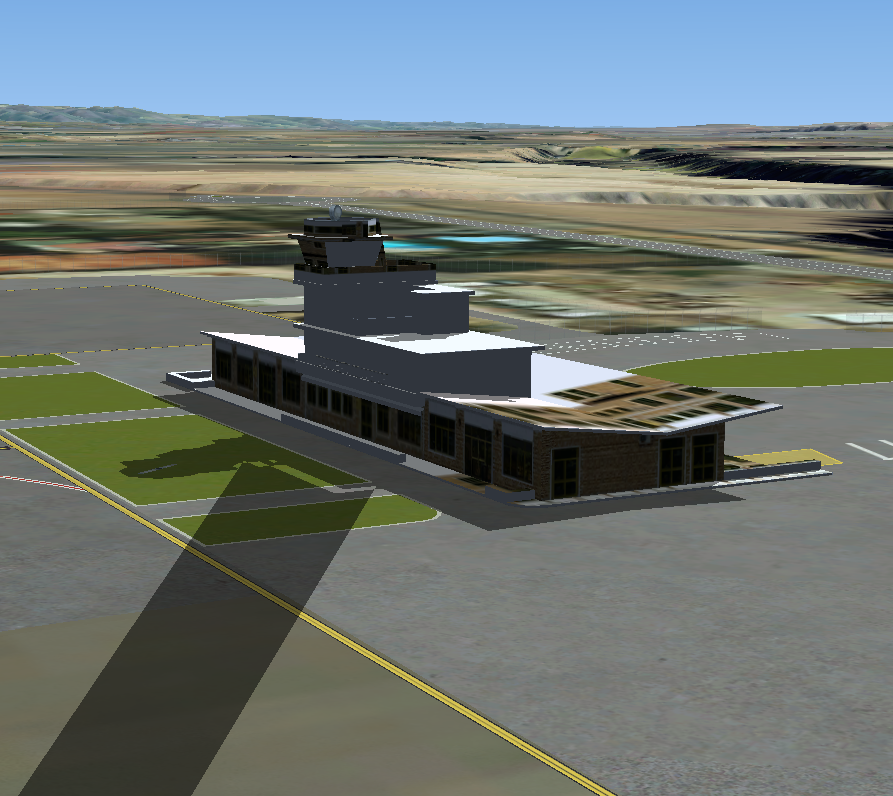
Picture.png

I know that every object must be manifold to cast volume shadows, but if i export just the text poly, there are no problem, then this object must be manifold, right? This is the image only when exported text object:
Picture1.png

Could anyone help me? Thanks a lot.
 
I don't know either what cause that. But you can try export only the sign and change GUID in MCX then use XML to place in the same coordinate as the building. This might solve the problem.
Using volume shadow, do not use drawcall batching, this can cause flickering.
 
Thanks jtanabodee. I start today my 2 weeks holidays so i couldnt try. Ill do it when come back.
 
I finally find the problem, the text wasnt fine modelized. I think FSX shadows dont works good with 1-sided objects. After converted the text object to splines, extrude them and converted to editable poly, now is working.
Thanks.
 
Interesting, I knew once converted that all objects were turned into mesh but I guess without a closed object or rather one with more only two dimensions the SIM doesn't recognize it as an object.
 
Exactly Paul, I think so. Now my terminal building is almost finished, with shadows!!!. One more question, do you know why materials appears so dark in FSX?
Picture3.png

Thanks!
 
From the image I think the materials look great! If you're running DX10 preview they may appear darker also what you see on your monitor may be different for someone else.
 
Thats amazing, jtanabodee. I follow the instructions on the threads u linked, and now the result is perfect for me. The day comes in!!. The following pictures shows the changes between "No base material specular", and "Assume vertical normal" turned off and on.
Picture4.png

Picture5.png

The differences are obvious. In your threads, you comment that is necessary to use "No drawcall batching", but i export the model with gmax, and placed in sim with ADE, so i can not turn on this option, but at the moment im happy with this results.
Thanks!!.
 
The reason for that is: the volume shadow does not eliminate the default shading of the game. So the volume shadow combine with the shadow from the shading of light make it too dark.
Congratulation with your success. You model and texture looks perfect.
 
Back
Top