
• Which the release of FS2020 we see an explosition of activity on the forun and of course we are very happy to see this. But having all questions about FS2020 in one forum becomes a bit messy. So therefore we would like to ask you all to use the following guidelines when posting your questions:

    • Tag FS2020 specific questions with the MSFS2020 tag.
    • Questions about making 3D assets can be posted in the 3D asset design forum. Either post them in the subforum of the modelling tool you use or in the general forum if they are general.
    • Questions about aircraft design can be posted in the Aircraft design forum
    • Questions about airport design can be posted in the FS2020 airport design forum. Once airport development tools have been updated for FS2020 you can post tool speciifc questions in the subforums of those tools as well of course.
    • Questions about terrain design can be posted in the FS2020 terrain design forum.
    • Questions about SimConnect can be posted in the SimConnect forum.

    Any other question that is not specific to an aspect of development or tool can be posted in the General chat forum.

    By following these guidelines we make sure that the forums remain easy to read for everybody and also that the right people can find your post to answer it.

Some of my customers report missing textures in some default assets

Messages
203
Country
ca-ontario
A couple of people reported missing textures in some assets in my scenery, and I tracked it down to certain Asobo packages. For example:
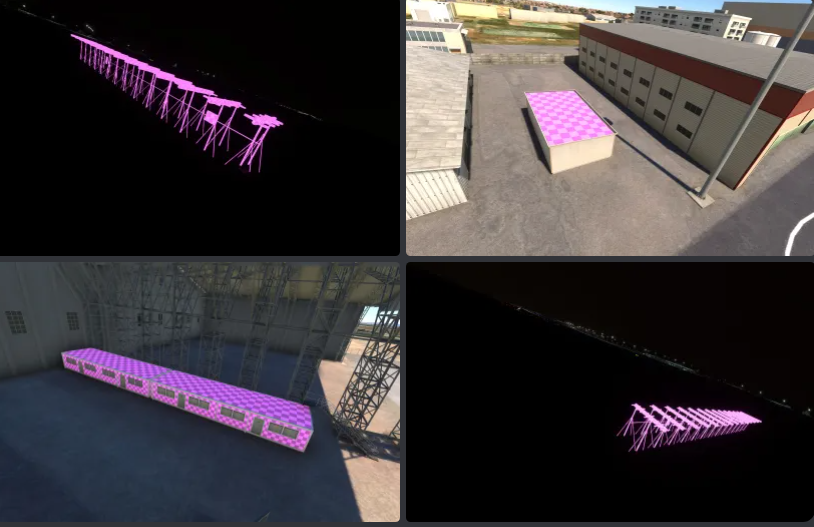
1712100148616.png


These buildings and ILS antenna are in asobo-airport-knfl-nas-fallon. But they say they have it installed, and in fact if I uninstall it myself, the whole asset is gone, I don't just get a pink texture. Does this problem indicate some issue on their side, where they may have to reinstall the assets? I'm asking them to confirm using the last Developer mode method shown here:

 
Similar issue with another couple of users who see a white checkerboard instead of grass on a couple of Aprons here:

1712100311941.png


This grass material was from microsoft-airport-smdh-heliponto-mirante-dona-marta, and they have the package installed.
 
A couple of people reported missing textures in some assets in my scenery, and I tracked it down to certain Asobo packages

I don't just get a pink texture. Does this problem indicate some issue on their side, where they may have to reinstall the assets?
Reinstall? Probably. First they should rename their Community folder, make a new Community folder, then add your package, then restart the sim... to see if there is a conflict in the Community addons. If it's still missing textures (and it probably is), then a rebuild of the relevant folders is needed. First, they can delete the new Community and rename the old folder as Community to restore their addons... and make sure your package is in Community as well.

The textures are either in asobo-airport-knfl-nas-fallon or asobo-modellib-texture, according to the texture.cfg file. If they delete (or move) those 2 folders, the sim will redownload those folders when they start the sim. Any corrupt or missing textures will be reinstalled. I just tried that, and the sim rebuilt the missing folders in about 3 minutes.
 
Last edited:
A couple of people reported missing textures in some assets in my scenery, and I tracked it down to certain Asobo packages. For example:

View attachment 92103

These buildings and ILS antenna are in asobo-airport-knfl-nas-fallon. But they say they have it installed, and in fact if I uninstall it myself, the whole asset is gone, I don't just get a pink texture. Does this problem indicate some issue on their side, where they may have to reinstall the assets? I'm asking them to confirm using the last Developer mode method shown here:

Just saw a post of someone pointing to that exact approach light on InBuilds Stansted, so it must be an issue.
 
Back
Top