• Which the release of FS2020 we see an explosition of activity on the forun and of course we are very happy to see this. But having all questions about FS2020 in one forum becomes a bit messy. So therefore we would like to ask you all to use the following guidelines when posting your questions:

    • Tag FS2020 specific questions with the MSFS2020 tag.
    • Questions about making 3D assets can be posted in the 3D asset design forum. Either post them in the subforum of the modelling tool you use or in the general forum if they are general.
    • Questions about aircraft design can be posted in the Aircraft design forum
    • Questions about airport design can be posted in the FS2020 airport design forum. Once airport development tools have been updated for FS2020 you can post tool speciifc questions in the subforums of those tools as well of course.
    • Questions about terrain design can be posted in the FS2020 terrain design forum.
    • Questions about SimConnect can be posted in the SimConnect forum.

    Any other question that is not specific to an aspect of development or tool can be posted in the General chat forum.

    By following these guidelines we make sure that the forums remain easy to read for everybody and also that the right people can find your post to answer it.

Strange FS9 Transparency Effects

gadgets

Resource contributor
Messages
9,388
Country
ca-britishcolumbia
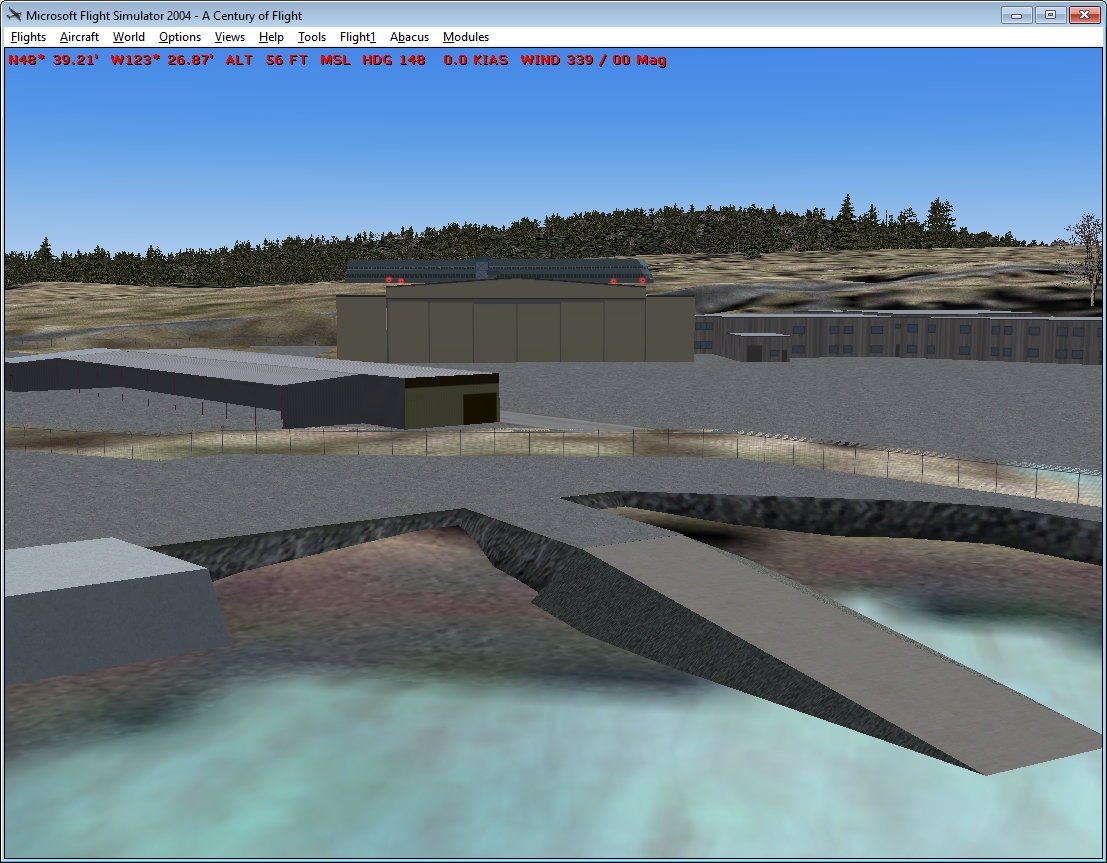
Updating my FS9 version CYYJ, I added a fence in the Pat Bay area. (See SS1). Up close, the fence appears normal. Back off a little and things change. (See SS2). Instead of the asphalt being seen through the fence, you see the underlying landclass. The asphalt is the top of a 3D model. There is also a platform under the asphalt. The distance at which the changeover occurs varies with the viewing azimuth. The fence is generated by FenceBuilder PRO and there is only one LOD.

The effect only occurs (at least apparently) in this situation. Fences over aprons and ground polys do not show this characteristic. I have prefaced the asphalt texture name with ZBIAS to ensure it is drawn last, but the landclass shows through anyway.

While it can't be seen in these screenshots, if the viewing angle is low such that a [portion of a building is behind the fence, the building displays instead on the landclass.

Any ideas as to what's wrong or how to fix appreciated.

Don

SS_1.jpg
SS_2.jpg
 
Last edited:
PROBLEM SOLVED!

It turns out not all DXT-3 textures are equal. It is well-known that DXT-3 textures can be problematic. And so it was in this case.

It occurred to me that in the absence of a second LOD, there had to be another reason for this discontinuity. Mipmaps!. So, I eliminated the mipmaps and tried again. To my surprise, a similar thing happened at the same time but the display of the show-through landclass was "grainer", presumably due to the non-mipmapped alpha. It seems that DXT-3 file still "assumed" there were mipmaps in the file.

I then converted the texture to DXT-1 (using ImageTool) and the problem disappeared. But then, I inadvertently saved the texture back into the original folder as DXT-3. STILL OK!

So, with a hex editor, I compared that DXT-3 file with the original. There were major differences! The RGBQUADs in the latter case were all 0's. Not so with the original file. There were also similar differences in the bitmap data. I don't recall what tool I used to generate the original texture, but it was probably DXTbmp.

I would note that simply loading the original DXT-3 file into ImageTool and saving it immediately had no effect - presumably because ImageTool "knew" no changes had been made. But, with an intermediate conversion and save as DXT-1 and then converting back to DXT-3, the "new-format" DXt-3 file was saved and the problem was eliminated.

I hope this helps other address DXt-3 issues.

Don
 
Back
Top