
• Which the release of FS2020 we see an explosition of activity on the forun and of course we are very happy to see this. But having all questions about FS2020 in one forum becomes a bit messy. So therefore we would like to ask you all to use the following guidelines when posting your questions:

    • Tag FS2020 specific questions with the MSFS2020 tag.
    • Questions about making 3D assets can be posted in the 3D asset design forum. Either post them in the subforum of the modelling tool you use or in the general forum if they are general.
    • Questions about aircraft design can be posted in the Aircraft design forum
    • Questions about airport design can be posted in the FS2020 airport design forum. Once airport development tools have been updated for FS2020 you can post tool speciifc questions in the subforums of those tools as well of course.
    • Questions about terrain design can be posted in the FS2020 terrain design forum.
    • Questions about SimConnect can be posted in the SimConnect forum.

    Any other question that is not specific to an aspect of development or tool can be posted in the General chat forum.

    By following these guidelines we make sure that the forums remain easy to read for everybody and also that the right people can find your post to answer it.

MSFS20 Terraforming issue

Messages
14
Country
brazil
Hey guys.

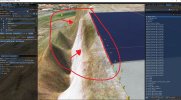
I'm trying to create a airport, which has a runway higher than the terrain around, so I literally need to "cut the terrain straight" and make the ground lower before the runway. As you can see the attached image, the issue is that I'm not being able to cut perfectly straight. It doesn't matter if I use polygon, rectangle or heightmap. I can never get the result as straight cut that doesn't affect the runway format.

Does anybody know any possible way to get this done?

Thanks.
 

Attachments

  • terraformingissue.jpg
    terraformingissue.jpg
    695.7 KB · Views: 356
Probably not possible. I think the cutoff is tied to the terrain mesh resolution as it was in FSX.
 
I´ve got also similar problems with terraforming... I haven´t caught it yet... Even though I´m applying the option "Apply flatten" in the Airport object this is what happens. to the Runway I´ve applied the height as published in the charts, and that´s the only thing I´ve done so far.
1615496917987.png


Any help is appreciated, as this is how it looks the terrain around it...

1615497082437.png
 
Hello:

You may wish to review this thread: :idea:

https://www.fsdeveloper.com/forum/t...g-a-large-non-flat-airport.450254/post-865482


IIUC, SDK Terra-Forming "Fall-off Distance" parameter values used will influence 'smoothing' of terrain polygon rendering at run time in MSFS-2020.


So, AFAIK, with new Hi-Res terrain having recently been unlocked in MSFS:

https://www.fsdeveloper.com/forum/threads/msfs-hi-res-terrain-mesh-unlocked.451481/

...we may find we now have even higher control over how terrain sculpting is displayed in MSFS-2020. :)


We 'should' be able to render at run time in MSFS-2020, detailed Airport Boundary sloped flattens using CVX vector BGLs created from *.SHP files:

https://www.fsdeveloper.com/forum/threads/blending-airports-into-custom-terrain.448048/post-850510

1552719011018-png.48406


GaryGB
 
Last edited:
Thanks a lot for your answer @GaryGB ... I have been taking a look ...but it sounds to rocket science. I´ve been playing for a while with GIS data from Google and Blender, but it´s not accurate for the track

I have managed to fix it doing the following:
1. Enter the elevation to the rwy using the profile from the charts
2. Enter a Rectangle around the rwy with exactly same heights as the rwy profile. This has removed the cliffs surrounding the runway and a fallout wide enough to cover the edges of the rwy
3. Add the needed rectangles in the building areas and twy and smooth the fallout as further I was from the Rwy

It has taken me a good 2 hours, but I think it´s done :)
 
Back
Top