• Which the release of FS2020 we see an explosition of activity on the forun and of course we are very happy to see this. But having all questions about FS2020 in one forum becomes a bit messy. So therefore we would like to ask you all to use the following guidelines when posting your questions:

    • Tag FS2020 specific questions with the MSFS2020 tag.
    • Questions about making 3D assets can be posted in the 3D asset design forum. Either post them in the subforum of the modelling tool you use or in the general forum if they are general.
    • Questions about aircraft design can be posted in the Aircraft design forum
    • Questions about airport design can be posted in the FS2020 airport design forum. Once airport development tools have been updated for FS2020 you can post tool speciifc questions in the subforums of those tools as well of course.
    • Questions about terrain design can be posted in the FS2020 terrain design forum.
    • Questions about SimConnect can be posted in the SimConnect forum.

    Any other question that is not specific to an aspect of development or tool can be posted in the General chat forum.

    By following these guidelines we make sure that the forums remain easy to read for everybody and also that the right people can find your post to answer it.

Texture Baking Tutorial.

jtanabodee

Resource contributor
Messages
3,924
Country
thailand
Hi,
I tried to search about texture baking tutorial and I found it was confusing. Someone recommends V-ray and other add on. Some tutorials are confusing.

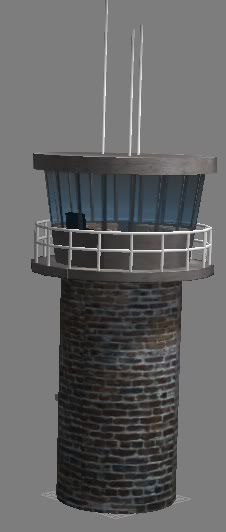
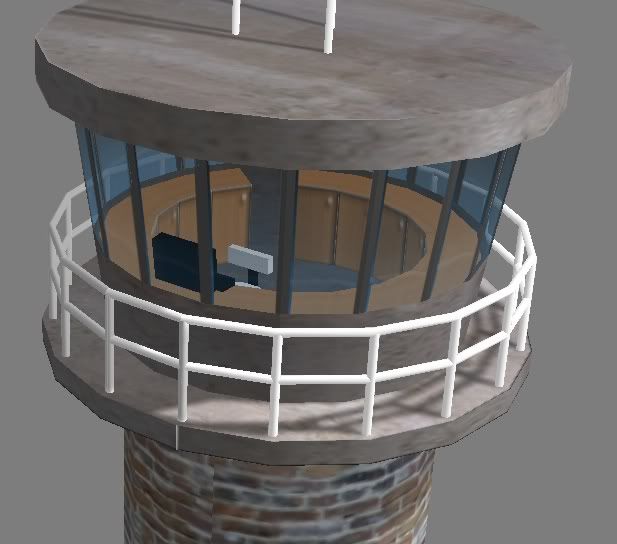
I made a control tower and try what I know from making a research on texture baking. It is a wonderful to make shadow on you model. Even though FSX support shadow casting on other objects, but I found the shadow is too strong.
Besides shadow, you can use this technic to produce reflection on the grass and metal surface, make bump textures. I have an example here:

This is a fiction tower in gmax after import from 3dmax.
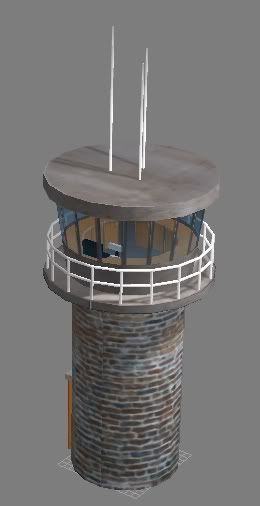
TowerComplete.jpg


TowerComplete03.jpg


You can see the detail of shadow even on the rail.
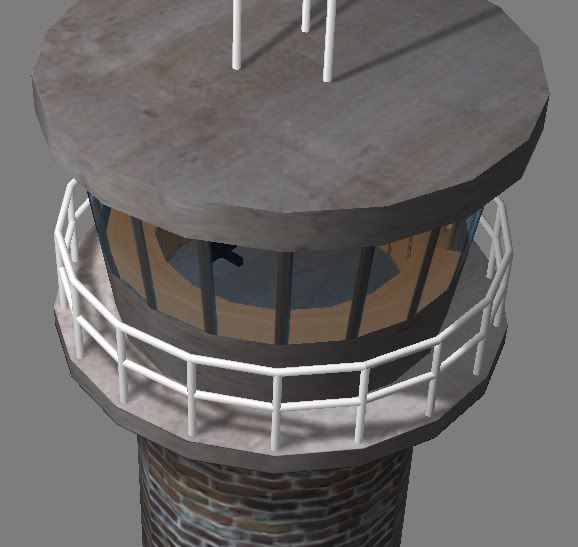
TowerComplete04.jpg


The detail inside.
TowerComplete02.jpg


Try this tutorial and please place a comment if you think it is useful.
http://www.4shared.com/document/9Mhx2JXU/Texture_Baking_English.html
Hope this help.
Tic
 
This is much needed indeed, a dedicated texture baking tutorial for FSX. I just looked at the preview though because I am generally reluctant to download exe files. Why does it have to be an exe, and why does it have to be "installed"? Can't you just save it as a zip, and here at FSDeveloper? I'd be happy to go through your steps and comment, as will I am sure others.

Judging from the preview (which is small and pixelated in some areas) what I think may be missing is some indication of your lights and rendering setup and how you pack and collate your individual UVW's into a single final map.
 
Why does it have to be an exe, and why does it have to be "installed"? Can't you just save it as a zip, and here at FSDeveloper? I'd be happy to go through your steps and comment, as will I am sure others.

Judging from the preview (which is small and pixelated in some areas) what I think may be missing is some indication of your lights and rendering setup and how you pack and collate your individual UVW's into a single final map.

No, it is not exe file. It is pdf file.
I searched in this forum many times in the past, no one ever tell us how to do it even though they are much better doing that than myself.
I'm sure that they are better than myself making light and render. Some people us 3dmax as their work making animation and models in other field such as advertising. This is a basic tutorial how to do it but not how to do the best rendering.

It is pixelated of course. Since this pictures are taken by print screen from Gmax. Not a render picture because I wanted to show how the model is in gmax which cannot render anything.

Please feel free to add any suggestions. It is good for me to know how the correct way and better way to do too. The more your comments, the more we can learn. Teach us if you can.
 
Last edited:
Sorry I mistook 4shared's own download link for your specific download link.

"4shared" doesn't quite sound right to me. Searching the 4shared database using the key "3ds max 2012" I get links to the full Max program, Vray etc. all for apparently nothing. In other words, this seems to be a torrent site. I won't have anything to do with it. As a matter of fact I think links to such sites shouldn't be posted.
 
4shared is an online file sharing and storage site, nothing more, nothing less. As such it can be used for both lawful and unlawful purposes, just like Photobucket and countless other sites. The only way to change this is to close down the internet; but wait a minute, people were swapping diskettes in the days before the internet!
 
Nothing wrong with the site per-se. (although it's been a long time since I used 4shared nd the invasive / mis-directed links are very annoying)

Unfortunately, these companies can't investigate and take down links as fast as the vermin put them up.
 
Unfortunately, these companies can't investigate and take down links as fast as the vermin put them up.

Those links I mentioned are four and six months old.
 
Nothing wrong with the site per-se. (although it's been a long time since I used 4shared nd the invasive / mis-directed links are very annoying).

Ya think? :)

There are so many of the silly things that I always have a hard time finding the real spot on which to "click" to get the file I came for!
 
Besides the flight simulation specific sites like AVSIM and FlightSim.com is there a good free file hosting/sharing site?
 
Why not simply upload it HERE in the Download Library?

The files are a series of pdf documents I am writing that cover scenery design for flight simulation bush flying enthusiasts, so I was looking for a generic file sharing site to host them on.
 
Why not simply upload it HERE in the Download Library?

http://www.fsdeveloper.com/forum/downloads.php?do=add&cat=
I don't know we have this option!

Now it is more easy to download. Don't care about 4 shared now, I don't like it either.

Try this http://www.fsdeveloper.com/forum/downloads.php?do=file&id=103
Any comments (about the tutorial not 4 shared:D) are welcome. Please give us any advices that make this tutorial better. I'm new to this and I know that a lot of experts here. Please suggest me and other folks who are new for texture baking.

Funny thing, searching about texture baking in this site, there are a handful of threads and none of them specifically about how to do it. Hope this help.
 
Last edited:
Ya think? :)

There are so many of the silly things that I always have a hard time finding the real spot on which to "click" to get the file I came for!

Ah yes ... same as filehippo and cnet ... this "browser confusion" seems to be the new rage for "free" sites. 4shared never used to be like that.

Those links I mentioned are four and six months old.
Someone has to report a link (I have done this for some of my stuff with various file sharing sites)

The problem is that ... one link gets reported and they put up another. The companies can keep reporting them, but in the end they just give up.

This is the problem with any site that offers free, large file serving.
 
But this is a company whose one and only intent is to offer as many illegal public copies as possible, in order for "users" to register and pay a small fee for the fast connection needed to d/l music, video, and software.

- They advertise themselves as having 27 million files available for free d/l.

- Many of the files openly declare themselves as "torrent".

- You can upload any file from your PC without registration or safety check. You can also spread viruses that way if you are so inclined.

- Many FS payware products are on offer for free download.

In a word, it is not like any site that offers free, large file serving, it is a criminal and dangerous enterprise. We may not be able to do anything against it, but that much we should say.
 
Last edited by a moderator:
- Many of the files openly declare themselves as "torrent".

Don't mistakenly associate a torrent as illegal. It is just a peer to peer file sharing protocol, in other words a file distribution method. Assuming that a torrent is illegal is as valid as saying that a RAR file or ZIP file is illegal. After all, just about all illegal software is distributed as either a RAR or a ZIP file.
 
Meanings are determined by contexts, aren't they? With that in mind consider the following quote in which I have taken the liberty to highlight certain items.

Google has expanded its search blacklist to include many of the top file-sharing sites on the Internet, including The Pirate Bay. The changes were quietly processed and appear to be broader than previous additions. Google’s blacklist prevents the names of sites appearing in their Instant and Autocomplete search services, while the pages themselves remain indexed.

Since January 2011, Google has been filtering “piracy-related” terms from its ‘Autocomplete‘ and ‘Instant‘ services.

Google users searching for terms like “torrent”, “BitTorrent” and “RapidShare” will notice that no suggestions and search results appear before they type the full word. As a consequence, there’s sharp decrease in Google searches for these terms.

Initially only a handful of “piracy-related” terms were censored, but a recent update to the blacklist includes nearly all the top file-sharing websites.

Searches referring to torrent sites such as “thepiratebay,” “the pirate bay,” “isohunt,” “torrentreactor,” “btjunkie,” “kickasstorrents,” “sumotorrent,” “btmon,” “extratorrent” and many others are now excluded from ‘Autocomplete‘ and ‘Instant‘. Interestingly, the full url “thepiratebay.org” is still offered as a suggestion.

The new list further includes several cyberlocker websites that were perviously left unfiltered, such as “4shared,” “filesonic” and “fileserve.”
 
Wait a minute guys!:confused:
Are we discussing about torrent and file sharing web site?
Can we come back to "Texture Baking"?
Please share your experience here.:D
 
Right you are, and apologies for delaying this.

I am in the process of learning texture baking myself, so my comments may be wholly worthless. What you and I really need is expert advice.

Anyway your tutorial is a fine attempt to uncover what seem to me some well-guarded secrets.

What isTexture Baking ? by Jirayu Tanabodee

Actually I think your tutorial is on Texture Baking for FSX scenery objects. Some of what you say does not apply to aircraft models, yet texture baking is used for a/c models as well.

(Some foreign characters occasionally come into your text - is it Thai? If so I may have a personal question for you.)

Whichever program you use, saving in
3ds file format and importing to Gmax make you capable to export to MDL.


I believe the usual route is to use the BFF 2007 system, as described in other threads on this forum. Edit: Why export to Gmax at all? It's no longer necessary.

1. Build your model as usual. You may add more detail but the actual model
using in the game may be less detail and used the baked texture instead.


This may be more important for scenery objects than for aircraft. There is a whole field called high poly to low poly texture baking which you might find instructive to google.

2. Make a texture for using with each object in the scene. I’ll call this
“Dummy Texture”. This texture should be a small one such as 128 x 128,
256 x 256 or 512x512 pixel. After rendering to texture we will add up these
baked textures into a bigger one to minimize draw call.


I believe this is a mistaken procedure. Better unwrap and arrange all the objects that you need on one UVW plane first, then use this plane for creating the base textures and later the baked textures. This way you avoid copying and resizing and rescaling and realigning objects, all prone to errors.

The program will keep it as
tga file. But we’d better save this
texture to the same folder as our other
textures that we are using. I’ll save as
JPG. The name should be the one that
you can recall. I used Base.jpg.


Have you checked the level of jpg compression for this? TGA or PNG might actually be better.

We need to do a new bigger texture to make less draw call. You can adjust the
brightness or contrast.


Bigger textures also allow for more detail.

On the whole I think you should walk the user through the Render To Texture settings in more detail.
 
Last edited by a moderator:
I believe this is a mistaken procedure. Better unwrap and arrange all the objects that you need on one UVW plane first, then use this plane for creating the base textures and later the baked textures. This way you avoid copying and resizing and rescaling and realigning objects, all prone to errors.
Yes, I agree with you. I do this too. But sometime a complex structure seem to be difficult to do that. Sometime I need just a plane texture to map on the object and let the shadow be the task of texture baking.
If you have complex structure like the rail in this example, how would you do unwrap? Please advice me.
 
You know you can do the UVW mapping without any texture at all?

For your rail? I would open the UVWUnwrap editor, choose Flatten at default 45 degress, normalize off, and see what comes out. If it is too fragmented I'd increase the degrees setting.

After doing this to say 10 objects, I'd select them all, throw on another UVWUnwrap modifier, edit, and move the "elements" around until they are well proportioned and scaled etc. Then > Tools > Render UVW Map > save to disk. That's your texture template showing the mesh. Save it as the topmost layer in Photoshop. Set opacity to 50%, and you're fine to proceed from there. Your baked textures will fit template and model perfectly.
 
Back
Top