-
Which the release of FS2020 we see an explosition of activity on the forun and of course we are very happy to see this. But having all questions about FS2020 in one forum becomes a bit messy. So therefore we would like to ask you all to use the following guidelines when posting your questions:
- Tag FS2020 specific questions with the MSFS2020 tag.
- Questions about making 3D assets can be posted in the 3D asset design forum. Either post them in the subforum of the modelling tool you use or in the general forum if they are general.
- Questions about aircraft design can be posted in the Aircraft design forum
- Questions about airport design can be posted in the FS2020 airport design forum. Once airport development tools have been updated for FS2020 you can post tool speciifc questions in the subforums of those tools as well of course.
- Questions about terrain design can be posted in the FS2020 terrain design forum.
- Questions about SimConnect can be posted in the SimConnect forum.
Any other question that is not specific to an aspect of development or tool can be posted in the General chat forum.
By following these guidelines we make sure that the forums remain easy to read for everybody and also that the right people can find your post to answer it.
You are using an out of date browser. It may not display this or other websites correctly.
You should upgrade or use an alternative browser.
You should upgrade or use an alternative browser.
P3D v4 traffic tools
- Thread starter jyarddog
- Start date

Pyscen
Resource contributor
- Messages
- 3,040
- Country

Copying the file into the location doesn't change the XML file that you may have to change/ correct (Maybe?). You have installed the SDK for P3D v4 correct? If so, the Traffic tools file is where it should be. It appears you need to copy the Traffic ToolBox folder located at "SDK\World\Traffic" to the ..\Prepar3D v4 Add-ons" folder/ directory.
- Copy the TrafficToolbox folder located at "SDK\World\Traffic" to the "%USERPROFILE%\Prepar3D v4 Add-ons" directory.
- Run Prepar3D and verify the add-on is created at startup. If not, please refer to the Troubleshooting & Limitations section.

- Messages
- 2,388
- Country

the trouble shooting and limitations section is way beyond my understanding. It then talks of add package and xml. i did copy and pasted the traffic folder from sdk to prepared 3d addons. first screen of p3d for addons shows my fsuipc but not traffic tools.
Seems like p3d is like parachuting... You have the pilot, the plane, the airstrip, but when you gt aloft.... you are shoved out the plane with no parachute.
Seems like p3d is like parachuting... You have the pilot, the plane, the airstrip, but when you gt aloft.... you are shoved out the plane with no parachute.
- Messages
- 2,388
- Country
Maybe this is chdeating... I found the xml for fsuipc copied it then change t he name fsuipc to traffictools , saved, and put that in p3d addons. game opened asking to enable traffictools I said ok. I checked and teh addon window in p3d shows traffictools as well as my fsuipc but opening the game to a scenery... menu shows no traffictools. well,,, I tried.

Hi Bob:
Just a few additional things to consider.
[EDITED]
P3Dv4 SDK Download Page:
https://www.prepar3d.com/support/sdk/
P3Dv4 SDK (*.MSI Installer) Download Link:
https://cloud.prepar3d.com/SDK/Prepar3D_v4_SDK_Setup_4.5.14.34698.msi
P3Dv4.x SDK Documentation:
https://www.prepar3d.com/SDKv4/LearningCenter.php
P3Dv4.x SDK Traffic ToolBox default install path:
C:\Program Files\Lockheed Martin\Prepar3D v4 SDK 4.5.14.34698\World\Traffic\TrafficToolbox\
[END_EDIT]
The P3Dv4.x online documentation for the Traffic ToolBox is here:
A pertinent thread at AVSIM on this topic:
https://www.avsim.com/forums/topic/552842-v45-traffic-toolbox/
GaryGB
Just a few additional things to consider.
[EDITED]
P3Dv4 SDK Download Page:
https://www.prepar3d.com/support/sdk/
P3Dv4 SDK (*.MSI Installer) Download Link:
https://cloud.prepar3d.com/SDK/Prepar3D_v4_SDK_Setup_4.5.14.34698.msi
P3Dv4.x SDK Documentation:
https://www.prepar3d.com/SDKv4/LearningCenter.php
P3Dv4.x SDK Traffic ToolBox default install path:
C:\Program Files\Lockheed Martin\Prepar3D v4 SDK 4.5.14.34698\World\Traffic\TrafficToolbox\
[END_EDIT]
The P3Dv4.x online documentation for the Traffic ToolBox is here:
A pertinent thread at AVSIM on this topic:
https://www.avsim.com/forums/topic/552842-v45-traffic-toolbox/
GaryGB
Last edited:
- Messages
- 2,388
- Country
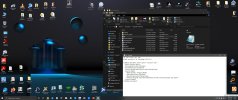
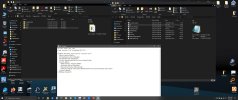
I will check that out. screenshots show my path of sdk on my machine and also what's in my p3d addons. Dang! I hate having to rebuild my machine contents after a hard drive death!
Attachments

Pyscen
Resource contributor
- Messages
- 3,040
- Country
Hello Bob @jyarddog
Change the "dll.xml" back to the original form (with the FSUIPC. being called.) Do not change it, - Leave it alone, please.
The image of the P3D SDK doesn't appear to be the correct SDK for v4. Mine looks a lot different (see images).
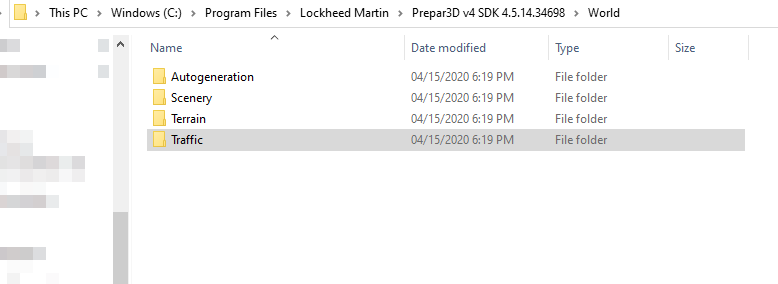
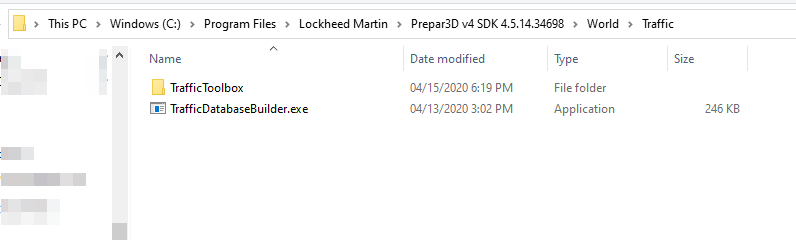
Are you sure you have the SDK for P3D v4 installed? The contents for the "Traffic" folder need to be copied to the "Prepar3D v4 Add-ons" folder.
@GaryGB
The "Traffic Toolbox" link is the same that I linked to "Troubleshooting & Limitations".
Change the "dll.xml" back to the original form (with the FSUIPC. being called.) Do not change it, - Leave it alone, please.
The image of the P3D SDK doesn't appear to be the correct SDK for v4. Mine looks a lot different (see images).
Are you sure you have the SDK for P3D v4 installed? The contents for the "Traffic" folder need to be copied to the "Prepar3D v4 Add-ons" folder.
@GaryGB
The "Traffic Toolbox" link is the same that I linked to "Troubleshooting & Limitations".
Last edited:
- Messages
- 2,388
- Country
acc to p3d I did download p3d4.5 AND skd 4.5 I just now removed it and downloaded it again. see- screenshot. yes I leave fsuipc alone but the other stuff? is that dll now a dll.xml? how change it back? btw reinstalled sdk 4.5 into same path as before after removing the old one.
Attachments

- Messages
- 2,388
- Country
When I first started to install 'traffic' I got done and started p3d 4.5 I got the notice.... ok to enable traffic tools" I said yes. I thought I was done. in the game I went to look for it.... no show. I forgot to mention this. Should I rip everything out concerning traffic and start over? ......leaving fsuipc alone of course?
Pyscen
Resource contributor
- Messages
- 3,040
- Country
I really can't say "why" it's not installing on your system. It might have a lot to do with where you installed the P3D v4.5 or even the SDK. It appears that you are not following the recommended installs. Even with the FSUPC6... the Folder titled "FSUPC6" should be located within your Document folder. The code for it to appear in the menu is located within P3D v4 (modules folder I believe).
The contents of the FSUPC6 folder only contain pdf files and lua scripts (zip file).
The contents of the FSUPC6 folder only contain pdf files and lua scripts (zip file).
- Messages
- 2,388
- Country
I will try all this. here's a few screenshots also- where I have p3d4.5 and the sdk are where I had it previously, and they work fine. Odd!