• Which the release of FS2020 we see an explosition of activity on the forun and of course we are very happy to see this. But having all questions about FS2020 in one forum becomes a bit messy. So therefore we would like to ask you all to use the following guidelines when posting your questions:

    • Tag FS2020 specific questions with the MSFS2020 tag.
    • Questions about making 3D assets can be posted in the 3D asset design forum. Either post them in the subforum of the modelling tool you use or in the general forum if they are general.
    • Questions about aircraft design can be posted in the Aircraft design forum
    • Questions about airport design can be posted in the FS2020 airport design forum. Once airport development tools have been updated for FS2020 you can post tool speciifc questions in the subforums of those tools as well of course.
    • Questions about terrain design can be posted in the FS2020 terrain design forum.
    • Questions about SimConnect can be posted in the SimConnect forum.

    Any other question that is not specific to an aspect of development or tool can be posted in the General chat forum.

    By following these guidelines we make sure that the forums remain easy to read for everybody and also that the right people can find your post to answer it.

Transparancy problem

Messages
18
Country
netherlands
After I finished quite a few things in 3DS to make my terminal look like a terminal I decided to put it in FSX.
I have all the alpha channels set and I started FSX, but it does not make my windows nor my poly's for shading transparant.

What am I doing wrong?

ad16833006.png


467db67927.png


e1c14e78c4.png
 
First thing I would check is that you saved in the proper DDS format. Textures with transparency should be saved as either DXT-3 or DXT-5 DDS files.
 
Dxt is not the only thing that controls transparency in FSX like FS9.
You need to scroll down the gmax material and you will see down below, "Default Transparent" click on that.
and set up Z-alpha test to around 128 and Alpha test mode to "Greater"
If you want semitransparent, you can set Z-alpha test to around 30-60. Test and see if you like it then come back to adjust more.
 
Did that and it didn't help. What you say will only be visible for renders.
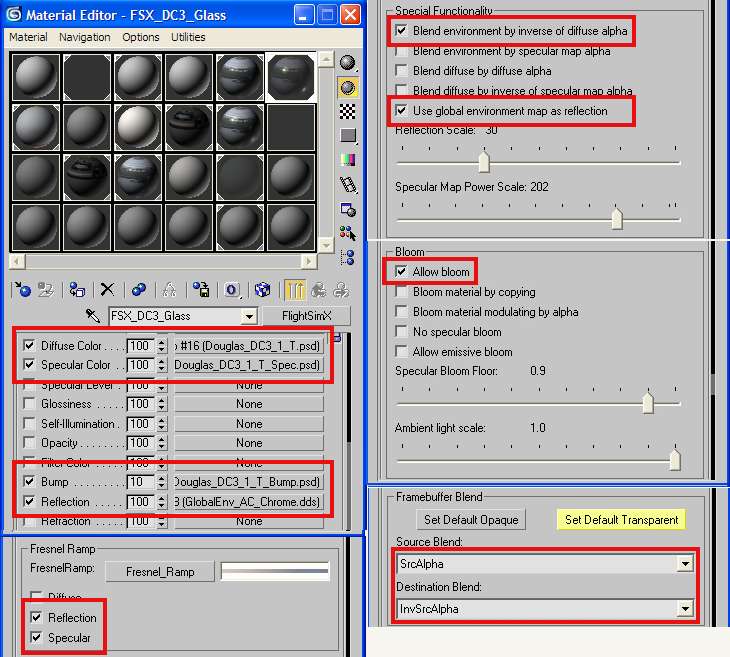
After a few google searches I found this image:
sdkglasssl2.jpg


As you can see there is a button with: FlightSimX
On my image I posted it says: Standard.

When you click on it you get a big list with option... including FlightSimX.
THen I only have to apply the things as in the image above.

I am going to test this out and then I will let you guys know if it worked.
 
Hmmmm, you did not apply any alpha textures in the opacity slot, but very strange. I guess the quality settings don't have anything to do with the quality in P3D...
 
Correct, the opacity slot only apply for rendering. I think just have to set "default transparent" this settings apply for Gmax and Max, once you have the SDK installed.
 
Last edited:
Fixed my last problem with a really simple solution. Somehow it have a sort of alpha to my other textures. So I made a separate texture file with all the windows in my scenery and added the alpha on it.

I am quite happy with it.
Is there any way were you can see the inside? Cuz now I don't see the lines of the windows on the inside.

17756c3258.png
 
I think it have to do with another parameter, in this case you should set "Greater" in the Alpha test Mode section , and doublé sided Could be?
 
Back
Top