Hello Fellow Simmers,
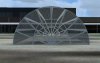
I have been struggling for the past few days to solve a transparency issue and I will try to explain the situation. I created a half cylinder as an Atrium for the top of a building. It is using 2 sided, default transparency set to TRUE and when in MCX the onside (Left) looking through to the opposite side it looks OK except the ends are totally transparent. Then rotating the model to the opposite side the onside looks OK but on other inside is total transparent. I have attached the zip file that contains the .gmax file, the texture and the .mdl. That should show the problem better than I can explain. It acts like there is a cancelation effect. The Z-Test Alpha is set to 46.xxx and the Alpha Test Mode is set to Greater Than.
Set Default Transparent to TRUE.
I am hoping there is a resolution to correct this but if not it is only a minor issue and can be overlooked.
Thanks for any help or advice that anyone can offer.
Richie S
I have been struggling for the past few days to solve a transparency issue and I will try to explain the situation. I created a half cylinder as an Atrium for the top of a building. It is using 2 sided, default transparency set to TRUE and when in MCX the onside (Left) looking through to the opposite side it looks OK except the ends are totally transparent. Then rotating the model to the opposite side the onside looks OK but on other inside is total transparent. I have attached the zip file that contains the .gmax file, the texture and the .mdl. That should show the problem better than I can explain. It acts like there is a cancelation effect. The Z-Test Alpha is set to 46.xxx and the Alpha Test Mode is set to Greater Than.
Set Default Transparent to TRUE.
I am hoping there is a resolution to correct this but if not it is only a minor issue and can be overlooked.
Thanks for any help or advice that anyone can offer.
Richie S