
• Which the release of FS2020 we see an explosition of activity on the forun and of course we are very happy to see this. But having all questions about FS2020 in one forum becomes a bit messy. So therefore we would like to ask you all to use the following guidelines when posting your questions:

    • Tag FS2020 specific questions with the MSFS2020 tag.
    • Questions about making 3D assets can be posted in the 3D asset design forum. Either post them in the subforum of the modelling tool you use or in the general forum if they are general.
    • Questions about aircraft design can be posted in the Aircraft design forum
    • Questions about airport design can be posted in the FS2020 airport design forum. Once airport development tools have been updated for FS2020 you can post tool speciifc questions in the subforums of those tools as well of course.
    • Questions about terrain design can be posted in the FS2020 terrain design forum.
    • Questions about SimConnect can be posted in the SimConnect forum.

    Any other question that is not specific to an aspect of development or tool can be posted in the General chat forum.

    By following these guidelines we make sure that the forums remain easy to read for everybody and also that the right people can find your post to answer it.

VC issue with Freeware plane from FSX to P3DV3

Messages
10
Country
croatia
Here is another issue which I have between FSX and P3DV3.

I found this beautiful freeware plane with authentic VC. Plane is classic trainer made in Yugoslavia called Soko Galeb.

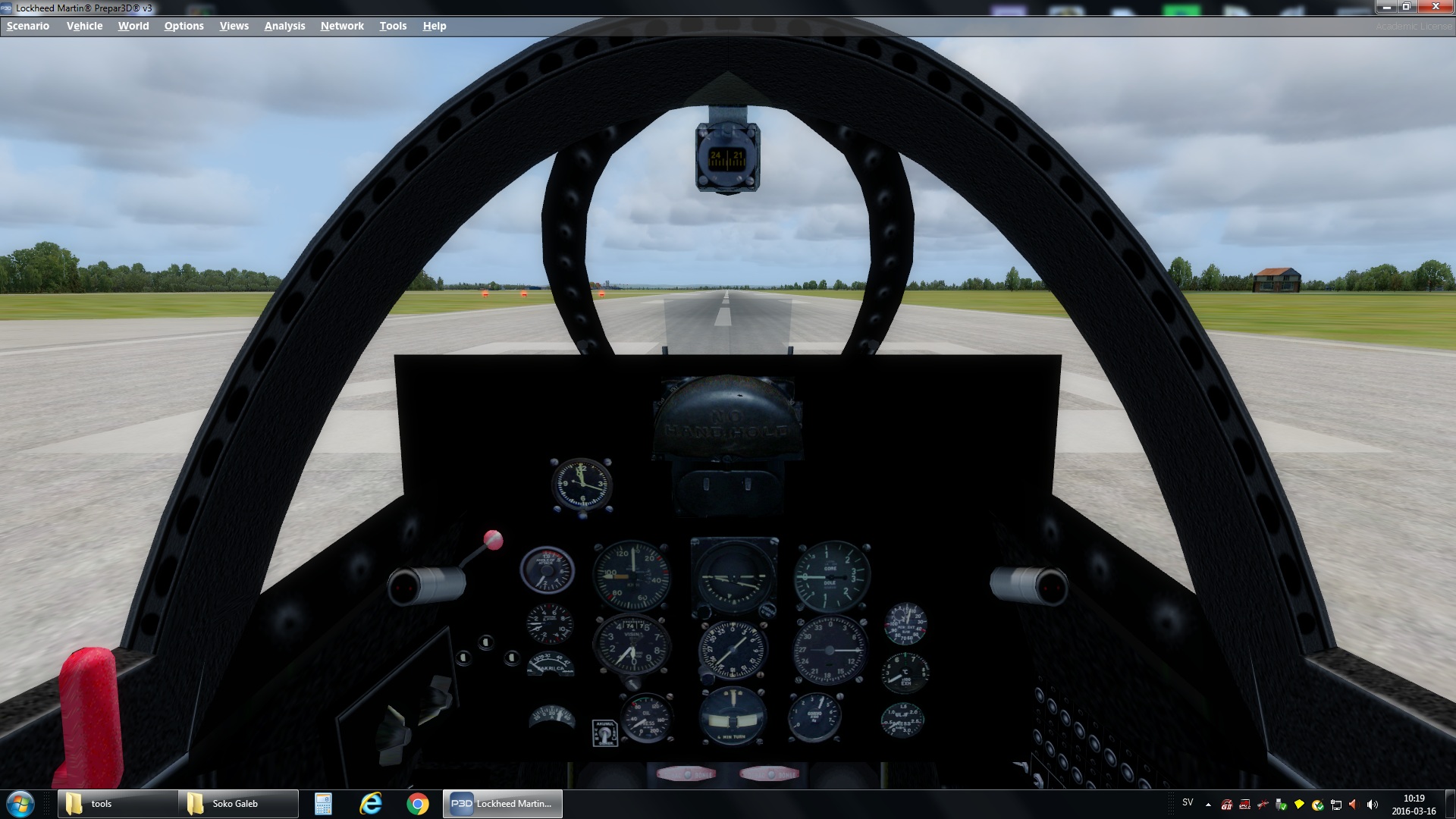
But in the P3D main VC panel texture is black.

See comparison on the screenshot between FSX and P3DV3.
I wanted to upload original bmp file, but its not possible here. So just screenshot in jpg.

Any idea where could I start to fix the panel?
thumbnail_vc_error.jpg
thumbnail_vc.jpg
bitmap.jpg
 
The model was made for FS2002 or 2004 and thus could have general compatibility issues in P3D. Please use the official P3D support forum for issues like these as you're much more likely to get useful answers there.
 
Last edited:
I think I found a problem when using some models from FSX (or probably FS2004) with P3D. In this case the Gauge background is not transparent and not aligned with the 3D model. See the screenshot I made.

You can notice that Gauges are in front of VC panel model and they have black non-transparent background.

So I think the problem could be solved if make transparent background of all Gauges. Or add alpha chanel. Any possible solution, like batch conversion?

In FSX I was using AddOn Converter X fro this plane.

vc_error_gauges black background not alligned.jpg

buttons.jpg
 
Last edited:
But seems there is not Gauge problem.

There is a panel in the 3D VC model. which appears black in P3D and not in FSX.

in FSX gauges actualy floating in front of panel, and Gauges background is transparent.

Is it possible to extract the VC model to GMAX , correct this and assemble it again for simulator?

Or I just need to make background transparent, as in FSX. I don't mind floating Gauges.


black square.jpg
black square 2.jpg

VC model 2.jpg
FSX floating Gauges.jpg
 
Last edited:
Surely you could try to export the model into a format that GMax can import, but be aware that you would have to recreate materials, mesh smoothing and animations from scratch.


And did you ask in the P3D forum about this issue with FS9 models?
 
Easy fix. Go into P3d settings, and uncheck "mipmap VC panels".
No need to do anything else.
 
Back
Top