
• Which the release of FS2020 we see an explosition of activity on the forun and of course we are very happy to see this. But having all questions about FS2020 in one forum becomes a bit messy. So therefore we would like to ask you all to use the following guidelines when posting your questions:

    • Tag FS2020 specific questions with the MSFS2020 tag.
    • Questions about making 3D assets can be posted in the 3D asset design forum. Either post them in the subforum of the modelling tool you use or in the general forum if they are general.
    • Questions about aircraft design can be posted in the Aircraft design forum
    • Questions about airport design can be posted in the FS2020 airport design forum. Once airport development tools have been updated for FS2020 you can post tool speciifc questions in the subforums of those tools as well of course.
    • Questions about terrain design can be posted in the FS2020 terrain design forum.
    • Questions about SimConnect can be posted in the SimConnect forum.

    Any other question that is not specific to an aspect of development or tool can be posted in the General chat forum.

    By following these guidelines we make sure that the forums remain easy to read for everybody and also that the right people can find your post to answer it.

FSXA Xtomdl.exe

Messages
383
Country
unitedkingdom
Hi

Does anyone have any clue why this is happening?

I'm using 3dsmax and xtomdl (prepar3d V1.4) to export my models into FSX. If I drop my .x file of the Hangar in the picture below onto xtomdl.exe, this is what I get
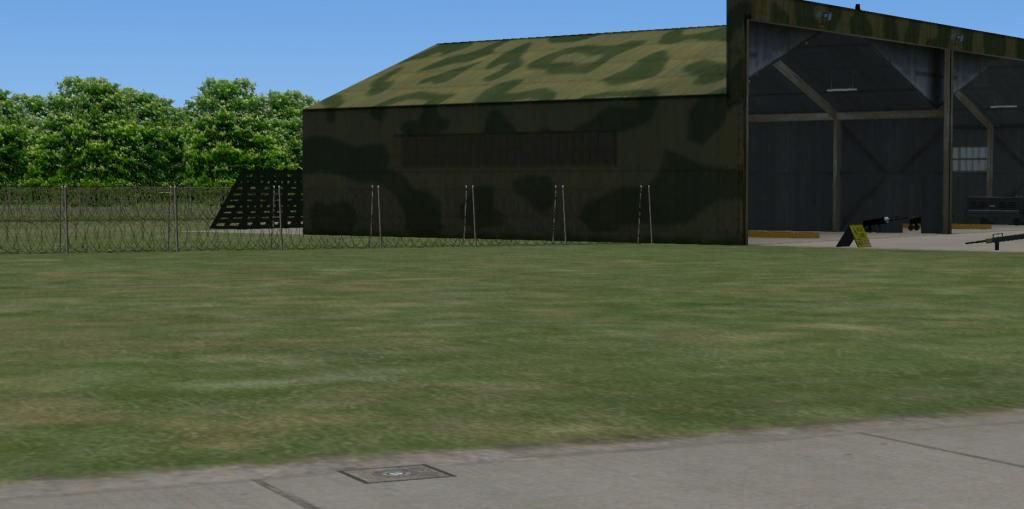

A nice model, no problems with the baredwire fence...But there are no LODs active on the Hangar becuase of drawcall batching.....

I read up a bit and found I have to have an empty .xanim file to active the LOD when dropping it on xtomdl becuase drawcall batching is on by default.

So i did that and this is now what i get,


the LODS are now active but something happens to the zbias on the barbedwire causing the hangar to become see through even though that model has not been altered?????

If i export my model into Gmax and export it from there, i dont get this issue at all and I dont want to have to export all my models into Gmax just to export them and was wondering if anyone else had come across this or if theres a way to get LODs but without the annoying alpha effect apart from using Gmax???

Stevo ;)
 
You just DON'T drop an .X file on to XtoMDL to compile a model: XtoMDL is a command-line program and there's a number of ways to set it up but many of us use the Send To menu from a right-click.

Read all about it in the Wiki. Once set up it's a right-click on your .X file and pick the option from the menu resulting. Simples!
 
Hey,

Dropping directly onto xtomdl does work otherise I wouldnt have the model in the sim..LOL, it just works without any of the flags /xamin, /xmlsample etc...

I've tried it from a shortcut (thats how i got LOD working), directly in the cmd prompt, with flags, witout flags, I either get the model in the top picture with drawcall batching active but LODs not working, or the model in the bottom picture which has LOD active, but affects the alpha on other models around it?? The only difference between the two models (bottom picture) is one is using the /xanim flag when compiling to make the LODs work, but why does that cause the see through problem?????.

Doesnt make sense....I can only assume its a compatibility issue with the Prepar3d V1.4 xtomdl. At the moment the only thing I can to to get both LOD active but have no effect on the other models around it is to port it into Gmax and export it from there....which isnt the best option. Gmax SDK seems to do something that the prepar3d xtomdl doesnt.

mmmm
 
Last edited:
Gmax SDK seems to do something that the prepar3d xtomdl doesnt.

The Gmax sdk exports to .mdl in a single step. From 3ds Max you export in two stages as described and the reason why we use a batch file or Send To shortcut is because we're following instructions from L-M or MS in the sdk documentation. Abbreviations like RT*M are often used in these cases by ill-mannered posters, but there are presumably reasons why we're told to do it that way by those who developed the sdk.

I presume you're using the v2.4 exporter to generate .X files? I'm afraid I don't know enough to answer your problems further: perhaps some others may know a solution.
 
The only difference between exporting from GMax and using the prepar3d V1.4 XToMDL.exe program is the actual XToMDL.exe compiler program.

In the case of GMax you are using the FSX SDK's version of XToMDL.exe instead of prepar3d V1.4 SDK's version of XToMDL.exe...

I strongly suspect that you need to spend some time investigating the "FSX Material" settings, particularly on how to configure the z-bias of the barbed wire's texture.
 
Interestingly, I accidentally exported the model (the hangar not the barbedwire) without including an effect for a red light that sits above the door of the hangar and to my surprise the see through side wall is now ok and the LODs work???

Model without effects exported


Model with effects exported


I repeated it four times, with and without the effect and it worked every time??? I dont see how that would make a difference but it seems to??????

I altered the z-bias on the barbed wire but it made no difference, it only made the wire less visible from a distance.

weird!
 
Back
Top