• Which the release of FS2020 we see an explosition of activity on the forun and of course we are very happy to see this. But having all questions about FS2020 in one forum becomes a bit messy. So therefore we would like to ask you all to use the following guidelines when posting your questions:

    • Tag FS2020 specific questions with the MSFS2020 tag.
    • Questions about making 3D assets can be posted in the 3D asset design forum. Either post them in the subforum of the modelling tool you use or in the general forum if they are general.
    • Questions about aircraft design can be posted in the Aircraft design forum
    • Questions about airport design can be posted in the FS2020 airport design forum. Once airport development tools have been updated for FS2020 you can post tool speciifc questions in the subforums of those tools as well of course.
    • Questions about terrain design can be posted in the FS2020 terrain design forum.
    • Questions about SimConnect can be posted in the SimConnect forum.

    Any other question that is not specific to an aspect of development or tool can be posted in the General chat forum.

    By following these guidelines we make sure that the forums remain easy to read for everybody and also that the right people can find your post to answer it.

FSXA Suspicious Specular....

jtanabodee

Resource contributor
Messages
3,924
Country
thailand
Hi,
Today I take a day off from scenery design and rethink about options in Gmax. Do they really work as we think ?
I really don't know and I'd like to find out. This is a open discussion, please fell free to comment. Not a tutorial since I don't know either.

What I'd like to find out is the best setting for a concrete building with reflecting windows. I think this is the most use material for scenery design.

I made a texture, white stripes on the green background.
I made specular texture by putting alpha channel in various shade;pure white, 50% white,25% white.

Experiment01.jpg


Then I made a box and put texture on it. I set up the material to be:
Specular Level 64
Glossiness 20
Blend environment by specular map alpha.
Use global environment map as reflection.
Reflection Scale 50%.
Exported and put it in FSX and see how it looked like.

specularpower.jpg


Personally, I think 50 alpha is the best for normal window. Pure white may be good for metal instead of window.
(I'm sorry that this picture is the specular texture with the 50% black tint on the whole texture. Too many options at a time might get me confused.)
 
Last edited:
Then I have more questions. If the specular power option make any different in this? Since it require new material, so I made three boxes and put different material for each of them. Specular power is set to 64, 90 and 128. How it looks like in FSX? Exciting for me! Since I thought it would make light refection more if the power is up. See what happen:

specularlevel64.jpg


specularlevel90.jpg


specularlevel.jpg


I think they are almost the same. The light reflect is much more controlled by specular diffuse color (specular color = light reflection power; specular alpha= how clear the environment reflect on the window). The more black tint on the specular diffuse texture, the less light reflect on the surface. See the first green strip on the left of the box.
I think for concrete building, 50% black tint on specular texture is OK. Too much black tint will make the color change to more dark than it should be.
Surprise that specular level has nothing to do with these.
 
Last edited:
Then I went on with more questions. How is reflection scale effect the appearance? The name is confusing. I once thought at first it is the scale of the picture that reflect on. Sorry for my English, I might be the only one that confuse with the name.

specularpower2.jpg


See in the picture, I think the reflect scale 50 is good. I think 100 and specular alpha to pure white is good for chrome metal rather than glass window. Lesser than 50 is not good at all. You can barely seen the environment reflect on the window.
 
Last edited:
Then I was getting more fun, or more confused. I'm not sure about that.

Now what! I thought about glossiness. It should make the light spot that reflect on the window smaller when the number of it is higher.

specularglossiness0.jpg


specularglossiness20.jpg


specularglossiness50.jpg


Ha ha, I was wrong. It has no effect at all. I think it might be a little bit smaller when you actually slew around but it is hard to tell by the photo.
My opinion about this: forget it. Let it be default never cause anything.
 
Last edited:
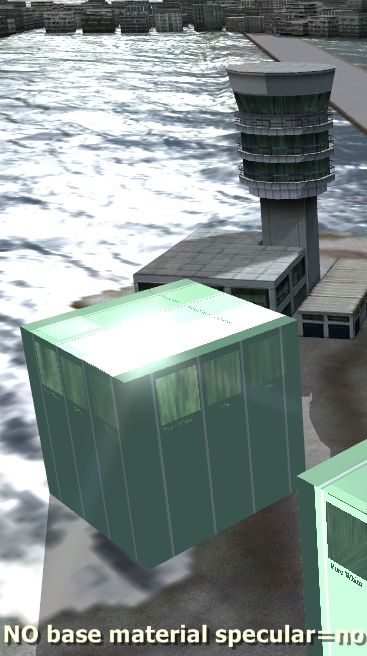
I cannot remember who recommend to tick on "No base material specular". I wonder if it works or makes any different. So I set up materials for two boxes.

baseYes.jpg

Check on "No base material specular'

baseNo.jpg

No check on "No base material specular'
I don't see any changes.
 
Last edited:
So my conclusion, just only for myself. You might have one of your own by looking at these pictures.
Best material for concrete is 50% black tint on the specular texture.
Best material for reflecting windows is 50% black on alpha of specular diffuse texture.
Specular level and glossiness seem to have no control if there is specular texture.
"No base material specular" does not make any different.

For chrome metal, put white on specular diffuse texture and white on specular alpha.

Please fell free to comment if anything wrong, or you are not agree with.

More comments will let me know more.
Thanks.
Tic
 
Last edited:
Hi Tic,

Great comparison. I'll have top read it in detail again tonight.

Normally specular power controls the size if the light spot. But it can very well be that is for materials that have no specular texture, just a colour. I'll try to do done tests with that.

Send from my phone using Tapatalk, so excuse the short sentences and possible typos
 
with "No base material specular" I can see a great difference, more luminousity in his faces.

Sorry about the label.
The first picture is "No base material specular" checked.
The second one is "No base material specular" not checked.
I think it is just the view of camera.
 
"No base material specular" does not make any different.

Great work here...of course the SDK will have all these comparisons but these are more 'real'.

My impression is that the 'No base material specular' option does work beautifully as a command BUT effective when an object has no specular map specified. If it does, then its specular properties will be mostly controlled by that map instead.

Indeed, no differences are shown in your image. Any difference you see between those items is because of their relative position.
 
Last edited:
My impression is that the 'No base material specular' option does work beautifully as a command BUT effective when an object has no specular map specified. If it does, then its specular properties will be mostly controlled by that map instead.


Thank you for your comment.
I cannot imagine which is applicable for 'No base material specular' since we almost always need specular texture to control reflection on the windows of the building.
Could you advice me what the model you have without specular texture and you use the option 'No base material specular' successfully? I'm on my wit's end actually.
 
Hi,

I cannot imagine which is applicable for 'No base material specular' since we almost always need specular texture to control reflection on the windows of the building.
Could you advice me what the model you have without specular texture and you use the option 'No base material specular' successfully? I'm on my wit's end actually.

I think it is quite often used. Many models have no specular texture, because they don't need a reflection. But with the default FSX material settings they have a specular color. That gives those sun spotlights on your material, which is not always realistic. No base material specular does disable those reflections.
 
There is surface that are not advisable to get specularr like the runway, I checked no base specular to get rid of the reflections.
 
Hi,


I think it is quite often used. Many models have no specular texture, because they don't need a reflection. But with the default FSX material settings they have a specular color. That gives those sun spotlights on your material, which is not always realistic. No base material specular does disable those reflections.
I see. So the object will be like the way FS2004 is, isn't it?

I have one question about the light in the shadow.
I often notice this when I set up my model with specular texture. On the shadow side of the model, opposite the direction of the Sun, there always a weird look high light as this picture.
baseNo.jpg

You can see some bright light on the dark side of the box. I don't know how to get rid of it.
 
Last edited:
Just for general information, the Blinn properties have zero effect in FSX Materials, just as your experiments have rather conclusively proven...
 
Very interesting findings Tic! Thanks for posting your research.

Reminds me of when I did a long research on Plexi. The more I went, the more confused I got. I really needed to take notes and screenshots as I went so I wouldnt go off course.

Nice work.
 
Thank you for your findings.

Specular surely adds life to objects. But as a scenery developer somehow I am afraid adding specular properties to objects increases the load on the computer, so I am inclined to use it on selected objects only, while for the rest and more common props I use non specular.

Although the additional specular texture doesn't count as a drawcall, I think.


So according to your experience adding specular to every object in scenery will have an effect on the general performance?
 
I don't know how much it does affect the performance. By my experience I don't think it drag fps down so much.
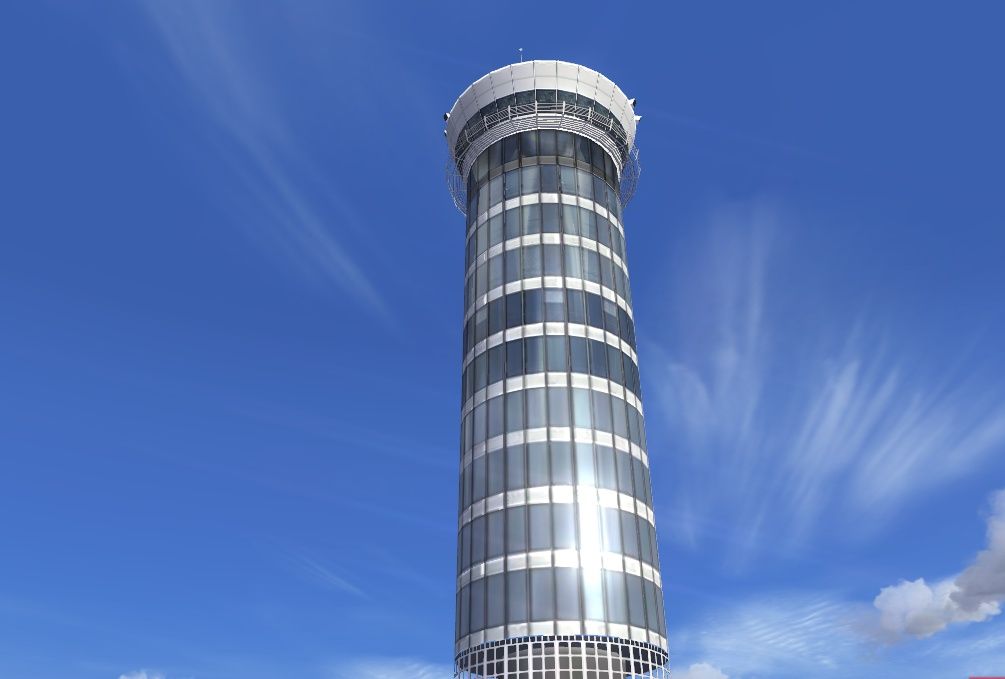
But I add specular texture to where it need to have only. The objects need this texture are buildings with glass windows and vehicles. Some buildings with metal component is really need this. Here is an example of using specular map.
vtbsupdate07_zps6e8a71da.jpg


I use pure white in diffuse texture and specular texture for the metal balcony around the tower and the area of metal sheet below each window. I think it will be bland without specular texture. Use it, I really recommend.
 
Last edited:
Back
Top