
• Which the release of FS2020 we see an explosition of activity on the forun and of course we are very happy to see this. But having all questions about FS2020 in one forum becomes a bit messy. So therefore we would like to ask you all to use the following guidelines when posting your questions:

    • Tag FS2020 specific questions with the MSFS2020 tag.
    • Questions about making 3D assets can be posted in the 3D asset design forum. Either post them in the subforum of the modelling tool you use or in the general forum if they are general.
    • Questions about aircraft design can be posted in the Aircraft design forum
    • Questions about airport design can be posted in the FS2020 airport design forum. Once airport development tools have been updated for FS2020 you can post tool speciifc questions in the subforums of those tools as well of course.
    • Questions about terrain design can be posted in the FS2020 terrain design forum.
    • Questions about SimConnect can be posted in the SimConnect forum.

    Any other question that is not specific to an aspect of development or tool can be posted in the General chat forum.

    By following these guidelines we make sure that the forums remain easy to read for everybody and also that the right people can find your post to answer it.

FSXA Blackfin Sailfish (1930s Racer)

Messages
84
Country
us-texas
This isn't a model of any specific aircraft, although I'm sure some of you could point out various similarities to some. I just started making it up, and this is what I've got so far. My overall objective is to have at least two variations: a racer prototype and a military fighter. Small (about 20'x20', ~6 m) but with a powerful engine and (probably) some insanely awesome lift. Ignore any mesh errors or untextured parts; still got lots to do.
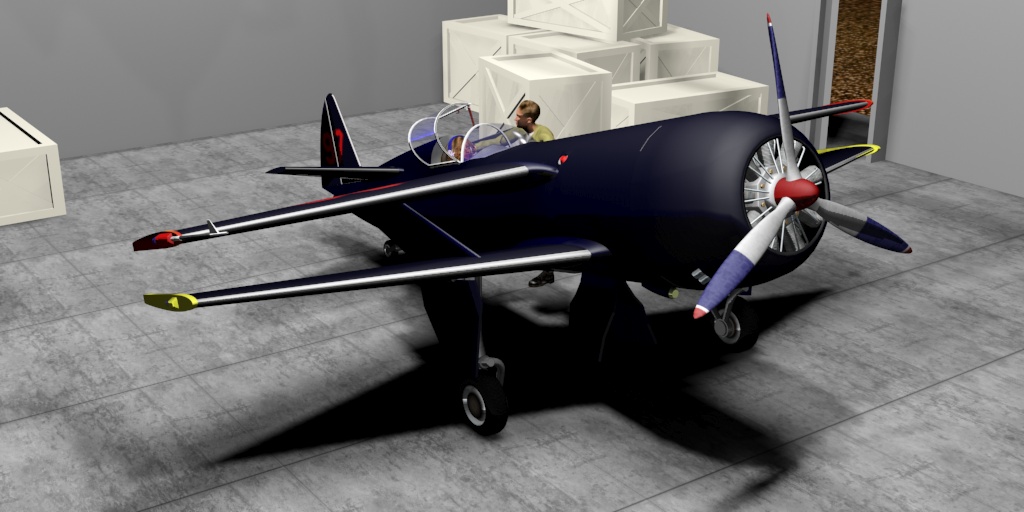
3rdProduction001.jpg
Right now I'm trying to finish out the model itself, but I want to get the fighter version modeled and I'm wondering what type of armament something like this would have. Small machine guns? The placement objects (the gray tubes) are 8" in diameter and 5.5' long, which should be plenty large enough for any guns I want to put onboard.
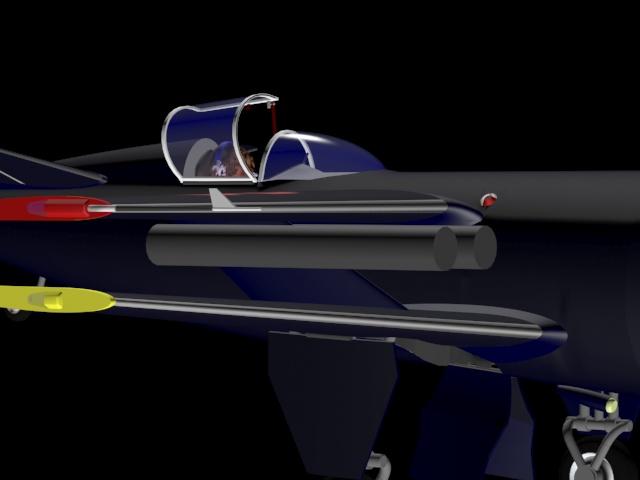
GunPlacement001.jpg


Thanks to Bill Ortis for helping me come refind these forums!
 
Last edited:
True to fashion of a late 1930s fighter, put two 7.7mm (.30 cal?) machine guns above the cowling. The wings seem to be too thin to house them.

The concept is cool, but all these wings induce one hell of a lot of drag.
 
The concept is cool, but all these wings induce one hell of a lot of drag.
Not only that, the close proximity of the wings would disrupt airflow between the two and drastically reduce lift. That in combination with increased drag.... I don't think it will fly Orville.
 
Heretic: Thanks! That was just what kind of info I was looking for.

As for the gun locations: I wasn't going to put them IN the wings, but rather suspend them under the upper wing. The reason being that the guns would be just outside of the prop clearance, precluding the need for a synchronization gear setup. However, since it wouldn't add much more weight or anything to the overall structure, perhaps putting them flush with the wing fairing up top would be better. It would make the roll rate better without the weight on the wings, as well . . .

Concerning wing drag, airflow, and lift: I'm not TOO concerned with it (fudging airfiles for difficult aircraft is what I've always done) but I'm gonna try to do some calculations and see what the REAL effect would be. Keep in mind: this is just for fun, so I'm not worried if the actual aircraft wouldn't fly.
 
I understand it's just a fun model, and a very nice one at that, just playing devil's advocate. :stirthepo
 
So I found an Autodesk program called Flow Design, which seems to be exactly what I would want to find the airflow over the aircraft. However, upon closer inspection I found that the dang thing won't run on Win10 and I don't want to revert to 8.1 just to use the program for a single project. Bummer.

Another thing I've been wondering is do any aircraft of this nature and era have dive brakes?
 
In the late 30s they were developing dive brakes that were similar to flaps but with grill work. Some aircraft would extend flaps and gear as dive brakes. It was a whole new study at the time.
 
In the late 30s they were developing dive brakes that were similar to flaps but with grill work. Some aircraft would extend flaps and gear as dive brakes. It was a whole new study at the time.

Isn't the Douglass DBS a great example of that?
The Aircraft looks great BTW.
 
The Devastator is an excellent example.
The F4U is a good example of using extended gear during a dive.
 
Thanks, F747! It's my best mesh yet, and I've learned more doing this than I did with any previous aircraft I've tried.

And I think you meant the Douglas SBD, also known as the Dauntless. I had a few moments of confusion when I typed Douglas DBS into Google . . . sent me to a "beauty system" site . . .o_O

I might try something like the grilles/mesh but I will wait until I begin modifying for the military version to incorporate those.

And just for kicks, here's another render:

3rdProduction002.jpg
 
Sorry, confussing the aircraft with a nice Biritsh car (Aston Martins DBS) :D
I've never acrually seen the dive breaks on a Devastator...
 
And now a technical question:

When setting up the interior (VC) is it of any use to include the entire aircraft exterior as part of the interior model? I remember in FS9 that if you did such a thing it would allow 3rd party software (such as ActiveCamera) to give you unique views of the aircraft that weren't very accessible in FS8 or 9. I guess the actual question is "Do the extra views found in the aircraft.cfg utilize the VC or the exterior model?".
 
Well you might want to get atleast a part of the aircraft's exterior included in the interior. Simply perhaps for the reason that if people use addons similar to ActiveCamera (in FSX EzDok is popular) they want to possible be able to see things such as the wings, tail, nose, horizontal stabalizers, etc. just within the confinds of the cockpit. To answer your question, in the case of EzDok, it utilizes the interior model for the interior views and the exterior model for exterior view. So to say you can move the camera outside of the cockpit within the interior viewing mode, but all you'll see is the outlines of the cockpit and whatever there is of the exterior, which in most cases is just what can be seen from the cockpit. Same goes for the exterior viewing mode, you get to float the camera around the aircraft but when you take it inside, you see nothing or just a low poly VC which was ment to be seen from the outside.
I hope that helped...
 
When building the VC use only the exterior parts of the model that can be seen by the pilot. You shouldn't be concerned with external camera views added by someone else.
 
Thanks, Paul! Although I'm fairly certain that I will be adding those views myself.

Here's the current cockpit. Don't mind the colors, but I would appreciate any ideas on what I might be forgetting to include. I know gear and flaps aren't represented, but I'm still trying to figure out where they should go. Having no blueprints to reference or follow leaves me surprisingly open to what I can do.

Cockpit001.jpg
 
And now a technical question:

When setting up the interior (VC) is it of any use to include the entire aircraft exterior as part of the interior model? I remember in FS9 that if you did such a thing it would allow 3rd party software (such as ActiveCamera) to give you unique views of the aircraft that weren't very accessible in FS8 or 9. I guess the actual question is "Do the extra views found in the aircraft.cfg utilize the VC or the exterior model?".

Hi Travis!

Very nice modeling. For the question on including the entire aircraft exterior in the interior model. No, I would only put the exterior parts that would be seen from within the cockpit. This will cut down your poly count and increase FPS.

Thanks, Kris
 
Hi Travis!

Very nice modeling. For the question on including the entire aircraft exterior in the interior model. No, I would only put the exterior parts that would be seen from within the cockpit. This will cut down your poly count and increase FPS.

Thanks, Kris

Thanks, Krispy. I have only modeled for FS9 prior to now, and your advice is just what I am attempting to do. I try to keep my poly count down, but details add so much to a model and I really don't like having to change mapped/textured objects once they get to a certain stage. That is in fact the reason I'm doing these posts: I hate extraneous polys and objects. To have someone point out that I'm doing something wrong is worth more hours than it would take for me to figure it out on my own.
 
Thanks, Paul! Although I'm fairly certain that I will be adding those views myself.

Here's the current cockpit. Don't mind the colors, but I would appreciate any ideas on what I might be forgetting to include. I know gear and flaps aren't represented, but I'm still trying to figure out where they should go. Having no blueprints to reference or follow leaves me surprisingly open to what I can do.

View attachment 25326
You could search for some aircraft cockpit photos of the era such as the Brewster F2A Buffalo or the Curtis P-36 Hawk or whatever aircraft fits your needs. A Google search for cockpits of 1930s fighter aircraft should give you more then enough data for a realistic VC.
 
Another thing. I hope you will be making 3d gauges. It's fun and relatively easy. I find XML coding for 3d gauges so much easier than for 2d.
 
3D gauges were the idea to begin with. I like my VCs to be immersive.

And I have done a few searches. I'm generally aiming at the P-51/P-38/Spitfire type of pit. However, I've pretty much just been placing things in what I think would be handy or logical spots. It's a pretty tiny aircraft and there isn't a great deal of room or clearance for Clarence (my new pilot) in there. The canopy is only 17" wide, for instance.

ClarenceDur.jpg
This is Clarence. He's kind of a tool, but he does what I tell 'im.
 
Back
Top