
-
Which the release of FS2020 we see an explosition of activity on the forun and of course we are very happy to see this. But having all questions about FS2020 in one forum becomes a bit messy. So therefore we would like to ask you all to use the following guidelines when posting your questions:
- Tag FS2020 specific questions with the MSFS2020 tag.
- Questions about making 3D assets can be posted in the 3D asset design forum. Either post them in the subforum of the modelling tool you use or in the general forum if they are general.
- Questions about aircraft design can be posted in the Aircraft design forum
- Questions about airport design can be posted in the FS2020 airport design forum. Once airport development tools have been updated for FS2020 you can post tool speciifc questions in the subforums of those tools as well of course.
- Questions about terrain design can be posted in the FS2020 terrain design forum.
- Questions about SimConnect can be posted in the SimConnect forum.
Any other question that is not specific to an aspect of development or tool can be posted in the General chat forum.
By following these guidelines we make sure that the forums remain easy to read for everybody and also that the right people can find your post to answer it.
You are using an out of date browser. It may not display this or other websites correctly.
You should upgrade or use an alternative browser.
You should upgrade or use an alternative browser.
MSFS20 glTF support for ModelConverterX
- Thread starter arno
- Start date
- Status
- Not open for further replies.
Hey, Arno.
Thanks for the gltf support.
Yesterday I was converting some P3D BGLs into gltf by using the batch convert wizard. All gltfs went into the same directory. I would like to suggest you to add an option to put each gltf output file in a different folder based on its name.
Thanks for the gltf support.
Yesterday I was converting some P3D BGLs into gltf by using the batch convert wizard. All gltfs went into the same directory. I would like to suggest you to add an option to put each gltf output file in a different folder based on its name.
- Messages
- 12
- Country

Happy Sunday Arno,
Would you happen to have a download link for 1.5? The website only seems to have 1.3 and there is no update option in the software, thanks!
Would you happen to have a download link for 1.5? The website only seems to have 1.3 and there is no update option in the software, thanks!

- Messages
- 34,328
- Country


Hello .Thank you very much for this awesome tool.Ive just started using model converter X to export my GLTF files.However for some reason the models are always shiny and highly reflective even though i havent set any PBR texture for the material,I simply imported the dae file,minimzed drawcalls,saved the textures and exported as GLTF. i tried setting bump scale,detail scale, and smoothness to 0 but its still like this ,Any ideas?Thank you
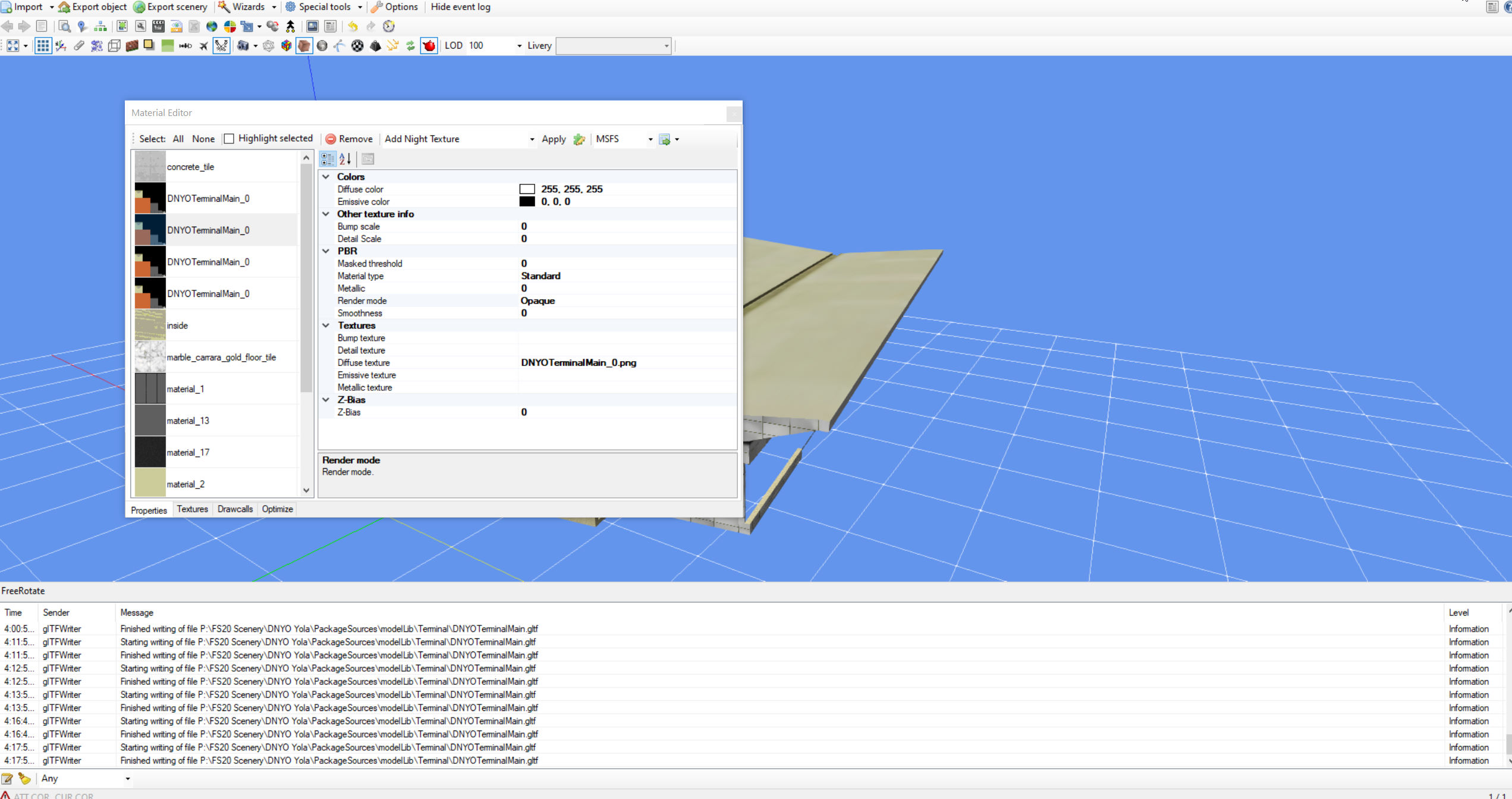
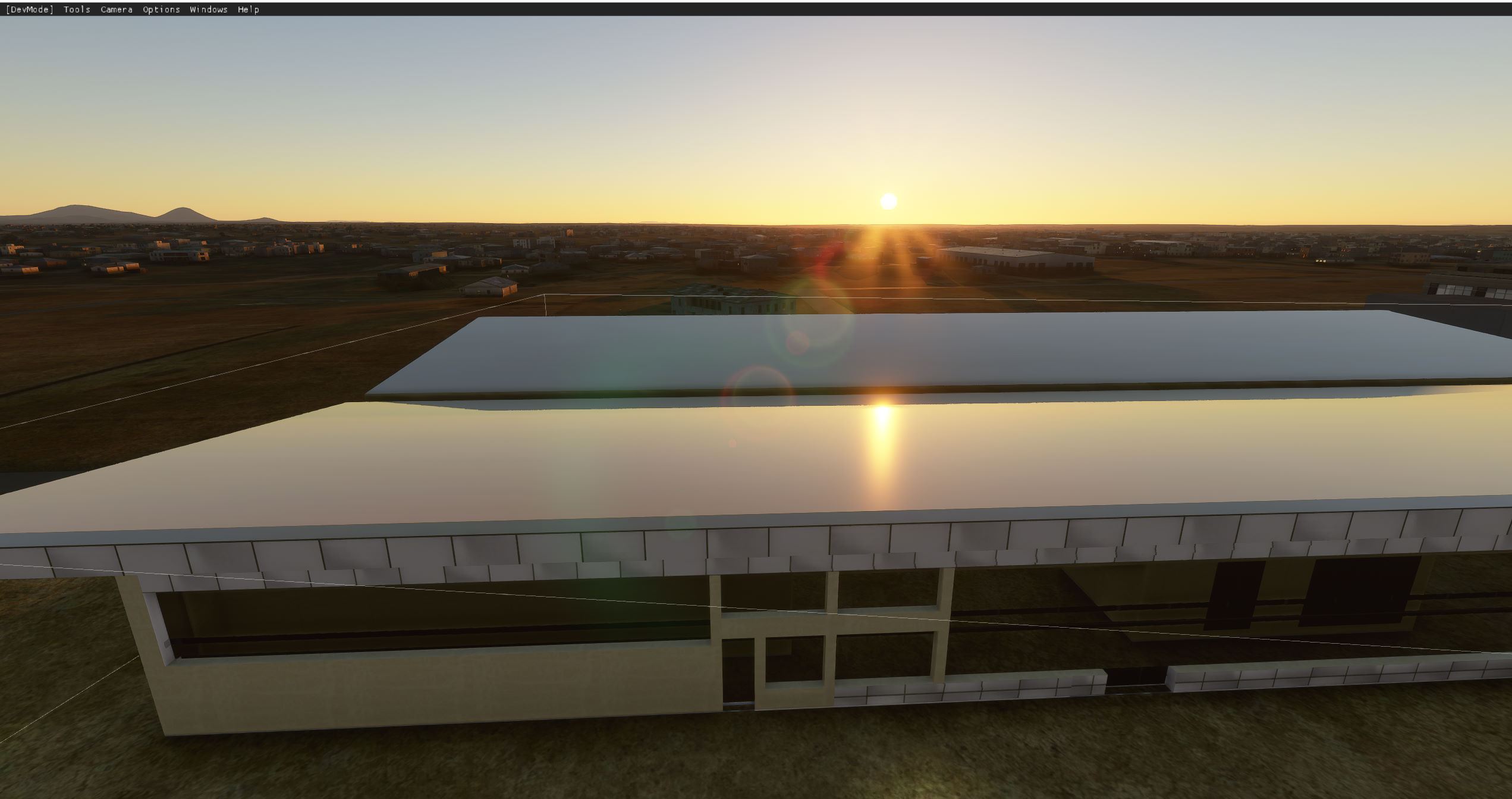
Last edited:
- Messages
- 34,328
- Country
Hi,
I noticed this on a test model as well. I need to check but MSFS does not use a smoothness, but a roughness attribute. So maybe the range of the value should be inverted, e.g. the smoothness should maybe be set to 0 instead of 1. If this difference is confirmed, I can make sure that MCX automatically handles it of course.
I noticed this on a test model as well. I need to check but MSFS does not use a smoothness, but a roughness attribute. So maybe the range of the value should be inverted, e.g. the smoothness should maybe be set to 0 instead of 1. If this difference is confirmed, I can make sure that MCX automatically handles it of course.
Ah i see now and i can indeed confirm that setting the smoothness to 1 instead gets rid of the shininess.Thank you very much for your work!Hi,
I noticed this on a test model as well. I need to check but MSFS does not use a smoothness, but a roughness attribute. So maybe the range of the value should be inverted, e.g. the smoothness should maybe be set to 0 instead of 1. If this difference is confirmed, I can make sure that MCX automatically handles it of course.

- Messages
- 392
- Country

Can confirm Roughness not smoothness.Hi,
I noticed this on a test model as well. I need to check but MSFS does not use a smoothness, but a roughness attribute. So maybe the range of the value should be inverted, e.g. the smoothness should maybe be set to 0 instead of 1. If this difference is confirmed, I can make sure that MCX automatically handles it of course.


- Messages
- 34,328
- Country
I don't know yet. Officially the glTF format only allows JPG or PNG. But I think the MSFS package tool does support other formats as well. According to the SDK the package tool does determine by itself which DXT compression it should use for the various types of textures. So I think the typical workflow is to use PNG.
- Messages
- 34,328
- Country
Can confirm Roughness not smoothness.
I have modified MCX now so that it will write the correct value to the glTF file. So the next development release you don't have to invert the value anymore.

- Messages
- 277
- Country

Absolutely wonderful, thank you! I am in the process of converting my old sceneries for the airfields in southern Finland from the FSX/P3D versions to MSFS. This tool saves a HUGE amount of work. Some of the models for an airport that was originally made for FS2004 were using BMP textures that caused some problems in the package building stage. So I edited the gITF files, replaced all .bmp extensions with .png, converted the textures using the ModelConverter's texture conversion tool and after that everything worked perfectly!
It looks like the complex shader is not working as expected yet. The screenshot shows the MSFS Innsbruck scene from ORBX. MCX version 1.5.0.0 49ef296b
And yet, when opening a scene from BGL, the log displays "Error while loading modeldef.xml". It's a trifle, but maybe it's worth introducing a check for the file's ownership to the new simulator?
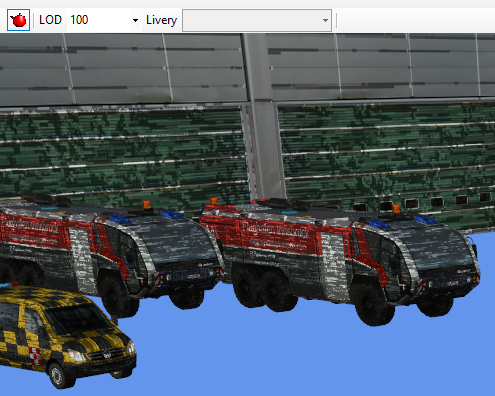
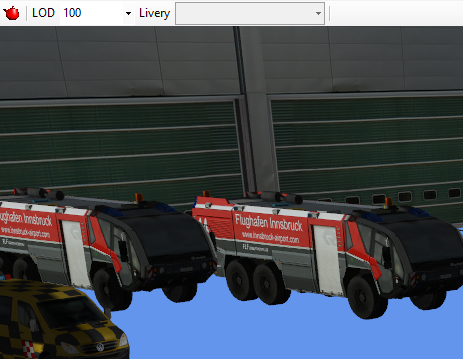
And yet, when opening a scene from BGL, the log displays "Error while loading modeldef.xml". It's a trifle, but maybe it's worth introducing a check for the file's ownership to the new simulator?
- Messages
- 24
- Country

The Material editor does not properly display occlusion-metallic-roughness texture DDS and normal map texture DDS.


It might be useful, for Photoshop there is an Intel® Texture Works plugin that correctly converts DDS from MSFS.
https://software.intel.com/content/www/us/en/develop/articles/intel-texture-works-plugin.html
It might be useful, for Photoshop there is an Intel® Texture Works plugin that correctly converts DDS from MSFS.
https://software.intel.com/content/www/us/en/develop/articles/intel-texture-works-plugin.html
- Status
- Not open for further replies.