• Which the release of FS2020 we see an explosition of activity on the forun and of course we are very happy to see this. But having all questions about FS2020 in one forum becomes a bit messy. So therefore we would like to ask you all to use the following guidelines when posting your questions:

    • Tag FS2020 specific questions with the MSFS2020 tag.
    • Questions about making 3D assets can be posted in the 3D asset design forum. Either post them in the subforum of the modelling tool you use or in the general forum if they are general.
    • Questions about aircraft design can be posted in the Aircraft design forum
    • Questions about airport design can be posted in the FS2020 airport design forum. Once airport development tools have been updated for FS2020 you can post tool speciifc questions in the subforums of those tools as well of course.
    • Questions about terrain design can be posted in the FS2020 terrain design forum.
    • Questions about SimConnect can be posted in the SimConnect forum.

    Any other question that is not specific to an aspect of development or tool can be posted in the General chat forum.

    By following these guidelines we make sure that the forums remain easy to read for everybody and also that the right people can find your post to answer it.

MSFS20 Different terrain elevation between SDK and in-game

Messages
413
Country
norway
Hello.

I am having a [hopefully last] issue with my current project, where the terrain within the SDK-developer mode is not show as it should when the project is within the community folder. I have no other addons than the HPG145 addon within the folder.

SDK:
Screenshot 2025-06-15 195350.jpg


In-sim (Note the wall, and terrain showing through the model asphalt):
Screenshot 2025-06-15 200320.png
 
Hello.

I am having a [hopefully last] issue with my current project, where the terrain within the SDK-developer mode is not shown as it should when the project is within the community folder. I have no other add-ons than the HPG145 add-on within the folder.

Hi Vetle:

Are darker areas only 'darker in appearance', or are there Face shadows above the co-planar surface of the Helipad Material ?

If you save a MSFS *.FLT file for a flight scenario of choice at ENLX, you can use it to maintain continuity for comparisons.


I am assuming 3D model is precisely Geo-located to IRL and oriented to Geographic N-S-E-W Axes by GIS Projection.

Enable Shadows Toolbar via: Sketchup Menu > Toolbars > Shadows

Then you can set the same Date / Time of Sketchup Shadows to compare with MSFS for (sur-)Face shadowing at ENLX.


If you DM a link to the project and compiled package folder chain for MSFS 2020, I could take a look at it to see if I may help.

The scenery otherwise looks great within the areas shown by your screenshots. :)

GaryGB
 
Last edited:
Hi Vetle:

Are darker areas only 'darker in appearance', or are there Face shadows above the co-planar surface of the Helipad Material ?

It may be helpful to save a *.FLT file for a flight scenario of choice at ENLX.

The you can set the same Date / Time for Sketchup Shadows for basic comparison with MSFS for (sur-)Face shadowing at ENLX.

I am assuming the 3D model is Geo-located to the IRL and precisely oriented to Geographic N-S-E-W Axes by GIS Projection.


If you DM a link to the project and the compiled package folder chain for MSFS 2020, I could take a look at it to see if I may help.

The scenery otherwise looks great within the areas shown by your screenshots. :)

GaryGB
Do you need the whole project, or just the packagesources and project xml-file?

The whole project is around 1.3gb with the built package.

My main concern is the darker ground textures around the trolley which is present when in game, but not in the sdk. The brick wall is also partly occluded due to the terrain. Relatively small issues, but annoying evem so since I am not getting what I should be from the sdk
 
Do you need the whole project, or just the package sources and project xml-file?

The whole project is around 1.3gb with the built package.

My main concern is the darker ground textures around the trolley which is present when in game, but not in the SDK (DevMode Scenery Editor ?). The brick wall is also partly occluded due to the terrain. Relatively small issues, but annoying even so since I am not getting what I should be from the SDK.

It is best to have access to the entire project as both source code and processed / compiled texture Materials are implicated.

Do you recall how to segment files via 7-ZIP into max 200 MB 'pieces' (Split To Volumes, Bytes = Max 200000000 Bytes / piece) ?

(That size value in Bytes to limit segments in 7-ZIP is a "2" followed by "8" zeroes)

[EDITED]

OK, a RAR will work too, if it does not exceed size limits of DropBox' other wise MediaFire can be used via 7-ZIP 200MB 7Z's.

[END_EDIT]

GaryGB
 
Last edited:
OK, here is MSFS 2020 at ENLX with the Release Candidate (aka "RC") loaded into Scenery Editor, before exiting that mode:

msfs_2020_enlx_dev_camera_terrain_lod_100_rc_before_exit_devmode-a-jpg.96877


Here is MSFS 2020 at ENLX with the Release Candidate (aka "RC") loaded into Scenery Editor, after exiting that mode:

msfs_2020_enlx_dev_camera_terrain_lod_100_rc_after_exit_devmode-a-jpg.96878


As you can see up close:

* There is a gap in coverage of the top 'Projected Mesh' Apron layer allowing the Asphalt texture Material layer to be seen.


Or, perhaps we are seeing the reverse due to a layering issue:

* There is a gap in coverage of the top Asphalt texture Material allowing 'Projected Mesh' Apron layer to be seen.


Which layer of texture Material did you want to be displayed on the very top... Apron -or- Asphalt ? ;)


We may need to see if the texture Material layer stack sequence and Priority in Properties can be ID'd via the DevMode GUI.

I have not yet stepped through the Scenery Editor project assets to analyze the intended layers and their "requested" priority.

I plan to do that tomorrow (Monday), due to the lateness of the hour here in Chicago time zone.


A Face 'Normal' orientation issue seems unlikely at this point; this appears to be a discontinuity of 'top' Material display. :scratchch


I do not see a projection of Geometry poking through the (sur-)Face of the Helipad itself in the anomalous area seen above.


PS: I don't know if you had tested this W.I.P. 'build' at Night yet, but IIUC, there are a few anomalies ...seen here at Dusk: :alert:

msfs_2020_enlx_dev_camera_terrain_lod_100_rc_before_exit_devmode_dusk-a-jpg.96879


msfs_2020_enlx_dev_camera_terrain_lod_100_rc_before_exit_devmode_dusk-b-jpg.96880


GaryGB
 

Attachments

  • MSFS_2020_ENLX_Dev_Camera_Terrain_LOD_100_RC_Before_Exit_DevMode-a.jpg
    MSFS_2020_ENLX_Dev_Camera_Terrain_LOD_100_RC_Before_Exit_DevMode-a.jpg
    289.6 KB · Views: 407
  • MSFS_2020_ENLX_Dev_Camera_Terrain_LOD_100_RC_After_Exit_DevMode-a.jpg
    MSFS_2020_ENLX_Dev_Camera_Terrain_LOD_100_RC_After_Exit_DevMode-a.jpg
    276.8 KB · Views: 376
  • MSFS_2020_ENLX_Dev_Camera_Terrain_LOD_100_RC_Before_Exit_DevMode_Dusk-a.jpg
    MSFS_2020_ENLX_Dev_Camera_Terrain_LOD_100_RC_Before_Exit_DevMode_Dusk-a.jpg
    150.2 KB · Views: 357
  • MSFS_2020_ENLX_Dev_Camera_Terrain_LOD_100_RC_Before_Exit_DevMode_Dusk-b.jpg
    MSFS_2020_ENLX_Dev_Camera_Terrain_LOD_100_RC_Before_Exit_DevMode_Dusk-b.jpg
    172.7 KB · Views: 359
Last edited:
OK, here is MSFS 2020 at ENLX with the Release Candidate (aka "RC") loaded into Scenery Editor, before exiting that mode:

msfs_2020_enlx_dev_camera_terrain_lod_100_rc_before_exit_devmode-a-jpg.96877


Here is MSFS 2020 at ENLX with the Release Candidate (aka "RC") loaded into Scenery Editor, after exiting that mode:

msfs_2020_enlx_dev_camera_terrain_lod_100_rc_after_exit_devmode-a-jpg.96878


As you can see up close:

* There is a gap in coverage of the top 'Projected Mesh' Apron layer allowing the Asphalt texture Material layer to be seen.


Or, perhaps we are seeing the reverse due to a layering issue:

* There is a gap in coverage of the top Asphalt texture Material allowing 'Projected Mesh' Apron layer to be seen.


Which layer of texture Material did you want to be displayed on the very top... Apron -or- Asphalt ? ;)


We may need to see if the texture Material layer stack sequence and Priority in Properties can be ID'd via the DevMode GUI.

I have not yet stepped through the Scenery Editor project assets to analyze the intended layers and their "requested" priority; I plan to do that tomorrow (Monday), due to the lateness of the hour here in Chicago time zone.


A Face 'Normal' orientation setting seems unlikely at this point; this appears to be a discontinuity of 'top' Material display. :scratchch


I do not see a projection of Geometry poking through the (sur-)Face of the Helipad itself in the anomalous area seen above.


PS: I don't know if you had tested this W.I.P. 'build' at Night yet, but IIUC, there are few anomalies ...seen here at Dusk: :alert:

msfs_2020_enlx_dev_camera_terrain_lod_100_rc_before_exit_devmode_dusk-a-jpg.96879


msfs_2020_enlx_dev_camera_terrain_lod_100_rc_before_exit_devmode_dusk-b-jpg.96880


GaryGB
Hello Gary, and thank you so much for testing this out!

First; I have not seen the texture anomalies with my project. I am not sure why it shows with yours. All materials I have used are MSFS SDK materials, and the ones you show in your screenshots are a grass texture and asphalt texture.

Regarding the texture issue: To be clear, the helipad surface is modelled through sketchup, and is not part of the terrain. The whole platform area and its trolleys are custom made models. What you show in the image above is the terrain popping up through the model - something that does not happen when inside the scenery editor.

EDIT: I could certainly work around the issue, elevating the helipad slightly. But I am more concerned about the not-as-obvious issues which also is relevant to the model, e.g. lighting which end up misplaced, collisionroad elevation also being misplaced and causing issues and so on.

To me it seems like the helipad building and platform have been placed downwards from where it was within the sdk. I will try to add a low-resolution placement. If that does not work I will try to clean the project, restart the sim and then build it again.
 
Last edited:
Hi again:

Hello Gary, and thank you so much for testing this out!

First; I have not seen the texture anomalies with my project. I am not sure why it shows with yours. All materials I have used are MSFS SDK materials, and the ones you show in your screenshots are a grass texture and asphalt texture.

This screenshots are MSFS 2020 with only your nordscape-airport-enlx-loerenskog-helibase loaded from my \Community folder.

Regarding the texture issue: To be clear, the helipad surface is modeled through Sketchup, and is not part of the terrain. The whole platform area and its trolleys are custom made models. What you show in the image above is the terrain popping up through the model - something that does not happen when inside the scenery editor.

EDIT: I could certainly work around the issue, elevating the helipad slightly.

Before you try that, be aware that examination of:

C:\Users\Admin\Downloads\ENLX-Loerenskog-helibase\PackageSources\Scenery\airport-enlx-loerenskog-helibase\scenery\ENLX.xml

...shows that all 3D models are placed AGL rather than AMSL. :alert:

As a minimum, I would re-place the Helipad to AMSL, slightly above the elevation of the "flattened" TIN causing anomalies.

But I am more concerned about the not-as-obvious issues which also is relevant to the model, e.g. lighting which end up misplaced, collision road elevation also being misplaced and causing issues and so on.

It may be that placing the Helipad AMSL, slightly above the elevation of the "flattened" TIN ...may eliminate anomalies. :scratchch

To me it seems like the helipad building and platform have been placed downwards from where it was (when the package is loaded) within the SDK DevMode Scenery Editor view. I will try to add a low-resolution placement. If that does not work I will try to clean the project, restart the sim and then build it again.

I noticed my user aircraft "fell" down to ground level on ENLX Helipad after I exited MSFS 2020 SDK DevMode Scenery Editor.

That alone would suggest the local scene Altitude is distinct between ENLX custom and MSFS default TIN (sur-)Faces.


BTW: That also raises questions as to whether / how we are able to completely "flatten" TIN photogrammetry at ENLX Helipad.


FYI: Here is MSFS 2020 with ENLX loaded as the ONLY add-on from my \Community folder chain:

D:\MSFS-2020_Packages\Community\nordscape-airport-enlx-loerenskog-helibase

MSFS_2020_ENLX_Dev_Camera_Terrain_LOD_100_RC_Community_Package_Load-a.jpg


I shall await your reply before I proceed with further analysis, to see if ENLX custom 3D model re-placement to AMSL fixes this. ;)


PS: Another screenshot showing texture Material anomalies for embankments ...in the daylight.

MSFS_2020_ENLX_Dev_Camera_Terrain_LOD_100_RC_Community_Package_Load-b.jpg


GaryGB
 
Last edited:
Hi again:


This screenshots are MSFS 2020 with only your nordscape-airport-enlx-loerenskog-helibase loaded from \Community folder.


Before you try that, be aware that examination of:

C:\Users\Admin\Downloads\ENLX-Loerenskog-helibase\Packages\nordscape-airport-enlx-loerenskog-helibase\Scenery\airport-enlx-loerenskog-helibase\scenery

...shows that all 3D models are placed AGL rather than AMSL. :alert:

As a minimum, I would re-place the Helipad to AMSL, slightly above the elevation of the "flattened" TIN causing anomalies.


It may be that placing the Helipad AMSL, slightly above the elevation of the "flattened" TIN may eliminate anomalies. :scratchch
Will try that out now. Thank you :)
I noticed my user aircraft "fell" down to ground level on ENLX Helipad after I exited MSFS 2020 SDK DevMode Scenery Editor.

That alone would suggest that the scene Altitude is distinct between ENLX custom and MSFS default TIN (sur-)Faces.


BTW: Here is MSFS 2020 with ENLX loaded as the ONLY add-on from \Community folder chain:

D:\MSFS-2020_Packages\Community\nordscape-airport-enlx-loerenskog-helibase

View attachment 96881
That is weird...I see the collision box is working correctly for the pad itself - good news, however the front left weel is actually hitting the MSFS terrain [anomaly], not the model, in that picture. So that is weird that it is sinking into the ground. :scratchch
 
Will try that out now. Thank you :)

That is weird...I see the collision box is working correctly for the pad itself - good news, however the front left wheel is actually hitting the MSFS terrain [anomaly], not the model, in that picture. So that is weird that it is sinking into the ground. :scratchch

FYI: Here is the superimposed Norway GIS Lidar DTM contours on ESRI World Imagery.

This is close to- but not identical to- SRTM V3+ / ASTER GDEM 1/3 Arc-Second elevation data:

ENLX_Lidar_DTM_Terrain_Contours_World_Imagery_GM-a.png


This data set was updated to 0.5 Meter elevation data point sampling intervals by the issuing agency when I placed the request.

The prior data set was reportedly only 2 data points per square Meter ground area; that 'may' have been the data Asobo used.

IIUC, Asobo TIN data may- or may not- have been lower resolution source data, and 'may' have been down-sampled for MSFS.


Note that MSFS generously provided us with Monolith "rock-trees" to the West of the Heliport, that require precision excludes.

When I get some more free time, I may make more precise ENLX TIN photogrammetry with Norse DSM (aka "DOM") data also.

I'd also use my "digital chain-saw" to take down those Monolith "rock-trees" (I can do this without even being Elon Musk. :stirthepo ).

MSFS_2020_ENLX_Dev_Camera_Terrain_LOD_100_RC_Community_Package_Load-c.jpg


Oh, and I almost forgot to ask about this local asset for a navigation landmark: Is this still being considered?

MSFS_2024_ENLX_Dev_Camera_Terrain_LOD_100_RC_Community_Package_Load-d.jpg


< ...Rock of Ages, cleft for me... let me find a way, to 'exclude' thee... :laughing: >

GaryGB
 
Last edited:
FYI: Here is the superimposed Norway GIS Lidar DTM contours on ESRI World Imagery.

This is close to- but not identical to- SRTM V3+ / ASTER GDEM 1/3 Arc-Second elevation data:

View attachment 96883

This data set was updated to 0.5 Meter elevation data point sampling intervals by the issuing agency when I placed the request.

The prior data set was reportedly only 2 data points per square Meter ground area; that 'may' have been the data Asobo used.

IIUC, Asobo TIN data may- or may not- have been lower resolution source data, and 'may' have been down-sampled for MSFS.


Note that MSFS generously provided us with Monolith "rock-trees" to the West of the Heliport, that require precision excludes.

When I get some more free time, I may make more precise ENLX TIN photogrammetry with Norse DSM (aka "DOM") data also.

I'd also use my "digital chain-saw" to take down those Monolith "rock-trees" (I can do this without even being Elon Musk. :stirthepo ).

View attachment 96885

GaryGB
Thanks for the feedback.

Regarding the three main issues;

1: The material not showing is a specific material which I have now replaced. Should be fixed.

2: The walls of "trees" annoy the heck out of me because adding TIN-exclusion also affect the photogrammetry. But; I was unaware until noticed by one of the crew-members at the base helping me out with the details on this one, and he uses msfs2024 where those "walls" show significantly clearer. I have now added exclusion polygons to the relevant surrounding area, so they should be fixed.

3: I adjusted the height to AMSL for the hangar/helipad and it looks much better now, although not perfect... The terrain is persistently uncooperative though, so a lot of sacrifices have been made..

Screenshot 2025-06-16 231737.png


Only thing left is getting the ILS to function. Will make a specific thread about that one if I cannot figure it out... 😬
 
3: I adjusted the height to AMSL for the hangar/helipad and it looks much better now, although not perfect... The terrain is persistently uncooperative though, so a lot of sacrifices have been made..😬

I see a few new MSFS SDK Terrain related features were recently- / will be- released after previously available in some cases as 'undocumented' options:


Terraforming:

When this option is checked, the polygon shape can be used to terraform the terrain based on the form of the polygon and its altitude, as set through the translate Gizmo. Checking this option will also show a new option:


Falloff Distance:

This sets the distance around the polygon which will be "feathered", smoothing the difference in altitude between the polygon terraformer and the surrounding terrain. This is shown in the scene as a dashed line, and the value is in meters.
The Falloff Distance For A Terrafromer Polygon


Force Elevation (COMING SOON):

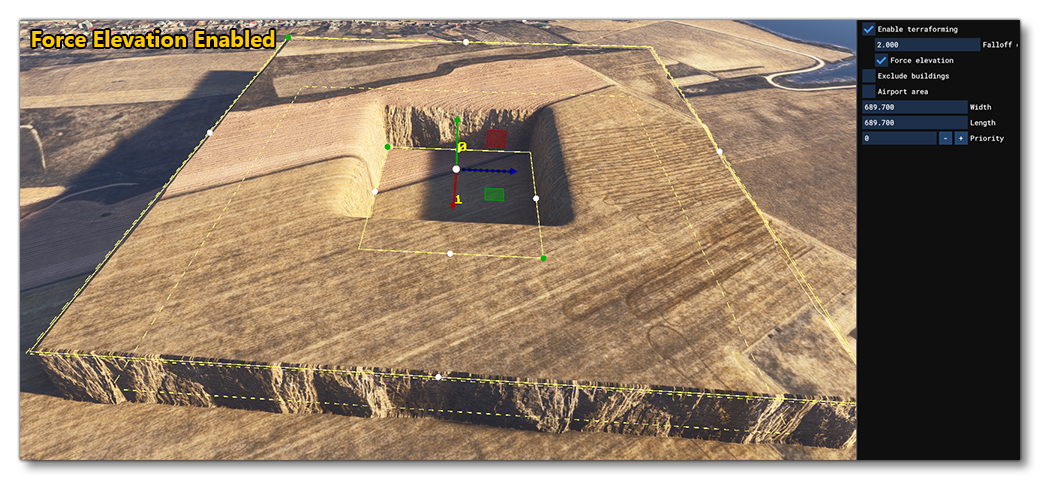
When enabled, this option will force the ground to be at the same elevation as the terraformer, creating a perfectly flat surface. This means, however, that you can't overlap terraformers without having severe discontinuity in the terrain (the Priority setting of the polygon is used to define which terraformer is used).

When this option is disabled you can more easily mix terraformers, as the falloff can sculpt any other terraformers that overlap.

You can mouse over the image below to see examples of this option enabled and disabled (note that image shows the Rectangle Object but the effect is the same for polygons):
  • Card Back
    Example Of the Force Elevation Option Enabled Or Disabled

Buildings


The buildings section can be expanded to show the following options:

Exclude All: Selecting this option will convert the polygon into an exclusion polygon which will exclude TIN data, buildings, OSM buildings and MS (Microsoft) buildings. Note that each of these options can be toggled on/off individually using the additional option underneath so you can choose to only exclude OSM buildings, or exclude only TIN data and MS buildings, etc...

The list below explains what each of these items is:


TIN: The TIN data is data streamed from Bing Maps, which may include buildings as well as other things.

Detected Buildings: These are buildings created algorithmically from the aerial image data.

OSM Buildings: These are buildings created from the data supplied by Open Street Maps.

MS Buildings: These are buildings generated from open-source data for North America that comes from Microsoft.


NOTE: These data-sets can overlap, so you may see different buildings in the same locations if you exclude one or the other of OSM or Detected buildings, and so will need to exclude both kinds to clear the area.


Force Buildings On Tin:

This can be used when you have excluded TIN data, but want to still have TIN generated buildings present.


Force Detected Buildings:

This option can be used to force the rendering of detected buildings for an area.


Exclude Secondary Heightmaps:

Secondary heightmaps are those which add more "ruggedness" to the ground, and so enabling this option will exclude any those heightmaps within the defined polygon and create a much flatter area of terrain.

Note that while this will help flatten the terrain, there will still be some surface heightmap detail applied from the primary heightmap."

GaryGB

 
Last edited:
I see a few new MSFS SDK Terrain related features were recently- / will be- released after previously available in some cases as 'undocumented' options:


Terraforming:

When this option is checked, the polygon shape can be used to terraform the terrain based on the form of the polygon and its altitude, as set through the translate Gizmo. Checking this option will also show a new option:


Falloff Distance:

This sets the distance around the polygon which will be "feathered", smoothing the difference in altitude between the polygon terraformer and the surrounding terrain. This is shown in the scene as a dashed line, and the value is in meters.
The Falloff Distance For A Terrafromer Polygon


Force Elevation (COMING SOON):

When enabled, this option will force the ground to be at the same elevation as the terraformer, creating a perfectly flat surface. This means, however, that you can't overlap terraformers without having severe discontinuity in the terrain (the Priority setting of the polygon is used to define which terraformer is used).

When this option is disabled you can more easily mix terraformers, as the falloff can sculpt any other terraformers that overlap.

You can mouse over the image below to see examples of this option enabled and disabled (note that image shows the Rectangle Object but the effect is the same for polygons):
  • Card Back
    Example Of the Force Elevation Option Enabled Or Disabled

Buildings


The buildings section can be expanded to show the following options:

Exclude All: Selecting this option will convert the polygon into an exclusion polygon which will exclude TIN data, buildings, OSM buildings and MS (Microsoft) buildings. Note that each of these options can be toggled on/off individually using the additional option underneath so you can choose to only exclude OSM buildings, or exclude only TIN data and MS buildings, etc...

The list below explains what each of these items is:


TIN: The TIN data is data streamed from Bing Maps, which may include buildings as well as other things.

Detected Buildings: These are buildings created algorithmically from the aerial image data.

OSM Buildings: These are buildings created from the data supplied by Open Street Maps.

MS Buildings: These are buildings generated from open-source data for North America that comes from Microsoft.


NOTE: These data-sets can overlap, so you may see different buildings in the same locations if you exclude one or the other of OSM or Detected buildings, and so will need to exclude both kinds to clear the area.


Force Buildings On Tin:

This can be used when you have excluded TIN data, but want to still have TIN generated buildings present.


Force Detected Buildings:

This option can be used to force the rendering of detected buildings for an area.


Exclude Secondary Heightmaps:

Secondary heightmaps are those which add more "ruggedness" to the ground, and so enabling this option will exclude any those heightmaps within the defined polygon and create a much flatter area of terrain.

Note that while this will help flatten the terrain, there will still be some surface heightmap detail applied from the primary heightmap."

GaryGB
Very interesting with the force-terraforming function! Again, working with ENLX has been hell when the scenery acts like sheets of paper lying, and adjusting a specific smaller area results in larger changes being made elsewere... . I believe it has been almost 50% of my work this time, and that includes the modelling....

I hope the "force-terraforming" will ahve a positive impact on terraforming the terrain.
 
Back
Top