
• Which the release of FS2020 we see an explosition of activity on the forun and of course we are very happy to see this. But having all questions about FS2020 in one forum becomes a bit messy. So therefore we would like to ask you all to use the following guidelines when posting your questions:

    • Tag FS2020 specific questions with the MSFS2020 tag.
    • Questions about making 3D assets can be posted in the 3D asset design forum. Either post them in the subforum of the modelling tool you use or in the general forum if they are general.
    • Questions about aircraft design can be posted in the Aircraft design forum
    • Questions about airport design can be posted in the FS2020 airport design forum. Once airport development tools have been updated for FS2020 you can post tool speciifc questions in the subforums of those tools as well of course.
    • Questions about terrain design can be posted in the FS2020 terrain design forum.
    • Questions about SimConnect can be posted in the SimConnect forum.

    Any other question that is not specific to an aspect of development or tool can be posted in the General chat forum.

    By following these guidelines we make sure that the forums remain easy to read for everybody and also that the right people can find your post to answer it.

FS2004 About cleaning materials question

Messages
1,451
Country
mexico
G'Day folks

I am not doing ok with Gmax material editor. Since I am using Unlimited export system, I have several scenes with objects sharing the same materials. The main problem is that I realized that the same material, appeared in the same scene (and also in the remaining) with different material and map names; all of them are sharing the same attributes (textures and parameter settings). :yikes::yikes::yikes::yikes::yikes:

The image is self explanatory and it was after I did a lot of cleanup in the same scene! The problem will remain the same in other scenes and the "same material" will have more different names...
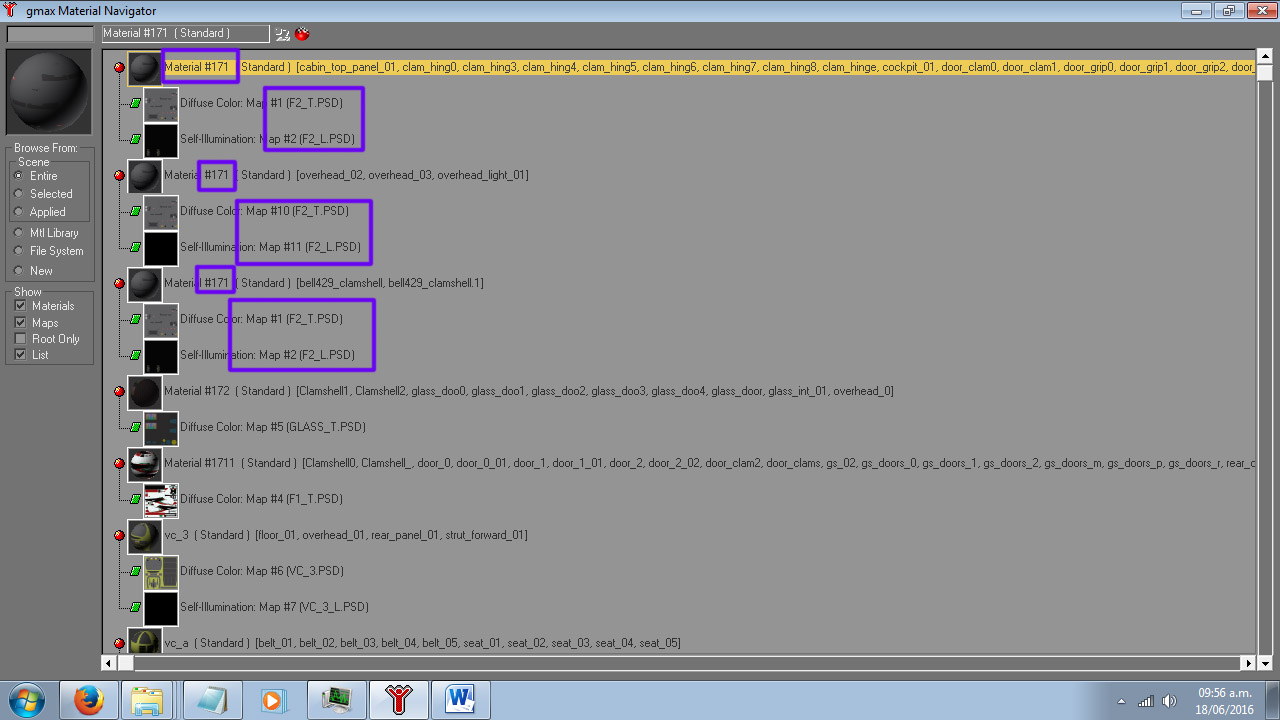
Material issues.jpg


I will do the clean up, however it will take me a thounsand years by hand; so, I have a couple of queries:
  1. Is this behavior a real problem (regarding drawcalls)?
  2. For that reason, would affect performance?
  3. Is there any more feasible way to keep track on parts and their material names for the cleaning process?
I'd like to keep consistent names in all my scenes; for whatever side effects this problem may cause.

In advance, thank you. Will keep cleaning until a kind soul give me some hints :(
Sergio.
 
Hi Tom

And yes!!! I am afraid I did that by merging objects and in many cases and detaching them later. If I only knew that it cause this big issue... holy cow! :banghead::banghead::banghead:

The script isn't working for me...odd. I've installed it and quoting you:

"Select an object with the duplicated material and run the script: if there are five objects using that material then all five will be selected by the script and can have the original material applied instead." Still no joy,

Thank you.
All the best,
Sergio.
 
Hi Tom

Got it now; thank you! I already have done all material names; however, I am wondering now if the map names would cause any inconvinience. If you remember in the old days for you using ULE, you need sometimes to split the model in a convinient way.

As result, the same material probably have another name as well; I asume by reading, that the compiler will take care of them; pfew!!! Almost 12 hours cleaning... I will compare file sizes to determine if some changes were made. I guess I will try to find something about this in the .X file logs. I will share what I found.

Happy week end.
Sergio.
 
Back
Top