
Hi,
I accidentally deleted a library object file in ADE. The file name is air_largetower2 and the guid is 87d440f0-dcfb-42a3-9504-61cee8607fcd. What I did is that I had launched the Library Object Manager under Tools in ADE and searched the file largetower2 and clicked the delete button to remove it because I wanted to remove this tower from my KBHM2008 airport project. But it still did not remove it so I guess I didn't do it correctly and deleted it from the list instead. This tower did not exist in the 1970s and 1980s and had the old control tower. Here's a screenshot of the Library Object Manger showing the list of towers now available:
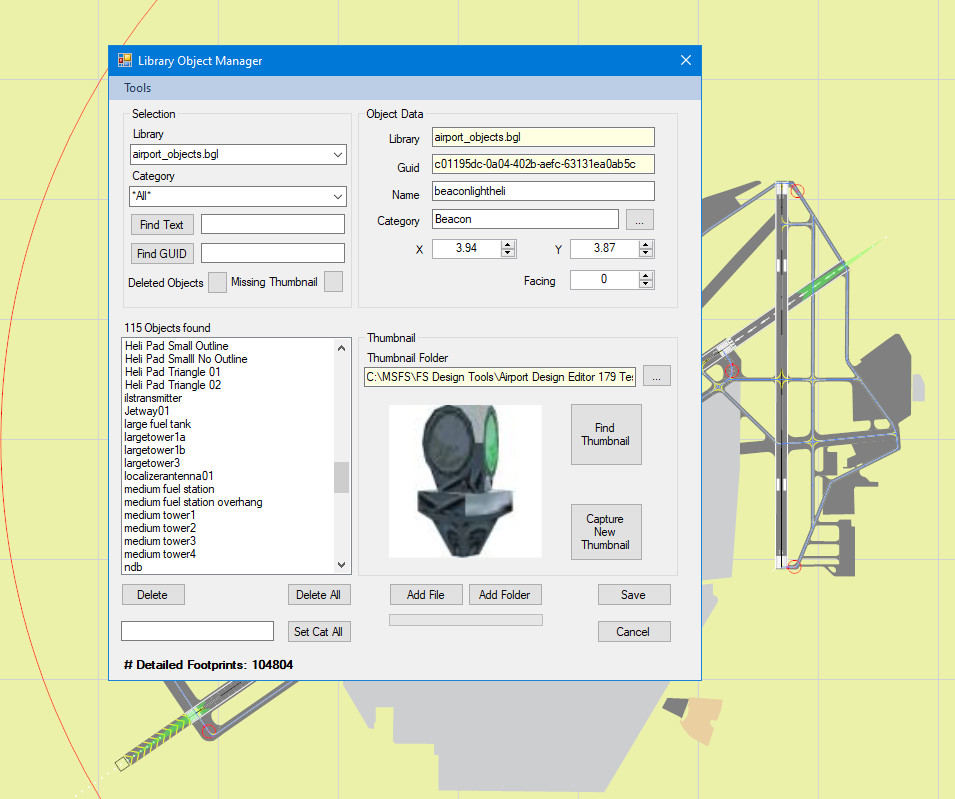
Noticed in the list that the only towers available now are the largetower1a, largetower1b, and largetower3. But the largetowr2 no longer shows up in the list. I've already checked the Global folder in the Scenery folder of FSX using MCX and the largetower2 is still there. It only removed it in ADE.
Here's a screenshot of the control tower I want to remove:

I downloaded a pdf ADE manual with the title: Adding Library Object Information to ADE. I don't know if I'm looking over the correct way to replace the file back in the list but this is what I've found using a search. I tried to add the file by clicking the Add Button but it tells me that the library is already in the database and to use the Update Single File. It shows in the manual that this is located under Tools in ADE but there is no selection under the Tools menu that allows me to use the Update Single File. Why is it not there? Is it because this manual is out of date or that selection had been moved or changed? If so, how can I bring up that selection? See the manual I have attached below:
By the way, I've checked every bgl scenery file in the bhm2008 project and there is no control tower, so it cannot be removed by using the exclusions. I've already tried it and it won't remove it. I got to looking around and the only location I can find is the Scenery/Global/airport_object.bgl, which has all of the objects for FSX, and apparently this is where the tower is coming from.
Ken.
I accidentally deleted a library object file in ADE. The file name is air_largetower2 and the guid is 87d440f0-dcfb-42a3-9504-61cee8607fcd. What I did is that I had launched the Library Object Manager under Tools in ADE and searched the file largetower2 and clicked the delete button to remove it because I wanted to remove this tower from my KBHM2008 airport project. But it still did not remove it so I guess I didn't do it correctly and deleted it from the list instead. This tower did not exist in the 1970s and 1980s and had the old control tower. Here's a screenshot of the Library Object Manger showing the list of towers now available:
Noticed in the list that the only towers available now are the largetower1a, largetower1b, and largetower3. But the largetowr2 no longer shows up in the list. I've already checked the Global folder in the Scenery folder of FSX using MCX and the largetower2 is still there. It only removed it in ADE.
Here's a screenshot of the control tower I want to remove:
I downloaded a pdf ADE manual with the title: Adding Library Object Information to ADE. I don't know if I'm looking over the correct way to replace the file back in the list but this is what I've found using a search. I tried to add the file by clicking the Add Button but it tells me that the library is already in the database and to use the Update Single File. It shows in the manual that this is located under Tools in ADE but there is no selection under the Tools menu that allows me to use the Update Single File. Why is it not there? Is it because this manual is out of date or that selection had been moved or changed? If so, how can I bring up that selection? See the manual I have attached below:
By the way, I've checked every bgl scenery file in the bhm2008 project and there is no control tower, so it cannot be removed by using the exclusions. I've already tried it and it won't remove it. I got to looking around and the only location I can find is the Scenery/Global/airport_object.bgl, which has all of the objects for FSX, and apparently this is where the tower is coming from.
Ken.
Attachments
Last edited:

