
-
Which the release of FS2020 we see an explosition of activity on the forun and of course we are very happy to see this. But having all questions about FS2020 in one forum becomes a bit messy. So therefore we would like to ask you all to use the following guidelines when posting your questions:
- Tag FS2020 specific questions with the MSFS2020 tag.
- Questions about making 3D assets can be posted in the 3D asset design forum. Either post them in the subforum of the modelling tool you use or in the general forum if they are general.
- Questions about aircraft design can be posted in the Aircraft design forum
- Questions about airport design can be posted in the FS2020 airport design forum. Once airport development tools have been updated for FS2020 you can post tool speciifc questions in the subforums of those tools as well of course.
- Questions about terrain design can be posted in the FS2020 terrain design forum.
- Questions about SimConnect can be posted in the SimConnect forum.
Any other question that is not specific to an aspect of development or tool can be posted in the General chat forum.
By following these guidelines we make sure that the forums remain easy to read for everybody and also that the right people can find your post to answer it.
You are using an out of date browser. It may not display this or other websites correctly.
You should upgrade or use an alternative browser.
You should upgrade or use an alternative browser.
AeroFly FS 2 support in scenProc
- Thread starter arno
- Start date
- Messages
- 15
- Country

But there will be no splitting; the problem is for a 0.25x0.25° area, there are more than 10.000.000 trees; i will set the ImportOGR bounding box same as GRID bounding box to keep not to big files;
i used to create a batch of 16 tasks (0.25°x0.25°) for 1 degree square, now it will be 400 tasks ! And the batch generator only accept only LOD values ! and each run will reload the big shape file.
I will try ! (and no method to change destination file with batch variable ?)
Thanks
i used to create a batch of 16 tasks (0.25°x0.25°) for 1 degree square, now it will be 400 tasks ! And the batch generator only accept only LOD values ! and each run will reload the big shape file.
I will try ! (and no method to change destination file with batch variable ?)
Thanks
- Messages
- 15
- Country
And the problem of overwriting file is still present (i just tried as you said, and it create extra cell for "exiting" polygons. These files will be overwritenby more recents tasks .
The only solution is to move and rename file between each task.
Thanks
The only solution is to move and rename file between each task.
Thanks

- Messages
- 34,328
- Country

Hi,
In general you need to use the same bounding box in ImportOGR and in SplitGrid if you want to ensure that you only have features inside that area. It doesn't matter that the bounding box is for a 0.25 degree area, while you split in 0.05 degree tiles.
You can only have issues with conflicting names if in different batch jobs you process the same tiles. But if you set the bounding boxes correctly that should never happen.
In general you need to use the same bounding box in ImportOGR and in SplitGrid if you want to ensure that you only have features inside that area. It doesn't matter that the bounding box is for a 0.25 degree area, while you split in 0.05 degree tiles.
You can only have issues with conflicting names if in different batch jobs you process the same tiles. But if you set the bounding boxes correctly that should never happen.
- Messages
- 15
- Country
No, the problem is shapefile polygones having a part outside ImportOGR area; there is an important side effect.
- if i "grid" the area they are not included in the area (nor the part inside the area, nor the part outside) and i have hole in my result.
- if the grid exclude them, they are not splitted and additional cells are created if their center is outside the area; but these additional cells/files can be overwritten by further jobs of the batch files with neighbours areas, or they can overwritten previous jobs neigbour areas.
- if the grid is same area as ImportOGR area, they are splitted, their "inner" part is in the area and the parts out of area are in additional cells with same problems of overwrite. I tested and i obtain 6 part/tsc file; the target one is the bottom-center, others results from "exiting" polygons.
Thanks for very much the time you take to answer my ennoying questions.
Nb : i used the PlacePointsAlongLine function to place power lines pylone, but they were 90° mis-oriented; could you implement an offset angle (i think this question was submitted, but i didnt found answer)
-
- if i "grid" the area they are not included in the area (nor the part inside the area, nor the part outside) and i have hole in my result.
- if the grid exclude them, they are not splitted and additional cells are created if their center is outside the area; but these additional cells/files can be overwritten by further jobs of the batch files with neighbours areas, or they can overwritten previous jobs neigbour areas.
- if the grid is same area as ImportOGR area, they are splitted, their "inner" part is in the area and the parts out of area are in additional cells with same problems of overwrite. I tested and i obtain 6 part/tsc file; the target one is the bottom-center, others results from "exiting" polygons.
Thanks for very much the time you take to answer my ennoying questions.
Nb : i used the PlacePointsAlongLine function to place power lines pylone, but they were 90° mis-oriented; could you implement an offset angle (i think this question was submitted, but i didnt found answer)
-
Attachments

- Messages
- 15
- Country
- Messages
- 15
- Country
- Messages
- 34,328
- Country
Hi,
I had a look at the script with the test data you attached, but I'm not sure I can reproduce the issue.
When I run the script with that test data initially I see that the data is split in 6 grid cells, although with the bounding area in the ImportOGR step and the SplitGrid size of 0.25 you would only suspect 1 cell. But that is because some polygons stick out. If I put the same bounding area in the SplitGrid step as well, so that I becomes like the line below, it works fine here, I get one grid cell and only one TSC/TOC file is written.
So to me it seems like it is behaving like it should. Or do you think I test it wrong?
I had a look at the script with the test data you attached, but I'm not sure I can reproduce the issue.
When I run the script with that test data initially I see that the data is split in 6 grid cells, although with the bounding area in the ImportOGR step and the SplitGrid size of 0.25 you would only suspect 1 cell. But that is because some polygons stick out. If I put the same bounding area in the SplitGrid step as well, so that I becomes like the line below, it works fine here, I get one grid cell and only one TSC/TOC file is written.
Code:
SplitGrid|0.25|2.75;3.00;42.25;42.50So to me it seems like it is behaving like it should. Or do you think I test it wrong?
- Messages
- 15
- Country
Wow, I never tested this combination ! You are true !
I tested
and all is fine : the area is gridded with correct area, "inner" part of polygones are present, no new extra cells out of area, and batch mode is working !
Thank you very much.
I tested
Code:
ImportOGR|D:\Geo\TEST.shp|@0@|NATURE|AUTODETECT
....
SplitGrid|0.05|@0@Thank you very much.
- Messages
- 15
- Country
Yes, it allows me to not obtain huges files.
- Messages
- 15
- Country
Hi Arno,
Thank you again for your marvellous software.
Some problems with scenproc 3 (with AFS2) :
There is part of my script :
The first line of my batch file is :
With scenproc 2, my 2 first sub-tile files were
Veg__N4400_E00300_N4403_E00303.tsc
and Veg__N4400_E00300_N4403_E00303_cultivation.toc
That was fine...
With scenproc 3, my 2 first sub-tile files are
Veg__N4400_E00300_N4403_E00303.tsc
and Veg__N4400_E00300_N4403_E00303_cultivation.toc
There is a small shift between the .tsc position :
3.025259 44.024991 (v2) as [3.028368 44.024957] (v3)
I noticed a user had problem with vegetation across landing way, it could be same problem.
The main problem is in the .toc
v2: <[string8][group][conifer]>
<[string8][species][]>
as
v3: <[string8][group][0]>
<[string8][species][conifer]>
This later make AFS2 unable to load scenery; the "clock"symbol freezes endless.
Thank you again.
Thank you again for your marvellous software.
Some problems with scenproc 3 (with AFS2) :
There is part of my script :
Code:
ImportOGR|D:\Geo\VEG_FULL_REP.shp|@0@|NATURE|AUTODETECT
SplitGrid|0.05|@0@|NATURE="*"
...
PlacePointsInPolygon|NATURE="Forêt fermée de conifères"|0.0001;0.0001|1.0;1.0|String;type|tree|INHERITPARENTATTR
...
CreateAF2Plant|NATURE="Forêt fermée de conifères"|10;20|0|conifer
...
ExportTSC|D:\Geo\Scenproc\|Veg_
The first line of my batch file is :
"F:\Aerofly SF2\scenproc\scenProc.exe" "F:\Aerofly SF2\scenproc\Template_test.spc" /run /log "D:\Geo\0.log" 3;3.25;44;44.25
With scenproc 2, my 2 first sub-tile files were
Veg__N4400_E00300_N4403_E00303.tsc
Code:
<[file][][]
  <[tmsimulator_scenery_place][][]
    <[string8]   [type]          [object]>
    <[string8]   [sname]         [Veg__N4400_E00300_N4403_E00303]>
    <[string8]   [lname]         [Veg__N4400_E00300_N4403_E00303]>
    <[tmvector2d][position]      [3.025259 44.024991]>
    <[float64]   [size]          [5000.000000]>
    <[bool]      [autoheight]    [true]>
    <[string8]   [coordinate_system][lonlat]>
    <[tmsimulator_scenery_objecttmslist][objects][]
    >

    <[list_tmsimulator_scenery_cultivation][cultivation_files][]
      <[tmsimulator_scenery_cultivation] [element] [0]
        <[string8][filename] [Veg__N4400_E00300_N4403_E00303_cultivation]>
        <[string8][building_textures_folder][]>
        <[bool][auto_height][true]>
      >
    >
  >
>
and Veg__N4400_E00300_N4403_E00303_cultivation.toc
Code:
<[file][][Veg__N4400_E00300_N4403_E00303_cultivation]
  <[cultivation][][]
    <[string8][coordinate_system][lonlat]>
    <[list_plant][plant_list][]
      <[plant][element][0]
        <[vector3_float64][position][3.046680 44.028478 0.000000]>
        <[vector2_float32][height_range][10.000000 20.000000]>
        <[string8][group][conifer]>
        <[string8][species][]>
      >
......With scenproc 3, my 2 first sub-tile files are
Veg__N4400_E00300_N4403_E00303.tsc
Code:
<[file][][]
  <[tmsimulator_scenery_place][][]
    <[string8]   [type]          [object]>
    <[string8]   [sname]         [Veg__N4400_E00300_N4403_E00303]>
    <[string8]   [lname]         [Veg__N4400_E00300_N4403_E00303]>
    <[tmvector2d][position]      [3.028368 44.024957]>
    <[float64]   [size]          [5000.000000]>
    <[bool]      [autoheight]    [true]>
    <[string8]   [coordinate_system][lonlat]>
    <[tmsimulator_scenery_objecttmslist][objects][]
    >

    <[list_tmsimulator_scenery_cultivation][cultivation_files][]
      <[tmsimulator_scenery_cultivation] [element] [0]
        <[string8][filename] [Veg__N4400_E00300_N4403_E00303_cultivation]>
        <[string8][building_textures_folder][]>
        <[bool][auto_height][true]>
      >
    >
  >
>
and Veg__N4400_E00300_N4403_E00303_cultivation.toc
Code:
<[file][][Veg__N4400_E00300_N4403_E00303_cultivation]
  <[cultivation][][]
    <[string8][coordinate_system][lonlat]>
    <[list_plant][plant_list][]
      <[plant][element][0]
        <[vector3_float64][position][3.046794 44.028174 0.000000]>
        <[vector2_float32][height_range][10.000000 20.000000]>
        <[string8][group][0]>
        <[string8][species][conifer]>
      >
.....
There is a small shift between the .tsc position :
3.025259 44.024991 (v2) as [3.028368 44.024957] (v3)
I noticed a user had problem with vegetation across landing way, it could be same problem.
The main problem is in the .toc
v2: <[string8][group][conifer]>
<[string8][species][]>
as
v3: <[string8][group][0]>
<[string8][species][conifer]>
This later make AFS2 unable to load scenery; the "clock"symbol freezes endless.
Thank you again.
- Messages
- 34,328
- Country
Hi,
The altitude argument in the CreateAF2Plant step was missing in scenProc 3.0, I guess it was dropped by accident during some merging. I have stored it again, it will be in the next development release.
The altitude argument in the CreateAF2Plant step was missing in scenProc 3.0, I guess it was dropped by accident during some merging. I have stored it again, it will be in the next development release.
- Messages
- 15
- Country
Hi Arno,
I used the new PolygonToPoint function, and i have a problem. I wrote
and trees are grid placed; it seems there is a problem with random parameters .
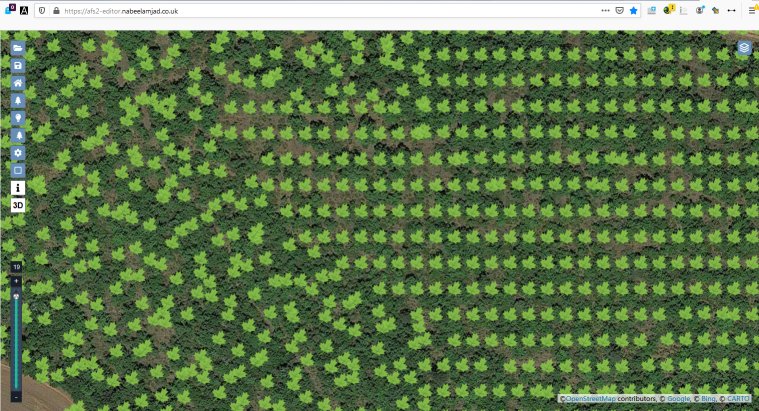
If opened the toc file with AFS2 Editor :

In some place it works correctly (the below place is just at the left side of upper)
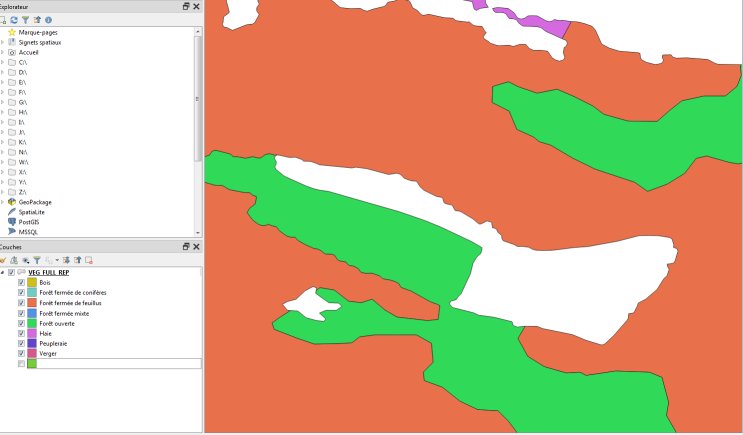
The Original polygons (QGIS) :
and the (heterogeneous) result :
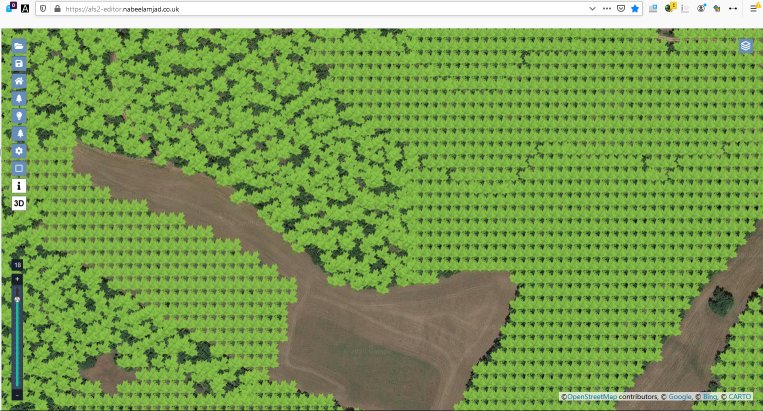
You see the left part of orange area above the field is gridded.
Sorry to submit you an other problem
I used the new PolygonToPoint function, and i have a problem. I wrote
Code:
PolygonToPoint|NATURE="Forêt fermée de conifères"|INSIDE|0.0001;0.0001|1.0;1.0|String;type|tree|hdg|INHERITPARENTATTRIf opened the toc file with AFS2 Editor :
In some place it works correctly (the below place is just at the left side of upper)
The Original polygons (QGIS) :
and the (heterogeneous) result :
You see the left part of orange area above the field is gridded.
Sorry to submit you an other problem
Attachments

- Messages
- 34,328
- Country
Hi,
I think I have seen this before. Do you only use one PolygonToPoint step in your script or are there multiple ones? In other words, did the area where the randomness didn't work come from the same step in the script or a different one?
I think I have seen this before. Do you only use one PolygonToPoint step in your script or are there multiple ones? In other words, did the area where the randomness didn't work come from the same step in the script or a different one?
- Messages
- 15
- Country
I used multiples :
The part of my script is
The part of my script is
Code:
PolygonToPoint|NATURE="Forêt fermée de conifères"|INSIDE|0.0001;0.0001|1.0;1.0|String;type|tree|hdg|INHERITPARENTATTR
PolygonToPoint|NATURE="Forêt fermée de feuillus"|INSIDE|0.0001;0.0001|1.0;1.0|String;type|tree|hdg|INHERITPARENTATTR
PolygonToPoint|NATURE="Forêt fermée mixte"|INSIDE|0.0001;0.0001|1.0;1.0|String;type|tree|hdg|INHERITPARENTATTR
PolygonToPoint|NATURE="Forêt ouverte"|INSIDE|0.0001;0.0001|1.0;1.0|String;type|tree|hdg|INHERITPARENTATTR
PolygonToPoint|NATURE="Haie"|INSIDE|0.0001;0.0001|1.0;1.0|String;type|tree|hdg|INHERITPARENTATTR
PolygonToPoint|NATURE="Peupleraie"|INSIDE|0.0001;0.0001|1.0;1.0|String;type|tree|hdg|INHERITPARENTATTR
PolygonToPoint|NATURE="Verger"|INSIDE|0.00010;0.00010|1.0;1.0|String;type|tree|hdg|INHERITPARENTATTR
PolygonToPoint|NATURE="Zone arborée"|INSIDE|0.00025;0.00025|1.0;1.0|String;type|tree|hdg|INHERITPARENTATTR
PolygonToPoint|NATURE="Bois"|INSIDE|0.00015;0.00015|1.0;1.0|String;type|tree|hdg|INHERITPARENTATTR