• Which the release of FS2020 we see an explosition of activity on the forun and of course we are very happy to see this. But having all questions about FS2020 in one forum becomes a bit messy. So therefore we would like to ask you all to use the following guidelines when posting your questions:

    • Tag FS2020 specific questions with the MSFS2020 tag.
    • Questions about making 3D assets can be posted in the 3D asset design forum. Either post them in the subforum of the modelling tool you use or in the general forum if they are general.
    • Questions about aircraft design can be posted in the Aircraft design forum
    • Questions about airport design can be posted in the FS2020 airport design forum. Once airport development tools have been updated for FS2020 you can post tool speciifc questions in the subforums of those tools as well of course.
    • Questions about terrain design can be posted in the FS2020 terrain design forum.
    • Questions about SimConnect can be posted in the SimConnect forum.

    Any other question that is not specific to an aspect of development or tool can be posted in the General chat forum.

    By following these guidelines we make sure that the forums remain easy to read for everybody and also that the right people can find your post to answer it.

MSFS20 Can´t add custom objects.

Messages
52
Country
costarica
Hello guys, best.
Trying to add some custom objects (acording user manual.16 User Models), all seem right, but can add nothing fellows.
some pics to check...gltf in proper folder, texture folder and right path.
btw, first time with the A.D.E. for MSFS ( a old fsx and p3d user).
tks in advance.
 

Attachments

  • Sin título1a.jpg
    Sin título1a.jpg
    351 KB · Views: 209
  • Sin título1.jpg
    Sin título1.jpg
    733.5 KB · Views: 204
  • Sin título2.jpg
    Sin título2.jpg
    712 KB · Views: 199
It doesn't work the same as previous versions of ADE. Using the latest alpha version, select the tools pull-down menu and select User Model Manager. Then select Get Models and wait for the compiler to build a list.
 
So to confirm you can't get it to show in the User Model Manager? I assume you have used the Get Models button?

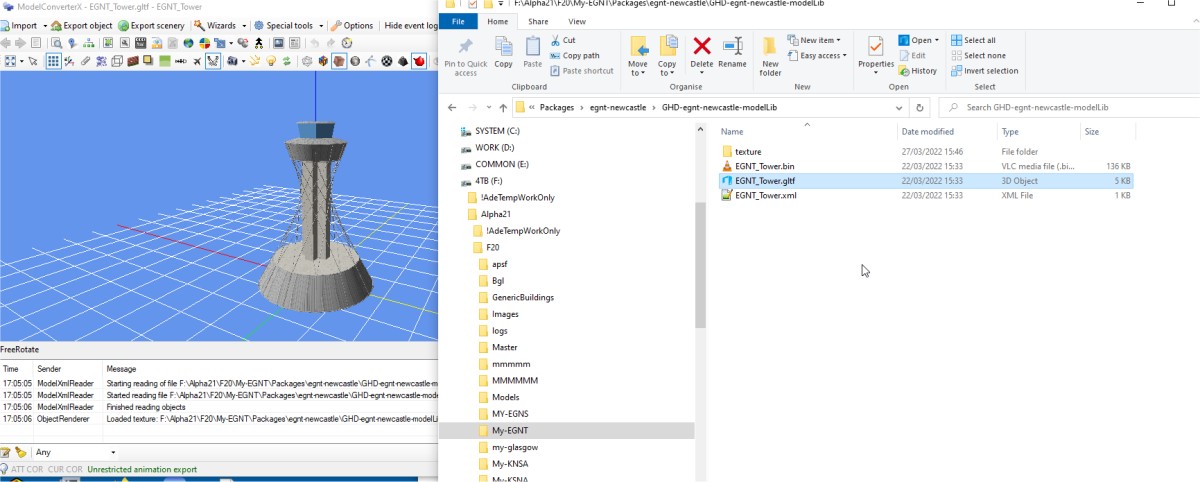
Looks like you have them in the main model-lib folder

As I recall each model needs to be in a separate sub folder but there is only one texture folder

Can you zip up the files for the model and post it here
 
OK - I was able to build this model with ADE. I am not sure I understand the folder structure you have. It seems the model information is in the packages folder where it should be in packageSources.

In the main ADE project folder there is a folder for package sources

1648631405810.png


Inside that there is a folder for models

1648631490423.png


This is where the source date for custom models goes

It has a texture folder in which all the textures for all the models go and then for each model you need to create a folder to hold the model sources

1648631584900.png


The model source folder egnt_tower in this example contains the three glTF source files

1648631645565.png


This works for me and creates the modelLib bgl file when I use Get Models

1648631705194.png


I placed the model into ADE as well.
 
Thhanks Jon,

I was able to get it to work after trying several directories for both the model and textures.

When I discover which ones work, I will write a thesis.
 
Thhanks Jon,

I was able to get it to work after trying several directories for both the model and textures.

When I discover which ones work, I will write a thesis.
Unfortunately I couldn't discover whch ones were actually being used.
 
Back
Top