• Which the release of FS2020 we see an explosition of activity on the forun and of course we are very happy to see this. But having all questions about FS2020 in one forum becomes a bit messy. So therefore we would like to ask you all to use the following guidelines when posting your questions:

    • Tag FS2020 specific questions with the MSFS2020 tag.
    • Questions about making 3D assets can be posted in the 3D asset design forum. Either post them in the subforum of the modelling tool you use or in the general forum if they are general.
    • Questions about aircraft design can be posted in the Aircraft design forum
    • Questions about airport design can be posted in the FS2020 airport design forum. Once airport development tools have been updated for FS2020 you can post tool speciifc questions in the subforums of those tools as well of course.
    • Questions about terrain design can be posted in the FS2020 terrain design forum.
    • Questions about SimConnect can be posted in the SimConnect forum.

    Any other question that is not specific to an aspect of development or tool can be posted in the General chat forum.

    By following these guidelines we make sure that the forums remain easy to read for everybody and also that the right people can find your post to answer it.

FSX Drawcall "batching" in FSX SP2

I think what benefit from drawcall batching are:
1. one texture-> many low poly mdl's -> many placements (such as static vehicle, trees) --------------------> best result.
2. one texture -> few low poly mdl's -> many placements (such as lamps, jetways, most airport only has one or two models) good result.
3. one texture -> high poly mdl -> few placements (such as big buildings) ------------------> no benefit should use LOD's instead.


Please correct me if I'm wrong.
 
Hi,

I think that is a good summary and matches the experiences I shared before in this thread.
 
I have one quick question.

EACH mdl that we export from gmax has their own draw call?

If that's right, should we put things together by linking as much as we can and making LODs for that?

I have a big terminal and I just put the big posts out as a separate mdl, made LODs, placed it 5-6 times. FPS is worse than the post that link to the big terminal.
The post has detail about 1500 polygons.
Regards,
Tic
 
Hi,

If you do not post-process the MDL files made by GMax each MDL will have their own drawcalls. Only if you made sure the drawcall batching works they can be combined by the rendering engine.

So in that case the performance can indeed get worse from making more MDL files. But if you enable the drawcall batching it should be better.
 
But the post has 1500 poly place 6 times, I think it may be too many polys since draw call batching will eliminate LODs.

Another thing, when I put mdl though, the attach point seem to be different. The fire cars which are object that I attached to the fire house model were placed their rear to the ground and the front to the sky, weird.
 
Hi,

If these 1500 polygons all use the same material, you might be better off with drawcall batching. But that would just be a try. If you place them 5 or 6 times, the drawcall batching would mean those 6 objects end in one drawcall, with the LOD active you have 6 separate drawcalls.
 
Hello Guys!


Let me please join the discussion :)


My question what exactly do I have to do in MCX?

In one of our scenery we created a vegetation pack. All objects use the same material so here would be a huge benefit by drawcall batching.

I rarely use MCX (mea culpa) but I do not see any option for that.

What will be the outcome? One big mdl file?
 
Hi,

What you would do in ModelConverterX to get drawcall batching is open all your MDL files and then save them again. You keep the same amount of files. All you need to make sure is that in the option you have set the preference to drawcall batching as described before.
 
Thanks Arno again!

I still do not want to believe it but here is my result. As I said we have a bunch of vegetation mdl which use exactly the same material.

Before the drawcall batch : approx. 30 FPS

1zp2jw2.jpg


After the re-exporting with MCX : 60 FPS!!!!!!

1qnabk.jpg
 
Thanks Arno again!

I still do not want to believe it but here is my result. As I said we have a bunch of vegetation mdl which use exactly the same material.

Yes, it certainly does make a difference -- when Orbx starting using this, they promised a 50% increase in performance, and it looks like they didn't exaggerate. They loved it so much they gave it a flash name -- Texture Flow.

They also said this: "Guys, this is nothing special really, we're just working with post-processing tools and 3D modeling tech to introduce efficiencies into FSX models which makes our stuff run like the ACES native stuff does."

I would imagine that the 'post-processing tools' were mainly Arno's ModelconverterX.
 
It is a very good thing and must be done in the case of one texture---> many MDL's. It will make FSX run much better.
I made a mini tutorial here.
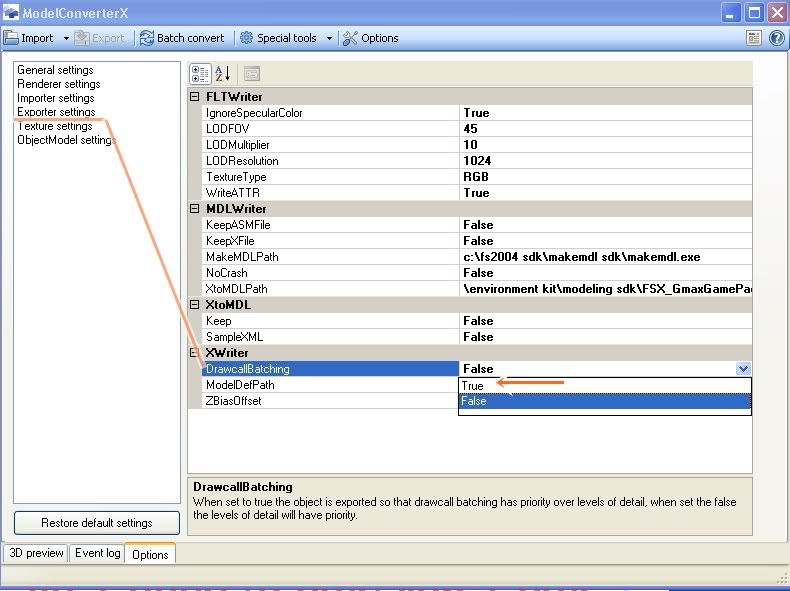
1. Open Model ConverterX and go to options. Go though the last list of options, make DrawCallBatching to "true".
ModelConverter01.jpg

Now you are ready for convert your MDL files.

2. If you have may MDL's , it is much better to use Batch Convert. Click on 1 to open Batch Convert and click 2 Seclet what you want to convert and select the folder you want to put the new mdl's. If you want to play safe, make a new folder.
ModelConverter02.jpg


3.After you done with that, the screen will flash quickly taking you mdl's and convert to a new one.
ModelConverter04.jpg

4. Now you have new mdl's waiting for you to compile to bgl. I would suggest you keep you old bgl in case that you don't get good result, you can get back where you were before.
 
I would imagine that the 'post-processing tools' were mainly Arno's ModelconverterX.

My impression was that the 'block' in draw-call batching is only GMAX-specific. For example, 3DSmax-exported models will also allow draw-call batching in FSX SP2 without any post processing. In which case, the MDX 'intervention' would only be necessary for GMAX exported models.

Is this right??
 
Last edited:
Emilios,

That is correct. Users of 3DS Max have to compile with XtoMDL themselves, so while doing that they can choose to have working LODs or drawcall batching. GMax gives no choice, so the post-processing is needed.
 
Nice tutorial, maybe I should make a little video tutorial about this as well later.
 
I know it's been some time, but I need to bump this discussion. I can't confirm the drawcall batching from own experience.
My test setup:
- 1 object in 3ds max, exported as:
- 1 single MDL, compiled and placed 2.500 times in FSX (at the same coordinates to make things easier)
- the same object placed 25 times in max and exported as 1 single MDL containing those 25 objects, compiled and placed close by 100 times (also makes 2.500 objects)

I see a significant difference between the framerate of the 2.500 MDLs compared to the 100 MDLs, the latter being up to 100% higher.
I tried this with the 3ds max exported and compiled MDLs as well as with opening them in MCX and saving them using the drawcall batching "true" option.

I'm sure Arno knows more about this than me, but the result is pretty clear in this scenario. Where does the difference come from when in both cases FSX has to render exactly the same amount of polys and materials?
 
Hi


If I understood right your question right, you had the same result from 3DSmax and MCX. As far as I remember and maybe mentioned in this post, the drawcall batching in 3DSmax is a default setting.
 
Well, yes, that's why I think it doesn't matter if I run the MDLs through MCX or not.
The actual point is: I get different results after placing 2.500 instances of the same object, depending on them being in individual or cumulated MDLs.
 
Hi Thorsten,

How complex are your objects (how many triangles)?

What you should try is to make a similar object with GMax and place it 2500 times. In that case it has no drawcall batching and your results are probably even worse :).

The difference between 2500 and 100 MDL files is the overhead of the individual object placement. As you have shown performance can also be gained there.
 
Back
Top