
-
Which the release of FS2020 we see an explosition of activity on the forun and of course we are very happy to see this. But having all questions about FS2020 in one forum becomes a bit messy. So therefore we would like to ask you all to use the following guidelines when posting your questions:
- Tag FS2020 specific questions with the MSFS2020 tag.
- Questions about making 3D assets can be posted in the 3D asset design forum. Either post them in the subforum of the modelling tool you use or in the general forum if they are general.
- Questions about aircraft design can be posted in the Aircraft design forum
- Questions about airport design can be posted in the FS2020 airport design forum. Once airport development tools have been updated for FS2020 you can post tool speciifc questions in the subforums of those tools as well of course.
- Questions about terrain design can be posted in the FS2020 terrain design forum.
- Questions about SimConnect can be posted in the SimConnect forum.
Any other question that is not specific to an aspect of development or tool can be posted in the General chat forum.
By following these guidelines we make sure that the forums remain easy to read for everybody and also that the right people can find your post to answer it.
You are using an out of date browser. It may not display this or other websites correctly.
You should upgrade or use an alternative browser.
You should upgrade or use an alternative browser.
Experiences with FS2004 aircraft import/export
- Thread starter arno
- Start date

tgibson
Resource contributor
- Messages
- 11,780
- Country

Now using 1/25 development version.
Test 1: FS9 AI DC-6B to FSX
All works fine. Door and airstairs Position and Rotation animations work OK, and the taxi lights illuminate when they should.
Nice job!
Test 2: FS9 AI Britannia to FSX
Note that this was created with FSDS, the DC-6B with GMAX.
The airstairs and door opening do not appear at the parking spot, and the flaps do not have the correct visibilities.
This has been discussed before, I see no changes.
As an example, one of the flaps' visibility conditions in the MCX modeldef file is:
Note that the variable has no (A: in front, and the &gt, & (etc) are in an invalid format.
That said, the code doesn't make any sense either. Percent variables (which need a closing parentheses) do not go between 0 and 16383. The SDK says "percent over 100", whatever that is. FS9 entries must have units included, I don't think that's required in FSX?
Finally the hierarchy of the flap parts in the plane as imported into MCX is not even close to the structure in FSDS. Thus they would not work even if the code was repaired.
These are rather complex part groupings used because FSDS2 did not support custom animations.
Again, old FSDS planes may not be a high priority at this point? Most of this can be fixed by the user with custom visibility/animation tags.
Test 1: FS9 AI DC-6B to FSX
All works fine. Door and airstairs Position and Rotation animations work OK, and the taxi lights illuminate when they should.
Nice job!
Test 2: FS9 AI Britannia to FSX
Note that this was created with FSDS, the DC-6B with GMAX.
The airstairs and door opening do not appear at the parking spot, and the flaps do not have the correct visibilities.
This has been discussed before, I see no changes.
As an example, one of the flaps' visibility conditions in the MCX modeldef file is:
XML:
<PartInfo>
<Name>custom_vis_TRAILING_EDGE_FLAPS_RIGHT_PERCENT_0_00_mcx</Name>
<Visibility>
<Parameter>
<Code>TRAILING EDGE FLAPS RIGHT PERCENT 0 &gt; TRAILING EDGE FLAPS RIGHT PERCENT 16383 &lt; &amp;</Code>
</Parameter>
</Visibility>
</PartInfo>
<PartInfo>Note that the variable has no (A: in front, and the &gt, &amp; (etc) are in an invalid format.
That said, the code doesn't make any sense either. Percent variables (which need a closing parentheses) do not go between 0 and 16383. The SDK says "percent over 100", whatever that is. FS9 entries must have units included, I don't think that's required in FSX?
Finally the hierarchy of the flap parts in the plane as imported into MCX is not even close to the structure in FSDS. Thus they would not work even if the code was repaired.
These are rather complex part groupings used because FSDS2 did not support custom animations.
Again, old FSDS planes may not be a high priority at this point? Most of this can be fixed by the user with custom visibility/animation tags.
- Messages
- 107
- Country

Excellent work! I got a 99.99% perfect conversion on the An-10... The only very minor issue was that the slow and blurred prop disk transparency didn't carry over between the FS9 and P3d models... Admittedly a two second fix in the material editor on my end; but otherwise AMAZING!!! No animation or texture name issues! THANK YOU!!!
FS9
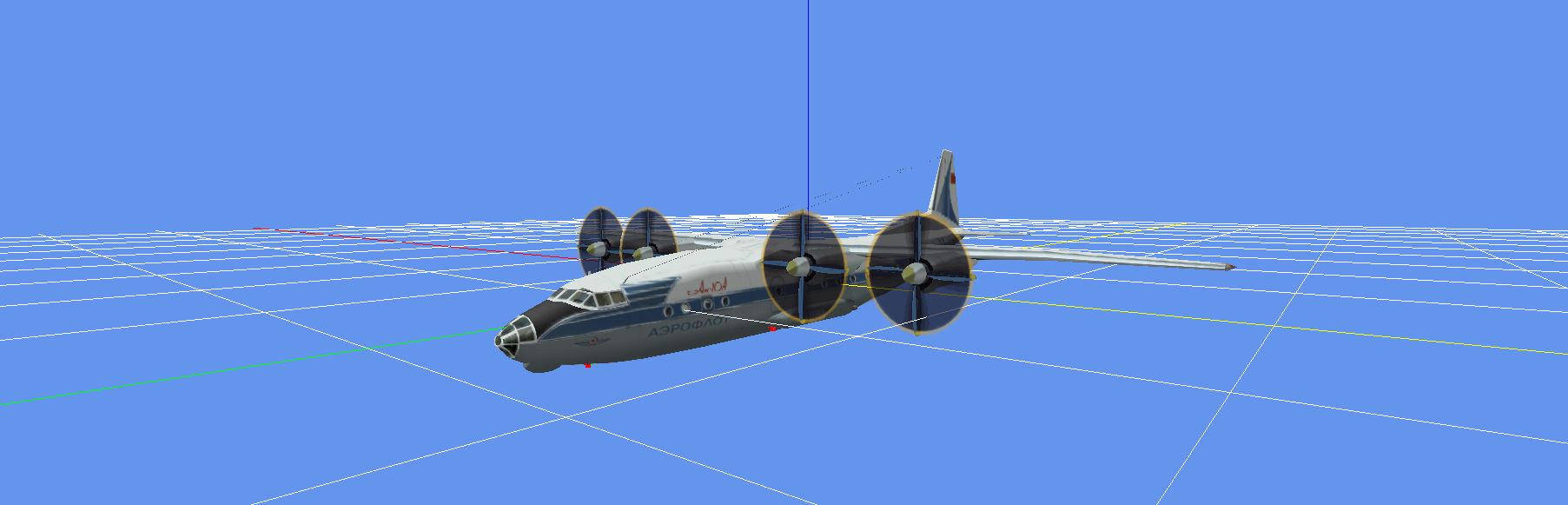
Post conversion
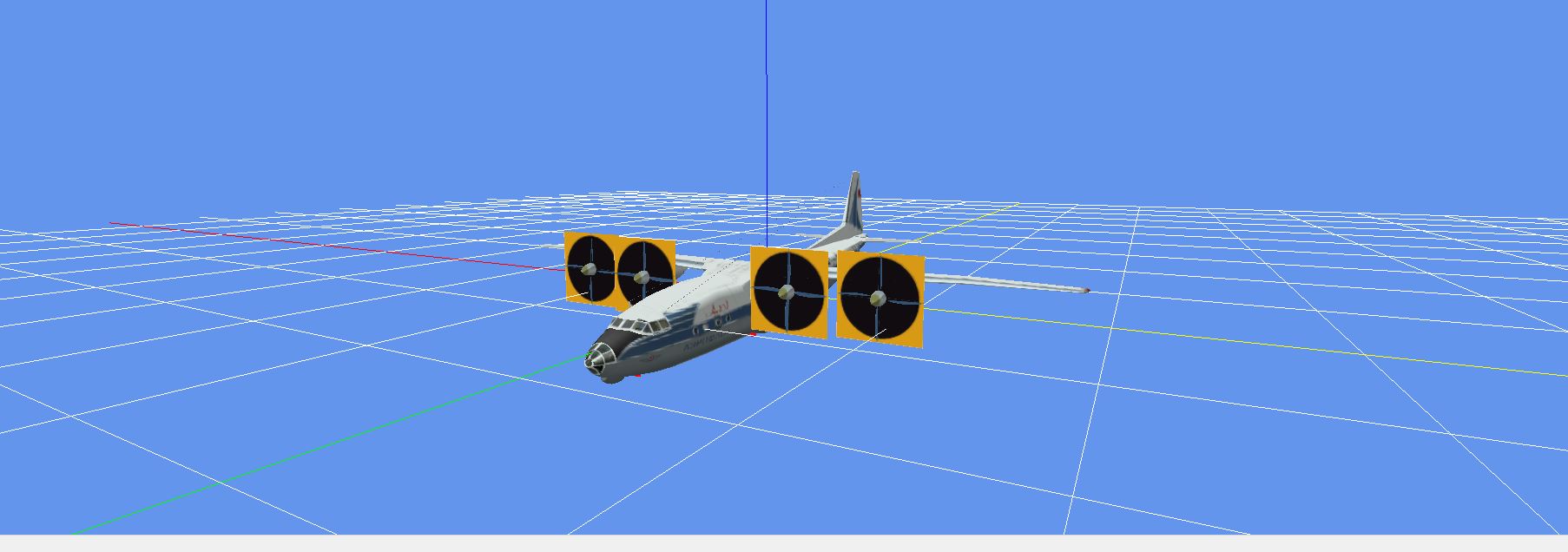
FS9
Post conversion

- Messages
- 34,376
- Country

Hi Tom,
I haven't look at the Britannia yet, that's next on my list. I'll check what happens there.
I guess this visibility condition was constructed by MCX based on the opcodes in the MDL file. But sounds there is room for improvement there
I haven't look at the Britannia yet, that's next on my list. I'll check what happens there.
I guess this visibility condition was constructed by MCX based on the opcodes in the MDL file. But sounds there is room for improvement there
tgibson
Resource contributor
- Messages
- 11,780
- Country
I fixed the Britannia - it would take me about 5 minutes to fix these models, now that I know how to do it.
MCX could probably fix the airstairs issue, which is just a simple visibility condition.
But the flaps are another matter., although MCX could probably get them working as they did in FSDS But when I do the conversion they even turn out better, just like the GMAX ones (which use a custom animation). This conversion to these GMAX style flaps probably could not be automated.
MCX could probably fix the airstairs issue, which is just a simple visibility condition.
But the flaps are another matter., although MCX could probably get them working as they did in FSDS But when I do the conversion they even turn out better, just like the GMAX ones (which use a custom animation). This conversion to these GMAX style flaps probably could not be automated.
- Messages
- 107
- Country
So another topic of curiosity... I was tinkering with SBAI Mig-29 V1... When open it in MCX I noticed that the afterburner cans are permanently glowing... When I click on the Hierarchy Editor the burner cans and the fuselage come up as one piece. When I click on the material editor the burner cans show up as single material incorporated with the wings and fuselage... and after conversion to P3d the burner cans are still permanently glowing. However, when I view the FS9 model in the OWL AI Editor Model viewer this is not the case the burner cans look cold... So is there some sort of difference between the way OWL sees these models and the way MCX sees them or is MCX missing some sort of parts / materials separation? Thanks!
Raw MCX View:

MCX Material Editor view (highlighted):

MCX Object Hierarchy view:

Owl Model Viewer P3d converted model:

Owl Model Viewer raw FS9 Model: (note the non-glowing burner cans)

Raw MCX View:
MCX Material Editor view (highlighted):
MCX Object Hierarchy view:
Owl Model Viewer P3d converted model:
Owl Model Viewer raw FS9 Model: (note the non-glowing burner cans)
- Messages
- 34,376
- Country
I would suspect these afterburners should get some visibility condition that prevents them from being combined with the rest of the model. Maybe that condition is not read correctly.
The OWL AI editor uses the same viewer as MCX, but an older version. So this might be something that has been broken with the recent changes.
I would not suggest putting collapse parts to false by default, as that can result in many more drawcalls and thus a worse performance.
The OWL AI editor uses the same viewer as MCX, but an older version. So this might be something that has been broken with the recent changes.
I would not suggest putting collapse parts to false by default, as that can result in many more drawcalls and thus a worse performance.
- Messages
- 107
- Country
Try setting CollapseModelParts to FALSE in the MCX Options.
So I tried that just to see what would happen... Did not make any difference... As you can see the burner can appears to be a single part with some sort of attributes or something that effect... If I delete the part it just leaves a vacant hole in the back of the plane...
Attachments


Last edited:
tgibson
Resource contributor
- Messages
- 11,780
- Country
HI Arno,
if you are going to tackle the AI Britannia, it might help to understand its flap system. Sorry for the long post..
There are two flap sections on each wing, the inner flap and mid flap (between the engines). Each flap has four duplicate parts, so there are 16 total flap parts on the plane. I will explain the need for these below the parts description.
Using the left inner flap as an example, those four flap parts are:
1. Left flap
Uses the stock l_flap animation tag, which means that maximum deflection is determined by the flaps section of the plane’s aircraft.cfg file (as I understand?). MCX converts this upon import to an FSX style keyframed animation. I don’t know what MCX does if the aircraft.cfg file is not available, though.
FSDS Pre-Process conditions (FSDS’s version of visibility conditions):
Left Flaps Down (visible anytime flaps are not up)
2. Left Gear Flap
Uses the key frame l_gear animation tag, keyframed from fully up to takeoff flap position.
Pre-Process conditions:
Landing Light Switch ON
Left Flaps Up
Left Gear Down
3. Flap Static 1
Not animated, fixed in the fully up position.
FSDS Pre-Process conditions:
Left Flaps Up
Left Gear Up
4. Flap Static 2
Not animated, fixed in the fully up position.
FSDS Pre-Process conditions:
Left Flaps Up
Landing Light Switch OFF
Left Gear Down
Why all the parts? Two reasons. First, FSDS2 cannot create custom animations for FS9 models. So I have to rely on multiple parts with different visibilities. Second, MS used the Cessna and DC-3 for their AI flap routine, for some reason. That means flaps are fully up for takeoff, and FS only deploys flaps for landing. This is not true for later airliners, so if we want flaps deployed for takeoff we need to create a system for that.
For AI aircraft, taxi lights are used for taxiing (turned off when the plane is stopped), and landing lights are only deployed at the runway threshold when taking the runway (and the taxi lights are also turned off). The landing lights turn off at 10,000 feet, as I remember. Some prefer to have takeoff flaps deployed while taxiing out from the gate, but that means they will also be deployed taxiing in from the runway (not correct). So I deploy mine at the runway.
So how does it work?
Sitting at the gate ready for takeoff and taxiing out:
Flaps up, landing light switch off, gear down, #4 displayed.
After getting permission to takeoff and taking runway:
Flaps up, landing light switch on, gear down, #2 displayed. Since this is animated as landing gear, the flap appears in takeoff position (key frame 100). This is where the GMAX custom animation is better, slowly lowering to takeoff position instead of “jumping”.
As the gear is retracted:
The takeoff flap slowly retracts to fully up - remember it is animated as a landing gear.
When the gear is fully up:
Flaps up, gear up, #3 displayed.
During landing when flaps are deployed by FS:
Flaps down, #1 displayed and animated.
After landing when flaps are fully up and landing lights turn off, and the taxi to the parking spot:
Flaps up, landing light switch off, gear down, #4 displayed.
Hope this helps,
if you are going to tackle the AI Britannia, it might help to understand its flap system. Sorry for the long post..
There are two flap sections on each wing, the inner flap and mid flap (between the engines). Each flap has four duplicate parts, so there are 16 total flap parts on the plane. I will explain the need for these below the parts description.
Using the left inner flap as an example, those four flap parts are:
1. Left flap
Uses the stock l_flap animation tag, which means that maximum deflection is determined by the flaps section of the plane’s aircraft.cfg file (as I understand?). MCX converts this upon import to an FSX style keyframed animation. I don’t know what MCX does if the aircraft.cfg file is not available, though.
FSDS Pre-Process conditions (FSDS’s version of visibility conditions):
Left Flaps Down (visible anytime flaps are not up)
2. Left Gear Flap
Uses the key frame l_gear animation tag, keyframed from fully up to takeoff flap position.
Pre-Process conditions:
Landing Light Switch ON
Left Flaps Up
Left Gear Down
3. Flap Static 1
Not animated, fixed in the fully up position.
FSDS Pre-Process conditions:
Left Flaps Up
Left Gear Up
4. Flap Static 2
Not animated, fixed in the fully up position.
FSDS Pre-Process conditions:
Left Flaps Up
Landing Light Switch OFF
Left Gear Down
Why all the parts? Two reasons. First, FSDS2 cannot create custom animations for FS9 models. So I have to rely on multiple parts with different visibilities. Second, MS used the Cessna and DC-3 for their AI flap routine, for some reason. That means flaps are fully up for takeoff, and FS only deploys flaps for landing. This is not true for later airliners, so if we want flaps deployed for takeoff we need to create a system for that.
For AI aircraft, taxi lights are used for taxiing (turned off when the plane is stopped), and landing lights are only deployed at the runway threshold when taking the runway (and the taxi lights are also turned off). The landing lights turn off at 10,000 feet, as I remember. Some prefer to have takeoff flaps deployed while taxiing out from the gate, but that means they will also be deployed taxiing in from the runway (not correct). So I deploy mine at the runway.
So how does it work?
Sitting at the gate ready for takeoff and taxiing out:
Flaps up, landing light switch off, gear down, #4 displayed.
After getting permission to takeoff and taking runway:
Flaps up, landing light switch on, gear down, #2 displayed. Since this is animated as landing gear, the flap appears in takeoff position (key frame 100). This is where the GMAX custom animation is better, slowly lowering to takeoff position instead of “jumping”.
As the gear is retracted:
The takeoff flap slowly retracts to fully up - remember it is animated as a landing gear.
When the gear is fully up:
Flaps up, gear up, #3 displayed.
During landing when flaps are deployed by FS:
Flaps down, #1 displayed and animated.
After landing when flaps are fully up and landing lights turn off, and the taxi to the parking spot:
Flaps up, landing light switch off, gear down, #4 displayed.
Hope this helps,
Last edited:
- Messages
- 34,376
- Country
Can I download this model somewhere to have a look at it?So I tried that just to see what would happen... Did not make any difference... As you can see the burner can appears to be a single part with some sort of attributes or something that effect... If I delete the part it just leaves a vacant hole in the back of the plane...
- Messages
- 34,376
- Country
Hi Tom,
Thanks for the details on the flaps. I'm not sure if that's easy to convert, but let's see.
I at least want to tackle those invalid code sections in the visibility conditions. And for the flaps I'll have a look.
When MCX can not find the aircraft.cfg file it will use default minimum and maximum angles to make the key frame animation. For the flaps I think the default I set is either 45 or 60 degrees.
Thanks for the details on the flaps. I'm not sure if that's easy to convert, but let's see.
I at least want to tackle those invalid code sections in the visibility conditions. And for the flaps I'll have a look.
When MCX can not find the aircraft.cfg file it will use default minimum and maximum angles to make the key frame animation. For the flaps I think the default I set is either 45 or 60 degrees.
- Messages
- 107
- Country
Can I download this model somewhere to have a look at it?
Came off avsimrus.com but again for time's sake here you go...
Attachments
- Messages
- 34,376
- Country
Thanks for the model.
I had a look, but I don't see any evidence that a second representation of the afterburners is there. I tried to disable the optimization at all and also check with different use conditions options. Also when loading in older versions of MCX that afterburner always looks the same.
I had a look, but I don't see any evidence that a second representation of the afterburners is there. I tried to disable the optimization at all and also check with different use conditions options. Also when loading in older versions of MCX that afterburner always looks the same.
- Messages
- 107
- Country
Thanks for the model.
I had a look, but I don't see any evidence that a second representation of the afterburners is there. I tried to disable the optimization at all and also check with different use conditions options. Also when loading in older versions of MCX that afterburner always looks the same.
Indeed I see what you mean but also why I am questioning it... As the OWL viewer shows non-glowing burner cans which would make sense as if an aircraft is shutdown and parked the burners would not be glowing; but I only see glowing burner cans in MCX which would be an engine running in AB... So the converted models look like they are in AB even when shutdown and parked...
- Messages
- 34,376
- Country
Can you see which version of my DLL files your versio of the OWL viewer uses? Then I can try that version. I already tried 1.5 and 1.6, but all with the same results.
The only thing I can think of now is that the texture is being switched based on some variable.
The only thing I can think of now is that the texture is being switched based on some variable.
- Messages
- 107
- Country
Sure; where would I look for that?

