
-
Which the release of FS2020 we see an explosition of activity on the forun and of course we are very happy to see this. But having all questions about FS2020 in one forum becomes a bit messy. So therefore we would like to ask you all to use the following guidelines when posting your questions:
- Tag FS2020 specific questions with the MSFS2020 tag.
- Questions about making 3D assets can be posted in the 3D asset design forum. Either post them in the subforum of the modelling tool you use or in the general forum if they are general.
- Questions about aircraft design can be posted in the Aircraft design forum
- Questions about airport design can be posted in the FS2020 airport design forum. Once airport development tools have been updated for FS2020 you can post tool speciifc questions in the subforums of those tools as well of course.
- Questions about terrain design can be posted in the FS2020 terrain design forum.
- Questions about SimConnect can be posted in the SimConnect forum.
Any other question that is not specific to an aspect of development or tool can be posted in the General chat forum.
By following these guidelines we make sure that the forums remain easy to read for everybody and also that the right people can find your post to answer it.
You are using an out of date browser. It may not display this or other websites correctly.
You should upgrade or use an alternative browser.
You should upgrade or use an alternative browser.
Experiences with FS2004 aircraft import/export
- Thread starter arno
- Start date

- Messages
- 34,385
- Country

Hi,
I had a look at the lights in the F-16 model as well now. But I can't fully reproduce the issue. This is what I see:
I had a look at the lights in the F-16 model as well now. But I can't fully reproduce the issue. This is what I see:
- The model has 2 landing lights and 2 taxi lights.
- On export these are put in the LOD 400 X file, the other X files do not have any lights in them.
- On import of the FS2004 model in MCX I see that initially there are 16 attached lights (4 for each of the 4 LODs), but in the cleanup after import this is reduced to 4 again. Actually there was a bug in this code, so at first it was reduced to 2 instead of 4, but I have fixed that now.
- I can't reproduce the situation where you get 6 X files on export, I only get 4 here.

- Messages
- 105
- Country

The FS9 F-16C/D, the last one I gave the link for, I have not tried any conversion for at all. There is no need. I was just using it as a reference to see what he did for the lights.
I found that he was doing the same as what I had been trying to do with the F-16A/B.
This was I moved the AEs for the two lights from being attached to the top SGN, i.e. fixed, to being attached to the SGN's for each undercarriage leg.
So what I did this morning is I created conversions again exactly as I had before. What I noticed this time was that there were only 4 X files, the same as you found.
The only thing that I had done was remove the option I set for 'DefaultLOD' from 400 back to default. This I did by comparing a saved User.config and seeing the difference being that 'DefaultLOD' was not in the saved version so I just deleted that key completely and it shows as 100 in app.
This does seem to have had a positive effect as I now get 400x, 100x, 50x and 10x. Which is the same as you got. Maybe my issue is related to that setting being actually set.
So I have loaded the FS9 conversion and made the same light adjustments as before, wiped out the previous x files - to rule out confusion and contamination - and exported back to FS9. This time it created 200x, 100x 50x and 10x which at least matches what it says the LODs are.
Now although I am not convinced that it will work, I will send the new conversions to the Guinea Pig to see what he sees in game. I will let you know what he finds.
Thanks very much for the prop issue fix. I will test it when I get over this F-16 project.
I found that he was doing the same as what I had been trying to do with the F-16A/B.
This was I moved the AEs for the two lights from being attached to the top SGN, i.e. fixed, to being attached to the SGN's for each undercarriage leg.
So what I did this morning is I created conversions again exactly as I had before. What I noticed this time was that there were only 4 X files, the same as you found.
The only thing that I had done was remove the option I set for 'DefaultLOD' from 400 back to default. This I did by comparing a saved User.config and seeing the difference being that 'DefaultLOD' was not in the saved version so I just deleted that key completely and it shows as 100 in app.
This does seem to have had a positive effect as I now get 400x, 100x, 50x and 10x. Which is the same as you got. Maybe my issue is related to that setting being actually set.
So I have loaded the FS9 conversion and made the same light adjustments as before, wiped out the previous x files - to rule out confusion and contamination - and exported back to FS9. This time it created 200x, 100x 50x and 10x which at least matches what it says the LODs are.
Now although I am not convinced that it will work, I will send the new conversions to the Guinea Pig to see what he sees in game. I will let you know what he finds.
Thanks very much for the prop issue fix. I will test it when I get over this F-16 project.
- Messages
- 34,385
- Country
I don't think the default lod setting will have any influence on a conversion like this. So what value it has should not matter.
The bugfix I mentioned about reading the lights from the converted fs2004 model is not yet part of the development release I pushed this morning.
The bugfix I mentioned about reading the lights from the converted fs2004 model is not yet part of the development release I pushed this morning.
- Messages
- 105
- Country
Thanks for that. I will look for the next release.
I do have one other idea.
I am wondering if the fact that the top LOD is reduced from 400 to 200 is the issue. I have asked the GP for clarification if the issue is that effects are becoming visible later than you would expect because of that, or whether it is more than that.
Whilst I wait for your next release I am going to try and alter the LOD number back to 400 and see if that alters things.
A modeller on our site says/thinks that MadeMDL automatically reduces the LOD number of the top LOD to 100 more than the one lower.
Have you heard of anything like this? If so is there anyway that MCX could prevent that alteration happening when using MakeMDL?
I will let you know how the test goes.
I do have one other idea.
I am wondering if the fact that the top LOD is reduced from 400 to 200 is the issue. I have asked the GP for clarification if the issue is that effects are becoming visible later than you would expect because of that, or whether it is more than that.
Whilst I wait for your next release I am going to try and alter the LOD number back to 400 and see if that alters things.
A modeller on our site says/thinks that MadeMDL automatically reduces the LOD number of the top LOD to 100 more than the one lower.
Have you heard of anything like this? If so is there anyway that MCX could prevent that alteration happening when using MakeMDL?
I will let you know how the test goes.
- Messages
- 105
- Country
OK fell at the first hurdle. Although I renamed LOD 201 to 400 using the LOD Creator successfully. It renames it upon export. It saves the file as 400x but seemingly compiles it as 201. I checked by re-importing.
Maybe what I was told is true. Maybe this has been the issue all along. Does this rings any bells?
I tried a simple test by compiling the x files through MakeMDL. I compiled OK, came out to more or less the same size but again once imported the top LOD was 201.
So leads me to believe that either MCX is putting something in the x file to set it to 200/201 or that there is a switch that can be set on compilation to keep the LOD number.
We know that a LOD of 400 is possible as the FS9 native compiled version is 400.
I realise that I am in the trap of being somebody that thinks they know a bit about what they are talking about, as opposed to somebody that does know what they are talking about.
Maybe what I was told is true. Maybe this has been the issue all along. Does this rings any bells?
I tried a simple test by compiling the x files through MakeMDL. I compiled OK, came out to more or less the same size but again once imported the top LOD was 201.
So leads me to believe that either MCX is putting something in the x file to set it to 200/201 or that there is a switch that can be set on compilation to keep the LOD number.
We know that a LOD of 400 is possible as the FS9 native compiled version is 400.
I realise that I am in the trap of being somebody that thinks they know a bit about what they are talking about, as opposed to somebody that does know what they are talking about.
- Messages
- 105
- Country
OK. I have spent several days, trying several things including renaming LODs. Exporting the Top LOD only and then merging it with the mdl with a higher LOD number all to now avail.
What I think I have proved to myself is that it is a makeMDL issue that renames the 400 LOD to 200 due to the gap to the next LOD. I also believe that the difference in light visual is due to the different LODs of the P3D model versions to the FS9 model versions and it is can't be resolved.
The only useful thing I did find was that when I tried the merge it auto-generated lights for the next two LODs down but made no difference visually.
Arno, one thing I did find that when I used the built-in merge it produced a model that was upside down, at least in the viewer. I didn't check in game. The command line merge worked fine.
Whether this was to do with FS9 or something else I can't say.
So I would like to say thank you for listening and the help but it seems that for reasons unknown this light issue seems unsolvable.
I would like to think that this is one of those times where you commit something to text and then straight away somebody comes up with the solution but I don't believe that in this case.
What I think I have proved to myself is that it is a makeMDL issue that renames the 400 LOD to 200 due to the gap to the next LOD. I also believe that the difference in light visual is due to the different LODs of the P3D model versions to the FS9 model versions and it is can't be resolved.
The only useful thing I did find was that when I tried the merge it auto-generated lights for the next two LODs down but made no difference visually.
Arno, one thing I did find that when I used the built-in merge it produced a model that was upside down, at least in the viewer. I didn't check in game. The command line merge worked fine.
Whether this was to do with FS9 or something else I can't say.
So I would like to say thank you for listening and the help but it seems that for reasons unknown this light issue seems unsolvable.
I would like to think that this is one of those times where you commit something to text and then straight away somebody comes up with the solution but I don't believe that in this case.

- Messages
- 207
- Country

I have a bug that has appeared since some of my successful conversions with a previous developmental release.
Its in the animation in this model with the main gear and specifically the resting of the left main bogies. The right side annimation works and pivots to the level or flat postion, but the left side stays in the angled position as you can see in the pic. This was a FSX-FS9 conversion and the animation does work correctly in the FSX version prior to conversion.
Here is the model to test https://www.alpha-india.net/forums/index.php?action=dlattach;attach=78131
The last conversion of the bigger -1000 model like this one works fine and that was last converted around Jan 24th 2024 so something after that date changed in the conversion process.
Thanks Arno
Greg
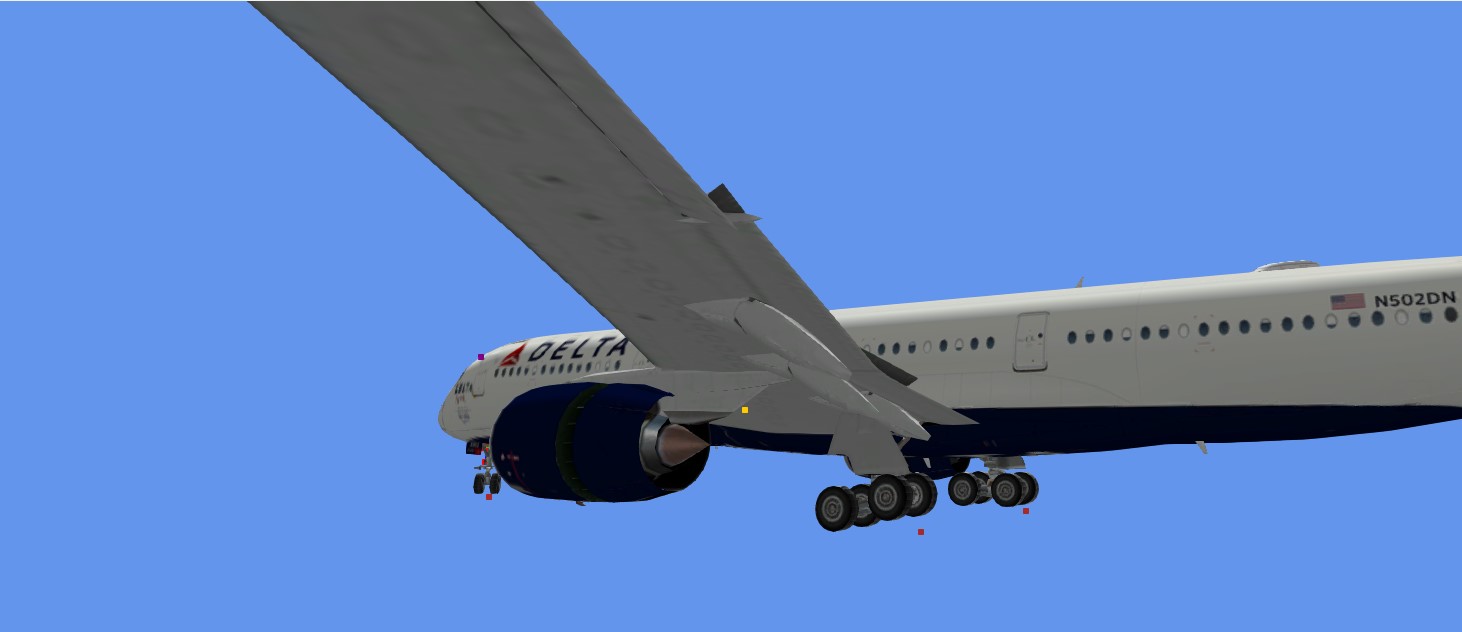
Its in the animation in this model with the main gear and specifically the resting of the left main bogies. The right side annimation works and pivots to the level or flat postion, but the left side stays in the angled position as you can see in the pic. This was a FSX-FS9 conversion and the animation does work correctly in the FSX version prior to conversion.
Here is the model to test https://www.alpha-india.net/forums/index.php?action=dlattach;attach=78131
The last conversion of the bigger -1000 model like this one works fine and that was last converted around Jan 24th 2024 so something after that date changed in the conversion process.
Thanks Arno
Greg
- Messages
- 34,385
- Country
Hi Greg,
I'll check the model and see what the difference between the two models is.
Did you try a recent development release? As I fixed a few issues recently with animations going in the wrong direction. Not sure if that applies here as well though.
I'll check the model and see what the difference between the two models is.
Did you try a recent development release? As I fixed a few issues recently with animations going in the wrong direction. Not sure if that applies here as well though.
- Messages
- 207
- Country
This was the most recent developmental release. The one from around mid january was the one that did a previous conversion and worked fine so something changed. LIke I said, the rightside bogies animate and look correct in the sim. It is just the left hand side that is wrong. Otherwise it worked great!!!
Greg
Greg
- Messages
- 105
- Country
Arno,
I have been trying to catch up on my Andovers since you were kind enough to find and fix that weird prop anim thing.
There are 6 mdls for this plane and 5 of the 6 worked out exactly as you would think after the fix. The 5th of the 6 didn't. However, the anim issue is different to what you fixed.
This time the still props rotate vertically around a point further outboard of the fuselage on both sides on both wings. Now it could be that this has always been there as I didn't get down to that mdl to convert.
Now I tried the same workaround as before, to comment out the propx_still parms in the animation_mapping.ini and this was successful.
So I would think that you would like to see the problematic mdl but would you also like to see one of the other successfully converted mdls to compare or the original FSX mdl, or both?
Pic attached.
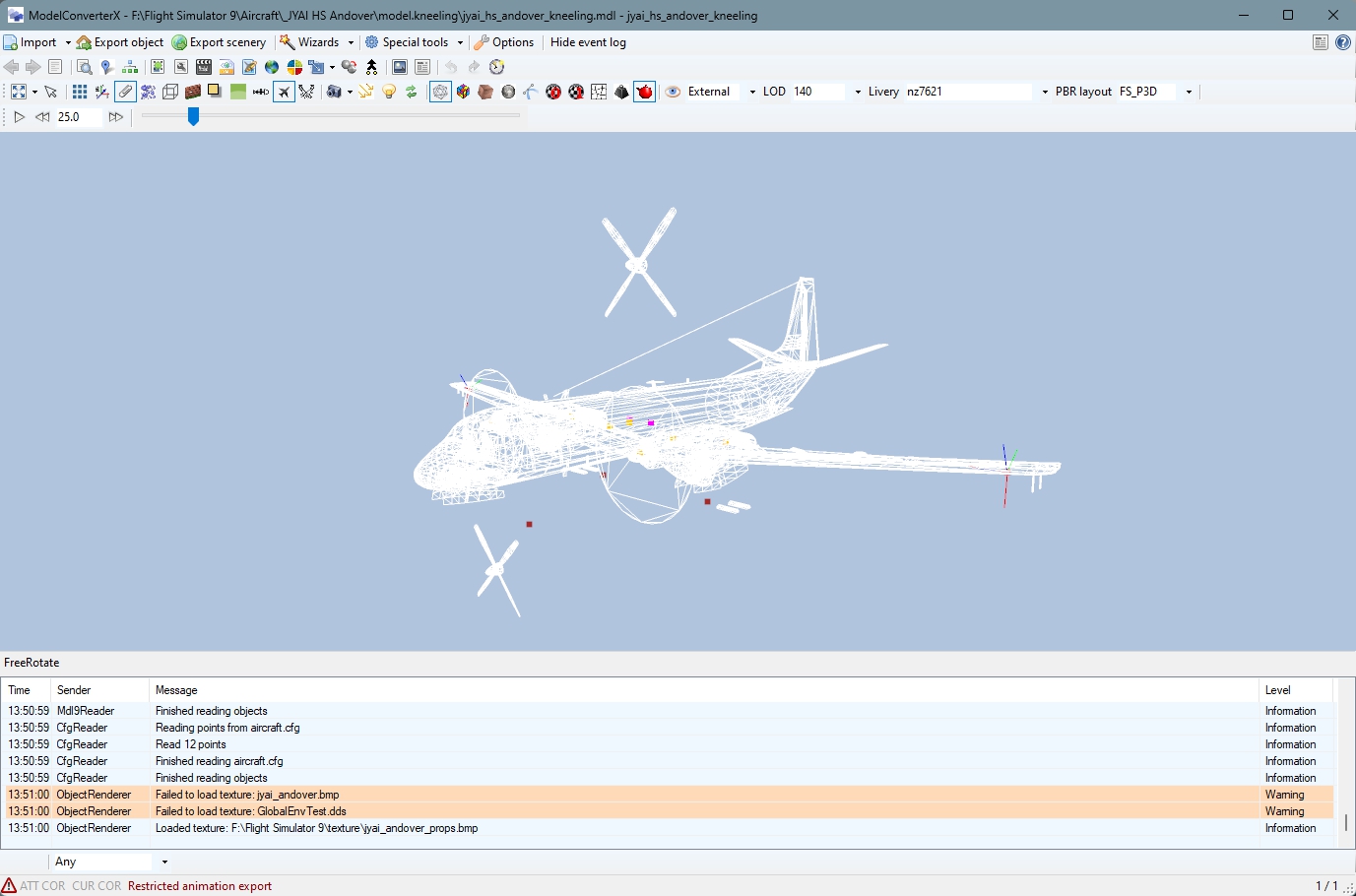
I have been trying to catch up on my Andovers since you were kind enough to find and fix that weird prop anim thing.
There are 6 mdls for this plane and 5 of the 6 worked out exactly as you would think after the fix. The 5th of the 6 didn't. However, the anim issue is different to what you fixed.
This time the still props rotate vertically around a point further outboard of the fuselage on both sides on both wings. Now it could be that this has always been there as I didn't get down to that mdl to convert.
Now I tried the same workaround as before, to comment out the propx_still parms in the animation_mapping.ini and this was successful.
So I would think that you would like to see the problematic mdl but would you also like to see one of the other successfully converted mdls to compare or the original FSX mdl, or both?
Pic attached.
Last edited:
- Messages
- 105
- Country
Not a problem. I have attached just the FSX original mdl. If you need anything else let me know.
As luck would have it I have found some more models that have the same thing this afternoon. This time helos. No point in sending these, at this time. If you want to check those out I can supply them.
As luck would have it I have found some more models that have the same thing this afternoon. This time helos. No point in sending these, at this time. If you want to check those out I can supply them.
Attachments
- Messages
- 34,385
- Country
Hi Greg,Thanks, let me check. I did fix a bug that caused some wheels to rotate in the wrong direction, hopefully it did not affect this one.
I have had a look at the issue. I know where it is (the model is exported to FS2004 fine, but MCX does not read it back in correctly afterwards). I'll try to find a fix for it.
- Messages
- 105
- Country
I have found why this model behaved differently, it will be fixed in the next development release. Hopefully it also addresses the issues in the helicopters.
Thanks, Arno. Glad you didn't have to spend too much time finding it.
- Messages
- 34,385
- Country
I have fixed the issue with the boogeys now, so in the next development release it will work.Hi Greg,
I have had a look at the issue. I know where it is (the model is exported to FS2004 fine, but MCX does not read it back in correctly afterwards). I'll try to find a fix for it.
- Messages
- 34,385
- Country
I still had this older issue on the list to check and I had a look today. I think the problem is partly in the input FSX model, as it seems the visibility conditions of the spinners are not assigned correctly there either. Sometimes a visibility condition for a different engine is assigned for example. I think that's what causes this issue.IL-38
Generally converts well in MCX. Two things become apparent in game though.
1. The Starboard outer spinner (prop0) becomes transparent when in prop0_blur mode. See MAIW_0661.jpg and also visible in MAIW_0660.jpg