
-
Which the release of FS2020 we see an explosition of activity on the forun and of course we are very happy to see this. But having all questions about FS2020 in one forum becomes a bit messy. So therefore we would like to ask you all to use the following guidelines when posting your questions:
- Tag FS2020 specific questions with the MSFS2020 tag.
- Questions about making 3D assets can be posted in the 3D asset design forum. Either post them in the subforum of the modelling tool you use or in the general forum if they are general.
- Questions about aircraft design can be posted in the Aircraft design forum
- Questions about airport design can be posted in the FS2020 airport design forum. Once airport development tools have been updated for FS2020 you can post tool speciifc questions in the subforums of those tools as well of course.
- Questions about terrain design can be posted in the FS2020 terrain design forum.
- Questions about SimConnect can be posted in the SimConnect forum.
Any other question that is not specific to an aspect of development or tool can be posted in the General chat forum.
By following these guidelines we make sure that the forums remain easy to read for everybody and also that the right people can find your post to answer it.
You are using an out of date browser. It may not display this or other websites correctly.
You should upgrade or use an alternative browser.
You should upgrade or use an alternative browser.
Experiences with FS2004 aircraft import/export
- Thread starter arno
- Start date


- Messages
- 34,458
- Country

But when the animation and visibility condition on a part don't match, that will still give issues on the export to the FS2004 model. For makemdl you can't assign the animation and visibility condition separately.

- Messages
- 207
- Country

The wheel animation is correct but we went backward with the control surface animations. The original FSX models have wingflex and in previous conversions with the older developmental release the control surfaces were flush with the wings.
The older developmental release(s) had this figured out so I am assuming it can be fixed again
Greg


The older developmental release(s) had this figured out so I am assuming it can be fixed again
Greg
- Messages
- 34,458
- Country
I see what is going on, the wings have a skin and bone wingflex. But skin and bone animations are not exported to FS2004. The contol surfaces do still follow the animation of the bones on export, while the wing does not. That's why it looks like this now.
- Messages
- 34,458
- Country
Hi,
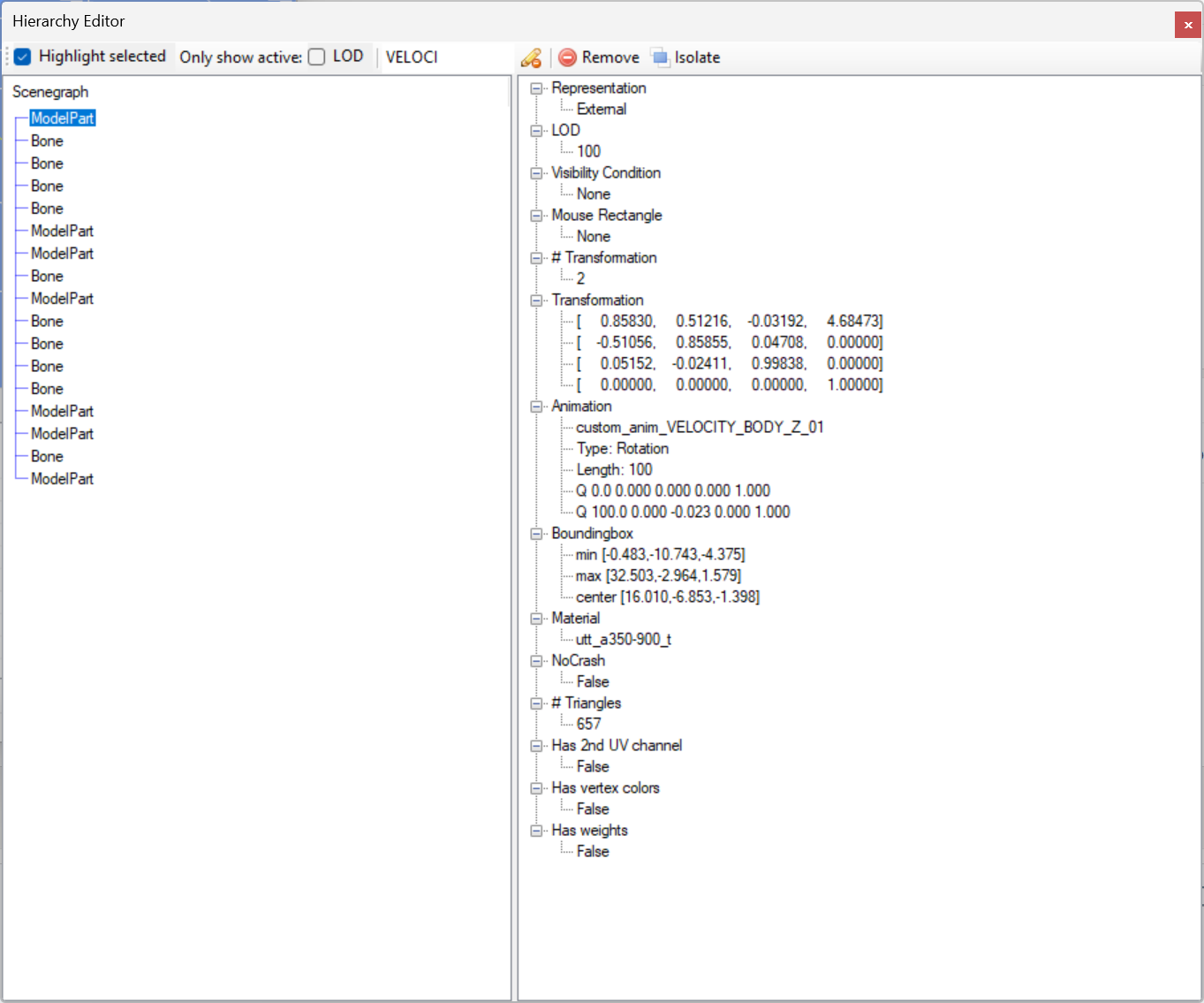
This is not something that MCX can fix automatically. The animation for the wingflex is not only on the bones, but also on some modelparts themself. But MCX does not know which animations to remove and which to keep to remove the wingflex. I tried to remove all animations that are used on the bones, but that also killed the trailing edge flaps. So I think this will remain a manual activity when converting such a model to FS2004. I have to move the custom_anim_VELOCITY_BODY_Z_01 from the model part above all control surfaces to get it export right.
This is not something that MCX can fix automatically. The animation for the wingflex is not only on the bones, but also on some modelparts themself. But MCX does not know which animations to remove and which to keep to remove the wingflex. I tried to remove all animations that are used on the bones, but that also killed the trailing edge flaps. So I think this will remain a manual activity when converting such a model to FS2004. I have to move the custom_anim_VELOCITY_BODY_Z_01 from the model part above all control surfaces to get it export right.

- Messages
- 105
- Country

Arno, just to let you know that the Andover prop issue was indeed resolved, and although I haven't finished working my way through them, it does seem to have fixed the helos too.I have found why this model behaved differently, it will be fixed in the next development release. Hopefully it also addresses the issues in the helicopters.
- Messages
- 207
- Country
So is there an easy way to remove those animations Arno. I have been playing with the animation editor for the first time really and have not yet figured out the trick. Am I in the right place to fix these manually or do I go into something else to get rid of them?
Thanks,
Greg
Thanks,
Greg
- Messages
- 34,458
- Country
Hi Greg,
All I had to do is go to the node I show in the screenshot in the hierarchy editor and then right click on that animation to remove it. Removing that specific custom animation from the animation editor should probably do the same.
All I had to do is go to the node I show in the screenshot in the hierarchy editor and then right click on that animation to remove it. Removing that specific custom animation from the animation editor should probably do the same.
- Messages
- 207
- Country
Ok.. I'll play around with that tomorrow and see if I can get some sucesss. I was messing around with it in the animation editor but had some funky results with engines and fan blades hovering above the wings after compiling, but I am pretty green at this so I'll chock that up to me.. lol
Thanks
Greg
Thanks
Greg
- Messages
- 207
- Country
Sucsess! Thanks Arno for the hint(s) as this was an area I had not played around in, so I have learned new skills that will surely be used down the road most certainly with other models. Compiles and displays correct in the sim now and actually went back an redid the big brother -1000 which had an issue with the bogies that I had not noticed until the issue arose on the -900 model.
Thanks again
Greg
Thanks again
Greg
- Messages
- 34,458
- Country
Hi all,
Small updte and some questions to you.
I'm still working on solving the issues reported before.
Small updte and some questions to you.
I'm still working on solving the issues reported before.
- I have fixed the issue that the Il-38 model did not give shadow. That was because the texture has an alpha channel and MCX did therefore set an diffuse color alpha as well to sort the parts correctly. But when the diffuse alpha is less than 1 you will get no shadow from the part. So I have improved when that setting is set now.
- I have also fixed the issue that the Mig-17 model did not show the pilot correctly. This was a drawing order issue, as the pilot texture has an alpha channel just as the canopy. By improving the logic that sets the FSX transparency materail settings that has been solved now.
- Messages
- 207
- Country
Got new one that may or may not be able to be addressed.
Brand New AIG 787 AI series models. Only P3d supported models so no chance to convert from a native FSX model. First run was the same bones animation issue but I know now where to fix that so not problem. The issue as the screenshots show are the engines/fanblades textures are not there after conversion. They use the same texture sheet as the rest of a majority of the fuselage so not sure where to try and fix that or if it is even possible. Any ideas?
Thanks


Greg

Brand New AIG 787 AI series models. Only P3d supported models so no chance to convert from a native FSX model. First run was the same bones animation issue but I know now where to fix that so not problem. The issue as the screenshots show are the engines/fanblades textures are not there after conversion. They use the same texture sheet as the rest of a majority of the fuselage so not sure where to try and fix that or if it is even possible. Any ideas?
Thanks
Greg