• Which the release of FS2020 we see an explosition of activity on the forun and of course we are very happy to see this. But having all questions about FS2020 in one forum becomes a bit messy. So therefore we would like to ask you all to use the following guidelines when posting your questions:

    • Tag FS2020 specific questions with the MSFS2020 tag.
    • Questions about making 3D assets can be posted in the 3D asset design forum. Either post them in the subforum of the modelling tool you use or in the general forum if they are general.
    • Questions about aircraft design can be posted in the Aircraft design forum
    • Questions about airport design can be posted in the FS2020 airport design forum. Once airport development tools have been updated for FS2020 you can post tool speciifc questions in the subforums of those tools as well of course.
    • Questions about terrain design can be posted in the FS2020 terrain design forum.
    • Questions about SimConnect can be posted in the SimConnect forum.

    Any other question that is not specific to an aspect of development or tool can be posted in the General chat forum.

    By following these guidelines we make sure that the forums remain easy to read for everybody and also that the right people can find your post to answer it.

Filter Out non Ground Polygon

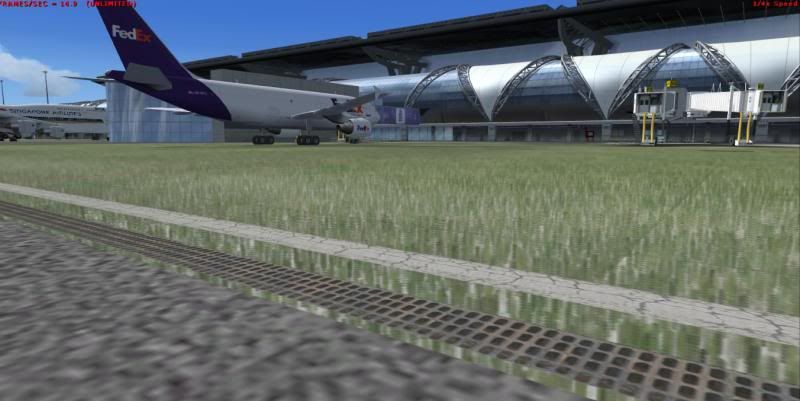
I have a series of pictures to show my experiment. Please don't mind that FEDex on apron. It is from faulty AI flight plan.

I have made a square of grass and staked it up into 15 layers. Then attached them together.
I export this grass with fs2002, fs2004 gamepack. Then I placed it over the center of my ground poly.
The concrete surface that you see is default concrete from AFCAD.
Other lines are from MCX at the layer above 8.

FS2004 export with MCX ground polygon wizard.
Grass was flatten out as a sigle sheet, I guess. Since no way to prove that the single dot is staked by 15 layers or 14 layers above it were wiped out leaving only one layer.

3dgrassMCX_zps98ebc5ea.jpg


FS2004 export and place with XML, no tweaking.
I'd like to have this to prove that there is no problem with FS2004 gamepack export. Of course, it has priority over the ground poly.

3dgrassFS9_zpsc131d362.jpg


FS2002 with ASM tweaking.
Perfect 3Dgrass, and the layers in ASM tweaked code have more priority than the height of the layer. No grass is visible on the lines even they are about 10-15 cm higher in Z axis in Gmax.
3dgrassTweakedASM_zps9fba6cf1.jpg


Arno, I also attached the file and texture in zip file. You can have a test with MCX. If you find the way to make MCX works, it would be nice. I appreciate your effort of making MCX for us.
Best Regards,
 

Attachments

Last edited:
Thanks, I'll try to reproduce your results. There must be a bug somewhere that gives the different results.
 
Thanks Arno for testing.
I think there is a bug inside MCX. May be what you try you have a box. There are polygons in vertical but none in this file. It contain only polygon in planes stake up to 15 layers.
 
Last edited:
Hi Tic,

I found out what I did different. You have to unselect the option to slice the polygons. In that case it works fine.

The code I have to slice polygons has only been designed for ground polygons. So I have to check if it can be adjusted to work for other polygons as well.
 
Hi Tic,

I found out what I did different. You have to unselect the option to slice the polygons. In that case it works fine.

The code I have to slice polygons has only been designed for ground polygons. So I have to check if it can be adjusted to work for other polygons as well.

That's a very good news. Thank you for testing. So I need to slice it manually to get this work.
 
Yes, I checked my code but I don't think I can easily adjust it to work on non-ground polygons as well.
 
Would it be useful to slice only the ground polygons, and leave the non-ground polygons unsliced?
 
If they are not sliced and cover a big area you are likely to see weird effects.

And they are being removed because the slice algorithm does not find and intersections when doing the boolean. Let me check, I can probably leave them in unsliced. That might be better in this case.
 
I think if MCX does not slice to give a proper model, I can slice them myself. No problem about that. After slice manually, I need to uncheck the slice function of MCX and do ground polygon wizard as usual. It should give the expected result, isn't it?
 
Yes, that should give the expected results.
 
Glad to see that implementing 3d grass is possible using MCX. I tried to do just that while developing my Tangier Island, VA scenery, but didn't manage to make it work and had to revert to the FS8/asm method.

Also, as far as layer priority of 3d grass, it can indeed be your lowest layer and be visible everywhere except where you've placed overlying ground polys. This sounds great, but produces one unwanted effect: when viewed from the side, the top of the grass has the effect of being flush with the overlying polys. I accepted this in my project, since it's not too bad and because I didn't want to go back and make Boolean cuts through my grass layers. In my current project, however, I will do it the right way, which should produce the desired effect of the grass growing vertically up at the thresholds of overlying GPs.

bmart
 
Dear Arno,
I got it right using MCX. I even added the seasonal texture to the grass. But I didn't slice them down to 100 meter. No problem with this because of 15 cm of layers prevent weird effect of earth curvature.

Spring-Summer texture.
VTBSspring_zps8c7ad5b5.jpg


This is my Fall-Winter. Grass become brown.

VTBSFall_zps358f7f85.jpg


Thanks for your wonderful tool.
BTW, are there any differences between ASM edited and MCX ground poly?
 
Last edited:
Hi Tic,

Looks nice.

I guess as long as your polygons do not have very long edges you should be ok with it slicing them. For long edges it could happen that they intersect with the terrain somewhere.

I use SCASM for the ground polygon wizard, but the opcodes used in the bgl are the same as using the gmax gamepack and tweaking the asm files. So there is hardly a difference. I would say my code is even a little more optimized for the way ground polygons are usually structured.
 
Back
Top