• Which the release of FS2020 we see an explosition of activity on the forun and of course we are very happy to see this. But having all questions about FS2020 in one forum becomes a bit messy. So therefore we would like to ask you all to use the following guidelines when posting your questions:

    • Tag FS2020 specific questions with the MSFS2020 tag.
    • Questions about making 3D assets can be posted in the 3D asset design forum. Either post them in the subforum of the modelling tool you use or in the general forum if they are general.
    • Questions about aircraft design can be posted in the Aircraft design forum
    • Questions about airport design can be posted in the FS2020 airport design forum. Once airport development tools have been updated for FS2020 you can post tool speciifc questions in the subforums of those tools as well of course.
    • Questions about terrain design can be posted in the FS2020 terrain design forum.
    • Questions about SimConnect can be posted in the SimConnect forum.

    Any other question that is not specific to an aspect of development or tool can be posted in the General chat forum.

    By following these guidelines we make sure that the forums remain easy to read for everybody and also that the right people can find your post to answer it.

Ground polygon looks blurry all the way..

Messages
17
Country
germany
Hi folks,

I got a problem with my Ground Polys.. They look like this:

What i did to get here was:

1. Export the Plane in Sketchup as COLLADA file (.dae)
2. Import into ModelConverterX
3. Start GP Wizard
4.
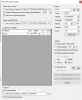

5. Press Convert
6. Put the output .bgl file into my scenery folder...

The altitude of the airport is set to 15 meters in Airport Design Editor..

What am I doing wrong? :(

Help
 

Attachments

  • Screenshot_10.png
    Screenshot_10.png
    37.5 KB · Views: 449
  • 2018-9-3_17-56-11-961.jpg
    2018-9-3_17-56-11-961.jpg
    457.9 KB · Views: 483
I'm guessing your image does not have a high enough resolution (i.e. enough pixels) to be clearer.
 
Do you think putting more than one picture together to one (i.e. this picture has 2048x2048), with each individual photo having 2048x2048 resolution will do the trick?
 
I put together more pictures and had a final resolution of 4096x4096 it still looks the same.. There must be something else im doing wrong
 
Ok, it looks like the Area i want to cover with the GP is too large. Its 6.5 * 4.5 km. How can I get the GP I want to? I mean most airports are atleast 4x2km arent they? Idk what I'm doing wrong :((
 
Well after hours i figured out that the problem is specific to taxiways and runways (due to them being as long as 4km). Idk whats causing this issues with Sketchup.. Its getting frustrating and keeps demotivating me..
 
Well after hours i figured out that the problem is specific to taxiways and runways (due to them being as long as 4km). Idk whats causing this issues with Sketchup.. Its getting frustrating and keeps demotivating me..
In order to have "better" textures you will have to get: 1 - better pictures and 2 - work in 1:1 aspect ration in SKU!

Here is a nice tutorial that will help you a lot.
 
Back
Top