• Which the release of FS2020 we see an explosition of activity on the forun and of course we are very happy to see this. But having all questions about FS2020 in one forum becomes a bit messy. So therefore we would like to ask you all to use the following guidelines when posting your questions:

    • Tag FS2020 specific questions with the MSFS2020 tag.
    • Questions about making 3D assets can be posted in the 3D asset design forum. Either post them in the subforum of the modelling tool you use or in the general forum if they are general.
    • Questions about aircraft design can be posted in the Aircraft design forum
    • Questions about airport design can be posted in the FS2020 airport design forum. Once airport development tools have been updated for FS2020 you can post tool speciifc questions in the subforums of those tools as well of course.
    • Questions about terrain design can be posted in the FS2020 terrain design forum.
    • Questions about SimConnect can be posted in the SimConnect forum.

    Any other question that is not specific to an aspect of development or tool can be posted in the General chat forum.

    By following these guidelines we make sure that the forums remain easy to read for everybody and also that the right people can find your post to answer it.

Help with services.xml

Thank you both for the answers. Now I had changed the value "frequency=0.0" to "frequency=0", but it didn't work.

I tried this file for another test, but it didn't help either:

Code:
<SimBase.Document Type="ServiceFile">
<Service.ParkingSpaceServices>
<ParkingSpace name ="RAMP GA" MinParkingSpaces=0>
<ParkingTypes>
<ParkingEntry ParkingType="RAMP_GA"/>
<ParkingEntry ParkingType="RAMP_GA_SMALL"/>
<ParkingEntry ParkingType="RAMP_GA_MEDIUM"/>
<ParkingEntry ParkingType="RAMP_GA_LARGE"/>
<ParkingEntry ParkingType="RAMP_MIL_COMBAT"/>
<ParkingEntry ParkingType="RAMP_MIL_CARGO"/>
<ParkingEntry ParkingType="GATE_SMALL"/>
<ParkingEntry ParkingType="GATE_MEDIUM"/>
<ParkingEntry ParkingType="GATE_HEAVY"/>
<ParkingEntry ParkingType="VEHICLE"/>
</ParkingTypes>

<IdleWorkers>
</IdleWorkers>

<Services>
<Service name ="SmallPushBack" Filename="Shared\Asobo_PushBack\SmallPushBack" AIType="SmallPushback" Frequency="0"
SpawnDistanceParkingRadiusFactor="1.0" SpawnDistanceAdditionalOffset="2.0" SpawnAngleFromParking="-10" HeadingFromParkingHeading="150"/>
</Services>

<SleepingActivities>
<SleepingAirlinerServices Probability ="1.0" Timer ="30"/>
<SleepingSmallPlaneRefueling Probability ="1.0" Timer ="30"/>
</SleepingActivities>

</ParkingSpace>

</Service.ParkingSpaceServices>

<Service.AirportServices>
<Services>
<Service name ="Fuel" Filename="Shared\Asobo_Fuel\Fuel" ParkingType="VEHICLE" Frequency="0"/>
</Services>
</Service.AirportServices>
</SimBase.Document>
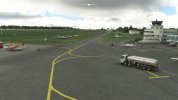
With the above file, it looks like this in EDLE in MSFS:
msfs_edle_airport_services.jpg

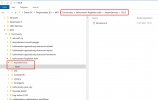
The path to the Service.xml under PackageSource is this:

msfs_services_package_source_path.jpg

The path in the finished package is this, the entry in the layout.json file is also correct:

msfs_services_package_path.jpg

Entry layout.json:

msfs_edle_layyout_json.jpg


Maybe it has less to do with the Service.xml and more to do with the configuration of LivingWorldTraffic?! I probably have to try something else :-(
 
Hi, feedback from me.

It finally worked, the little pushbackers and the airport workers are gone:

msfs_edle_services.jpg


It was due to an undefined type of medium parking spot (RAMP_GA_MEDIUM). The XML file looks like this, maybe it will help one or the other:

Code:
<SimBase.Document Type="ServiceFile">
<Service.ParkingSpaceServices>
<ParkingSpace name ="RAMP SMALL">
<ParkingTypes>
<ParkingEntry ParkingType="RAMP_GA_MEDIUM"/>
<ParkingEntry ParkingType="RAMP_GA_SMALL"/>
<ParkingEntry ParkingType="RAMP_GA"/>
</ParkingTypes>
<IdleWorkers>
</IdleWorkers>
<Services>
</Services>
<SleepingActivities>
</SleepingActivities>
</ParkingSpace>
</Service.ParkingSpaceServices>
<Service.AirportServices>
<Services>
</Services>
</Service.AirportServices>
</SimBase.Document>

Thanks for the great support! :)

PS: A completely different question is how to get the vehicles away
 
Digging up a somewhat old thread here, but do these changes still affect an entire region, or only each airport now? I have several bush strips I would like to get rid of equipment on, but obviously I don't want to do it if it's going to affect other airports in a region.

Anyone know if that's been cleared up yet?

Edit: From what I can understand, maybe the regional conflict was with the living world file? So, it seems that the services.xml only affects individual airports. Is that right?
 
Last edited:
Yes, the question has been resolved. At least for me.

I use several Services.xml, individually for each airport and each airfield. For normal airports I use a Services.xml, and for smaller airports I use a slightly modified Services.xml. None of the services files intervene in another airport or airfield.
 
I got a services.xml file set up correctly to have 1 GPU in one of my GA_MEDIUM parking spots as this airport in real life only has 1 GPU. Anyway I got rid of the idle ramp workers too and it's working as it should. The only issue I have is that the Ground Services in the ATC menu does not appear so even if in a parking spot with the GPU I am unable to call for a fuel truck or the GPU through the ATC Menu. I have the Pushback Addon which works to call the GPU and Fuel truck. That's fine with me but may not be good for the end user who doesn't have such and addon. My airport is UNICOM/Uncontrolled and only has a UNICOM Frequency and AWOS. Is there an issue with ground services in the ATC Menu at an uncontrolled airport? Otherwise I don't know why it's not showing up in the menus.
 
Hi Christian, any chance you can post your final services.xml? I have used the one from the first Aug1 post but I still get random vehicles. I want to remove everything (Fuel, vehicles and workers) so is the one to use the second shorter xml?
 
Hi Christian, any chance you can post your final services.xml? I have used the one from the first Aug1 post but I still get random vehicles. I want to remove everything (Fuel, vehicles and workers) so is the one to use the second shorter xml?
If you are talking about random vehicles driving around the airport then you can't get rid of those with a services.xml to my knowledge. Those are coded in the living world config files and if you add one of those to your airport it will change all airports in the region because they are region specific for now (even though the SDK makes it look like you can do this by airport).

If you are still getting random vehicles in your parking spots then yes you can remove those via services.xml
 
If you are still getting random vehicles in your parking spots then yes you can remove those via services.xml
So what does the xml look like? I want to remove cars, buses and anything in parking spots and of course, the workers.
 

Attachments

Thankyou. That's the one I'm using. It seems I have sporadic success. On some airports I get nothing which is what I want and on others I get no Fuel, no workers but some vehicles. Or Fuel and vehicles. It seems this only removes the workers
 
I still have forklifts, buses, service vehicles, etc. at the parking positions. No idea how to get rid of it.
 
So what does the xml look like? I want to remove cars, buses and anything in parking spots and of course, the workers.
Here is my services xml. It's a small GA airport and this method got rid of the workers and other vehicles in the parking spots except for the vehicles that drive around the airport (living world). I have a GPU service for the medium GA spots that spawns 20% of the time and a marshalller that is supposed to spawn 100% of the time in the GA Medium spots. I may have made a mistake though with the marshaller because now that I think about it I have not seen the marshaller yet when I have landed at the airport and parked. I will have to do some more testing on that but maybe this will help get you started.

<SimBase.Document Type="ServiceFile">
<Service.ParkingSpaceServices>
<ParkingSpace name="RAMP GA">
<ParkingTypes>
<ParkingEntry ParkingType="RAMP_GA"/>
<ParkingEntry ParkingType="RAMP_GA_SMALL"/>
</ParkingTypes>
<IdleWorkers>
</IdleWorkers>
<Services>
</Services>
<SleepingActivities>
<SleepingSmallPlaneRefueling Probability="0.1" Timer="600"/>
</SleepingActivities>
</ParkingSpace>
<ParkingSpace name="RAMP MEDIUM" MinParkingSpaces="1" >
<ParkingTypes>
<ParkingEntry ParkingType="RAMP_GA_MEDIUM"/>
</ParkingTypes>
<IdleWorkers>
</IdleWorkers>
<Services>
<Service name ="GroundPowerUnit" Filename="Shared\Asobo_GroundPowerUnit\GroundPowerUnit" AIType="GROUNDPOWERUNIT" Frequency="0.20"
SpawnDistanceParkingRadiusFactor="1.0" SpawnDistanceAdditionalOffset="4.0" SpawnAngleFromParking="70" HeadingFromParkingHeading="50"/>
<Service name ="Marshaller" Filename="Shared\Asobo_Marshaller\Marshaller" AIType="MARSHALLER" Frequency="1.0"
SpawnDistanceParkingRadiusFactor="1.0" SpawnDistanceAdditionalOffset="4.0" SpawnAngleFromParking="0" HeadingFromParkingHeading="180"/>
</Services>
<SleepingActivities>
<SleepingSmallPlaneRefueling Probability="0.1" Timer="600"/>
</SleepingActivities>
</ParkingSpace>
</Service.ParkingSpaceServices>
<Service.AirportServices>
<Services>
<Service name ="Fuel" Filename="Shared\Asobo_Fuel\Fuel" ParkingType="VEHICLE" Frequency="1.0"/>
</Services>
</Service.AirportServices>
</SimBase.Document>
 
I am struggling with the same problem, getting rid of all these services at my local grass field as we don't have any of these there. I will try the above XML examples, but until now what I tried did not work, maybe I wrote a wrong code...
Just a question, in this line

<ParkingSpace name="RAMP GA">

does it matter what name I give? Should this be the display name I give to the parking spot in the scenery editor?
Can one set ground services one by one, or only by parking types, such as one setting for all RAMP GA SMALL, another for RAMP GA and so on...
I would like to have refuelling option (where GA planes occasionally go refuel) at only one particular RAMP GA SMALL type spot, and nothing at all others with the same type.
 
Last edited:
I dont' know what am I doing wrong but this pushback trolley guy is just there, no matter what...
Képkivágás.jpg

Here is my xml code:

<SimBase.Document Type="ServiceFile">
<Service.ParkingSpaceServices>
<ParkingSpace name="RAMP GA" MinParkingSpaces="0">
<ParkingTypes>
<ParkingEntry ParkingType="RAMP_GA_EXTRA"/>
</ParkingTypes>
<IdleWorkers>
</IdleWorkers>
<Services>
</Services>
<SleepingActivities>
<SleepingSmallPlaneRefueling Probability="0.1" Timer="600"/>
</SleepingActivities>
</ParkingSpace>
<ParkingSpace name="RAMP GA SMALL" MinParkingSpaces="0">
<ParkingTypes>
<ParkingEntry ParkingType="RAMP_GA_SMALL"/>
<ParkingEntry ParkingType="RAMP_GA_MEDIUM"/>
</ParkingTypes>
<IdleWorkers>
</IdleWorkers>
<Services>
</Services>
<SleepingActivities>
</SleepingActivities>
</ParkingSpace>
</Service.ParkingSpaceServices>
<Service.AirportServices>
<Services>
</Services>
</Service.AirportServices>
</SimBase.Document>

So basically all services are turned off, but still...

Update: now at the next few tries even f**ing fire trucks and fuel trucks appeared. So my services.xml simply does not do anything.
 
Last edited:
Back
Top
