
-
Which the release of FS2020 we see an explosition of activity on the forun and of course we are very happy to see this. But having all questions about FS2020 in one forum becomes a bit messy. So therefore we would like to ask you all to use the following guidelines when posting your questions:
- Tag FS2020 specific questions with the MSFS2020 tag.
- Questions about making 3D assets can be posted in the 3D asset design forum. Either post them in the subforum of the modelling tool you use or in the general forum if they are general.
- Questions about aircraft design can be posted in the Aircraft design forum
- Questions about airport design can be posted in the FS2020 airport design forum. Once airport development tools have been updated for FS2020 you can post tool speciifc questions in the subforums of those tools as well of course.
- Questions about terrain design can be posted in the FS2020 terrain design forum.
- Questions about SimConnect can be posted in the SimConnect forum.
Any other question that is not specific to an aspect of development or tool can be posted in the General chat forum.
By following these guidelines we make sure that the forums remain easy to read for everybody and also that the right people can find your post to answer it.
You are using an out of date browser. It may not display this or other websites correctly.
You should upgrade or use an alternative browser.
You should upgrade or use an alternative browser.
How to make windows in round tower
- Thread starter F747fly
- Start date


F747fly
Resource contributor
- Messages
- 1,713
- Country

First of I exported in .DAE but the event log says it has no error (and thus no error number), it just comes up with a .net outofmemory error when mass material editing to get the materials to convert to po2 and dds. Once that error pops-up I can click, close and continue (JIT-error) and when I then export it gives a 0 bytes .mdl file.

First of I exported in .DAE but the event log says it has no error (and thus no error number), it just comes up with a .net outofmemory error when mass material editing to get the materials to convert to po2 and dds. Once that error pops-up I can click, close and continue (JIT-error) and when I then export it gives a 0 bytes .mdl file.
I'm not quite sure what the "po2" file format is; possibly you were referring to *.PNG format (for use with Sketchup as an alternative to *.JPG) ?
IIUC, the phrase "mass material editing" tells us that you are using MCX version 1.3 ?
BTW: It's quite common for the first run through this process to be somewhat challenging !

GaryGB
F747fly
Resource contributor
- Messages
- 1,713
- Country
I'm not quite sure what the "po2" file format is; possibly you were referring to *.PNG format (for use with Sketchup as an alternative to *.JPG) ?
IIUC, the phrase "mass material editing" tells us that you are using MCX version 1.3 ?
BTW: It's quite common for the first run through this process to be somewhat challenging !
GaryGB
I meant "Power Of 2", So to say MCX makes the textures square automatically and then converts them to .DDS.
All the textures used in Sketchup are .PNG and .JPG (I used both formats).
And yes I'm using the MCX version 1.3.
I ran it a couple of times but I keep on getting the same error, I'll see if I can copy the text of that error and post it here.
F747fly
Resource contributor
- Messages
- 1,713
- Country
Maybe I'm way off, but I'll ask it anyway
Did you try to minimize the drawcalls? It helped me once when I had a lot of different textures applied to the model.
Since I have no experience with the combined textures I don't know if it will work.
No I did not. How can I do that?
Next to the "mass texture editor" icon is an icon which is named "minimize drawcalls"
This will combine some of the textures.
EDIT:
I attached a print screen of the minimize drawcall screen, just in case.
I selected all of the boxes and started to minimize the drawcalls. After that's been done, convert the textures to DDS.
This will combine some of the textures.
EDIT:
I attached a print screen of the minimize drawcall screen, just in case.
I selected all of the boxes and started to minimize the drawcalls. After that's been done, convert the textures to DDS.
Attachments

Last edited:
F747fly
Resource contributor
- Messages
- 1,713
- Country
Next to the "mass texture editor" icon is an icon which is named "minimize drawcalls"
This will combine some of the textures.
EDIT:
I attached a print screen of the minimize drawcall screen, just in case.
I selected all of the boxes and started to minimize the drawcalls. After that's been done, convert the textures to DDS.
Tried it but it doesn't seem to work. Thanks for the advice though!
You may wish to try working with the "Latest Development Release" of MCX:
http://www.scenerydesign.org/development-releases/
http://www.scenerydesign.org/latest-release/modelconverterx_latest_development_release.zip
Hope this helps !
GaryGB
http://www.scenerydesign.org/development-releases/
http://www.scenerydesign.org/latest-release/modelconverterx_latest_development_release.zip
Hope this helps !
GaryGB
Last edited:
F747fly
Resource contributor
- Messages
- 1,713
- Country
You may wish to try working with the "Latest Development Release" of MCX:
http://www.scenerydesign.org/development-releases/
http://www.scenerydesign.org/latest-release/modelconverterx_latest_development_release.zip
Hope this helps !
GaryGB
Tried the development version, witch seemed to work right up untill I wanted to make a library. Then I got a error saying the .mdl wasn't functional. I then checked and the .mdl became to be 0 bytes.
However I did find another clue perhaps. Two textures seem to cause the trouble. Both of them are 1X1 pixels big and are just gray. I can't remember using it anywhere in my sketchup model, though they where transfered into the textures folder when exporting to .dae .
With that nolage I deselected those textures in mcx so they wouldn't be converted to .dds (after all I didn't know where in the model they would be), no luck with that so far either aswell. But perhaps someone could tell me if it would matter if I deleted to textures or if I could check if it would make a difference.
EDIT: when deleting those two .PNG files all textures where converted to .DDS succesfully, but the error still appears. When converting to .MDL I still get 0 bytes. Any more suggestions?
Last edited:
However I did find another clue perhaps. Two textures seem to cause the trouble. Both of them are 1X1 pixels big and are just gray. I can't remember using it anywhere in my sketchup model, though they where transfered into the textures folder when exporting to .dae .
I've never used textures that small; I wonder if there is a "division error" occurring in MCX due to code expecting / requiring "Powers of 2" texture sizes larger than 1 x 1 pixel ?

I've personally never seen smaller than 64 x 64 pixel dimensions used in FSX default scenery texture files, but Arno and others here may know if such a pixel dimension minimum size requirement actually exists for FSX itself.
Arno does, however give examples of Powers of 2 texture sizes which include "1-pixel" in Section 6.2.1. "Design the texture sheet" on Page 31 of 75 in his excellent tutorial here:
http://www.fsdeveloper.com/downloads/BuildYourHouseForFSUsingSketchup.pdf
Perhaps this info might merit consideration:

http://www.fsdeveloper.com/forum/threads/modelconverterx-dae-export-problem.34060/
http://www.fsdeveloper.com/forum/threads/1024xnot_1024.427763/
http://www.fsdeveloper.com/forum/threads/applying-textures-from-a-texture-sheet.426623/
A particularly notable treatise on the whys and wherefores of utilizing Powers of 2 texture sizes relative to 3D accelerated rendering performance in games / simulators:

http://www.katsbits.com/tutorials/textures/make-better-textures-correct-size-and-power-of-two.php
Hope this helps !
GaryGB
Last edited:

- Messages
- 1,693
- Country

I had this problem. im lookig into my notes for the solution.
Run MCX as administrator to see if that might be it.
Not 100% sure but this might be it. In material properties, remove the call for the texture.
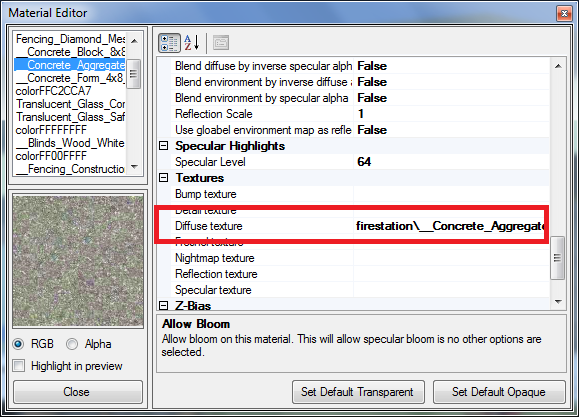
Run MCX as administrator to see if that might be it.
Not 100% sure but this might be it. In material properties, remove the call for the texture.
Last edited: