
-
Which the release of FS2020 we see an explosition of activity on the forun and of course we are very happy to see this. But having all questions about FS2020 in one forum becomes a bit messy. So therefore we would like to ask you all to use the following guidelines when posting your questions:
- Tag FS2020 specific questions with the MSFS2020 tag.
- Questions about making 3D assets can be posted in the 3D asset design forum. Either post them in the subforum of the modelling tool you use or in the general forum if they are general.
- Questions about aircraft design can be posted in the Aircraft design forum
- Questions about airport design can be posted in the FS2020 airport design forum. Once airport development tools have been updated for FS2020 you can post tool speciifc questions in the subforums of those tools as well of course.
- Questions about terrain design can be posted in the FS2020 terrain design forum.
- Questions about SimConnect can be posted in the SimConnect forum.
Any other question that is not specific to an aspect of development or tool can be posted in the General chat forum.
By following these guidelines we make sure that the forums remain easy to read for everybody and also that the right people can find your post to answer it.
You are using an out of date browser. It may not display this or other websites correctly.
You should upgrade or use an alternative browser.
You should upgrade or use an alternative browser.
P3D v4 Multi select
- Thread starter RED COOL
- Start date
-
- Tags
- ade airport design editor


- Messages
- 734
- Country

See this discussion from Sept 2014 -
https://www.fsdeveloper.com/forum/threads/default-taxi-link-properties.431910/page-2
- seems like something similar to this topic.
One of my comments included mentioning a function "Make same as first" where you selected an object, right-clicked (I think) and selected "Make same as first" and proceeded to select objects to change them to the same as the first. This must be what I remembered from way back. I am not sure why it disappeared as it was similar to what I have been talking about above. I am not bothered about having to click-click-click on successive objects to change their properties - it is something I am used to in other Windows programs.
Jon, if this could be re-instated, I for one would be pleased. I would guess the programming for this would still exist somewhere in your system. If others still want to push for the other methods under discussion then OK - different methods for different users.
https://www.fsdeveloper.com/forum/threads/default-taxi-link-properties.431910/page-2
- seems like something similar to this topic.
One of my comments included mentioning a function "Make same as first" where you selected an object, right-clicked (I think) and selected "Make same as first" and proceeded to select objects to change them to the same as the first. This must be what I remembered from way back. I am not sure why it disappeared as it was similar to what I have been talking about above. I am not bothered about having to click-click-click on successive objects to change their properties - it is something I am used to in other Windows programs.
Jon, if this could be re-instated, I for one would be pleased. I would guess the programming for this would still exist somewhere in your system. If others still want to push for the other methods under discussion then OK - different methods for different users.

- Messages
- 34,981
- Country
Yes and no. It's primarily about link properties inheritance. it does mention multi edit though. I think I have found the code that lets the user pick the object type to edit.
- Messages
- 34,981
- Country
This is based pretty much on the code I found in a development branch from a few years ago that didn't get implemented
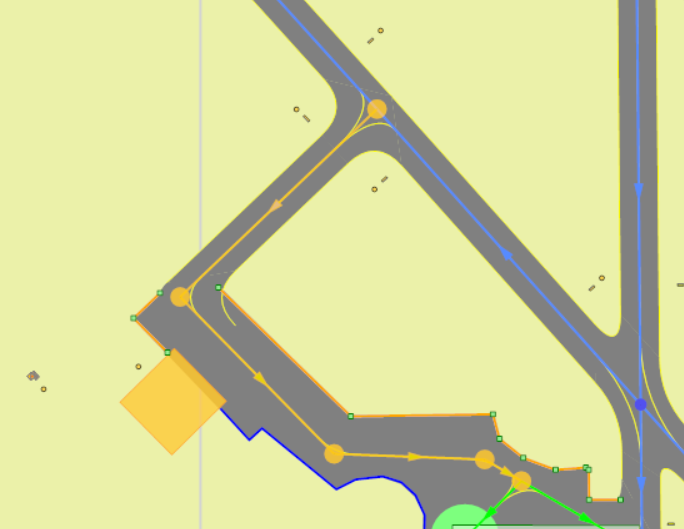
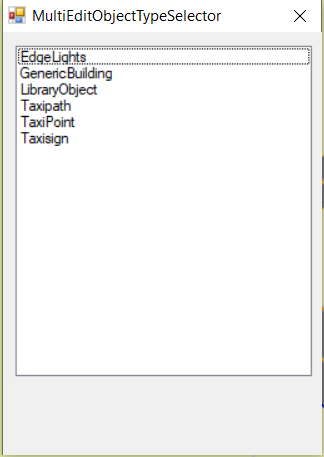
This dialog needs tidying up it is currently in pure test mode.
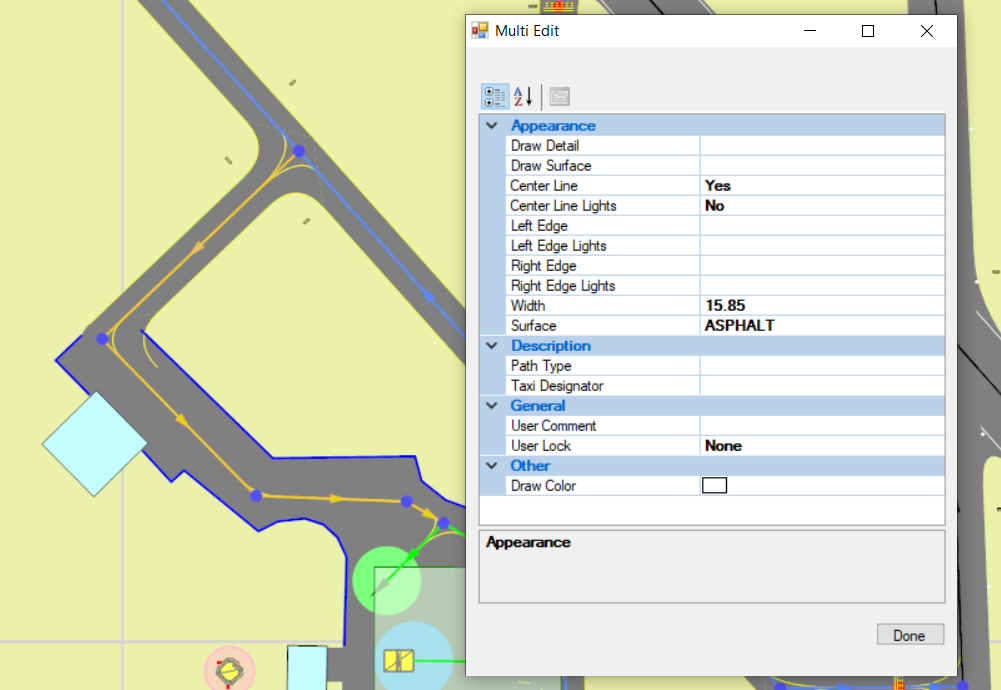
ADE will clear down any selected items not of the chosen type in the display so that you can see what is going to be affected by the Edit and opens the Multi Edit Dialog for that object type
This may not do exactly what you might want but it seems closer to me than multiple clicking. It doesn't follow AFCAD in how you get the chosen type - this is driven pretty much by the graphics engine inside ADE and existing code. To achieve an exact match of process with AFCAD would involve some work - maybe quite a bit to get a reliable result.
PS This does not work in Lists at the moment but might be implemented if of interest
- Use 'R' + drawn rectangle to select items in an area
- Make any adjustments you wish using Shift+Left Click. You can ignore the object types you are not interested in
- Hit the Enter Key (you can Right Click > Edit but that adds one click or key stroke to the work
- If all the selected objects are of the same type then Calling Edit will open the Multi Edit dialog directly. If not you will get this
This dialog needs tidying up it is currently in pure test mode.
- Left click the object type you want to edit as a group.
ADE will clear down any selected items not of the chosen type in the display so that you can see what is going to be affected by the Edit and opens the Multi Edit Dialog for that object type
- If you realize that you have something missed or still selected then you can click Done on the dialog, make your changes and hit Enter again. This time the Multi Edit Dialog will come straight up without asking you to select the object type (unless you made a mistake and selected a taxi point for example)
This may not do exactly what you might want but it seems closer to me than multiple clicking. It doesn't follow AFCAD in how you get the chosen type - this is driven pretty much by the graphics engine inside ADE and existing code. To achieve an exact match of process with AFCAD would involve some work - maybe quite a bit to get a reliable result.
PS This does not work in Lists at the moment but might be implemented if of interest
Last edited:
- Messages
- 734
- Country
Another thought.
We already have a method of creating Paths and Taxiways to a 'Default Setting' which has been set by selecting a Path whose settings we want others to be set to.
Would it be possible to add a 'Selection' in the Multi-Edit box, such as "Set to Default Setting" so that, having selected all of the objects using a box and selecting the type of object we want to edit, all we have to do is click on "Set to Default Setting"? This would make it even simpler to do what we are looking for (in my opinion).
So for my work in modifying existing layouts, I would change a path segment to the settings I require, make this the 'Default Setting', select (by whatever method) all of the other path segments that I want to make the same, right-click, select Edit and, in the Multi-Edit box I can select "Set to Default Setting". This is almost as good as having a "Format Painter" function.
We already have a method of creating Paths and Taxiways to a 'Default Setting' which has been set by selecting a Path whose settings we want others to be set to.
Would it be possible to add a 'Selection' in the Multi-Edit box, such as "Set to Default Setting" so that, having selected all of the objects using a box and selecting the type of object we want to edit, all we have to do is click on "Set to Default Setting"? This would make it even simpler to do what we are looking for (in my opinion).
So for my work in modifying existing layouts, I would change a path segment to the settings I require, make this the 'Default Setting', select (by whatever method) all of the other path segments that I want to make the same, right-click, select Edit and, in the Multi-Edit box I can select "Set to Default Setting". This is almost as good as having a "Format Painter" function.
- Messages
- 34,981
- Country
As far as I recall we only use default settings in this way for taxi links...
- Messages
- 734
- Country
The key point from the start of this topic was the selecting of taxi links.
I am not sure which other types of object have a requirement for 'Multi-editing' which cannot already be done by other selection methods (using Lists for selecting) but, having made a selection using a box and then selecting 'Taxipaths', the Multi-edit dialog could contain a "Set to Default settings" pick.
If you do not think this is a viable option then I will leave it to you to come up with what you have previously suggested.
I am not sure which other types of object have a requirement for 'Multi-editing' which cannot already be done by other selection methods (using Lists for selecting) but, having made a selection using a box and then selecting 'Taxipaths', the Multi-edit dialog could contain a "Set to Default settings" pick.
If you do not think this is a viable option then I will leave it to you to come up with what you have previously suggested.

- Messages
- 579
- Country

That's a great solution it is exactly what i needThis is based pretty much on the code I found in a development branch from a few years ago that didn't get implemented
View attachment 50407
- Use 'R' + drawn rectangle to select items in an area
View attachment 50408
- Make any adjustments you wish using Shift+Left Click. You can ignore the object types you are not interested in
- Hit the Enter Key (you can Right Click > Edit but that adds one click or key stroke to the work
- If all the selected objects are of the same type then Calling Edit will open the Multi Edit dialog directly. If not you will get this
This dialog needs tidying up it is currently in pure test mode.
View attachment 50410
- Left click the object type you want to edit as a group.
ADE will clear down any selected items not of the chosen type in the display so that you can see what is going to be affected by the Edit and opens the Multi Edit Dialog for that object type
- If you realize that you have something missed or still selected then you can click Done on the dialog, make your changes and hit Enter again. This time the Multi Edit Dialog will come straight up without asking you to select the object type (unless you made a mistake and selected a taxi point for example)
This may not do exactly what you might want but it seems closer to me than multiple clicking. It doesn't follow AFCAD in how you get the chosen type - this is driven pretty much by the graphics engine inside ADE and existing code. To achieve an exact match of process with AFCAD would involve some work - maybe quite a bit to get a reliable result.
PS This does not work in Lists at the moment but might be implemented if of interest

can you please let us know when it is gonna be in the next BETA ?