
-
Which the release of FS2020 we see an explosition of activity on the forun and of course we are very happy to see this. But having all questions about FS2020 in one forum becomes a bit messy. So therefore we would like to ask you all to use the following guidelines when posting your questions:
- Tag FS2020 specific questions with the MSFS2020 tag.
- Questions about making 3D assets can be posted in the 3D asset design forum. Either post them in the subforum of the modelling tool you use or in the general forum if they are general.
- Questions about aircraft design can be posted in the Aircraft design forum
- Questions about airport design can be posted in the FS2020 airport design forum. Once airport development tools have been updated for FS2020 you can post tool speciifc questions in the subforums of those tools as well of course.
- Questions about terrain design can be posted in the FS2020 terrain design forum.
- Questions about SimConnect can be posted in the SimConnect forum.
Any other question that is not specific to an aspect of development or tool can be posted in the General chat forum.
By following these guidelines we make sure that the forums remain easy to read for everybody and also that the right people can find your post to answer it.
You are using an out of date browser. It may not display this or other websites correctly.
You should upgrade or use an alternative browser.
You should upgrade or use an alternative browser.
Scenery Objects Not Showing Issue
- Thread starter davide96
- Start date


- Messages
- 560
- Country

Why have you shown me a screenshot of MCX? MCX has nothing to do with placing objects in ADE.


- Messages
- 34,981
- Country
We are doing this blind. As well as the ADE file we need the object libraries that contain the objects that don't display and also which objects don't show up in sim.
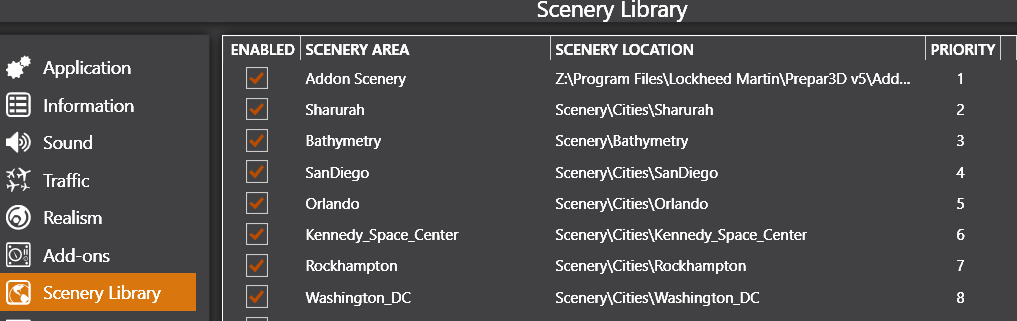
Is Addon Scenery activated (enabled) and at the top of the priority list?addon scenery/scenery folder
Last edited:
- Messages
- 34,981
- Country
I listed a number of things to look at in a PM. I am duplicating them here so that we are only dealing with this in one place
Finally changes to the Scale value will make objects larger or smaller so it this is not 1.0 then the object could be shrunk and hard to see
How many of these have you tried and excluded?
- The object is not recognized by ADE and shows as a black box. If you have black box objects then you need to find and load the library bgl file(s) containing the objects into the Library Object Manager
- The bgl file(s) containing the actual objects (mdls) are not in an active scenery folder in the sim. Adding objects to the ADE LOM is not sufficient. This just tells ADE about the object(s) So if you have the objects in one or more library bgl files then make sure they are in an active scenery folder. For example copy them to Addon Scenery\scenery
- The Image complexity set in the sim is such that it stops some of your objects showing up. Make sure that you have image complexity set to EXTREMELY DENSE in both ADE and the sim
- There are missing textures for the objects. As well as ensuring that the objects are in an active scenery folder you need to ensure that any textures are loaded in the relevant texture folder For example Addon Scenery\texture. Usually missing textures just result in black or grey objects in sim but they have been known to stop display
- An exclusion rectangle from another bgl file (or possible in the same file if the source has been directly modified) is excluding the objects. The rule is last bgl loaded trumps all others. Loading order matters and there are rules as to what gets loaded when https://scruffyduck.screenstepslive.com/s/help_docs/m/20268/l/199760-priority-matters
Finally changes to the Scale value will make objects larger or smaller so it this is not 1.0 then the object could be shrunk and hard to see
How many of these have you tried and excluded?
Last edited:
- Messages
- 34,981
- Country
I have moved this to its own thread since it is currently on the end of a long thread which appears to be a different issue
stis is my scenery list
and
Hi yes this is my scenery listWe are doing this blind. As well as the ADE file we need the object libraries that contain the objects that don't display and also which objects don't show up in sim.
Is Addon Scenery activated (enabled) and at the top of the priority list?
View attachment 83721
and
everything here is verified, I don't know why this buildings won't show upI listed a number of things to look at in a PM. I am duplicating them here so that we are only dealing with this in one place
Another one is that the object is not set to AGL - that is zero alt is on the surface. The alternative is AMSL or above mean sea level. Check AGL is set and the altitude is zero to ensure objects sit visible on the surface of the ground.
- The object is not recognized by ADE and shows as a black box. If you have black box objects then you need to find and load the library bgl file(s) containing the objects into the Library Object Manager
- The bgl file(s) containing the actual objects (mdls) are not in an active scenery folder in the sim. Adding objects to the ADE LOM is not sufficient. This just tells ADE about the object(s) So if you have the objects in one or more library bgl files then make sure they are in an active scenery folder. For example copy them to Addon Scenery\scenery
- The Image complexity set in the sim is such that it stops some of your objects showing up. Make sure that you have image complexity set to EXTREMELY DENSE in both ADE and the sim
- There are missing textures for the objects. As well as ensuring that the objects are in an active scenery folder you need to ensure that any textures are loaded in the relevant texture folder For example Addon Scenery\texture. Usually missing textures just result in black or grey objects in sim but they have been known to stop display
- An exclusion rectangle from another bgl file (or possible in the same file if the source has been directly modified) is excluding the objects. The rule is last bgl loaded trumps all others. Loading order matters and there are rules as to what gets loaded when https://scruffyduck.screenstepslive.com/s/help_docs/m/20268/l/199760-priority-matters
How many of these have you tried and excluded?
Finally changes to the Scale value will make objects larger or smaller so it this is not 1.0 then the object could be shrunk and hard to see
Attachments

- Messages
- 34,981
- Country
As requested above can you provide the library object bgl file(s) that contain the objects which are not displaying in sim although they are placed in ADE? We can then check if we have the same issue with them or noteverything here is verified, I don't know why this buildings won't show up
- Messages
- 560
- Country
This is your ADE file in my P3Dv5:
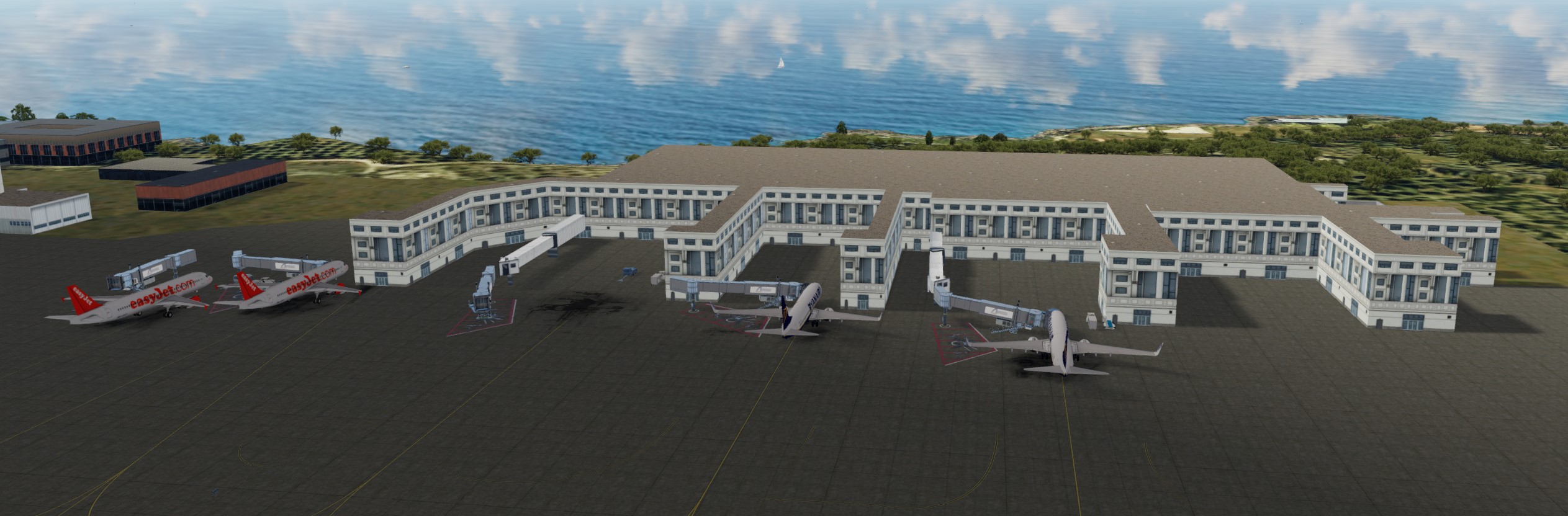
This is the same file in ADE 1.79:

The two things missing are the building connecting your inserted JFK Jetway and the FSX/P3D animated jetway (no idea where you got that from), and the KMIA jetway extension (far left gates of the terminal) which I think is in the prepar3dv5\scenery\NAME\Scenery\Miami.bgl. From your screenshot, you have included the jetway tower building in your Library Object Manager, but while ADE recognises the KMIA jetway extension, that item is not normally available to other locations. The KMIA item is fairly easily remedied by extracting it from that library, but you have to place both that and the missing tower into your scenery file as bgls.
This is the same file in ADE 1.79:
The two things missing are the building connecting your inserted JFK Jetway and the FSX/P3D animated jetway (no idea where you got that from), and the KMIA jetway extension (far left gates of the terminal) which I think is in the prepar3dv5\scenery\NAME\Scenery\Miami.bgl. From your screenshot, you have included the jetway tower building in your Library Object Manager, but while ADE recognises the KMIA jetway extension, that item is not normally available to other locations. The KMIA item is fairly easily remedied by extracting it from that library, but you have to place both that and the missing tower into your scenery file as bgls.
- Messages
- 560
- Country
Hmmm. Of course, I forgot to delete the stock buildings (occupational hazard with P3Dv5!). This is what it looks like with them gone:
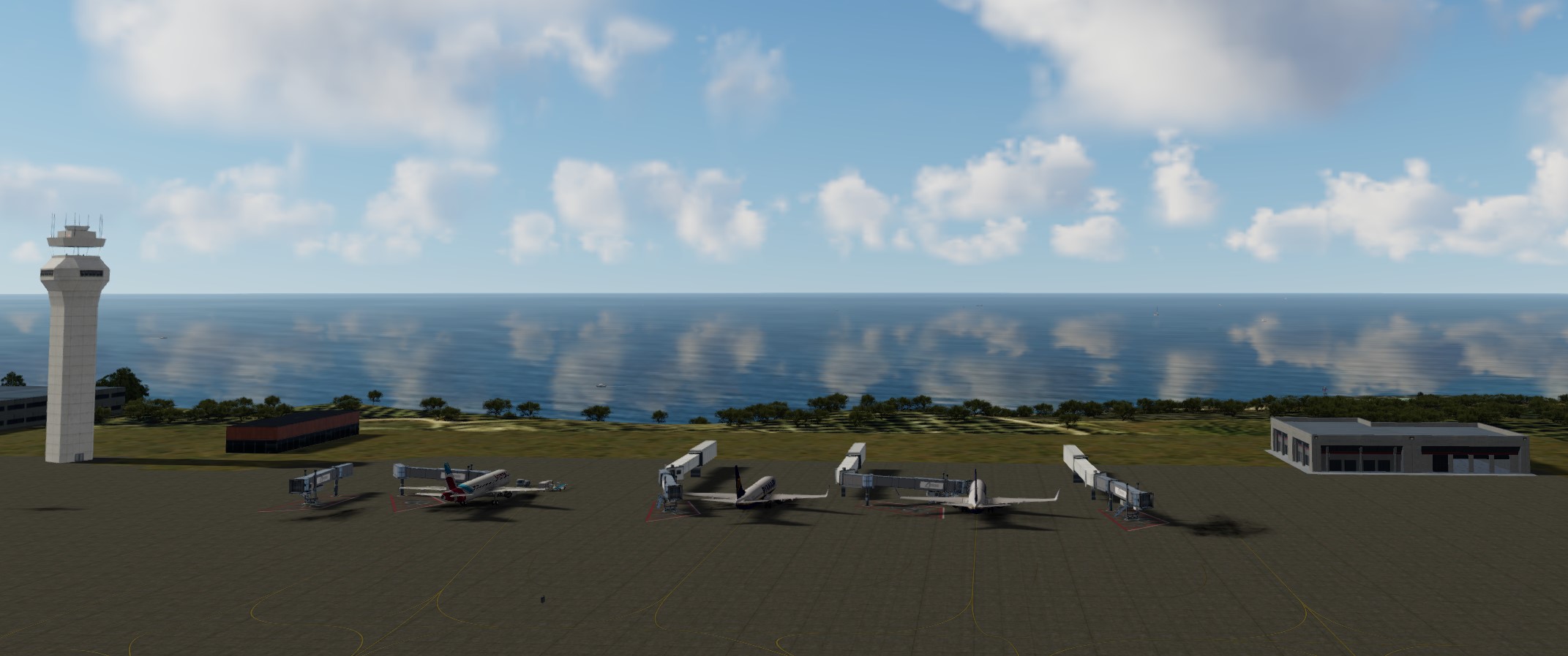
So it looks like you've 'borrowed' the default buildings from Ray Smith's LIRF which he reformatted to mdls and incorporated in his 'own' library (why on earth????) and which you subsequently extracted in MCX.
These are default buildings available to anyone using FSX/P3D (and ADE). Why use a bastardised version mucked about with by someone else? You've just made life difficult for yourself for no good reason.
So it looks like you've 'borrowed' the default buildings from Ray Smith's LIRF which he reformatted to mdls and incorporated in his 'own' library (why on earth????) and which you subsequently extracted in MCX.
These are default buildings available to anyone using FSX/P3D (and ADE). Why use a bastardised version mucked about with by someone else? You've just made life difficult for yourself for no good reason.
- Messages
- 560
- Country
I've done a little bit more digging, as the file names in the Ray Smith scenery objects rang some bells in the rustier parts of my memory.
The terminal buildings he used to construct the 'custom' bits of LIRF (terminal114 and terminal126) that you've used here are from the library 'default_terminals_ss' which, if I remember rightly, was an EZ Scenery library and for which Jon included thumbnails in the ADE Object Library Manager. I believe it effectively collated 153 of the Microsoft terminal objects that are hidden deep in the area bgls in FS9/FSX. There was also a V2 of this file, but what the differences were I have no idea. If this file can still be found, it'll be on one of the main download sites. I would imagine there are no copyright issues with using it to construct FSX/P3D scenery, as I believe the objects were created by Microsoft in the first place and just made accessible by the EZ Scenery library - but Jon may have more detailed memories of it.
Because you have used Ray's library, I think a further problem you have run up against is that he seems to have geolocated his adopted scenery objects, and thus wherever you attempt to place them in the world they will only appear in the location on Fumicino that he nominated - another good reason for not using someone else's scenery, even if it consists essentially of default objects!
The terminal buildings he used to construct the 'custom' bits of LIRF (terminal114 and terminal126) that you've used here are from the library 'default_terminals_ss' which, if I remember rightly, was an EZ Scenery library and for which Jon included thumbnails in the ADE Object Library Manager. I believe it effectively collated 153 of the Microsoft terminal objects that are hidden deep in the area bgls in FS9/FSX. There was also a V2 of this file, but what the differences were I have no idea. If this file can still be found, it'll be on one of the main download sites. I would imagine there are no copyright issues with using it to construct FSX/P3D scenery, as I believe the objects were created by Microsoft in the first place and just made accessible by the EZ Scenery library - but Jon may have more detailed memories of it.
Because you have used Ray's library, I think a further problem you have run up against is that he seems to have geolocated his adopted scenery objects, and thus wherever you attempt to place them in the world they will only appear in the location on Fumicino that he nominated - another good reason for not using someone else's scenery, even if it consists essentially of default objects!
Last edited:

Hi Tim:
In the OP's prior (2) threads on this topic, I did not investigate the actual source or GUID of the Terminal 3D models used by Ray Smith and/or Robert W. Catherall when I had them (temporarily) imported into MCX for inspection.
I did notice, however that Ray Smith's textures were all from default FS 3D scenery models in various FS default sub-folder chains.
If you are convinced that the 3D models are all derived from 3D models / geometry and textures of default objects, I believe that rather than us all agonizing over "custom re-packaged" versions of default objects, it may be best for the OP to instead learn how to find them in original default object listings via ADE LOM, as ADE 1.79x includes all default objects listed in its out-of-the-ZIP installer.
IIRC, the thumbnails for those default 3D models may now be separate downloads off the Scruffyduck website:
https://www.scruffyducksoftware.com/downloads
FS Default objects can be identified fairly easily via use of either the thumbnails in ADE LOM, or either / both of these visual references:
[EDITED]
* Lamont Clark's (aka "lc0277" FSX scenery objects (these are smaller screenshots only):
https://web.archive.org/web/20160829071911/http://lc0277.gratisim.fr/sceneobjects.zip
* Sven's On-Line FSX Scenery Library Object Catalog (these are much larger screenshots only)
https://www.fsdeveloper.com/forum/t...ery-library-object-catalog.426094/post-904209
As for Sidney Schwartz' Terminals, AFAIK, Sid mostly made numerous custom objects; these may not actually be default ones:
https://library.avsim.net/esearch.php?CatID=fs2004sd&DLID=96581
https://library.avsim.net/esearch.php?CatID=fs2004sd&DLID=142066
Although MCX can re-package 3D models / change their GUID's, and geo-locking can be removed, it's bad Mojo to do so.
Since nearly all default scenery in Lockheed-Martin's Prepar3D is FSX SP2, and nearly all FSX SDK compiled add-ons are P3D compatible,
if I were Davide, I would use FSX for scenery object placement with IS3 (this is only compatible with FS2004, FSX, or P3D versions 1,2,3):
 www.flight1.com
[END_EDIT]
Davide could also use P3Dv4 SDK Object Placement Tool or Whisplacer to get a live in-sim 're-placement' for IS3 in P3Dv4+ (both= free).
https://www.google.com/search?q=Pre...R-SAQg1LjI0LjEuMZgBAKABAbABCg&sclient=gws-wiz
https://www.google.com/search?q=site:www.fsdeveloper.com+GaryGB+Whisplacer&source=hp&ei=W_gMY6zNFe6B0PEPn4CK8AI&iflsig=AJiK0e8AAAAAYw0GazepDY_lmBqwESJymZIj_jGsKLYz&ved=0ahUKEwjs5v_Eyuz5AhXuADQIHR-AAi4Q4dUDCAg&uact=5&oq=site:www.fsdeveloper.com+GaryGB+Whisplacer&gs_lcp=Cgdnd3Mtd2l6EAM6EQguEIAEELEDEIMBEMcBENEDOgsIABCABBCxAxCDAToICC4QsQMQgwE6FAguEIAEELEDEIMBEMcBENEDENQCOggILhCABBCxAzoOCC4QsQMQgwEQxwEQ0QM6CwguEIAEEMcBEK8BOg4ILhCABBCxAxDHARDRAzoICAAQgAQQsQM6CwguEIAEELEDENQCOgUIABCABDoLCC4QgAQQsQMQgwE6CwguEIAEEMcBENEDOhEILhCABBCxAxDHARDRAxDUAjoECAAQAzoOCC4QgAQQxwEQrwEQ1AJQAFjN2gFgyuYBaABwAHgAgAHaAogB2h-SAQgzNC45LjAuMZgBAKABAQ&sclient=gws-wiz
IMHO, whether OrbX FTX scenery is installed in P3D4.x or not, all add-on scenery must be placed in a dedicated sub-folder chain linked via a Area layer in P3D Scenery Library GUI, and NOT dumped as loose files into \Addon Scenery \Scenery and \Texture, or he will continue to agonize over the whys and wherefores of scenery not rendering predictably.
I hope these (repeated) suggestions might help reduce everyone's time involvement in this ongoing endeavor.
GaryGB
In the OP's prior (2) threads on this topic, I did not investigate the actual source or GUID of the Terminal 3D models used by Ray Smith and/or Robert W. Catherall when I had them (temporarily) imported into MCX for inspection.
I did notice, however that Ray Smith's textures were all from default FS 3D scenery models in various FS default sub-folder chains.
If you are convinced that the 3D models are all derived from 3D models / geometry and textures of default objects, I believe that rather than us all agonizing over "custom re-packaged" versions of default objects, it may be best for the OP to instead learn how to find them in original default object listings via ADE LOM, as ADE 1.79x includes all default objects listed in its out-of-the-ZIP installer.
IIRC, the thumbnails for those default 3D models may now be separate downloads off the Scruffyduck website:
https://www.scruffyducksoftware.com/downloads
FS Default objects can be identified fairly easily via use of either the thumbnails in ADE LOM, or either / both of these visual references:
[EDITED]
* Lamont Clark's (aka "lc0277" FSX scenery objects (these are smaller screenshots only):
https://web.archive.org/web/20160829071911/http://lc0277.gratisim.fr/sceneobjects.zip
* Sven's On-Line FSX Scenery Library Object Catalog (these are much larger screenshots only)
https://www.fsdeveloper.com/forum/t...ery-library-object-catalog.426094/post-904209
As for Sidney Schwartz' Terminals, AFAIK, Sid mostly made numerous custom objects; these may not actually be default ones:
https://library.avsim.net/esearch.php?CatID=fs2004sd&DLID=96581
https://library.avsim.net/esearch.php?CatID=fs2004sd&DLID=142066
Although MCX can re-package 3D models / change their GUID's, and geo-locking can be removed, it's bad Mojo to do so.
Since nearly all default scenery in Lockheed-Martin's Prepar3D is FSX SP2, and nearly all FSX SDK compiled add-ons are P3D compatible,
if I were Davide, I would use FSX for scenery object placement with IS3 (this is only compatible with FS2004, FSX, or P3D versions 1,2,3):
Flight1.com - Flight Simulator Add-ons for FSX and Prepar3D
[END_EDIT]
Davide could also use P3Dv4 SDK Object Placement Tool or Whisplacer to get a live in-sim 're-placement' for IS3 in P3Dv4+ (both= free).
https://www.google.com/search?q=Pre...R-SAQg1LjI0LjEuMZgBAKABAbABCg&sclient=gws-wiz
https://www.google.com/search?q=site:www.fsdeveloper.com+GaryGB+Whisplacer&source=hp&ei=W_gMY6zNFe6B0PEPn4CK8AI&iflsig=AJiK0e8AAAAAYw0GazepDY_lmBqwESJymZIj_jGsKLYz&ved=0ahUKEwjs5v_Eyuz5AhXuADQIHR-AAi4Q4dUDCAg&uact=5&oq=site:www.fsdeveloper.com+GaryGB+Whisplacer&gs_lcp=Cgdnd3Mtd2l6EAM6EQguEIAEELEDEIMBEMcBENEDOgsIABCABBCxAxCDAToICC4QsQMQgwE6FAguEIAEELEDEIMBEMcBENEDENQCOggILhCABBCxAzoOCC4QsQMQgwEQxwEQ0QM6CwguEIAEEMcBEK8BOg4ILhCABBCxAxDHARDRAzoICAAQgAQQsQM6CwguEIAEELEDENQCOgUIABCABDoLCC4QgAQQsQMQgwE6CwguEIAEEMcBENEDOhEILhCABBCxAxDHARDRAxDUAjoECAAQAzoOCC4QgAQQxwEQrwEQ1AJQAFjN2gFgyuYBaABwAHgAgAHaAogB2h-SAQgzNC45LjAuMZgBAKABAQ&sclient=gws-wiz
IMHO, whether OrbX FTX scenery is installed in P3D4.x or not, all add-on scenery must be placed in a dedicated sub-folder chain linked via a Area layer in P3D Scenery Library GUI, and NOT dumped as loose files into \Addon Scenery \Scenery and \Texture, or he will continue to agonize over the whys and wherefores of scenery not rendering predictably.
I hope these (repeated) suggestions might help reduce everyone's time involvement in this ongoing endeavor.
GaryGB
Last edited:
- Messages
- 34,981
- Country
Thanks Tim you identified another reason why objects will not show despite being in a library and active scenery folder - Geolocking.
A geo-locked object is one intended for a specific place such as a terminal building for a specific airport. This means that placing a geo-locked object at another location will not work and the object will not display. Technically it is triggered when the placement code is located in the same bgl file as the actual model (mdl). There are a lot of these related to stock airports where the airport has custom building which are relevant to the airport. Unlocking them is possible and the recently passed Gadgets from these forums wrote a tool to do this. We may be straying into copyright issues here if you take a library of geo-locked objects and unlock them to re use elsewhere.
A geo-locked object is one intended for a specific place such as a terminal building for a specific airport. This means that placing a geo-locked object at another location will not work and the object will not display. Technically it is triggered when the placement code is located in the same bgl file as the actual model (mdl). There are a lot of these related to stock airports where the airport has custom building which are relevant to the airport. Unlocking them is possible and the recently passed Gadgets from these forums wrote a tool to do this. We may be straying into copyright issues here if you take a library of geo-locked objects and unlock them to re use elsewhere.
- Messages
- 34,981
- Country
IIRC, the thumbnails for those default 3D models may now be separate downloads off the Scruffyduck website:
No they are included in the main installer
IIRC, the thumbnails for those default 3D models may now be separate downloads off the Scruffyduck website:
https://www.scruffyducksoftware.com/downloads
No they are included in the main installer
Many thanks for that extra convenience provided to ADE users in latter versions of ADE 1.79x.


"The model footprint database is for ADE 1.70 and 1.75. Please note that you only need to download this for installations between 1.70 and 1.75. It is included in the installer for version 1.76 and later"
GaryGB
Last edited:
- Messages
- 560
- Country
Hi Gary
The default_terminals_ss library was definitely compiled by Sid, and I have it (and its V2 companion), and it is a different model set from those that you link to. I always understood that they were repackaged MS terminals, but of course I may well be wrong about that. Jon definitely includes them in the default Thumbs for ADE, so that also reinforced my belief that they are MS items. They do, as you say, use MS textures which also tends to indicate that they are MS items. I haven't tried to decompile the various MS scenery areas to try and find the individual models; I had previously thought they were in a more accessible place, but of course that would make Sid's efforts a bit of a waste. My installation of ADE is highly customised nowadays, so I have no idea if they are accessible in a vanilla installation of ADE (though I imagine they would be). However, I am pretty certain they appear in many, many stock airfields, so I'm fairly confident that someone using ADE to create modified stock airports would be within the EULA terms of MS FSX or LM P3D in using these buildings.
As for Sidney Schwartz' Terminals, AFAIK, Sid mostly made numerous custom objects; these may not actually be default ones:
https://library.avsim.net/esearch.php?CatID=fs2004sd&DLID=96581
https://library.avsim.net/esearch.php?CatID=fs2004sd&DLID=142066
The default_terminals_ss library was definitely compiled by Sid, and I have it (and its V2 companion), and it is a different model set from those that you link to. I always understood that they were repackaged MS terminals, but of course I may well be wrong about that. Jon definitely includes them in the default Thumbs for ADE, so that also reinforced my belief that they are MS items. They do, as you say, use MS textures which also tends to indicate that they are MS items. I haven't tried to decompile the various MS scenery areas to try and find the individual models; I had previously thought they were in a more accessible place, but of course that would make Sid's efforts a bit of a waste. My installation of ADE is highly customised nowadays, so I have no idea if they are accessible in a vanilla installation of ADE (though I imagine they would be). However, I am pretty certain they appear in many, many stock airfields, so I'm fairly confident that someone using ADE to create modified stock airports would be within the EULA terms of MS FSX or LM P3D in using these buildings.
Last edited:
Hi Tim:
Indeed, I had not yet found the default_terminals_ss library files you were referring to above.
But, thanks to your further clarification, IIUC, I have now found both of the files you were referring to:
https://www.flightsim.com/vbfs/showthread.php?288589-FS9-running-in-background&p=1914551#post1914551
https://www.flightsim.com/vbfs/fslib.php?searchid=93678043
https://library.avsim.net/esearch.php?CatID=fs2004sd&DLID=140233
AFAIK, after years of initially using RWY-12, Sid later worked intensively with Instant Scenery (aka "IS3").
As many here may know, in IS3, one had to manually pick (1) library BGL file at a time ...from which to place objects.
So IIUC, Sid may have found it convenient to make such "extracted" libraries so one could save toggling / scrolling a BGL file pick-list between numerous default files in deeply nested FS 'system' sub-folders.
I am glad Sid eventually saw the wisdom of using the MCX GUID change feature for "re-packaged" default objects; years ago he did not.
Arno was just setting up this web site (in the very early 2000's ?) when Sid had told me "don't fix what ain't broke" after I had expressed concern about use of the original Scruffyduck LOM for FS 2004 MDL Libraries to create such "re-packaged" MDLs with duplicate GUIDs.
As a result of that exchange (in a un-official Instant Scenery community support forum hosted at a Birds Eye View (aka "BEV") forum, I registered at FSDeveloper.
So, Arno, we have Sid to "thank" for my being here.

GaryGB
Indeed, I had not yet found the default_terminals_ss library files you were referring to above.
But, thanks to your further clarification, IIUC, I have now found both of the files you were referring to:
https://www.flightsim.com/vbfs/showthread.php?288589-FS9-running-in-background&p=1914551#post1914551
https://www.flightsim.com/vbfs/fslib.php?searchid=93678043
https://library.avsim.net/esearch.php?CatID=fs2004sd&DLID=140233
AFAIK, after years of initially using RWY-12, Sid later worked intensively with Instant Scenery (aka "IS3").
As many here may know, in IS3, one had to manually pick (1) library BGL file at a time ...from which to place objects.
So IIUC, Sid may have found it convenient to make such "extracted" libraries so one could save toggling / scrolling a BGL file pick-list between numerous default files in deeply nested FS 'system' sub-folders.
I am glad Sid eventually saw the wisdom of using the MCX GUID change feature for "re-packaged" default objects; years ago he did not.
Arno was just setting up this web site (in the very early 2000's ?) when Sid had told me "don't fix what ain't broke" after I had expressed concern about use of the original Scruffyduck LOM for FS 2004 MDL Libraries to create such "re-packaged" MDLs with duplicate GUIDs.
As a result of that exchange (in a un-official Instant Scenery community support forum hosted at a Birds Eye View (aka "BEV") forum, I registered at FSDeveloper.
So, Arno, we have Sid to "thank" for my being here.
GaryGB
Last edited:
- Messages
- 560
- Country
Ah, well done Gary - that Avsim entry by Sid makes it clear, and it would appear to be as I thought. By implication, there are probably a great many more terminal components in the MS files, but the 153 he gave us are probably more than enough.
Love your story!
Love your story!
yes this is exactly what I see in my p3d v4.5 (except the jfk jetway and I don't know why).
oh god, 24gb of library object* Sven's On-Line FSX Scenery Library Object Catalog
https://www.fsdeveloper.com/forum/t...ery-library-object-catalog.426094/post-904209
 these are not geolocked, of course so I can use them to create my costoms airport right??
what is the best app for this kind of operation?? in your opinionn?Davide could also use P3Dv4 SDK Object Placement Tool or Whisplacer to get a live in-sim 're-placement' for IS3 in P3Dv4+.
is there a way to do this operation?of course I will use these models only for me.Thanks Tim you identified another reason why objects will not show despite being in a library and active scenery folder - Geolocking.
A geo-locked object is one intended for a specific place such as a terminal building for a specific airport. This means that placing a geo-locked object at another location will not work and the object will not display. Technically it is triggered when the placement code is located in the same bgl file as the actual model (mdl). There are a lot of these related to stock airports where the airport has custom building which are relevant to the airport. Unlocking them is possible and the recently passed Gadgets from these forums wrote a tool to do this. We may be straying into copyright issues here if you take a library of geo-locked objects and unlock them to re use elsewhere.
Davide
- Messages
- 560
- Country
Davide, I realise the thread moved on quickly since your last post and a great deal of information is contained in those interim posts.
The reason you don't see the objects you used is that Ray Smith geolocked them to Fumicino. So, wherever in the world you place them, the only place you will see them is Fumicino. Why he did that I have no idea, but he did and it is not worth trying to undo it.
The objects you are trying to use are all MS objects and to make them easy to find, a guy called Sidney Schwartz compiled them all into this library: https://library.avsim.net/esearch.php?CatID=fs2004sd&DLID=140233 You can use those to your heart's content. They are already in your sim. ADE already has the thumbnail images for these objects, so you'll be able to see what you're using in ADE. If you want to download Sven's catalogue of all MS FSX objects by all means do so, but you don't need to.
The one item that you are trying to use and isn't displaying that is not in that library is the KMIA Jetway Extension. That is also an MS FSX object, but may possibly be geolocked by Microsoft to the default KMIA scenery. It depends where you found it. If it's another one of the objects that Ray used at LIRF, he may have geolocked that version of it to LIRF along with everything else. If so, you'll find the original in your default scenery directories (I gave you the path in Post #9) and you can import it into ADE (and either your main Scenery directory or the LICJ scenery directory) for use at your Palermo. If Ray used it, the original is not geolocked.
I'm trying to make this simple because it really doesn't have to be complicated! And the way you are going about it is far more complicated than it needs to be. Stop trying to reverse-engineer what Ray did. Use the resources freely available to you from within FSX/P3D (with a bit of help from Sid).
Edit: I think the reason that you can see the JFK Jetway in my image is that I imported that object into ADE some time ago, and made it available to my P3Dv5 by putting it in the general Scenery directory. Quite a few old FS9/FSX sceneries have made use of that object, so it's a useful one to have in the Scenery directory. Note that the one on the far left of the three is wrongly placed, so the animated jetway (as you have placed it) cannot connect to the parked aircraft.
The reason you don't see the objects you used is that Ray Smith geolocked them to Fumicino. So, wherever in the world you place them, the only place you will see them is Fumicino. Why he did that I have no idea, but he did and it is not worth trying to undo it.
The objects you are trying to use are all MS objects and to make them easy to find, a guy called Sidney Schwartz compiled them all into this library: https://library.avsim.net/esearch.php?CatID=fs2004sd&DLID=140233 You can use those to your heart's content. They are already in your sim. ADE already has the thumbnail images for these objects, so you'll be able to see what you're using in ADE. If you want to download Sven's catalogue of all MS FSX objects by all means do so, but you don't need to.
The one item that you are trying to use and isn't displaying that is not in that library is the KMIA Jetway Extension. That is also an MS FSX object, but may possibly be geolocked by Microsoft to the default KMIA scenery. It depends where you found it. If it's another one of the objects that Ray used at LIRF, he may have geolocked that version of it to LIRF along with everything else. If so, you'll find the original in your default scenery directories (I gave you the path in Post #9) and you can import it into ADE (and either your main Scenery directory or the LICJ scenery directory) for use at your Palermo. If Ray used it, the original is not geolocked.
I'm trying to make this simple because it really doesn't have to be complicated! And the way you are going about it is far more complicated than it needs to be. Stop trying to reverse-engineer what Ray did. Use the resources freely available to you from within FSX/P3D (with a bit of help from Sid).
Edit: I think the reason that you can see the JFK Jetway in my image is that I imported that object into ADE some time ago, and made it available to my P3Dv5 by putting it in the general Scenery directory. Quite a few old FS9/FSX sceneries have made use of that object, so it's a useful one to have in the Scenery directory. Note that the one on the far left of the three is wrongly placed, so the animated jetway (as you have placed it) cannot connect to the parked aircraft.
Last edited: