• Which the release of FS2020 we see an explosition of activity on the forun and of course we are very happy to see this. But having all questions about FS2020 in one forum becomes a bit messy. So therefore we would like to ask you all to use the following guidelines when posting your questions:

    • Tag FS2020 specific questions with the MSFS2020 tag.
    • Questions about making 3D assets can be posted in the 3D asset design forum. Either post them in the subforum of the modelling tool you use or in the general forum if they are general.
    • Questions about aircraft design can be posted in the Aircraft design forum
    • Questions about airport design can be posted in the FS2020 airport design forum. Once airport development tools have been updated for FS2020 you can post tool speciifc questions in the subforums of those tools as well of course.
    • Questions about terrain design can be posted in the FS2020 terrain design forum.
    • Questions about SimConnect can be posted in the SimConnect forum.

    Any other question that is not specific to an aspect of development or tool can be posted in the General chat forum.

    By following these guidelines we make sure that the forums remain easy to read for everybody and also that the right people can find your post to answer it.

MSFS20 Terraforming on TIN

When I get back to a computer with MSFS 2020 and 2024 installed, I hope to ID the Quad structure for MSFS TIN coding, as it looks like there may now be issues occurring with such TerraForming / TIN conflicts in both versions of MSFS, and that they may not yet have been resolved in MSFS 2024 SU2.

GaryGB
 
When I get back to a computer with MSFS 2020 and 2024 installed, I hope to ID the Quad structure for MSFS TIN coding, as it looks like there may now be issues occurring with such TerraForming / TIN conflicts in both versions of MSFS, and that they may not yet have been resolved in MSFS 2024 SU2.

GaryGB
Thank you... this issue is making me loose what is left og my hair😳
 
I noticed a "pilot-error"...😬🤦‍♂️. It seems that I did not adjust the fallout distance of the terraformin rectangle... I noticed it when the surrounding area was suddenly extremely elevated in a strange way, and only due to terraforming within the rectangle.

Reducing the fallout distance to 1 solved that particular issue. I did adjust that settings previously when the other spiking terrain occurred, so we are not there yet - unfortunately...

Screenshot 2025-06-09 113652.png


Screenshot 2025-06-09 115136.png
 
With a couple of compromises, I am happy to say that I am settling with the current look of the terraforming. Some details here and there which the observant will notice, but...
 
Indeed, 'fallout' can cause one to lose hair.

Sometimes MSFS project complexities seem almost as if they are 'radioactive', don't they? ;)

The "falloff" value was one part of what I planned to look into upon my return.


BTW: Looks like your troubleshooting skills are progressing well, along with your scenery making skills. 😀

GaryGB
 
Last edited:
Indeed, 'fallout' can cause one to lose hair.

Sometimes MSFS project complexities seem almost as if they are 'radioactive', don't they? ;)

The "falloff" value was one part of what I planned to look into upon my return.

I had also intended to look into what the functional impact may be when TerraForming falloff is configured using the stacked layer method we originally discussed in January 2025 within this thread about ENLX:

https://www.fsdeveloper.com/forum/threads/enlx-loereneskog-lørenskog-oslo-air-ambulance-base.459601/post-930846

Looks like your troubleshooting skills are progressing well, along with your scenery making skills. 😀

GaryGB
Haha! See what you did there. Thanks for correcting me on the use of the term "fallout" 😁 🤦‍♂️ .
 
I am fairly certain the complexities of MSFS projects might cause ones hair to "falloff" too. 😆

GaryGB
 
Last edited:
When I get back to a computer with MSFS 2020 and 2024 installed, I hope to ID the Quad structure for MSFS TIN coding, as it looks like there may now be issues occurring with such TerraForming / TIN conflicts in both versions of MSFS, and that they may not yet have been resolved in MSFS 2024 SU2.

GaryGB

As MSFS TerraForming uses Rectangles in addition to Polygons, and since Rectangles are in part based on MSFS' SDK Quad Grid, having returned to "a real computer", I had also intended to look into what the functional impact may be when TerraForming 'falloff' is configured via stacking of TerraForming Rectangles as we discussed in December 2024 ...within this thread about ENSX:

https://www.fsdeveloper.com/forum/t...-party-photogrammetry-area.459478/post-930253

https://docs.flightsimulator.com/ht...jects.htm?rhhlterm=stacking&rhsearch=stacking


  • "
  • Enable Terraforming​

    This option can be used to enable or disable terraforming. When enabled, without changing any other properties, the rectangle area will be flattened and you will be presented with a new option:
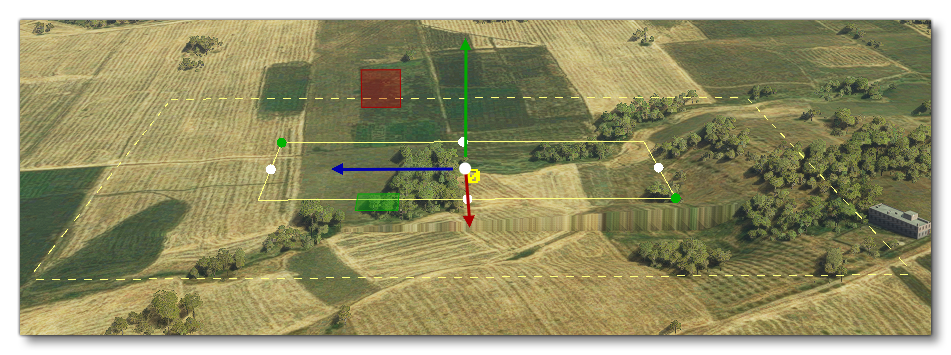
    • Falloff Distance: This sets the distance around the rectangle which will be "feathered", smoothing the difference in altitude between the rectangle terraformer and the surrounding terrain. This is shown in the scene as a dashed line, and the value is in meters.
      The Falloff Distance As Shown In The World Around A Rectangle Object
    • IMPORTANT! When stacking terraforming rectangles, the falloff will only be used for the lowest priority rectangle. All rectangles on top will have their falloff behave as if it was set to 0 and so give the sharpest transition possible
  • Note that this option will be enabled automatically when you create a terrain Profile or add a Heightmap, and disabling the option will also disable any profiles or heightmaps that you have created (although they will not be deleted and enabling the option again will show them)."


Although the MSFS SDK Docs on Rectangles state:
"
  • Width / Length​


    These input fields permit you to precisely set the width and length of the rectangle object element. Values are in meters and will be updated automatically if you change the width and length using the gizmo a the scene."

...I infer that MSFS Rectangles also fall back to 'fixed' sizes since AFAIK, Rectangles are in part based on MSFS' SDK Terrain Quad Grid:

https://www.fsdeveloper.com/forum/threads/flattens.425495/post-633002


Use of Rectangles in multiple scaled sizes may be needed to exclude / modify TIN Photogrammetry at/near ENLX Heliport. :pushpin:

One can assemble a grid of adjacent Rectangles in a mix of sizes to (Terra-) form varying shapes of surfaces / areas of exclusion.


Edges of surfaces / areas of exclusion SDK Terrain Grid Rectangles may be jagged / aliased, and edges of Faces modeled in 3D are also aliased 'vectors'.

One 'may' be able to achieve individual adjacent MSFS SDK Terrain Grid Quad "Rectangle" sizes as small as LOD-27 / QMID-29: :wizard:

Code:
                    Quad      Area    Area    Area
                    Cell      Point   Point   Point
                   Terrain    Quad    Quad   Terrain
                    Grid      LOD     QMID    Grid
                  Interval    Grid    Grid   Interval
LOD  QMID  TMVL   (Meters)    Size    Size   (Meters)
-2     0    8   40,075,468.8    6       8    156,544.8
-1     1    9   20,037,734.4    7       9     78,272.4
 0     2   10   10,018,867.2    8      10     39,136.2
 1     3   11    5,009,433.6    9      11     19,568.1
 2     4   12    2,504,716.8   10      12      9,784.0
 3     5   13    1,252,358.4   11      13      4,892.0
 4     6   14      626,179.2   12      14      2,446.0
 5     7   15      313,089.6   13      15      1,223.0
 6     8   16      156,544.8   14      16        611.5
 7     9   17       78,272.4   15      17        305.8
 8    10   18       39,136.2   16      18        152.9
 9    11   19       19,568.1   17      19         76.4
10    12   20        9,784.0   18      20         38.2
11    13   21        4,892.0   19      21         19.1
--------------------------------------------------------------------------> FS9*
12    14   22        2,446.0   20      22          9.6
--------------------------------------------------------------------------> FS8*
13    15   23        1,223.0   21      23          4.8
14    16   24          611.5   22      24          2.4
--------------------------------------------------------------------------> FSX*
15    17   25          305.8   23      25          1.2
--------------------------------------------------------------------------> P3D*
16    18   26          152.9   24      26          0.6 =(60 cm)
17    19   27           76.4   25      27          0.3 =(30 cm)
18    20   28           38.2   26      28          0.15 =(15 cm)
19    21   29           19.1   27      29          0.075 =(7.5 cm)
20    22   30            9.6   28      30          0.0375 =(3.75 cm)
--------------------------------------------------------------------------> MSFS-2020*
21    23   31            4.8   29      31          0.01875 =(1.875 cm)
22    24   32            2.4   30      32          0.009375 =(9.375 mm)
23    25   33            1.2   31      33          0.0046875 =(4.6875 mm)
24    26   34            0.6   32      24          0.00234375=(2.34375 mm)
25    27   35            0.3   33      35          0.001171875 =(1.171875 mm)
26    28   36            0.15  34      36          0.0005859375 =(0.5859375 mm)
27    29   37            0.075 35      37          0.00029296875 =(0.29296875 mm)

GaryGB
 
Last edited:
Back
Top