

- Messages
- 203
- Country

Hi, sorry if this is in the wrong place, I know this is a commercial product I'm referring to but I'm trying to understand why autogen is being excluded over a large area :S
The answer I had to this from the developer was that there was nothing they could do about it, but no other scenery I've seen had suffered this problem this bad? The airport itself is pretty good I think, but the horrible 2-dimensioned flat tree planes around the airport look terribly amateurish and kill any immersion for me...can anyone shed any light on why this is happening with this scenery and if there is any technical solution please? :s
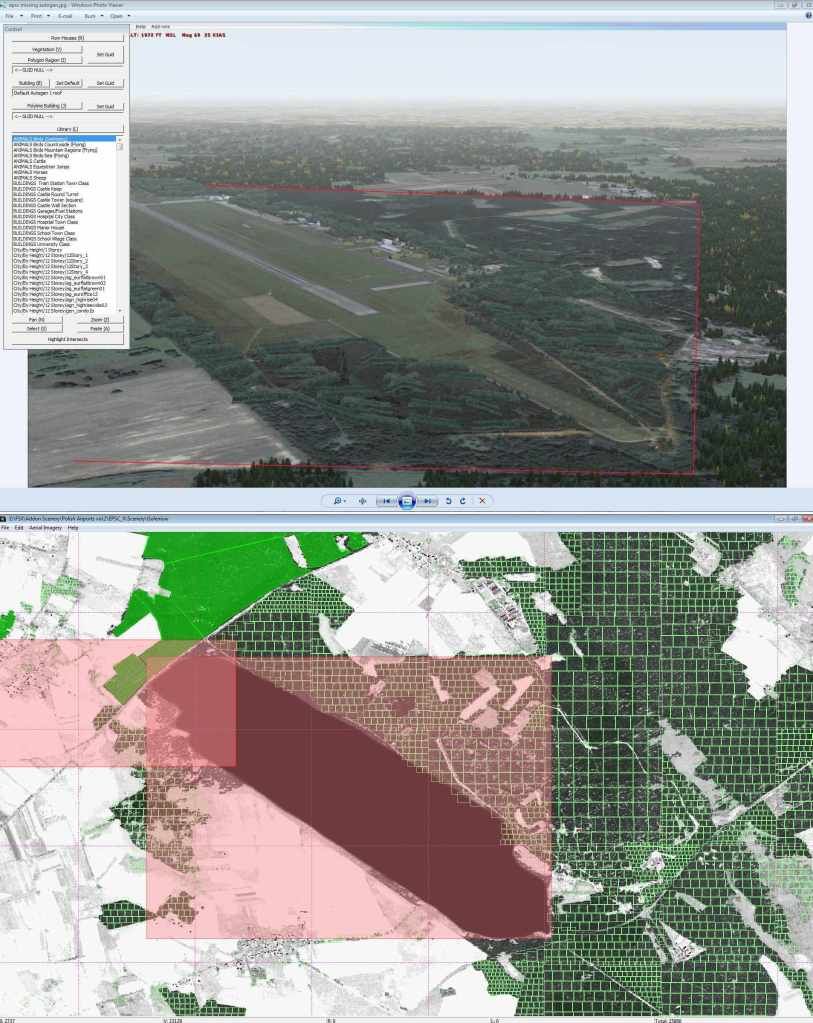
I've included an screenshot showing the mapping of the missing autogen from Autogen Annotator. The red boxes denote the missing areas of autogen shown in the FSX screenshot. The central largest one corresponds exactly to the boundaries of the airport ground layer, which gave rise to a hypothesis that this photoscenery .bgl is causing that 'knock out' of autogen. The other smaller knocked out region foxed me though.
With the EPSC_Ground.bgl (the main airport ground image) inactive, the autogen referred to above in the smaller box to the top left shows properly, but the main central square is still not showing. So one question answered but not the one I was expecting!
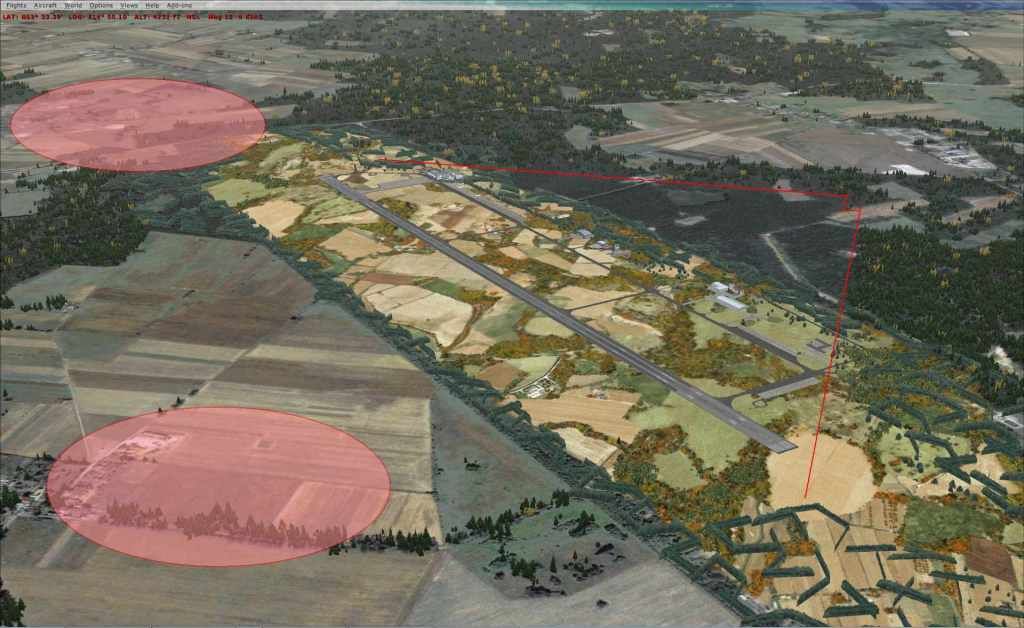
The amended screenshot below shows EPSC without EPSC_Ground.bgl or EPSC_Fence.bgl active. As can be seen from the two shaded elipses, this has brought back a large chunk of the missing autogen. There is still an area missing from the other side of the runway, but it is much smaller than before - this is outlined by the straight red lines.
So I continued disabling bgls to find what's causing the problem on that side of the runway...further investigation reveals:
apronlights.bgl - impacts on autogen
fence.bgl - impacts on autogen
gateFSX.bgl - impacts on autogen
linesFSX.bgl - impacts on autogen
redlights.bgl - impacts on autogen
rwylights.bgl - impacts on autogen
snow_fsx.bgl - impacts on autogen
taxilights.bgl -impacts on autogen
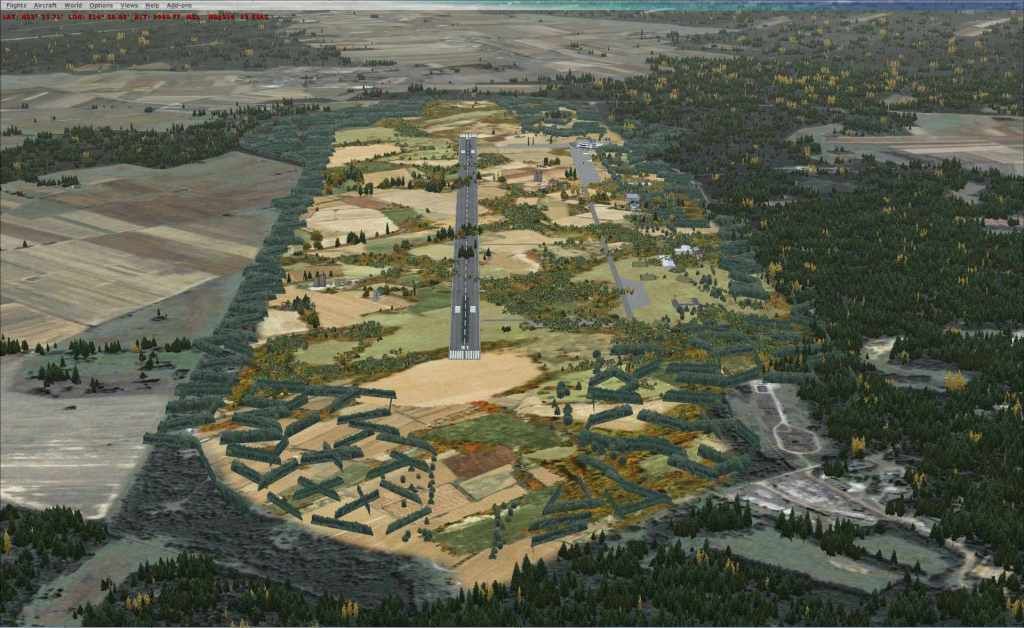
The image above is with only those bgl's inactive. (+EPSC_ground.bgl) As you can see the autogen now covers exactly what annotator says it should.
I tried to get round some of the problems by creating a new layer in the scenery folder and placing just the extended photoscenery and autogen files in that, above the scenery folder containing the airport itself. What I've discovered is that solves the smaller missing autogen square referred to earlier, but not the larger one. That makes sense partially...I think!
One strange thing was I noticed the developer had annotated both photoscenery bgl's fully, despite them overlapping to some extent around the airport. What would be the point of trying to add autogen to the same place twice? Could that be having any effect?
The airport itself is pretty good I think, but the horrible 2-dimensioned flat tree planes around it,which were placed there to try to mask the missing autogen, look terribly amateurish and kill any immersion for me...can anyone shed any light on why this is happening with this scenery and if there is any technical solution please? :s
Sorry for the long post, and thanks for reading!
Kevin
The answer I had to this from the developer was that there was nothing they could do about it, but no other scenery I've seen had suffered this problem this bad? The airport itself is pretty good I think, but the horrible 2-dimensioned flat tree planes around the airport look terribly amateurish and kill any immersion for me...can anyone shed any light on why this is happening with this scenery and if there is any technical solution please? :s
I've included an screenshot showing the mapping of the missing autogen from Autogen Annotator. The red boxes denote the missing areas of autogen shown in the FSX screenshot. The central largest one corresponds exactly to the boundaries of the airport ground layer, which gave rise to a hypothesis that this photoscenery .bgl is causing that 'knock out' of autogen. The other smaller knocked out region foxed me though.
With the EPSC_Ground.bgl (the main airport ground image) inactive, the autogen referred to above in the smaller box to the top left shows properly, but the main central square is still not showing. So one question answered but not the one I was expecting!
The amended screenshot below shows EPSC without EPSC_Ground.bgl or EPSC_Fence.bgl active. As can be seen from the two shaded elipses, this has brought back a large chunk of the missing autogen. There is still an area missing from the other side of the runway, but it is much smaller than before - this is outlined by the straight red lines.
So I continued disabling bgls to find what's causing the problem on that side of the runway...further investigation reveals:
apronlights.bgl - impacts on autogen
fence.bgl - impacts on autogen
gateFSX.bgl - impacts on autogen
linesFSX.bgl - impacts on autogen
redlights.bgl - impacts on autogen
rwylights.bgl - impacts on autogen
snow_fsx.bgl - impacts on autogen
taxilights.bgl -impacts on autogen
The image above is with only those bgl's inactive. (+EPSC_ground.bgl) As you can see the autogen now covers exactly what annotator says it should.
I tried to get round some of the problems by creating a new layer in the scenery folder and placing just the extended photoscenery and autogen files in that, above the scenery folder containing the airport itself. What I've discovered is that solves the smaller missing autogen square referred to earlier, but not the larger one. That makes sense partially...I think!
One strange thing was I noticed the developer had annotated both photoscenery bgl's fully, despite them overlapping to some extent around the airport. What would be the point of trying to add autogen to the same place twice? Could that be having any effect?
The airport itself is pretty good I think, but the horrible 2-dimensioned flat tree planes around it,which were placed there to try to mask the missing autogen, look terribly amateurish and kill any immersion for me...can anyone shed any light on why this is happening with this scenery and if there is any technical solution please? :s
Sorry for the long post, and thanks for reading!
Kevin


