
• Which the release of FS2020 we see an explosition of activity on the forun and of course we are very happy to see this. But having all questions about FS2020 in one forum becomes a bit messy. So therefore we would like to ask you all to use the following guidelines when posting your questions:

    • Tag FS2020 specific questions with the MSFS2020 tag.
    • Questions about making 3D assets can be posted in the 3D asset design forum. Either post them in the subforum of the modelling tool you use or in the general forum if they are general.
    • Questions about aircraft design can be posted in the Aircraft design forum
    • Questions about airport design can be posted in the FS2020 airport design forum. Once airport development tools have been updated for FS2020 you can post tool speciifc questions in the subforums of those tools as well of course.
    • Questions about terrain design can be posted in the FS2020 terrain design forum.
    • Questions about SimConnect can be posted in the SimConnect forum.

    Any other question that is not specific to an aspect of development or tool can be posted in the General chat forum.

    By following these guidelines we make sure that the forums remain easy to read for everybody and also that the right people can find your post to answer it.

Very strange Collision problem

Messages
1,819
Country
australia
Firstly the scenario - a water airport with docks and floatplanes.
I have been trying to add collision box to some areas and cannot get a floatplane to simply bounce away instead of 'climbing' the object and tipping over.

Firstly, I have successfully added a collision box to a mesh and it works (floatplanes bounce off instead of tipping over) BUT only in one place in the scenery.

Refer the image below which shows a tall pier and a dock.

I have a collision box attached to the timber piles/supports for a pier - marked (number) 1 in red.
When I deliberately 'touch' that part of the pier with a floatplane it 'bounces' off the area.

I have created another object (using my pier object) made up of just the timber supports with the collision box attached and placed it in the water next to the pier (marked 2 in red) and once again if a floatplane 'touches' it the floatplane 'bounces' off the same as it does for the total pier. Note I would normally make the material MSFS Invisible but not for the example so that you can see that object.

HOWEVER when I add the exact same object (a duplicate of the one marked 2) and place in over a dock (marked 3 in red) floatplanes do NOT bounce off, they 'climb' the object and tip over.

Any suggestions? Why does the same object work the way I want it to in one area but not another?
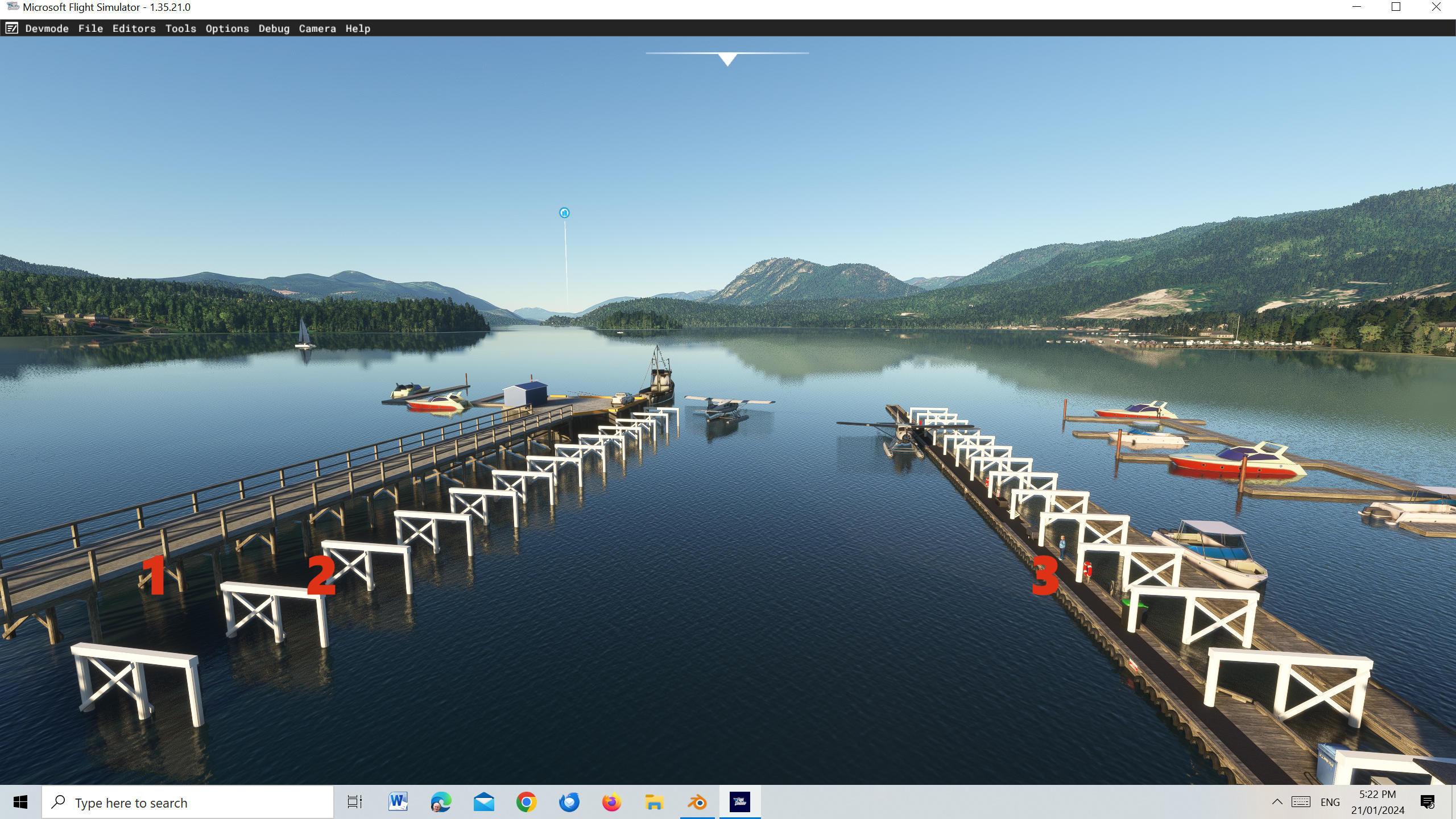

collision_problem.jpg
 
It might help if you could provide another screenshot with the collision (mesh & simple) checked off under Debug in the Dev Toolbar (Make sure you set anti-aliasing to TAA first so it displays accurately). Then we could see exactly what those collisions are doing in the sim. If they are actually positioned and scaled correctly, etc. Collisions always need to be parented under your main mesh (Which should be all of your parts joined together) and the parent mesh also needs to have a scale of 1 (Apply scale in your modeling program). Those are the first two things I would check.
 
Thanks. All my meshes have a scale of 1. Not sure though about having all meshes joined to just 1 as the pier is multiple meshes (with the collider box) attached to just the timber supports mesh (which is an array of supports with the array applied) and in any case the test mesh (of just the supports) is only one mesh and it works as I want in one location but not the other.
I will get some screen shots as requested.

BTW how do I attach a file? I will attached a blender file of my (test for collision) pier supports and added collision box.
 
Last edited:
Here is a screen shot of the floatplane tipped over after attempting to 'climb' the collision box. Anti-Aliasing is set to TAA (in MSFS) and I note that when I have debug collision (simple and mesh) selected the image (more noticeable of the sky) flashes dark and light blue (you can see in the image) which I don't know if that is normal.

collision_problem_screen_shot.jpg
 
You know in my wildest imaginations, I can not come up with a scenario in which Asobo anticipates "water collisions" so I checked the SDK. Voila, now I am an expert on collider meshes and SDK strongly recommends we use collision shapes; rectangle, cylinder, sphere, over meshes/materials. There are as expected, no mentions of water in relation to collisions. I did find this:
IMPORTANT! Collisions will not be properly detected if the vertices are too far from each other, in particular when the object has been scaled by a large amount in the world, or it's geometry hasn't got enough subdivisions.
and this:
col.png


But it strongly seems like an unanticipated circumstance, meaning we're largely on our own.

Collisions always need to be parented under your main mesh (Which should be all of your parts joined together).

You know, I am not familiar with this requirement, are you sure this is not in relation to aircraft modelling, that all elements must be placed into their respective LODs, x0, x1, x2 etc? Because there is a fairly thorough instructional using CDG airport for the example and parenting collision meshes does not appear to be mentioned there. They do go into great detail about instancing, which uses extra nodes, could that be to what you are referring?


Could you link us to your source for the information that collision meshes must be parented to something?
 
Hi Rick. What I find is most unusual though is the fact that the (single mesh) object with the collision box attached results in my floatplane being 'bumped' away when placed in an area of water by itself but when I position that same object over another one (ie the docks) collision results in the floatplane tipping over - it NEVER is simple bumped away. There must be a reason/workaround hopefully. Maybe I will experiment further by joining all meshes together into one mesh (for one of the 'parts' to my dock which is made up of many 9 metre long dock objects placed adjacent to each other) and add a collision box HOWEVER the (total) pier contains many mesh parts not joined.
 
What I find unusual is that a company creating a "flight simulator" has so smooth a brain. Bruce Artwick thought of everything, in comparison, I guess except maybe drones. As to collisions, I would not expect anything to work out linearly. One object working somewhere has no relation to another object, because they are not "objects," they are collections of numbers that have ratios and one objects number ratios are not the same as another's and we have zero information about which specific numbers Asobo modifies to make collision meshes work or not work.

Every individual object is a node and for practicalities sake you should have as few nodes as possible. Individual nodes consume render resources so combining them reduces the bottleneck.
 
Very interesting Rick and maybe that is the reason. It's a pity as I really want collision detection on my docks as a floatplane taxiing through them just doesn't look right. AND a very small bump caused when a parked floatplane on startup and gently bumps the dock sideways results in a crash yet this must happen all the time in real life (a slight bump of the floats against a dock).

I created a new version of one of my dock scenery objects, joined all mesh parts into one mesh and added an MSFS Collision box to it and placed it by itself well away from any other scenery objects I had.

Placed into my scenery and slowly taxied to it and once again the floatplane tried to climb it and tipped over.
It realty beats me that the collision detect does not result in the same floatplane climbing and tipping over for the pier mentioned above.
The blender file for this 'experiment' can be downloaded from https://mega.nz/file/gfFkyA6L#Bran0W4MKE71LuLkiVm6-qDE4Qo0ucYIugvv2FyyLY0

collision_problem_new.jpg


collision_problem_new_blender.jpg
 
It gets even more strange.
I placed my test pier support object well away from all the piers and docks etc and tried again.
This time the floatplane climbed the object and tipped over YET that does not happen with the same object placed between the pier and the docks (where it simply bounces off).

Pity we can't have at least consistency.

Also that perhaps aircraft which GENTLY come in contact with an object with c collision box don't just bounce off instead of crashing. Maybe the powers that be aren't interested floatplanes (which in real life do gently come in contact with docks as do boats as well).
 
Pretty sure I found what Chris had been referring to so hopefully he reads all the thread before digging up the same thing for us.

collide.png


Also, I'd try a mesh. The boxes look bulky and the mesh is going to be the same number of polygons anyway, it conforms much closer and it seems like a strong understanding of this section is necessary to do it all right.

 
Pretty sure I found what Chris had been referring to so hopefully he reads all the thread before digging up the same thing for us.
This might have been the section, but reading through it again I think it's more in relation to 3DS and that exporter, not Blender. I do know that I used to not parent colliders before I read this and I recall them working (appearing to) in Blender, at least mesh colliders (I don't think I knew how to do simple collisions back then). Probably good practice to parent them anyway. You only need them in LOD0.

Also, I'd try a mesh. The boxes look bulky and the mesh is going to be the same number of polygons anyway, it conforms much closer and it seems like a strong understanding of this section is necessary to do it all right.
I've always gotten better detection results using simple collisions. Mesh can be a little more buggy, even if you subdivide it a bunch, but worth a try to see if it behaves any differently.

John, your issue really just seems like a classic case of the sim being the sim. I wonder if it's just coming in at the right angle and the combination of the sim liking to pop the camera or SimObjects up to the top of a collider? Simple shapes are just that, simple. Not much you can tweak on them. Not much you can screw up. Does it behave the same way if you place it on land and taxi the amphib Beaver up to it?

If I come in straight to my docks, I can get the Beaver to pop up onto it. If I come in at a shallow angle, it bumps, but I have had it pop up to the top after bumping enough or if the wind is pushing me into it.
 
Last edited:
Thanks Chris.

I wonder if it's just coming in at the right angle
I have tried coming in at 'right angles' and at oblique angles and also (my pet hate and why I am eager to get 'collision' to work) where the floatplane is parked next to the dock, I start the engine and either a cross wind or the torque of the engine causes the floatplane to 'drift' sideways ever so slowly onto the side of the dock and it tips over. As such I cannot release this airport as freeware with collision boxes unless I set the parking location far enough away from the side of the dock so that sideways drift does not result in the floatplane touching the dock.

AND more importantly this 'problem' ONLY occurs at my Sechelt water airport. I also have water airports created for Whistler and Vancouver harbour where the 'problem' does NOT occur ie the floatplanes bounce off them when they touch.

I have tried both using the Asobo collision box and adding a separate MSFS invisible material with collision set with the same result.

Also once when I got distracted and the floatplane ended up on land it 'crashed' into a building (not mine so must have been an Asobo building) it crashed and tipped up. I don't know it that is normal for an Asobo simobject or scenery object though.

What could cause the problem to only occur at one location I wonder?
Same scenario at each location but different 'actions' when floatplanes touch the docks.
 
I have spent far too long experimenting trying this and that and don't want to waste any more time trying to solve what appears to be the unsolvable.

I now need to decide whether to leave collision boxes in and make sure I place my (dock) parking positions far enough away from the docks and with the nose of the aircraft pointing slightly away from the docks to almost ensure no one will accidently bump a dock on startup (and crash) or leave collision boxes off and allow floatplanes to taxi through the docks which IMHO looks stupid.

I am hoping that Asobo will in a future update of MSFS address this problem.
 
Hi guys, has there been any update on this collision issue? Having the same problem with my docks in my upcoming YRAY scenery.
 
Hi Rick. Using an existing freeware water airport (available at flightsim.to) I 'disassembled' and found that the author had used a separate (Blender) 'invisible' mesh cube and shaped it like this (basically a cube rotated on the X (or Y depending on which way you have it) axis 45 degrees_ -

collision.jpg


which when with material set to MSFS invisible and with 'collision' ticked and positioned (in my case) along a floating dock with the edges marked about at water level results in floatplanes 'bumping' off the dock instead if trying to 'climb' the dock and tipping over.
I spent many many hours fiddling around with the (blender) flight simulator collision box and also a regular shaped elongated cube without success. Yet both of them work with other objects which makes me now wonder if the 'mass' of the object (being 'protected') has an effect of what happens in MSFS. Anyway the method above 'works like a charm' for me.
I hope this helps.
BTW which area are your docks at? Somewhere in Australia?
 
Hi Rick. Using an existing freeware water airport (available at flightsim.to) I 'disassembled' and found that the author had used a separate (Blender) 'invisible' mesh cube and shaped it like this (basically a cube rotated on the X (or Y depending on which way you have it) axis 45 degrees_ -

View attachment 91804


which when with material set to MSFS invisible and with 'collision' ticked and positioned (in my case) along a floating dock with the edges marked about at water level results in floatplanes 'bumping' off the dock instead if trying to 'climb' the dock and tipping over.
I spent many many hours fiddling around with the (blender) flight simulator collision box and also a regular shaped elongated cube without success. Yet both of them work with other objects which makes me now wonder if the 'mass' of the object (being 'protected') has an effect of what happens in MSFS. Anyway the method above 'works like a charm' for me.
I hope this helps.
BTW which area are your docks at? Somewhere in Australia?
Hi jgarnold,

Thanks will try and test tonight using this method, appreciate it. Like you I've done everything so far, from invisible meshes, to subdivided invisible meshes and normal asobo collision gizmos.

Yes so I'm currently about to wrap up development on my debut scenery YRAY Sydney Seaplanes in Sydney,AU. Check it out in the showroom


Best regards,
Rick
 
Very nice scenery. I wished I could do that especially the interiors which I have never really attempted as I considered that they would possibly never be seen.
[added later]
Aha I now note that it will be released as payware and with the obvious amount of work you have put in I agree it deserves to be payware.
I never new that there was such a floatplane base at Rose Bay and I live in the Sydney area (I was aware of Sydney Seaplanes but not the modern base).
An old schoolfriend flew out of Rose Bay in a Ansett Sandringham seaplane to Lord Howe Island on his honeymoon around 1970.
 
Last edited:
Very nice scenery. I wished I could do that especially the interiors which I have never really attempted as I considered that they would possibly never be seen.
[added later]
Aha I now note that it will be released as payware and with the obvious amount of work you have put in I agree it deserves to be payware.
I never new that there was such a floatplane base at Rose Bay and I live in the Sydney area (I was aware of Sydney Seaplanes but not the modern base).
An old schoolfriend flew out of Rose Bay in a Ansett Sandringham seaplane to Lord Howe Island on his honeymoon around 1970.
Hi jgarnold,

Yes I’ve actually registered a company to make this addon thing my side gig. Yes I think YRAY is often under the radar, particularly with people who aren’t local to the area. They’ve really made that whole Bay Area nice, so I’ve tried to capture it as best as I can.

Regarding the collision, yes it’s not 100% but it’s much better now. I think it’s time to communicate with Asobo on my part so that they can look into it.
 
I suggest you experiment with the 'shape' of the collision 'box. ie start with an elongated cube, rotate 45 degrees which ever axis the length is on and then 'flatten' it ie the height is smaller than the width hope you understand. Also it worked better for me with the (long) horizontal edge in line with the edge of the dock and positioned so that edge is just below the water level AND 'protruding' past the dock in to the water so that the floatplane pontoons don't actually continue into the dock before bumping off.
Also did I point out that I have my collision box as a separate object which I then add to my PackageSources and place using Devmode (I don't have it together with my dock object in Blender). Not sure if this makes any difference.

Good idea that someone contacts Asobo as both the Blender Collision box and a mesh cube with material set to invisible and collision box selected/'ticked' works sometimes and sometimes not.
I have developed a few water airports and have a variety of 'collision box' types as they were the only ones I could get to work at that particular water airport docks and also where they are situated.

At one of my airport packages the Blender collision box works perfectly 'attached' to a pier but if I make a copy of it (the added 'collision box) and place anywhere else (in the package) it doesn't work. How crazy is that?

There doesn't seem to be many people out there who seem to be able to help maybe because people like you and me who develop water airports are 'far and wide' or don't bother with collision boxes with their docks (I have downloaded the odd scenery package which allows floatplanes to taxi straight through their docks which looks rather silly.

Take a screen shot in Devmode with the collision box selected and post here so I can compare with what I did to get it to work.
 
Back
Top