• Which the release of FS2020 we see an explosition of activity on the forun and of course we are very happy to see this. But having all questions about FS2020 in one forum becomes a bit messy. So therefore we would like to ask you all to use the following guidelines when posting your questions:

    • Tag FS2020 specific questions with the MSFS2020 tag.
    • Questions about making 3D assets can be posted in the 3D asset design forum. Either post them in the subforum of the modelling tool you use or in the general forum if they are general.
    • Questions about aircraft design can be posted in the Aircraft design forum
    • Questions about airport design can be posted in the FS2020 airport design forum. Once airport development tools have been updated for FS2020 you can post tool speciifc questions in the subforums of those tools as well of course.
    • Questions about terrain design can be posted in the FS2020 terrain design forum.
    • Questions about SimConnect can be posted in the SimConnect forum.

    Any other question that is not specific to an aspect of development or tool can be posted in the General chat forum.

    By following these guidelines we make sure that the forums remain easy to read for everybody and also that the right people can find your post to answer it.

MSFS20 Wrong shadows orientations

Messages
10
Country
russia
Greetings! I've searched the forum and found no answer to my question....
I'm new to the development, so it's obvious that I'll end up with some troubles.
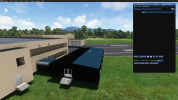
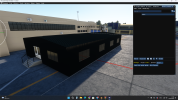
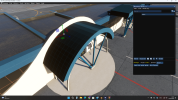
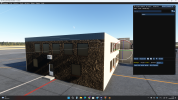
Trouble is shadows on my object... What did I wrong?
Please help. I'm out of thoughts. I checked face orientation in Blender all good.

I think this is smth about normal maps, but I'm not sure to be honest.
Thanks in advance, really looking forward to your suggestions🙏
Снимок экрана (209).png
 

Attachments

  • Снимок экрана (210).png
    Снимок экрана (210).png
    3.7 MB · Views: 172
  • Снимок экрана (211).png
    Снимок экрана (211).png
    3.7 MB · Views: 170
  • Снимок экрана (212).png
    Снимок экрана (212).png
    3.3 MB · Views: 175
  • Снимок экрана (213).png
    Снимок экрана (213).png
    1.5 MB · Views: 166
My first thought was to go to Edit mode, select all, Mesh | Normals | Recalculate Outside. But you say you checked the normals orientation. To check if the normal texturing is OK, just export without the normal textures in the Materials, and see if the problem is there.
 
Are your normal maps all DirectX and not OPENGL? also make sure your AO channels are correct.
Yeah, I cheked it, and where I can see it, I changed them from OpenGl to DirectX. As you can see on the pictures below not so much of a result...
About AO I cheked everything in green channel with alpha channel.
And lastly about Flipped Normals sending screenshot from blender
 

Attachments

  • Снимок экрана (220).png
    Снимок экрана (220).png
    1 MB · Views: 166
  • Снимок экрана (219).png
    Снимок экрана (219).png
    1 MB · Views: 173
  • Снимок экрана (218).png
    Снимок экрана (218).png
    2.9 MB · Views: 180
  • Снимок экрана (217).png
    Снимок экрана (217).png
    3.4 MB · Views: 186
  • Снимок экрана (216).png
    Снимок экрана (216).png
    3 MB · Views: 181
  • Снимок экрана (215).png
    Снимок экрана (215).png
    2.9 MB · Views: 197
My bad. I mean Roughness. AO wasn't presented in textures set, so I didn't make any Red Channel at all. Only Blue and Green.
But I completely flipped textures from a good one, and I've got pretty same result (Photo 2). This Texture is got the AO and works absolutely fine on the same objects. (Photo 3) Mb It's not textures afterall... I'm so confusedo_Oo_O
UPD. I Also set all metallnes value in Blender to 0. Got a little bit better, but not so much (Photo 4). Also this fragment had no metallness or AO at all, only roughness value.:(
 

Attachments

  • MetalPlates_1K_AORM.jpg
    MetalPlates_1K_AORM.jpg
    59.7 KB · Views: 157
  • Снимок экрана (221).png
    Снимок экрана (221).png
    3.3 MB · Views: 178
  • Metal_Roof_1k_RM.png
    Metal_Roof_1k_RM.png
    3.1 MB · Views: 193
  • Снимок экрана (224).png
    Снимок экрана (224).png
    3.2 MB · Views: 178
Last edited:
Send me your RGB texture. Your AO is in your R channel.
So, A little update of this problem. So the problem was in AO. After I've made AO map by myself and made united AORM maps everything is good.
But, the arches have had that wierd shadows... So I unwraped UV Maps and added Shade Smooth. I guess that's finally solved my problem. At least It's not looking terrible right now😅
Thank you for the help! It's so nice to have a place where I can get a help!👍
Rick, thank you especially, you've set me to the right path!🤝:)
 

Attachments

  • Снимок экрана (227).png
    Снимок экрана (227).png
    3.1 MB · Views: 168
  • Снимок экрана (229).png
    Снимок экрана (229).png
    3 MB · Views: 183
  • Снимок экрана (231).png
    Снимок экрана (231).png
    3.4 MB · Views: 177
  • Снимок экрана (234).png
    Снимок экрана (234).png
    3.2 MB · Views: 178
Back
Top