
-
Which the release of FS2020 we see an explosition of activity on the forun and of course we are very happy to see this. But having all questions about FS2020 in one forum becomes a bit messy. So therefore we would like to ask you all to use the following guidelines when posting your questions:
- Tag FS2020 specific questions with the MSFS2020 tag.
- Questions about making 3D assets can be posted in the 3D asset design forum. Either post them in the subforum of the modelling tool you use or in the general forum if they are general.
- Questions about aircraft design can be posted in the Aircraft design forum
- Questions about airport design can be posted in the FS2020 airport design forum. Once airport development tools have been updated for FS2020 you can post tool speciifc questions in the subforums of those tools as well of course.
- Questions about terrain design can be posted in the FS2020 terrain design forum.
- Questions about SimConnect can be posted in the SimConnect forum.
Any other question that is not specific to an aspect of development or tool can be posted in the General chat forum.
By following these guidelines we make sure that the forums remain easy to read for everybody and also that the right people can find your post to answer it.
You are using an out of date browser. It may not display this or other websites correctly.
You should upgrade or use an alternative browser.
You should upgrade or use an alternative browser.
Place lights
- Thread starter MyPC8MyBrain
- Start date


Hello Arno,
Sorry if I insist, but I'm going crazy trying to figure out where I'm wrong ...
unfortunately still have the problem of the poles turned 90 ° with respect to the road ...
If I place the poles with agn and guid:
PLACEPOINTSALONGLINE|FTYPE=LINE;highway=tertiary|50|5|type|light|hdg
CREATEAGNLIBOBJ|FTYPE=POINT;type=light|{0017a263-464f-14fd-f77f-2996fed44864}|hdg|6;6
It works perfectly the stakes are in place over the road.
If I place objects with:
PLACEPOINTSALONGLINE|FTYPE=LINE;highway=tertiary|50|5|type|light|hdg
CREATEXMLLIBOBJ|FTYPE=POINT;type=light|{47c97ced-c4e6-4e4b-8e9f-b110989eea62}|hdg|6;6|noautogensup
the poles are parallel to the road in the wrong position??
Possible that only I have this problem? Any idea?
The place of evidence is always Schiermonnikoog, i send you the file BGL if you want to try it, or create you and it look on my pc.
I do not know what else to search .....
Anto80.
P.S. I use FSX....
Attachments


Last edited:
The object is AG_lightpole default in the library of FSX, which is located
in C: \ Program Files (x86) \ Microsoft Games \ Microsoft Flight Simulator X \ Scenery \ Global \ scenery.
I tried to rotate the object 90 degrees. I tried to put it lying down, but in FSX seems to have no effect, the object is always in the same position I used for swirling ModelCoverter and resaved the library with the same name autogen.bgl.
But no change seems to work ...
It may be that I modify the library that is not the right one?
The object ag_lightpole guid (47c97ced-c4e6-4e4b-8e9f-b110989eea62) I find in autogen.bgl
The only thing I did was to add a particle to the light.
Excuse the inconvenience...
Antonio.
in C: \ Program Files (x86) \ Microsoft Games \ Microsoft Flight Simulator X \ Scenery \ Global \ scenery.
I tried to rotate the object 90 degrees. I tried to put it lying down, but in FSX seems to have no effect, the object is always in the same position I used for swirling ModelCoverter and resaved the library with the same name autogen.bgl.
But no change seems to work ...
It may be that I modify the library that is not the right one?
The object ag_lightpole guid (47c97ced-c4e6-4e4b-8e9f-b110989eea62) I find in autogen.bgl
The only thing I did was to add a particle to the light.
Excuse the inconvenience...
Antonio.
Attachments

Hi,
Well, if it is not an object you made yourself than modifying it is not a good idea.
I'll see if I can add an option to add an offset to the heading after my vacation.

Ok Arno,forget about it, obviously there is something wrong in my pc.
I have create the object for my scenery, rotate position correct in ModelConverter, given a new guid, guid changed
in the XML file it generates scenproc, recompiled and now the object is perfect.
I shall use objects outside of the default library and so solve the problem.
What I do not understand where he is my problem.
Does not matter ...
Thank you for everything you do for us.
Good holidays to you too.
Antonio.
In these shots the position is correct.
Attachments


- Messages
- 203
- Country

over my head!
Gentlemen, this looks absolutely beautiful and I'd love to have a go, but I wonder if someone could pen a short tutorial from start to finish for those of lesser intelligence such as myself to follow please?
Sorry for being a newb with scenproc
Cheers k
Gentlemen, this looks absolutely beautiful and I'd love to have a go, but I wonder if someone could pen a short tutorial from start to finish for those of lesser intelligence such as myself to follow please?
Sorry for being a newb with scenproc
Cheers k

- Messages
- 596
- Country

Arno is on vacation for time being
my quick tutorial is on first post
read through thread to figure things out with scenproc
my quick tutorial is on first post
read through thread to figure things out with scenproc
Last edited:
- Messages
- 596
- Country
i had to show how far this got; thanks to Arno and Vitaly's help and creativity
everything in the pics was produce with scenProc, including ground splash effect


Chris,
everything in the pics was produce with scenProc, including ground splash effect
Chris,
Last edited:
- Messages
- 596
- Country
a quick night flight through Israel's coastline with new iCVFR lighting effects
http://www.youtube.com/watch?v=v06xplXS06U&hd=1&noredirect=1
Enjoy
Chris
http://www.youtube.com/watch?v=v06xplXS06U&hd=1&noredirect=1
Enjoy
Chris
- Messages
- 596
- Country
im looking for advice on how to correct the zigzag effect when placing road lights
i believe this only accrues with trunk roads where there are two parallel roads
one in each direction, next to each other
i think placement start in the direction the traffic flows;; which creates "sig sag" patterns
since starting point aren't the same
anyway to get around this?

Regards
Chris
i believe this only accrues with trunk roads where there are two parallel roads
one in each direction, next to each other
i think placement start in the direction the traffic flows;; which creates "sig sag" patterns
since starting point aren't the same
anyway to get around this?
Regards
Chris
Last edited:

- Messages
- 3,278
- Country

Very cool, I hope you get the fix for those sig_sag ligts, which data you have to get those city and road lights ?
Hi,
That feature is still on the to-do list. I had a quick look at it, but implementing it was not super easy. I need to recode the existing implementation quite a bit.
No problem, Arno, I will ask my friend to make a tool for changing scaling and heading values in XML-file.
Last edited:
Thank you, Arno.
My friend Michail made a small tool for randomizing of scale, heading and add/remove NoShadow and NoCrash options. Just drag'n'drop XML-file on the EXE-file, enter ranges of randomization, check/uncheck boxes and press Update. New file will be generated with suffix _New.
http://www.mediafire.com/download/7xj7lffglyo91gv/XML_Randomizer.zip
Here is the result:
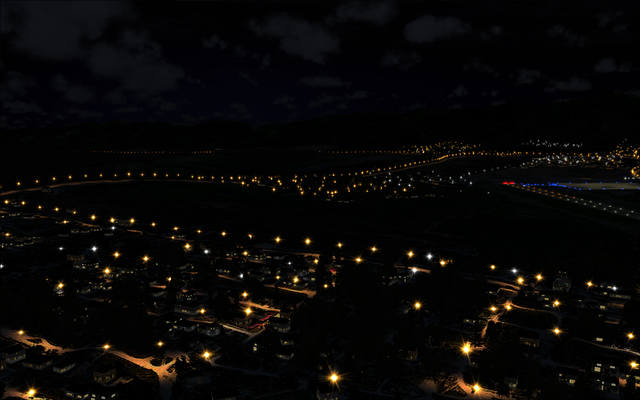
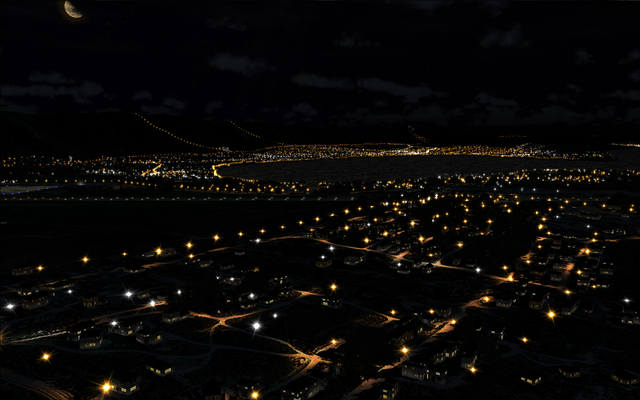
My friend Michail made a small tool for randomizing of scale, heading and add/remove NoShadow and NoCrash options. Just drag'n'drop XML-file on the EXE-file, enter ranges of randomization, check/uncheck boxes and press Update. New file will be generated with suffix _New.
http://www.mediafire.com/download/7xj7lffglyo91gv/XML_Randomizer.zip
Here is the result:
Last edited:
- Messages
- 3,278
- Country
very cool the output Operator, and thanks for the link, sorry for my dumbness, but when you say randomizing of scale, what do you mean ?