• Which the release of FS2020 we see an explosition of activity on the forun and of course we are very happy to see this. But having all questions about FS2020 in one forum becomes a bit messy. So therefore we would like to ask you all to use the following guidelines when posting your questions:

    • Tag FS2020 specific questions with the MSFS2020 tag.
    • Questions about making 3D assets can be posted in the 3D asset design forum. Either post them in the subforum of the modelling tool you use or in the general forum if they are general.
    • Questions about aircraft design can be posted in the Aircraft design forum
    • Questions about airport design can be posted in the FS2020 airport design forum. Once airport development tools have been updated for FS2020 you can post tool speciifc questions in the subforums of those tools as well of course.
    • Questions about terrain design can be posted in the FS2020 terrain design forum.
    • Questions about SimConnect can be posted in the SimConnect forum.

    Any other question that is not specific to an aspect of development or tool can be posted in the General chat forum.

    By following these guidelines we make sure that the forums remain easy to read for everybody and also that the right people can find your post to answer it.

Place lights

Hi,
If you add the SPLITGRID step back in the configuration file you will get multiple files based on the grid size given. Instead of AGN you can also type the desired size in degrees.
Thank you, Arno.
I tried to leave SPLITGRID|AGN step, but ScenProc starts to generate too many XMLs and, finally, crashes to desktop.
Now I'm experimenting with fixed values instead 'AGN'. When I write 0.1;0.1, I have 12 BGLs.
 
Last edited:
Thx Clutch & Arno,

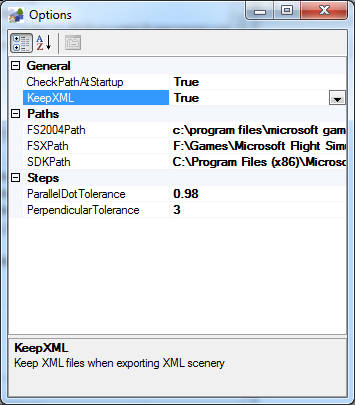
not sure if this is possible; it would be very useful to be able to pass "Type" to XML as well as "ALT"
with these enabled; the only need for XML output is to save time when testing with different GUID's


Chris,
 
Hi Chris,

What do you mean with type here? The altitude type (AGL or MSL)?
 
i apologies Arno,
i believe i mixed two unrelated functions in my head :o

i was thinking about when creating roads, we need to pass type for direction and lane width


Chris,
 
Hi,

I have made the two changes now. So in the next development release you can keep the XML files while exporting and specify the altitude when creating XML objects.
 
Thank you very much Arno, much appreciated!

are the files still updated every night?

Chris,
 
Last edited:
Hello Arno, I saw the placement of lights as objects, excellent
so there is no need to make the files AGN.

How ever to make the agn (autogen) with the object light pole and scenproc
PLACEPOINTSALONGLINE | FTYPE = LINE; highway = secondary | 150 | 5 | type | light | hdg
CREATEAGNLIBOBJ | FTYPE = POINT, type = light | {0017a263-464f-14fd-f77f-2996fed44864} | hdg | 6; 6
using the guid
{0017a263-464f-14fd-f77f-2996fed44864}
here is correct, the light poles are upon the road because I have turned by 90 °
the object in the file / scenery / global / autogen.bgl
otherwise they are parallel to it.


if you want create an object
CREATEXMLLIBOBJ | type = licht | {47c97ced-c4e6-4e4b-8e9f-b110989eea62} | hdg
using the guid
{47c97ced-c4e6-4e4b-8e9f-b110989eea62}
is not the same object?
But there is a problem: the piles should turn 90 ° to be corrected.

If using {0017a263-464f-14fd-f77f-2996fed44864} don't work.

Sorry for my english....

Anto.
 
Hi,

When creating autogen objects you don't call the object guid, but the autogen class guid. That's why the two different examples have a different guid value.

For the autogen lights I am sure that they are correct along the road in my test scenery. I don't have to rotate them. Are you using fsx as well or fs2004?
 
HI,
I use FSX sp2.....

"When creating autogen objects you do not call the object guid, but the autogen class guid. That's why the two different examples have a different guid value."

OK I understand ....

Regarding the wrong orientation of 90 ° you're right ... I put the original file autogen.bgl and actually are right now without the need to turn 90 degrees ....
I do not understand why at the beginning of this year when I tried to put the lights were turned by 90 degrees??
Perhaps in the meantime you correct this problem?
Or when I added the effect (luce.FX particle) to the light pole in autogen.bgl I did something wrong and here the stakes were wrong by 90 °.
Since then I have done more tests because I put the poles as single objects created by me. This is in place.
example poles right in AGN file in the shot


The problem remains that if I do the file texel_light_0.bgl as your example:
# Example XML place lights
#
IMPORTOSM | texel.osm | * | highway
#
PLACEPOINTSALONGLINE | FTYPE = LINE; highway = secondary | 150 | 5 | type | light | hdg
#
CREATEXMLLIBOBJ | type = light | {47c97ced-c4e6-4e4b-8e9f-b110989eea62} | hdg | NOAUTOGENSUP
#
EXPORTBGL | FSX | texel_light | C: \ flightsim \ FSX \ Addon scenery \ scenery [/ quote]

the light poles are wrong from the road always the fault of 90 ° ....?
here with one shot with the poles in the wrong texel_light_0.bgl


The interesting aspect that scenproc save the file texel_light_0.xml
which I find very useful ....

Thank you.
Anto. :)
 

Attachments

  • agnfile.jpg
    agnfile.jpg
    102.3 KB · Views: 675
  • lucebgl.jpg
    lucebgl.jpg
    101.9 KB · Views: 695
Hello Arno

Thank you again for this valuable addition

Ive been testing the with new EXPORTBGLGP
unfortunately i wasn't able to create the file yet
the process fail at the end writing the file
i will submit through the debugger so you have all the info needed

one other issue comes in mind
if it would be possible to pass ALT="x" through CREATEXMLLIBOBJ instead EXPORTBGLGP
we who'd then be able to specify different ALT parameter for multiple object sets

Thank you in advance


Chris,
 
Last edited:
Hi Chris,

I am not sure if I understand your comment about the altitude.

To export XML object you need EXPORTBGL, not EXPORTBGLGP. That last one is for ground polygons only and will not export XML objects.

Like I wrote a few days ago, you can now specify the altitude in the CREATEXMLLIBOBJ step. You can either specify the altitude value or the name of the attribute that contains the altitude. That last approach allows you to have a different altitude per object, as long as your data contains the values.
 
Thank you for your prompt response and explanation Arno

my ALT mix up rooted from using the wrong command; as you pointed out

i just looked again and saw the updated string as you mentioned
run the job again with correction and a successful completion
a bgl file was created with correct ALT, xml was still deleted
am i missing a step to save the XML file other than
EXPORTBGL|fsversion|basename|folder ?


Chris,
 
Last edited:
Hi, Arno.
Is it possible to make the points placing more randomly? It means their spacing, offset, altitude and scaling. Here is an example code:

Code:
PLACEPOINTSALONGLINE|filter|distanceMIN;MAX|offsetMIN;MAX|attribute|value|headingAttr
CREATEXMLLIBOBJ|filter|objectGuid|headingAttribute|altMIN;MAX|scalingMIN;MAX|NoAutogenSuppression

It might be very useful to light placing.
 
Last edited:
Hi, I see what you mean. I'll have a look if I can implement it.

Send from my phone using Tapatalk, so excuse the short sentences and possible typos
 
Hello.

I have used Arno's code with success and also tried to adapt to export as AGN instead with limited sucess.

This code will: Import my current AGN files. Import a shapefile with the roads. It'll then follow Arno's code to place points along a line. Now instead of creating a XML lib object, it'll create AGN lib object.

It'll then export new AGN files into the export folder.

I created a test light using the same GUID as supplied and have my bgl file placed in fsx\scenery\global\scenery

Using the original XML export, it shows up fine. But I want to use as autogen as people say have less fps impact. Using the edited code I posted above, it exported the AGN file successfully, apparently anyway, as when I decompile the AGN file with agn2txt I see the objects and their guid code at the bottom, BUT it does not appear in FSX.

I think I need to edit one of those autogen.xml or default.xml files to include my new autogen object's GUID or something right? Can someone point me in the right direction for this?

BTW I copied the FS2004 output of the code, as I use both sims, so if you can tip me for both fs2004 and fsx that would be even better :D

Code:
#
IMPORTAGN|C:\mdlconverterx\agnimp
IMPORTSHP|roadsforlights.shp|*|NOREPROJ
#
SPLITGRID|AGN|*
#
SETAGNBUILDINGHEIGHT|*|0.4;0.3;0.2;0.1
SETAGNVEGETATIONSETTINGS|*|1|2|0.5|1|12;22|14;26
#
PLACEPOINTSALONGLINE|*| 150|5|type|licht|hdg
#
CREATEAGNLIBOBJ|type=licht|{47c97ced-c4e6-4e4b-8e9f-b110989eea62}|hdg|6;6
#
WRITEAGNFILES|FS2004|C:\mdlconverterx\agnexp
 
Hi,

To have both fsx and fs2004 output the only difference would be that you enter the correct version when writing the agn files. Be aware that fsx can have different autogen types than fs2004 though.

Since you only add library objects, I would not change the building height or vegetation type of the autogen. That might give unexpected results.

Then to your main question. The agn library objects indeed refer to an object class from the default.xml file, not to the object guid from your library. So that's why it is not working now. You need to modify the default.xml file to use your own object in the autogen.

It is probably easiest to just copy an existing entry. Give it a new guid and update the guid of the library object that is being called. Be aware that the entries are organized by geographic regions.
 
Back
Top