• Which the release of FS2020 we see an explosition of activity on the forun and of course we are very happy to see this. But having all questions about FS2020 in one forum becomes a bit messy. So therefore we would like to ask you all to use the following guidelines when posting your questions:

    • Tag FS2020 specific questions with the MSFS2020 tag.
    • Questions about making 3D assets can be posted in the 3D asset design forum. Either post them in the subforum of the modelling tool you use or in the general forum if they are general.
    • Questions about aircraft design can be posted in the Aircraft design forum
    • Questions about airport design can be posted in the FS2020 airport design forum. Once airport development tools have been updated for FS2020 you can post tool speciifc questions in the subforums of those tools as well of course.
    • Questions about terrain design can be posted in the FS2020 terrain design forum.
    • Questions about SimConnect can be posted in the SimConnect forum.

    Any other question that is not specific to an aspect of development or tool can be posted in the General chat forum.

    By following these guidelines we make sure that the forums remain easy to read for everybody and also that the right people can find your post to answer it.

What tolerance is in Scenproc for (not quite) right angles and paralel lines?

Messages
115
Country
australia
What tolerance is in Scenproc for (Not quite) right angles and paralel lines?

Often Processed or hand drawn building polys are not quite rectangular.

For example, if you use Global mapper to convert raster buiding shapes to vector areas, the polys are like sawtooth edged rectangle. Once smoothed out the polys are rarely good rectangles with perfect parellel lines of right angles, and can be quite messy if the building plan is more complex.

Is there a built in tolerance for what is a 90 Degree angle and parallel line or does it consider anything not exactly aligned/square as non-parallel/square?

cheers

Braedon
 
Most steps work with a bounding rectangle that fits around the polygon. Or are you referring to the attributes about the number of perpendicular edges? These have a build in tolerance indeed.
 
The bounding rectangle will work for most situations, but I was more concerned with the FNUMPERANG and the one for Parallel line checking. if the raw output from Global Mapper is used, the bounding rectangle will (AFAICT) take the right angle on one of the edges and use it as the basis of the bounding area. As the lines are a jagged representation of an otherwise straight line, and often the corners are quite flat with many points in a straight line vertically or horizontally, so the bounding rectangle will be much larger than the actual poly for any house not in an N-S or E-W orientation.

upload_2017-7-10_18-33-41.png


In the picture above, the jagged polys are how Global Mapper converts Google Maps raster building polys to vector polys. There is a corresponding 'simplified' poly for each (with fewer vertices) that, even a casual glance will show, often does not have perpendicular or parallel lines. The values in the simplified polys are the maximum distance that a pixel is away from any other pixel to be in consideration for a straight line. I have some far more mangled shapes in the real dataset. You can also see that some of the polys have clipped corners in the simplified version and not many angles are square.

I'm about to do a test on what scenproc does with the raw (jagged) GM polys and see if it processes better than Global Mapper.

Braedon
 
Hi,

For the FNUMPERANG the tolerance is 3 degrees. For the parallel edges a dot product of 0.98 is used as tolerance.

With the jagged edges from a raster image these attributes won't work well indeed, it will count all the edges separately.
 
I wonder if QGIS has any options for Raster to Vector conversion that can be tweaked to avoid the jagged edges. Global mapper lets you specify colour and 'fudge factor' for the colours to class as matched, but not for smoothing out the jagged edges.

Or Scenproc feature detection itself for that matter I guess...??

cheers

Braedon
 
The feature detection function of scenProc will smooth automatically for you, it uses the simplify option of GDAL for that. It's on the wishlist to add this smoothing as a separate step as well.

You can also use it on the command prompt with ogr2ogr if you want.
 
http://www.fsdeveloper.com/forum/th...-angles-and-paralel-lines.440519/#post-776416

The feature detection function of scenProc will smooth automatically for you, it uses the simplify option of GDAL for that. It's on the wishlist to add this smoothing as a separate step as well.

You can also use it on the command prompt with ogr2ogr if you want.

Hi Arno:

So, IIUC, when we process a vector 'building footprint' data set derived from raster source in a 3rd party application, ScenProc can not currently perform "smoothing" (aka "anti-aliasing") on that imported 3rd party vector data set ?


And IIUC, ScenProc can currently perform "smoothing" on a imported 3rd party 'building footprint' Raster data set, but only if ScenProc itself performs the Raster-to-Vector derivation and conversion via ScenProc's own 'feature detection' processes ?


If that is (currently) the case, and we wish to test using the "simplify option of GDAL" ..."on the command prompt with ogr2ogr", what command line syntax must we use to do this ? :scratchch


FYI: Some of us may wish to perform the Raster-to-Vector derivation / conversion of building footprints in ex: Global Mapper or another 3rd party GIS application external to ScenProc.


For example, some of us may wish to perform the Raster-to-Vector derivation / conversion / anti-aliasing of building footprints in QGIS (which reportedly supports Vector layer transparency and anti-aliasing, enhanced vector editing, including copy, cut, paste, snapping and vertex editing):

https://docs.qgis.org/2.6/en/docs/training_manual/complete_analysis/raster_to_vector.html

https://gis.stackexchange.com/questions/170143/how-to-anti-alias-raster-data-in-qgis


...or via ex: Geo-rectified output from WinTopo, Vector Magic, Corel Power Trace, or the freeware Inkscape (via Potrace and MkBitmap) etc.. ;)

http://wintopo.com/

http://wintopo.com/features.htm


NOTE: WinTopo freeware version is also available (but requires manual Geo-rectification of files derived from a output Vector format file):

http://wintopo.com/wintopo-freeware.htm

http://wintopo.com/freeware-example1.htm


https://vectormagic.com/comparisons

http://learn.corel.com/tutorials/convert-images-to-vector-files-quickly-and-easily-with-powertrace/

https://inkscape.org/en/

http://potrace.sourceforge.net/

http://potrace.sourceforge.net/mkbitmap.html

http://wiki.openstreetmap.org/wiki/User:TomChance/VectorisingStreetView


BTW
: Whereas Global Mapper and/or ArcGIS may not yet have implemented capabilities for anti-aliasing of Vector objects, QGIS apparently has implemented more extensive capabilities for Vector anti-aliasing:

http://cartogeographers.blogspot.com/2015/09/how-to-replicate-qgis-vector-smoothing.html


Additionally, some of us may also wish to convert a Land Cover Classification or Tree type data from Raster to Vector in QGIS, for use in establishing more accurate 'weightings' in the output of AGN Vegetation Polygons via ScenProc.

https://fromgistors.blogspot.com/2013/06/classification-from-raster-to-vector.html

http://www.qgistutorials.com/en/docs/raster_mosaicing_and_clipping.html


Others may have "Clipping Path" vector data sets derived from semi-automatic "Magic Wand" color selection areas composited and converted from a raster graphics application, that they have Geo-rectified, and would like to process with ScenProc. :idea:


Thanks in advance for any further clarification you might offer regarding our options / work-flow for performing this step inside- or (partially) outside- ScenProc, as a prelude to the (subsequent) steps to be performed inside ScenProc ...also under discussion in another thread here: :)

http://www.fsdeveloper.com/forum/threads/replace-building-by-rectangles-updated.429564/#post-776435


GaryGB
 
Last edited:
Hi Gary,

You are right. At the moment the simplification is only done when you let scenProc vectorize the data. If you do that in another tool, you have to take care of the simplification of the geometry yourself as well.

I need to check how easy it is to do the simplification stand alone in a separate step. That probably requires that I transform the feature into the GDAL datamodel, simplify it and then convert it back to the scenProc datamodel. I'm not sure if I have all the functions already to do that smoothly.
 
Thanks for that clarification, Arno ! :)

So, IIUC, when we perform the Raster-to-Vector derivation / conversion / anti-aliasing (aka "smoothing") of building footprint Vectors in another 3rd party GIS application external to ScenProc, we may simply export a ex: ESRI SHP file from the 3rd party GIS application ...that can then be imported into ScenProc.

That imported ESRI SHP file can be processed in ScenProc to "Replace Building Polygons By Multiple Rectangles", and subsequently to create AGN / Generic rectangular buildings, or to create building footprints (to be exported and used as "primitives" extruded to make more detailed building models in a 3D modeling application) ? :scratchch

GaryGB
 
Last edited:
I just had an idea. Instead of a separate simplify step, it might be easier to implement the simplification as an option in the ImportOGR step. The only downside would be it applies to all features in the file then. Would that work?
 
Hi Arno:

I'm not sure whether Braedon might also reply with his perspective on this, but as for what I understand thus far to be the work-flow currently used in ScenProc, the IMPORTOGR step would be the process of importing Vector data from ex: a ESRI SHP file (...after the 'Raster' processing has already been performed externally to ScenProc in order to derive and generate the working Vector SHP file submitted to ScenProc in this proposed scenario under discussion).

Since individual ESRI SHP files can contain whatever vertices, poly-lines and polygons mapped to Geographic coordinates that we specify, IIUC, we should thereby be able to determine what data sets we wish to submit to ScenProc to be processed via the ImportOGR step.

Thus, IMHO, we should be 'OK' with allowing ScenProc to implement the simplification, knowing in advance that the Vector simplification (aka "smoothing") of vertices would be applied to all features / objects in a submitted SHP file when processed via the ScenProc work-flow proposed above.

AFAIK, this might still be easy to work with for the end user, since we can interactively select the objects to be included within a particular SHP file submitted to ScenProc for Vector simplification. :)

GaryGB
 
Last edited:
HI again, Arno:

I am thinking of one more processing step or output option to be considered for the IMPORTOGR phase when a imported ESRI SHP file has been processed in ScenProc to "Replace Building Polygons By Multiple Rectangles". :scratchch


While most ScenProc users subsequently use the ScenProc Vector output to create AGN / Generic rectangular buildings, some of us may use the ScenProc Vector output to create building footprints to be exported in a 3D file format and used as "primitives" extruded to make more detailed building models in a 3D modeling application.


So, I am wondering if you could also add the option to take those 'Building' Polygons Replaced By "Multiple Rectangles" which are within a specified (very) close proximity to one another, and merge those adjacent Rectangles into a single object ?

I am thinking the goal would be equivalent to a GIS 'subtraction' procedure, where any internal geometry is deleted when the Rectangles are merged, somewhat like what is done in Sketchup when the inner geometry is removed in a "Union", leaving only the 'outer shell' to reduce 3D Geometry burden:

https://help.sketchup.com/en/article/3000100


The result of this ScenProc Vector processing step could perhaps be exported from ScenProc as Vector "tiles" having a 1-Kilometer maximum extent coverage area (for considerations of Geo-referencing / Geo-location accuracy and burden from 3D model geometry on USERVA in 32-bit 3D modeling application task sessions).

Preferably the ScenProc Vector processing output could be written into ex: Geo-referenced KMZ files which, when imported into ex: Sketchup and converted to "faces", can easily be extruded to make more detailed building 3D models at their real world Geographic coordinates.


Optionally, when a 3D SHP file with X,Y and Z elevation values is used, the object can also be pre-extruded to the specified Height as a 3D object when written into the KMZ file. :idea:


Thanks in advance for considering this as a possible additional enhancement to MCX' innovative and very helpful feature set. :)

GaryGB
 
Last edited:
Hi,

I'm not sure I understand why you would not want to use the input footprints to extrude. Why replace them by rectangles?

GDAL can export to kml I think, so that part should work. Although not in 3D because my extrusion steps go to FS models only.
 
http://www.fsdeveloper.com/forum/th...-angles-and-paralel-lines.440519/#post-776568

Hi,

I'm not sure I understand why you would not want to use the input footprints to extrude. Why replace them by rectangles?

Hi Arno:

To optimize the work-flow I envision for utilizing Vector footprints exported from ScenProc and imported into Sketchup as either 2D flat "Faces" or 3D extruded "primitives" to allow for use of Sketchup manual 'inferencing' features and/or semi-automatic Sketchup plugin Ruby scripts that operate relative to each 3D model datum and associated 3D world axes, I would prefer to utilize footprint objects that have precisely parallel side "Edges" and perpendicular corners.

WHY:

As seen in Braedon's example illustrations above, many of the Vector objects one sees in 3rd party data sources have been digitally derived from aerial imagery that was originally generated from an "off-Nadir" perspective and thereby "warped", which was subsequently re-projected for use in a GIS file format that endeavors to display them as "mostly non-warped".

This residual 'warping' of "mostly non-warped" aerial imagery can also be seen in such online web tile servers as Google Maps / Google Earth, OpenStreetMaps etc., and in Sketchup itself when "Geo-located" aerial imagery is inserted from the Trimble 3rd party online web tile server du jour.

When working with such "Geo-located" aerial imagery inserted into Sketchup, we would otherwise ignore the relatively small degree of warping in the background image when we manually use the Sketchup "Rectangle" drawing tool to create a truly Rectangular "Face" as a building footprint object that has precisely parallel side "Edges" and perpendicular corners.

This truly Rectangular "Face" would allow for maximal compatibility with Sketchup manual 'inferencing' features and/or semi-automatic Sketchup plugin Ruby scripts that operate relative to each 3D model datum and associated 3D world axes.


But a digitally derived building footprint 2D or 3D object may not have precisely parallel side "Edges" and perpendicular corners, again as seen in Braedon's examples above, and would potentially otherwise prove incompatible with an 'optimal' work-flow when utilizing such footprints via Sketchup manual 'inferencing' features and/or semi-automatic Sketchup plugin Ruby scripts that operate relative to each 3D model datum and associated 3D world axes.


Granted, there are 'some' larger buildings in the real world that by design and construction, purposely do not have precisely parallel side "Edges" and perpendicular corners; but these are encountered very infrequently, and can be dealt with manually if needed / desired by a FS developer in their 3D modeling application of choice.

In some cases smaller such buildings can, IMHO, be better rendered in MSFS as 'Building' Polygons Replaced By "Multiple Rectangles".


BTW: In addition to the issue of needing to optimize Sketchup manual and/or scripted work-flow by using ScenProc to correct "warped" building footprints digitally derived from aerial imagery that was originally generated from an "off-Nadir" perspective and re-projected for use in a GIS file format that endeavors to display them as "mostly non-warped", I forgot to consider in my original conceptual overview above, that such correction by ScenProc would also involve a GIS file re-projection to a truly "non-warped" ex: "Flat Earth" / spherical web Mercator - EPSG:3857 / UTM / Orthographic format that can be imported into Sketchup and then extruded / 3D modeled to produce buildings with parallel side "Edges" and perpendicular corners. :pushpin:

I have since read that the KMZ (ZIP-ped KML) file criteria inherently requires use of Geographic (Lon-Lat) / WGS84 projected GIS coordinates, so I am not certain that one could export truly "non-warped" building footprints using a KMZ file format ...which can be imported by Sketchup, as Geographic (Lon-Lat) / WGS84 projected GIS coordinates are displayed as vertically-compressed and rotated for most parts of the world ...unless one internally compensates for that distortion when creating- or importing- the exported GIS file. :confused:


As an alternative that retains Geo-referencing which might be imported to- and exported from- a Sketchup 3D modeling project, I suppose I shall have to test the 3rd party ESRI SHP file importer plugin Ruby script I recently discovered for versions of Sketchup since 8M3, to see if it can properly work with building footprint SHP files generated by ScenProc in a truly "non-warped" ex: "Flat Earth" / spherical web Mercator - EPSG:3857 / UTM / Orthographic GIS projection format. :idea:


I hope this explains what I seek to accomplish via the proposed work-flow for "non-warped" building footprints using ScenProc.

PS:

http://www.fsdeveloper.com/forum/th...-angles-and-paralel-lines.440519/#post-776568

GDAL can export to kml I think, so that part should work. Although not in 3D because my extrusion steps go to FS models only.

I had anticipated that ScenProc could output either a 3D (X,Y,Z / Lon,Lat,Alt) Google Earth type KMZ or a 3D type SHP file of the 'corrected' / "non-warped" building footprints.

But if the capabilities of ScenProc's current state of development make it necessary to instead output a 2D (X,Y / Lon,Lat) Google Earth type KMZ or a 2D type SHP file of the 'corrected' / "non-warped" building footprints, that would also be helpful to the further use of digitally-derived building footprints imported to ex: Sketchup (or anther 3D modeling application of choice) by FS developers.


Thanks again for further considering this as a possible additional feature option in ScenProc. :)

GaryGB
 
Last edited:
The warped rectangles are all to do with the projection used being one based on the radial measure of arc degrees (WGS84) being projected onto a flat linear surface. The further away from the equator you are the more warped the imagery *appears* for items that are not perfectly aligned north-south or east-west. Even GIS software has issues with this as when you create a "Square/Rectangular" poly in Global Mapper you get a rectangle on screen, which is increasingly less rectangular on the ground the higher you go in latitude. Anyone who has used the SDK annotator tool will have seen this too as it tries to draw an unprojected rectangle on a projected tile. But that wasn't my real issue, that just makes it difficult to draw a truly square poly on the ground because you have to hand draw what looks like a parallelogram.

I think Gary's workflow is for a different purpose to what I am doing so he may have other workflow (correct me if I'm wrong there Gary :)) as I am just trying to turn jagged vector shapes into rectangular autogen, or preferably start without the jagged shapes straight from the raster.

The big issue is that GDAL, Global Mapper, and presumably QGIS (as I think it uses GDAL too), literally translate the raster with all it's pixelated goodness into a vector, complete with the pixelations. As these tools do not have any context of what they are converting that is fair enough. Then they use pure math (once again with no context of what the shapes mean) to smooth the jaggedness out, the undesirable results of which can be seen in my original post. However In the case of buildings, it would be nice if the vector rasteriser assumed, interpolated or checked for something that approximates a 90 degree angle (reference to the ground not as rectangular when projected), and drew a nice clean rectangle. Second best would be to take the mangled shapes that come from pure mathematical smoothing and apply the same logic to square them up in a way that makes sense for making autogen.

I would imagine that neither of those would be a simple task (??)

cheers

Braedon
 
Last edited:
http://www.fsdeveloper.com/forum/th...-angles-and-paralel-lines.440519/#post-776583

I think Gary's workflow is for a different purpose to what I am doing so he may have other workflow < considerations ? > (correct me if I'm wrong there Gary :)), as I am just trying to turn jagged vector shapes into rectangular autogen, or preferably start without the jagged shapes straight from the raster.

Hi Braedon:

I am indeed proposing to take ScenProc Vector building footprints into Sketchup for creation of more detailed 3D models/MDLs which would be used as "custom" scenery library objects placed via BGLComp XML and/or via Autogen 'class' / Autogen 'library' object placement methods. ;)


http://www.fsdeveloper.com/forum/th...-angles-and-paralel-lines.440519/#post-776583

The big issue is that GDAL, Global Mapper, and presumably QGIS (as I think it uses GDAL too), literally translate the raster with all it's pixelated goodness into a vector, complete with the pixelations < 'aliasing' of Vector polygon edge lines ? >. As these tools do not have any context of what they are converting that is fair enough. Then they use pure math (once again with no context of what the shapes mean) to smooth the jaggedness out, the undesirable results of which can be seen in my original post. However In the case of buildings, it would be nice if the vector rasterizer assumed, interpolated or checked for something that approximates a 90 degree angle (reference to the ground not as rectangular when projected), and drew a nice clean rectangle. Second best would be to take the mangled shapes that come from pure mathematical smoothing and apply the same logic to square them up in a way that makes sense for making autogen.

I would imagine that neither of those would be a simple task (??)

cheers

Braedon

IIUC, you intend only to achieve a more precise rectangular type of footprint shape, so that ScenProc can achieve a more accurate interpretation of the building(s) based on the computational algorithm described in the ScenProc User Guide:

"5.4 Identify different building shapes

One of the challenges when processing building footprints into autogen buildings
is how to deal with footprints that are not perfectly rectangular. The configuration
below shows how more complex buildings can be setup with different
roof types.
ImportOGR|..\geo\osm\nantucket.osm|*|building;highway|NOREPROJ
#
SplitGrid|AGN|building="*"
##
Add attribute to indicate the type of building
# 1 = ALMOST RECTANGLE (BASED ON AREA RATIO)
# 3 = REGULAR SHAPED (MANY PARALLEL EDGES)
# 4 = CONVEX POLYGONS
# 5 = CONCAVE POLYGONS
AddAttribute|FTYPE="POLYGON" And building="*" And FAREARAT>0.80|
,! Integer;BUILDTYPE|1
27
AddAttribute|FTYPE="POLYGON" And building="*" And BUILDTYPE<>1
,! And FNUMVERT<10 And FNUMPERPANG>3 And FNUMNOTPAR<2|Integer
,! ;BUILDTYPE|3
AddAttribute|FTYPE="POLYGON" And building="*" And BUILDTYPE<>1
,! And BUILDTYPE<>3 And FCONVEX=1|Integer;BUILDTYPE|4
AddAttribute|FTYPE="POLYGON" And building="*" And BUILDTYPE<>1
,! And BUILDTYPE<>3 And BUILDTYPE<>4|Integer;BUILDTYPE|5
##
Classify industrial/commercial buildings
AddAttributeIfInside|FTYPE="POLYGON" And building="*"|LUCODE=16|
,! String;BUILDCAT|INDUSTRIAL
AddAttributeIfInside|FTYPE="POLYGON" And building="*"|LUCODE=15|
,! String;BUILDCAT|COMMERCIAL
##
Add attribute for roof type
AddAttribute|FTYPE="POLYGON" And building="*" And FWIDTH>5|String
,! ;ROOFTYPE|PEAKED_ALL
AddAttribute|FTYPE="POLYGON" And building="*" And FWIDTH>5 And
,! FLENGTH<12|String;ROOFTYPE|PEAKED_SIMPLE
AddAttribute|FTYPE="POLYGON" And building="*" And FWIDTH>20|
,! String;ROOFTYPE|PEAKED_LOW_PITCH
AddAttribute|BUILDCAT="INDUSTRIAL"|String;ROOFTYPE|
,! PEAKED_LOW_PITCH
AddAttribute|BUILDCAT="COMMERCIAL"|String;ROOFTYPE|
,! PEAKED_LOW_PITCH
##
Remove complex buildings
ReplacePolygonByBuildingRectangles|BUILDTYPE
,! =3|0.8;4;4|0.25;2.0;0.5|BUILDTYPE|2
##
Create buildings autogen
CreateAGNGenBuild|BUILDTYPE<3 And ROOFTYPE="PEAKED_ALL"|{c05c5106
,! -d562-4c23-89b8-a4be7495b57c}|MAXRATIO=2
CreateAGNGenBuild|BUILDTYPE<3 And ROOFTYPE="PEAKED_SIMPLE"|{
,! d4ee02a2-ed47-4f10-b98c-502516983383}
CreateAGNGenBuild|BUILDTYPE<3 And ROOFTYPE="PEAKED_LOW_PITCH"|{
,! a9b0e686-0758-4294-a760-9bb4fd341621}
#
ExportAGN|FSX|..\..\texture


After loading the data first the footprints are categorized based on the complexity
of the footprint shape. They are classified as (almost rectangular), regular
shaped (with parallel edges), convex and concave polygons.


Next it is also checked if they are residential or industrial, by checking them
against land-use polygons. This allows to select different roofs for industrial
buildings for example. Also based on the size of the footprint and the building
category an attribute is added to define the roof type we want to use.


With the ReplacePolygonByBuildingRectangles step the footprints that were
classified as regular shaped are next replaced by a number of rectangles. In the
final step autogen buildings are made for all buildings that are almost rectangular
or have been processed by the ReplacePolygonByBuildingRectangles
step. All other footprints, that are more complex in shape are ignored in this
configuration."


IIUC, thus far, the ScenProc procedures you plan to use in your project ultimately utilizes "default" Autogen objects, and does not seek to create "custom" Autogen objects as 3D models / MDLs.


However, I understand from Arno's prior posts here in the forums and on his Blog, that he is working on a "custom" 'Autogen objects as 3D models' feature for ScenProc. :wizard:


FYI: I brought up the related sub-topic of the ScenProc "ReplacePolygonByBuildingRectangles" step for (2) reasons:

* to see if it would help you achieve your own goal of outputting 'truly' rectangular Vector building footprints so that ScenProc would perhaps be better able to detect / classify them, and then generate accurate rectangular buildings as (default) Autogen Generic Buildings

* to see if ScenProc could help me achieve my goal of outputting 'truly' rectangular Vector building footprints so that Sketchup would be able to create accurate rectangular buildings for use in FS via MCX and/or ScenProc as (custom) Autogen Buildings from 3D Models/MDLs.

Sorry if my sub-topic discussion may have diverted too much attention from resolving your work-flow challenges as cited in the OP. :duck:


Some links on the ScenProc and MS-FSX SDK features currently under discussion here: :pushpin:

https://blogs.msmvps.com/arnogerretsen/2012/07/21/some-autogen-thoughts/

http://www.fsdeveloper.com/forum/threads/airport-buildings.385145/

http://www.fsdeveloper.com/wiki/index.php?title=Autogen_from_OpenStreetMap_data_with_scenProc

https://www.scenerydesign.org/2011/10/autogen-from-osm-3/


https://msdn.microsoft.com/en-us/library/cc526979.aspx#CreatingBuildingFootprints

[EDITED]

http://www.fsdeveloper.com/downloads/generic_buildings_for_FS9_and_FSX.pdf

[END_EDIT]


GaryGB
 
Last edited:
I would dearly like to have custom objects as autogen as the default ones are, well, unrepresentative of what's there, but I had not extended that far. I can't even find a good industrial or rural shed with a peaked roof.

In the process as laid out in the manual (as per your excerpt above), most of the polys generated would be of the "ALMOST RECTANGLE" type by area ratio or ignored, but the rectangle would be appreciably larger than the footprint as the corners leading to the longest side are not well defined or accurate in either placement or direction if smoothed, so the definition of the bounding rectangle as the first step will often be inaccurate and get worse from there.

In many places this won't be an issue (ie, be largely cosmetic), but in dense areas or where separate buildings are close to each other it will be a problem as they will overlap.

cheers

Braedon
 
Hi again, Braedon:

As a followup to resolving your work-flow challenges cited in the OP, I wanted to inquire as to whether you did any pre-processing of your Raster aerial imagery source data to implement better anti-aliasing via a 3rd party graphics application, then restored the GeoTIFF Geo-rectification to the image files before re-importing to Global Mapper to perform the Raster-to-Vector conversion ?


Also, did you use Global Mapper "Simplify / Smooth Vertex" options on your Vector objects resulting from the Raster-to-Vector conversion ?

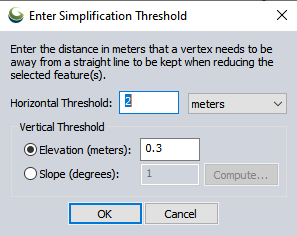
"SIMPLIFY (Reduce) Vertices of Selected Feature(s)
This option will automatically remove vertices that do not significantly contribute to the shape of your selected area or line features. This is useful to significantly reduce the size of features without giving up much detail in the shape. Select Line or Area Features to simplify with the Digitizer tool and right-click. In the Move/Reshape Feature(s) submenu, selected the SIMPLIFY - Simplify (Reduce) Vertices of Selected Line/ Area Feature(s) option. When selected the Enter Simplification Threshold dialog will appear (pictured below).

simplification.png


Smooth Selected Line/ Area Feature(s)
This option allows you to modify the position of the vertices of your selected line and area features to smooth the appearance. This can be used to give jagged contour lines a better appearance."


http://www.bluemarblegeo.com/knowledgebase/global-mapper-18-2/Move_Reshape_Feature(s).htm

http://www.bluemarblegeo.com/knowle...nging_the_Shape_of_Area_and_Line_Features.htm


If one researches the Global Mapper and/or QGIS GDAL 'Polygonize' plugin Raster-to-Vector conversion features, AFAIK, both those GIS applications do not provide any means to control pre-processing of the Raster source data- or the filtering algorithm used- during conversion, so one may be compelled to utilize an external 3rd party application for pre-processing of the Raster source data intended to be converted to a Vector format. :scratchch


Perhaps you could improve your results with ScenPProc by using some of the options cited in this post ...and in my post above: :idea:

http://www.fsdeveloper.com/forum/th...-angles-and-paralel-lines.440519/#post-776447


Consider this alternative work-flow
:

1.) In a graphics application, over-sample a copy of aerial imagery Raster source data to 2X or 4x more pixels than the original

2.) Anti-alias that copy of aerial imagery Raster source data that has been over-sampled

3.) Use as many iterations of graphics 'filtration' as needed to improve footprint outline edge definition

NOTE: See the example graphics 'filtration' shown on these web pages:

http://potrace.sourceforge.net/mkbitmap.html

http://learn.corel.com/tutorials/convert-images-to-vector-files-quickly-and-easily-with-powertrace/


4.) Perform Raster-to-Vector conversion of the anti-aliased / filtered copy of that over-sampled image size

5.) Scale the resulting Vector output back to the size of the original aerial imagery

NOTE: If necessary, do this in a external GIS, vector graphics, or 3D modeling application, then restore the Geo-referencing, and output a SHP file when finished


6.) 'Smooth' and 'Simplify' all Vector objects resulting from the Raster-to-Vector conversion in Global Mapper


When the final SHP file is processed via ScenProc, one may then find that ScenProc does not generate as many of the larger type of classification footprints which prevent Autogen Rectangular Buildings from being created at a 'closer' proximity to one another. ;)


GaryGB
 
Last edited:
Back
Top