

tgibson
Resource contributor
- Messages
- 11,790
- Country

Hi,
Using the ADE beta update and 0.25.
I have the same problem as George - when I enter the editor with a poly using something like the gp_Signs_red texture, the location is in the upper left corner, forcing me to scroll all the way left and up to see the texture and polygon.
The second problem I'm having is that the texture mapping is not kept between GP Editor sessions. I map the polygon with a given texture, and when I re-enter the GP Editor my mapping is not retained - it seems to be at some other mapping values.
Initial mapping:

Then I press OK. Then I right click/Edit Object and get this:

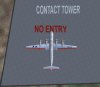
Note also two more things. The texture has been squashed horizontally - the GMAX UVUnwrap command never does this - it is always displayed as it really is. And second, note the distance marker at the bottom (2 ft) - and here is the result in FS:

The wingspan of this aircraft is 150 ft - clearly the lettering is not less than 2 ft wide...
ADE file attached below.
Hope this helps,
Using the ADE beta update and 0.25.
I have the same problem as George - when I enter the editor with a poly using something like the gp_Signs_red texture, the location is in the upper left corner, forcing me to scroll all the way left and up to see the texture and polygon.
The second problem I'm having is that the texture mapping is not kept between GP Editor sessions. I map the polygon with a given texture, and when I re-enter the GP Editor my mapping is not retained - it seems to be at some other mapping values.
Initial mapping:
Then I press OK. Then I right click/Edit Object and get this:
Note also two more things. The texture has been squashed horizontally - the GMAX UVUnwrap command never does this - it is always displayed as it really is. And second, note the distance marker at the bottom (2 ft) - and here is the result in FS:
The wingspan of this aircraft is 150 ft - clearly the lettering is not less than 2 ft wide...
ADE file attached below.
Hope this helps,




 Don and I are wondering if there is any feedback or perhaps the new function is so good that y'all are immersed in the opportunities it provides
  Or perhaps it is so arcane that no one finds it the least bit interesting


