
-
Which the release of FS2020 we see an explosition of activity on the forun and of course we are very happy to see this. But having all questions about FS2020 in one forum becomes a bit messy. So therefore we would like to ask you all to use the following guidelines when posting your questions:
- Tag FS2020 specific questions with the MSFS2020 tag.
- Questions about making 3D assets can be posted in the 3D asset design forum. Either post them in the subforum of the modelling tool you use or in the general forum if they are general.
- Questions about aircraft design can be posted in the Aircraft design forum
- Questions about airport design can be posted in the FS2020 airport design forum. Once airport development tools have been updated for FS2020 you can post tool speciifc questions in the subforums of those tools as well of course.
- Questions about terrain design can be posted in the FS2020 terrain design forum.
- Questions about SimConnect can be posted in the SimConnect forum.
Any other question that is not specific to an aspect of development or tool can be posted in the General chat forum.
By following these guidelines we make sure that the forums remain easy to read for everybody and also that the right people can find your post to answer it.
You are using an out of date browser. It may not display this or other websites correctly.
You should upgrade or use an alternative browser.
You should upgrade or use an alternative browser.
AeroFly FS 2 support in scenProc
- Thread starter arno
- Start date

- Messages
- 35
- Country

Hadn't looked at the export commands. I imited the extract to just one U shaped building which is split into 3. Then ran the export to a kml and looked at the result with a text editor for the building. When using RND(15,20) for building_levels the building had been updated to "<SimpleData name="building_levels">14.6423633837338</SimpleData>". But when I looked in the TOC file I found each of the 3 buildings with value "<[int32][floors][1]>".
Also checked using height as RND(100,200) and got <SimpleData name="height">140.424176091526</SimpleData> and again in the TOC file just 1 floor "<[int32][floors][1]>"
I also tried using a single value of 14 in place of RND(10,15) in the AddAttribute line and this resulted in a correct value of <[int32][floors][14]>" in the TOC file. Then tried 10;15 in place of RND(10,15). This value should have prompted the CreateAF2Building line to generate random floor values for each of the buildings, but again got only 1 floor in the TOC file. Interestingly it correctly appeared in the export data as "<SimpleData name="building_levels">10;15</SimpleData>".
I manually changed "<[int32][floors][1]>" in the TOC file to "<[int32][floors][14.6423633837338]>" and a 14 floor building appeared in FS2. When I updated the CreateAF2Buildings to use 10:15 in place of building_levels I got floor values with 6 decimal places in the TOC file. So FS2 can handle floor values with any number of decimal points, and CreateAF2Buildings itself generate floor values with decimal places.
When I used 14.6423633837338 in the CreateAF2Building line I got <[int32][floors][1]>" in the TOC file. I tried shortening the number of decimals but even with 1 decimal place CreateAF2Building failed to send the value across to the TOC file.
So it seems that CreateAF2Buildings will only accept whole numbers. And for some obscure reason will only accept values like 10;15 if they are in the CreateAF2Building line and not in a parameter it loads.
So the solution appears to be to either change the AddAttribute RND command to produced only whole numbers OR change the CreateAF2Buildings command to accept decimal places.
Also checked using height as RND(100,200) and got <SimpleData name="height">140.424176091526</SimpleData> and again in the TOC file just 1 floor "<[int32][floors][1]>"
I also tried using a single value of 14 in place of RND(10,15) in the AddAttribute line and this resulted in a correct value of <[int32][floors][14]>" in the TOC file. Then tried 10;15 in place of RND(10,15). This value should have prompted the CreateAF2Building line to generate random floor values for each of the buildings, but again got only 1 floor in the TOC file. Interestingly it correctly appeared in the export data as "<SimpleData name="building_levels">10;15</SimpleData>".
I manually changed "<[int32][floors][1]>" in the TOC file to "<[int32][floors][14.6423633837338]>" and a 14 floor building appeared in FS2. When I updated the CreateAF2Buildings to use 10:15 in place of building_levels I got floor values with 6 decimal places in the TOC file. So FS2 can handle floor values with any number of decimal points, and CreateAF2Buildings itself generate floor values with decimal places.
When I used 14.6423633837338 in the CreateAF2Building line I got <[int32][floors][1]>" in the TOC file. I tried shortening the number of decimals but even with 1 decimal place CreateAF2Building failed to send the value across to the TOC file.
So it seems that CreateAF2Buildings will only accept whole numbers. And for some obscure reason will only accept values like 10;15 if they are in the CreateAF2Building line and not in a parameter it loads.
So the solution appears to be to either change the AddAttribute RND command to produced only whole numbers OR change the CreateAF2Buildings command to accept decimal places.

- Messages
- 34,376
- Country

Hi,
Good to know the floor value can be a floating number, I indeed made sure they are integer values before. I have removed that now and that seems to have fixed the issues you had. The fix will be in the next development release.
Good to know the floor value can be a floating number, I indeed made sure they are integer values before. I have removed that now and that seems to have fixed the issues you had. The fix will be in the next development release.
- Messages
- 34,376
- Country
Yes I think that would work. I tried using NOT FROMFILE = "include.kml" but it didn't work.
I have added the inverse option to the AddAttributeIfInside step as well now. It will be in the next development release as well.
- Messages
- 35
- Country
Hi Arno, Downloaded the 14/10 update and while RND is now working I have encountered another issue.
The ReplacePolygonByBuildingRectangles is not assigning the nominated attribute to all the buildings it creates just the 1st one. In my example below, each building should have the attribute "build" with value "multi2". But only the 1st building created has the attribute assigned, with the other having the attribute missing. See attached ExportOGR file (YBB2multi2.txt) showing one building split into 3.
ReplacePolygonByBuildingRectangles|split="*"|0.7;4;4|0.5;2.0;1.0|String;build|multi2
Any attributes created/assigned before this step make it through to all buildings, as do any attributes from OSM.
The ReplacePolygonByBuildingRectangles is not assigning the nominated attribute to all the buildings it creates just the 1st one. In my example below, each building should have the attribute "build" with value "multi2". But only the 1st building created has the attribute assigned, with the other having the attribute missing. See attached ExportOGR file (YBB2multi2.txt) showing one building split into 3.
ReplacePolygonByBuildingRectangles|split="*"|0.7;4;4|0.5;2.0;1.0|String;build|multi2
Any attributes created/assigned before this step make it through to all buildings, as do any attributes from OSM.
Attachments
- Messages
- 35
- Country
Hi Arno, I think your 2nd example on page 60 for the AddAttributeIfInside command is missing the INVERSE text.
I have also encountered another problem. I am trying to assign a random building_levels value to those entries with no building_levels, but am getting an error "Error Value type of 'AttributeString' is not assignable to required type of 'AttributeDouble'.
AddAttribute|building="*" And NOT building_levels="*"|String;building_levels|RND(5,10)
CreateAF2Building|building="*" And building_levels="*"|building_levels|1|flat|commercial|0
This errors on the AddAttribute command line. Script and error report attached as Script1...
If you comment out the SplitGrid line, the AddAttribute line works without error but the CreateAF2Building line then fails with the same error.
Script and error report attached as Script2...
If you first use another attribute to identify buildings without a building_levels value, then use that new attribute to filter buildings without a building level, you still get the same error on the CreateAF2Building line with or without the SplitGrid command.
Script and error report attached as Script3...
Last if you update a value other than building_levels everything works either with or without the SplitGrid command. The problem is then you have to replicate all your CreateAF2Building lines to use 2 different building level attributes, 1 from OSM data and 1 generated by the RND command, which is a bit messy.
Script and report attached as Script4...
I have also encountered another problem. I am trying to assign a random building_levels value to those entries with no building_levels, but am getting an error "Error Value type of 'AttributeString' is not assignable to required type of 'AttributeDouble'.
AddAttribute|building="*" And NOT building_levels="*"|String;building_levels|RND(5,10)
CreateAF2Building|building="*" And building_levels="*"|building_levels|1|flat|commercial|0
This errors on the AddAttribute command line. Script and error report attached as Script1...
If you comment out the SplitGrid line, the AddAttribute line works without error but the CreateAF2Building line then fails with the same error.
Script and error report attached as Script2...
If you first use another attribute to identify buildings without a building_levels value, then use that new attribute to filter buildings without a building level, you still get the same error on the CreateAF2Building line with or without the SplitGrid command.
Script and error report attached as Script3...
Last if you update a value other than building_levels everything works either with or without the SplitGrid command. The problem is then you have to replicate all your CreateAF2Building lines to use 2 different building level attributes, 1 from OSM data and 1 generated by the RND command, which is a bit messy.
Script and report attached as Script4...
Attachments
-
map.osm.txt823 KB · Views: 467
-
Script1_TEST.txt1.1 KB · Views: 422
-
Script1_TEST_ErrorReport.txt2.7 KB · Views: 398
-
Script2_TEST.txt1.1 KB · Views: 404
-
Script2_TEST_ErrorReport.txt2.6 KB · Views: 376
-
Script3_TEST.txt1.2 KB · Views: 425
-
Script3_TEST_ErrorReport.txt2.9 KB · Views: 392
-
Script4_TEST.txt1.1 KB · Views: 400
-
Script4_TEST_NoErrorsReport.txt1.6 KB · Views: 381
- Messages
- 34,376
- Country
Hi,
I had a look, but the step is working as expected here. The only situation where the attribute is not added, is when the remaining polygon after splitting a building doesn't qualify as a proper polygon. E.g. when a triangle is left over or so. In that case it is not assigned the attribute as specified in the step, to indicate this is not "valid" output.
Hi Arno, Downloaded the 14/10 update and while RND is now working I have encountered another issue.
The ReplacePolygonByBuildingRectangles is not assigning the nominated attribute to all the buildings it creates just the 1st one. In my example below, each building should have the attribute "build" with value "multi2". But only the 1st building created has the attribute assigned, with the other having the attribute missing. See attached ExportOGR file (YBB2multi2.txt) showing one building split into 3.
ReplacePolygonByBuildingRectangles|split="*"|0.7;4;4|0.5;2.0;1.0|String;build|multi2
Any attributes created/assigned before this step make it through to all buildings, as do any attributes from OSM.
I had a look, but the step is working as expected here. The only situation where the attribute is not added, is when the remaining polygon after splitting a building doesn't qualify as a proper polygon. E.g. when a triangle is left over or so. In that case it is not assigned the attribute as specified in the step, to indicate this is not "valid" output.
- Messages
- 34,376
- Country
Hi,
Thanks, I have fixed the typo.
The RND function was returning a double value, but you stored it in an attribute of type string. That's where thing went wrong. I have modified the AddAttribute step now so that it stores the value in the type specified and not always as a double. That prevents the error. It will be in the next development release.
Hi Arno, I think your 2nd example on page 60 for the AddAttributeIfInside command is missing the INVERSE text.
Thanks, I have fixed the typo.
I have also encountered another problem. I am trying to assign a random building_levels value to those entries with no building_levels, but am getting an error "Error Value type of 'AttributeString' is not assignable to required type of 'AttributeDouble'.
The RND function was returning a double value, but you stored it in an attribute of type string. That's where thing went wrong. I have modified the AddAttribute step now so that it stores the value in the type specified and not always as a double. That prevents the error. It will be in the next development release.
- Messages
- 35
- Country
I had a look, but the step is working as expected here. The only situation where the attribute is not added, is when the remaining polygon after splitting a building doesn't qualify as a proper polygon. E.g. when a triangle is left over or so. In that case it is not assigned the attribute as specified in the step, to indicate this is not "valid" output.
Thanks Arno. The only problem is all the buildings without the attribute are being picked up in the CreateAF2Building line that is used to generate all the smaller buildings that are not being split. I find it is only necessary to split larger buildings like shopping centres etc. With smaller buildings it is not necessary to take the extra effort to split them, and they end up looking a bit odd if you are using the "residential" and "gable" settings.
I think I can work around this by placing the ReplacePolygonByBuildingRectangles line after the CreateAF2Building line for the smaller buildings. The only issue is the ReplacePolygonByBuildingRectangles command runs best is placed before the MergeGrid command. This would place the CreateAF2Building line before the MergeGrid command and I found in the past it performs best if placed after the MergeGrid command. This was only for areas with very dense OSM data, so I'll make the changes and give it a test against my New Orleans test area.
The RND function was returning a double value, but you stored it in an attribute of type string. That's where thing went wrong. I have modified the AddAttribute step now so that it stores the value in the type specified and not always as a double. That prevents the error. It will be in the next development release
Thanks, this has fixed the problem.
- Messages
- 34,376
- Country
Hi,
How I typically use the ReplacePolygonByBuildingRectangles step is that I first identify the features that need to be split. These get a specific attribute, e.g. BUILDTYPE=3. When I then process them these that succeed get a different atribute, e.g. BUILDTYPE=2. I use BUILDTYPE=1 typically for simple buildings that need no processing. When making my final buildings I only use BUILDTYPE<3, this means that the "remaining" bits from the splitting are ignored there.
How I typically use the ReplacePolygonByBuildingRectangles step is that I first identify the features that need to be split. These get a specific attribute, e.g. BUILDTYPE=3. When I then process them these that succeed get a different atribute, e.g. BUILDTYPE=2. I use BUILDTYPE=1 typically for simple buildings that need no processing. When making my final buildings I only use BUILDTYPE<3, this means that the "remaining" bits from the splitting are ignored there.
- Messages
- 35
- Country
Hi Arno, Still wrestling with a way to allow one script operate both with and without a include polygon. Unfortunately I just can't see how to use the INVERSE option of the AddAttributeIfInside to do it. However an INVERSE option on the CopyAttributeIfInside might do it, depending how it behaves if there is nothing inside.
So the scenario is to use an include polygon to define your urban area. Then create houses and then unload any houses in the rural area outside the include polygon. But where there is no include polygon, and therefore the whole area is urban and all houses are kept.
step 1 - AddAttribute|building="build1"|String;area|urban - Assign urban value to all houses
step 2 - AddAttributeIfInside|building="build1"|include ="yes"|String;area|rural - Assign rural to those house inside the include polygon. This is just a temporary measure for the CopyAttributeIfInside step below.
step 3 - CopyAttributeIfInside|building="build1"|include ="yes"|area|INVERSE - Assigns rural to only those houses not inside the include polygon.
step 4 - AddAttributeIfInside|building="build1"|include ="yes"|String;area|urban - Assigns urban to houses inside the polygon
step 5 - UnloadFeatures|area="rural" - Unloads all rural houses
Note - I assigned all include polygons with an attribute "include" = "yes" to allow these lines to operate without reference to the source file, as the missing file causes an error message, while a missing polygon does not.
So the idea is that the INVERSE CopyAttributeIfInside line would result in a different outcome where there is and isn't an include polygon. Where there is an include polygon, there are values to copy across to houses outside the include polygon and houses outside the include polygon would receive a value of rural. But where there is no include polygon, no values can be copied across and the attribute on all houses would not change from urban.
So where the is an include polygon, steps 1 through 5 would all perform some action. However where the isn't an include polygon, step 2, 3, 4 & 5 would perform no action since there is nothing inside.
Using the INVERSE AddAttributeIfIInside line would work where there is an include polygon, but not where there is no include polygon as it then sets all houses as rural.
Can you think of any way to make this work with existing coding? Would an INVERSE CopyAttributeIfInside work?
So the scenario is to use an include polygon to define your urban area. Then create houses and then unload any houses in the rural area outside the include polygon. But where there is no include polygon, and therefore the whole area is urban and all houses are kept.
step 1 - AddAttribute|building="build1"|String;area|urban - Assign urban value to all houses
step 2 - AddAttributeIfInside|building="build1"|include ="yes"|String;area|rural - Assign rural to those house inside the include polygon. This is just a temporary measure for the CopyAttributeIfInside step below.
step 3 - CopyAttributeIfInside|building="build1"|include ="yes"|area|INVERSE - Assigns rural to only those houses not inside the include polygon.
step 4 - AddAttributeIfInside|building="build1"|include ="yes"|String;area|urban - Assigns urban to houses inside the polygon
step 5 - UnloadFeatures|area="rural" - Unloads all rural houses
Note - I assigned all include polygons with an attribute "include" = "yes" to allow these lines to operate without reference to the source file, as the missing file causes an error message, while a missing polygon does not.
So the idea is that the INVERSE CopyAttributeIfInside line would result in a different outcome where there is and isn't an include polygon. Where there is an include polygon, there are values to copy across to houses outside the include polygon and houses outside the include polygon would receive a value of rural. But where there is no include polygon, no values can be copied across and the attribute on all houses would not change from urban.
So where the is an include polygon, steps 1 through 5 would all perform some action. However where the isn't an include polygon, step 2, 3, 4 & 5 would perform no action since there is nothing inside.
Using the INVERSE AddAttributeIfIInside line would work where there is an include polygon, but not where there is no include polygon as it then sets all houses as rural.
Can you think of any way to make this work with existing coding? Would an INVERSE CopyAttributeIfInside work?
- Messages
- 34,376
- Country
Hi,
I would not see how an INVERSE option for CopyAttributeIfInside would make sense. This step copies attributes from one feature to another. But if you would copy attributes from all the features you are not in to another feature that would be kind of undefined.
Let's take one step back, since I want to understand your workflow better.
You are processing a big area and you have exclude polygons to remove trees and houses from areas like airports or water. And you have the include polygons to do different processing in urban and rural areas?
Because I don't really understand when you say that no include polygons means urban, but otherwise an include polygon is urban.
I would not see how an INVERSE option for CopyAttributeIfInside would make sense. This step copies attributes from one feature to another. But if you would copy attributes from all the features you are not in to another feature that would be kind of undefined.
Let's take one step back, since I want to understand your workflow better.
You are processing a big area and you have exclude polygons to remove trees and houses from areas like airports or water. And you have the include polygons to do different processing in urban and rural areas?
Because I don't really understand when you say that no include polygons means urban, but otherwise an include polygon is urban.
- Messages
- 35
- Country
Hi Arno, Sorry I was originally trying to solve a problem without boring you with the full story, but as that might explain my problem, here it is.
I have developed a script that does lights, trees and buildings using OSM data. I did this so your average user could easily create cultivation data for FS2 without needing a detailed knowledge of how scenProc works. This would also allow programs like Nick Hod's AeroScenery to automate cultivation for FS2. While you could use a exclude polygon with this script, it usually isn't needed as I use OSM data to exclude buildings and trees from airports and others areas where they are not required. I have been refining this over time to do more things, run quicker and fix more problems created by overlapping OSM data etc. While this gave a pretty good result, there were still large areas of towns/cities that had no building data. While there are complicated and labour intensive ways of adding to that data, continuing on my aim for a script for the masses, I started work on a 2nd script to create buildings where there is no OSM building data.
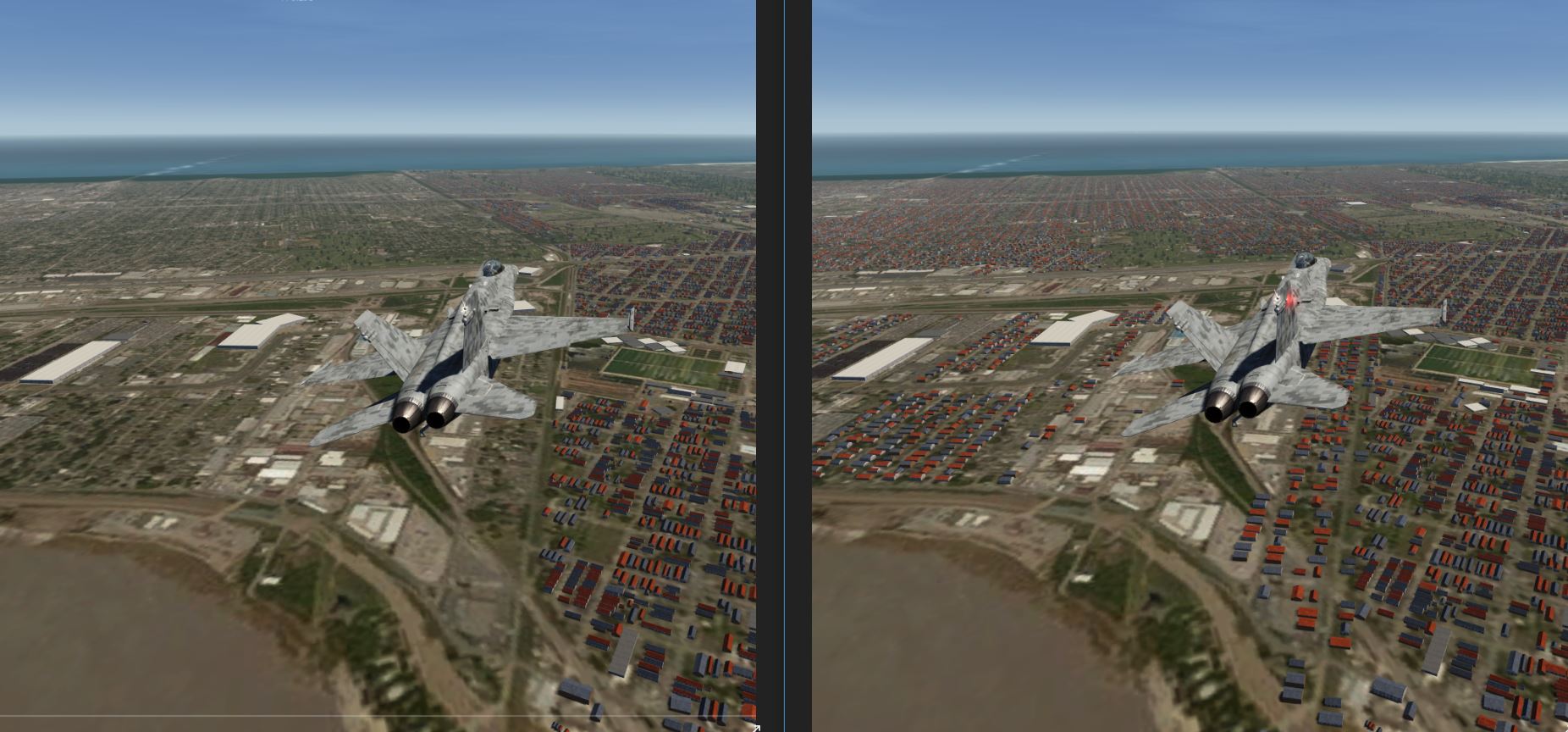
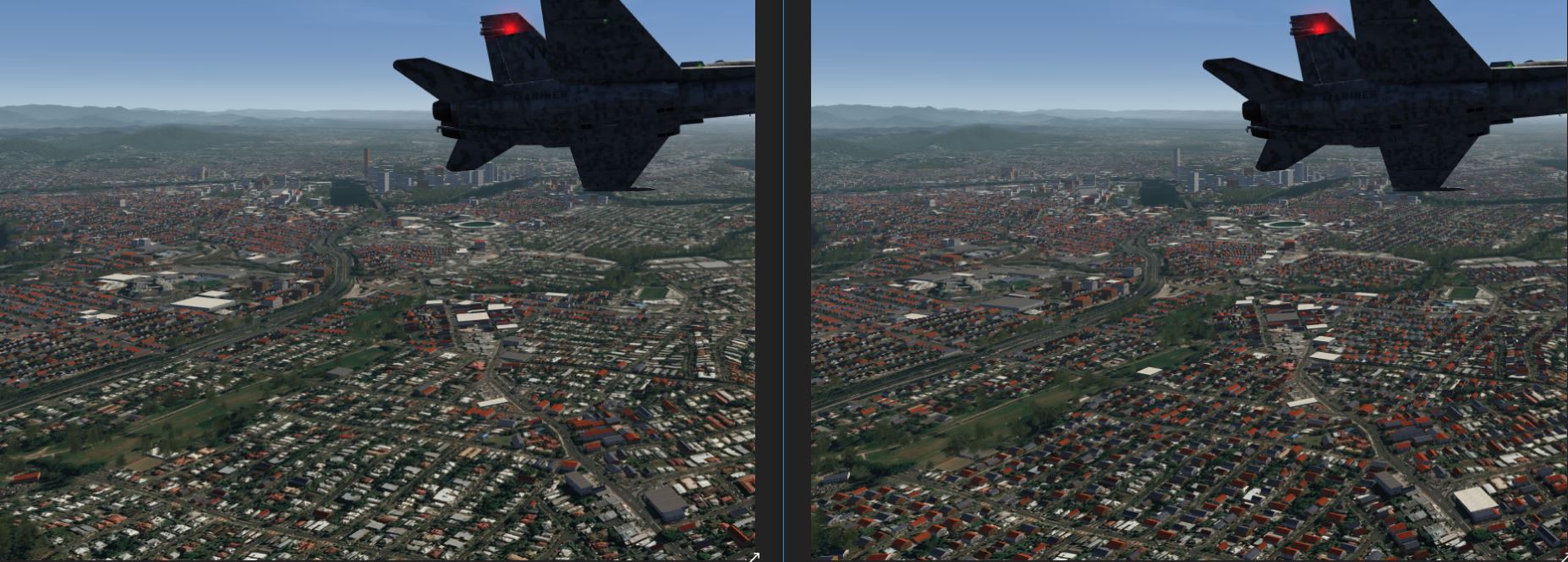
So I developed a 2nd script that supplements the data produced by the 1st script and creates a separate TOC file. It has only one purpose, to create buildings where no building data exists in OSM. Once again exclude polygons are not needed as it manages to filter out all houses not required using existing OSM data. It creates buildings by using the residential street data in OSM, then uses existing OSM data to remove houses created where they are not required. For instance in an area where OSM houses already exist, or where streets cross etc. So what you get is like the 2 screen shots below. The left hand picture shows buildings, trees and lights created from OSM data using the 1st script. The picture on the right is after my 2nd script has run generating houses from residential street data. While the houses created by the 2nd script don't sit on the housing footprints in the photo imagery used for textures, they faithfully follow the street layout . This gives a pretty good coverage with little effort (except for me of course).
I separated them into 2 scripts because firstly sticking it all in one script became too complex, and secondly because some of the commands I needed for the 2nd script had a detrimental effect on items being created in the 1st script. The 2nd script has enough logic in it not to create houses in areas when trees or buildings have been created by the 1st script. So they work together.
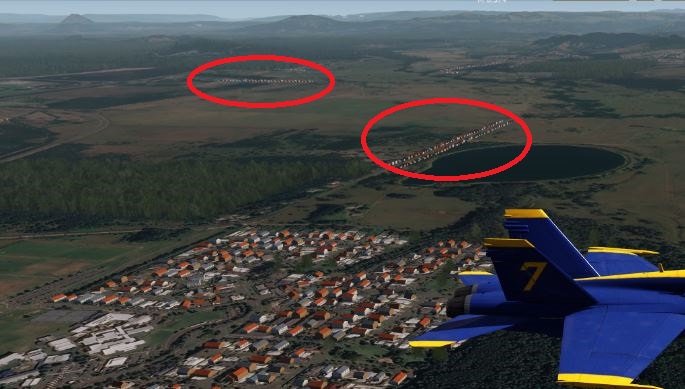
The one place I haven't been able to use OSM data to filter out houses that are not required is streets in OSM that are recorded as residential, but are in a rural areas. This seems to be quite common. If you don't remove these houses then you have something like the 3rd screen shot below. This spoils the whole thing. Unfortunately there is nothing in the OSM data that would allow me to exclude these streets so I had think of something else. So I created a polygon in Google Earth that defines urban areas. I decided to define urban areas rather than rural areas as it is quicker and easier to create the polygon in Google Earth for urban areas. I could then get scenProc to exclude any houses it had generated outside this urban polygon.
But the problem occurs when you are doing an area like New Orleans where there are no rural areas. Forcing users to create a polygon to defines the urban area is unnecessary as everything is urban. So I wanted my script to work whether they use an urban area polygon or not. Otherwise users would have to manually comment out the part of the script that removes the houses outside the urban area, or it would remove everything when there is no urban polygon. Having users manually editing specific sections of the script also defeats the purpose of creating it in the first place.
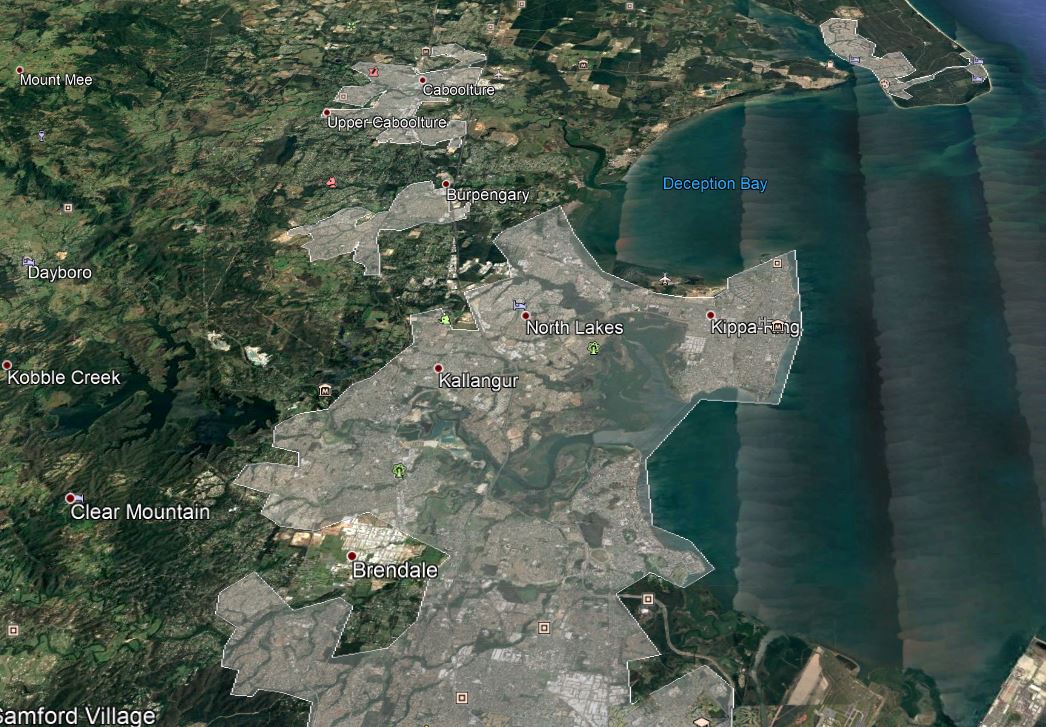
Had I gone down the path of using an exclude polygon, then any script would have worked with or without the polygon. But creating an exclude polygon that defines rural areas is much harder than creating an include polygon that defines urban areas. Look at my last screen shot to see what a nightmare it would be to create a polygon that defines all the areas NOT covered by the urban polygons. Using the urban include method it is also very easy to add another small urban area as I have done for the satellite towns at the north of the city.
So hopefully the last 2 paragraphs above explain the issue I am trying unsuccessfully to solve.
Here is one of New Orleans in an area with varying levels of OSM building data. The left image is just using OSM data, while the right shows the result after running my 2nd script.
And here in my home town of Brisbane where some suburbs had houses in OSM and other with little or none. Once again OSM only on the left and both scripts on the right.
The rural problem - this is what occurs if you don't use an urban polygon
Urban polygons for Brisbane and surrounding towns
I have developed a script that does lights, trees and buildings using OSM data. I did this so your average user could easily create cultivation data for FS2 without needing a detailed knowledge of how scenProc works. This would also allow programs like Nick Hod's AeroScenery to automate cultivation for FS2. While you could use a exclude polygon with this script, it usually isn't needed as I use OSM data to exclude buildings and trees from airports and others areas where they are not required. I have been refining this over time to do more things, run quicker and fix more problems created by overlapping OSM data etc. While this gave a pretty good result, there were still large areas of towns/cities that had no building data. While there are complicated and labour intensive ways of adding to that data, continuing on my aim for a script for the masses, I started work on a 2nd script to create buildings where there is no OSM building data.
So I developed a 2nd script that supplements the data produced by the 1st script and creates a separate TOC file. It has only one purpose, to create buildings where no building data exists in OSM. Once again exclude polygons are not needed as it manages to filter out all houses not required using existing OSM data. It creates buildings by using the residential street data in OSM, then uses existing OSM data to remove houses created where they are not required. For instance in an area where OSM houses already exist, or where streets cross etc. So what you get is like the 2 screen shots below. The left hand picture shows buildings, trees and lights created from OSM data using the 1st script. The picture on the right is after my 2nd script has run generating houses from residential street data. While the houses created by the 2nd script don't sit on the housing footprints in the photo imagery used for textures, they faithfully follow the street layout . This gives a pretty good coverage with little effort (except for me of course).
I separated them into 2 scripts because firstly sticking it all in one script became too complex, and secondly because some of the commands I needed for the 2nd script had a detrimental effect on items being created in the 1st script. The 2nd script has enough logic in it not to create houses in areas when trees or buildings have been created by the 1st script. So they work together.
The one place I haven't been able to use OSM data to filter out houses that are not required is streets in OSM that are recorded as residential, but are in a rural areas. This seems to be quite common. If you don't remove these houses then you have something like the 3rd screen shot below. This spoils the whole thing. Unfortunately there is nothing in the OSM data that would allow me to exclude these streets so I had think of something else. So I created a polygon in Google Earth that defines urban areas. I decided to define urban areas rather than rural areas as it is quicker and easier to create the polygon in Google Earth for urban areas. I could then get scenProc to exclude any houses it had generated outside this urban polygon.
But the problem occurs when you are doing an area like New Orleans where there are no rural areas. Forcing users to create a polygon to defines the urban area is unnecessary as everything is urban. So I wanted my script to work whether they use an urban area polygon or not. Otherwise users would have to manually comment out the part of the script that removes the houses outside the urban area, or it would remove everything when there is no urban polygon. Having users manually editing specific sections of the script also defeats the purpose of creating it in the first place.
Had I gone down the path of using an exclude polygon, then any script would have worked with or without the polygon. But creating an exclude polygon that defines rural areas is much harder than creating an include polygon that defines urban areas. Look at my last screen shot to see what a nightmare it would be to create a polygon that defines all the areas NOT covered by the urban polygons. Using the urban include method it is also very easy to add another small urban area as I have done for the satellite towns at the north of the city.
So hopefully the last 2 paragraphs above explain the issue I am trying unsuccessfully to solve.
Here is one of New Orleans in an area with varying levels of OSM building data. The left image is just using OSM data, while the right shows the result after running my 2nd script.
And here in my home town of Brisbane where some suburbs had houses in OSM and other with little or none. Once again OSM only on the left and both scripts on the right.
The rural problem - this is what occurs if you don't use an urban polygon
Urban polygons for Brisbane and surrounding towns
- Messages
- 34,376
- Country
Hi,
Thanks for the explanation. I don't think you can have what you want automatic. If no include polygon can either mean rural area or full urban area, only the user can specify this difference. You might be able to use an user varisble for that.
Thanks for the explanation. I don't think you can have what you want automatic. If no include polygon can either mean rural area or full urban area, only the user can specify this difference. You might be able to use an user varisble for that.

- Messages
- 21
- Country
can someone tell me how to use multiple .TOC files in aerofltFS2 this is my .TFCThis week I was approached by an AeroFly FS 2 user with the question if scenProc could be used to make cultivation (the AeroFly name for autogen) for AeroFly FS 2 as well. Of course this was not the highest priority item on the wishlist to work on, but I liked the challenge and the data structure to write to seemed simple enough. So I sidetracked a bit from what I was actually working on and decided to give it a go.
The fact that I’m writing about it now already indicates that it worked. In the next development release of scenProc you will find support to create cultivation for AeroFly FS 2 as well. You can create plants (trees), buildings and lights.
Section 5.9 of the updated manual shows an example script that can be used for AeroFly FS 2. Using OpenStreetMap data I have scattered trees into forest polygons, placed lights along a road and create houses from buildings that are almost rectangular. Hopefully this sample script should be enough to get you going. If there are any questions or suggestions, just let me know.

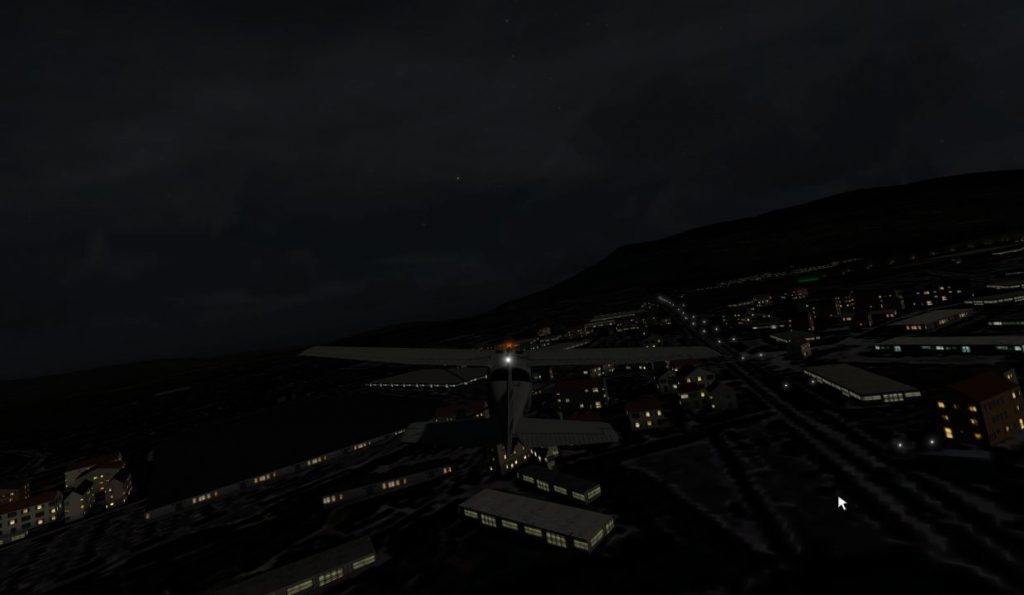
Continue reading...
<[file][][YMHB] //9
<[tmsimulator_scenery_place][][]
//////////////////////////////////////////////////////////////////////////////
//
// general information
//
//////////////////////////////////////////////////////////////////////////////
<[string8] [type] [airport]>
<[string8] [sname] [Hobart Airport]>
<[string8] [lname] [Hobart International Airport]>
<[string8] [icao] [YMHB]>
<[string8] [country] [au]>
<[tmvector2d][position] [147.50777156 -42.83716485]> //This is the distinctive reference point for your model
<[float64] [height] [2.35]>
<[float64] [size] [5000]>
<[vector2_float64][tower_position][147.50165210 -42.83566119]>
<[float64] [tower_height] [30.0]>
<[bool] [autoheight] [true]>
<[string8] [coordinate_system][lonlat]>
//////////////////////////////////////////////////////////////////////////////
//
// objects
//
//
//////////////////////////////////////////////////////////////////////////////
<[tmsimulator_scenery_objecttmslist][objects][]
<[tmsimulator_scenery_object][element][0]
<[string8][type][object]>
<[string8][geometry][tower00_medium_blue_ds_05_08_08_virtual_0_obj]>
<[tmvector3d][position][147.50165210 -42.83566119 0]>
>
<[tmsimulator_scenery_object][element][1] //Runway #1 crosses runway # ***Retained***
<[string8][type][ground]>
<[string8][geometry][rap1927m47m_rwy]> //135.13 degrees
<[tmvector3d][position][147.51020943 -42.83498778 0]>
<[float64][orientation][-135.13]>
>
<[tmsimulator_scenery_object][element][2] //Runway #1 crosses runway # ***Retained***
<[string8][type][decal]>
<[string8][geometry][rap1927m47m_decal]>
<[tmvector3d][position][147.51020943 -42.83498778 0]>
<[float64][orientation][-135.13]>
>
<[tmsimulator_scenery_object][element][3] //Runway #1 crosses runway # ***Retained***
<[string8][type][decal]>
<[string8][geometry][12_decal]>
<[tmvector3d][position][147.50255829 -42.82935265 0]>
<[float64][orientation][44.87000000]>
>
<[tmsimulator_scenery_object][element][4] //Runway #1 crosses runway # ***Retained***
<[string8][type][decal]>
<[string8][geometry][30_decal]>
<[tmvector3d][position][147.51786056 -42.84062291 0]>
<[float64][orientation][-135.13]>
>
//1240 bytes
>
//////////////////////////////////////////////////////////////////////////////
//
// runways
//
//////////////////////////////////////////////////////////////////////////////
<[tmsimulator_runwaytmslist][runways][]
<[tmsimulator_runway][element][0]
<[tmvector2d][endpoint1][147.50188044 -42.82885252]>
<[tmvector2d][endpoint2][147.51854003 -42.84112245]>
<[tmvector2d][threshold1][147.50188044 -42.82885252]>
<[tmvector2d][threshold2][147.51854003 -42.84112245]>
<[float64][width][45.00]>
<[string8][name1][12]>
<[string8][name2][30]>
<[string8] [appltsys1][rail]>
<[string8] [appltsys2][rail]>
<[string8] [papi1]
>
<[string8] [papi2]
<[string8] [papi2]
>
<[string8] [reil1][none]>
<[string8] [reil2][none]>
>
>
//////////////////////////////////////////////////////////////////////////////
//
// parking positions
//
//////////////////////////////////////////////////////////////////////////////
<[tmsimulator_parking_positiontmslist][parking_positions][]
<[tmsimulator_parking_position][element][0]
<[tmvector2d][position][147.50543453 -42.83624241]>
<[float64]
<[string8] [reil1][none]>
<[string8] [reil2][none]>
>
>
//////////////////////////////////////////////////////////////////////////////
//
// parking positions
//
//////////////////////////////////////////////////////////////////////////////
<[tmsimulator_parking_positiontmslist][parking_positions][]
<[tmsimulator_parking_position][element][0]
<[tmvector2d][position][147.50543453 -42.83624241]>
<[float64]
[255.00]>
<[string8][name][Start Position #1]>
>
<[tmsimulator_parking_position][element][1]
<[tmvector2d][position][147.50507780 -42.83607326]>
<[float64]
<[string8][name][Start Position #1]>
>
<[tmsimulator_parking_position][element][1]
<[tmvector2d][position][147.50507780 -42.83607326]>
<[float64]
[245.00]>
<[string8][name][Start Position #2]>
>
<[tmsimulator_parking_position][element][2]
<[tmvector2d][position][147.50564654 -42.83648186]>
<[float64]
<[string8][name][Start Position #2]>
>
<[tmsimulator_parking_position][element][2]
<[tmvector2d][position][147.50564654 -42.83648186]>
<[float64]
[255.00]>
<[string8][name][Start Position #3]>
>
>
///////////////////////////////////////////////////////////////////////////
//
// cultivation_files
//
// Add filename here if you have some cultivation
//
///////////////////////////////////////////////////////////////////////////
<[list_tmsimulator_scenery_cultivation][cultivation_files][1]
<[tmsimulator_scenery_cultivation][element][0]
<[string8][filename][map]>
<[string8][filename][hobart]>
<[string8][filename][hobart trees]>
<[string8][filename][hobart2]>
<[bool][auto_height][true]>
>
>
<[string8][name][Start Position #3]>
>
>
///////////////////////////////////////////////////////////////////////////
//
// cultivation_files
//
// Add filename here if you have some cultivation
//
///////////////////////////////////////////////////////////////////////////
<[list_tmsimulator_scenery_cultivation][cultivation_files][1]
<[tmsimulator_scenery_cultivation][element][0]
<[string8][filename][map]>
<[string8][filename][hobart]>
<[string8][filename][hobart trees]>
<[string8][filename][hobart2]>
<[bool][auto_height][true]>
>
>
- Messages
- 24
- Country

Hi Arno,
It would be great to have the ability to add the " square coefficient" attribute in scenProc, input polygon to the output rectangle. The coefficient Ks = S (input poly) / S (output rectangle). This is useful when creating building cultivation or AGN buildings.
Example
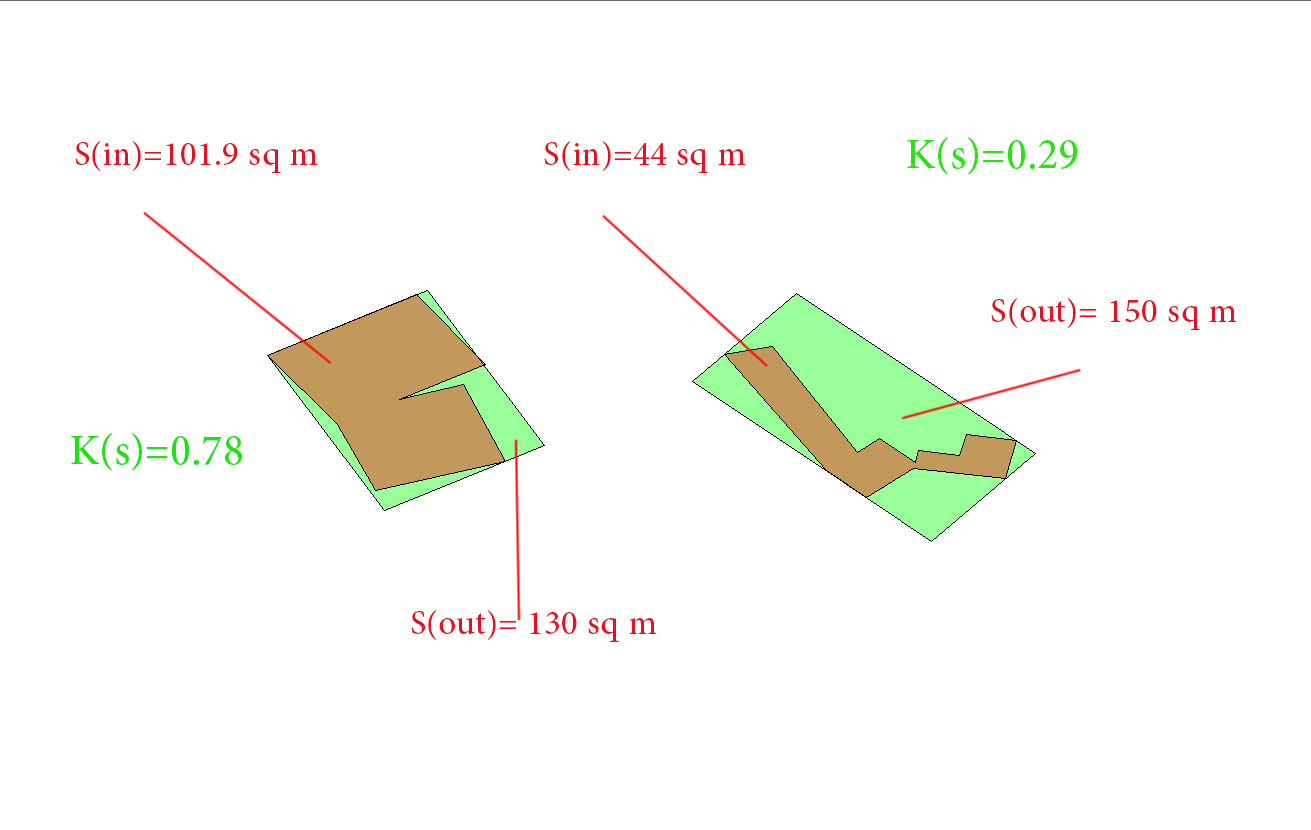
It would be great to have the ability to add the " square coefficient" attribute in scenProc, input polygon to the output rectangle. The coefficient Ks = S (input poly) / S (output rectangle). This is useful when creating building cultivation or AGN buildings.
Example