
• Which the release of FS2020 we see an explosition of activity on the forun and of course we are very happy to see this. But having all questions about FS2020 in one forum becomes a bit messy. So therefore we would like to ask you all to use the following guidelines when posting your questions:

    • Tag FS2020 specific questions with the MSFS2020 tag.
    • Questions about making 3D assets can be posted in the 3D asset design forum. Either post them in the subforum of the modelling tool you use or in the general forum if they are general.
    • Questions about aircraft design can be posted in the Aircraft design forum
    • Questions about airport design can be posted in the FS2020 airport design forum. Once airport development tools have been updated for FS2020 you can post tool speciifc questions in the subforums of those tools as well of course.
    • Questions about terrain design can be posted in the FS2020 terrain design forum.
    • Questions about SimConnect can be posted in the SimConnect forum.

    Any other question that is not specific to an aspect of development or tool can be posted in the General chat forum.

    By following these guidelines we make sure that the forums remain easy to read for everybody and also that the right people can find your post to answer it.

Blender to FSX drag chute visible code in modeldef.xml ?

Melo965

Resource contributor
Messages
118
Country
us-washington
Building an aircraft in Blender2FSX and everything else works fine, but I can't get a simple drag chute to appear when the aircraft is on the ground
and the spoiler key (/) is pressed. I have a visibility attach point coded to the part, but it never appears.

Here is what the simple drag chute (Chute_vis) looks like:
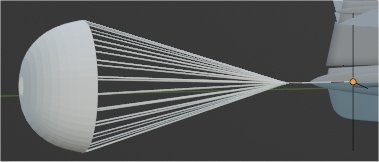
Blender drag chute.jpg


And yes, the object has a material and texture already applied.

And here is the modedef code I am using:

<PartInfo>
<Name>Chute_vis</Name>
<!-- show part only when Aircraft is on ground and spoilers are in use -->
<Visibility>
<Parameter>
<Code>
(A:SIM ON GROUND, bool) 1 ==
(A:SPOILERS Position,percent) 50 &gt; ==
and if{ 1 } els{ 0 }
</Code>
</Parameter>
</Visibility>
</PartInfo>

Does this code look correct?
On the runway, and spoiler key on or off, the drag chute is never visible.

I also regenerated the MDL file with the chute_vis part and no visibility attach point, and it is always there, so the object is not the issue.

Even though the part does not move, do I need to animate it as well? This is the first time I have tried to use the visibility attach point for an object.

Please advise.

Best regards,
Melo965
 
Are you sure for this statement " (A:SPOILERS Position,percent) 50 &gt; == "
Personnally, I will use this one " (A:SPOILERS Position,percent) 50 &gt; = "

When I have some problèmes with a new code, I try with the more simple code that i can use as " (A:SIM ON GROUND, bool) 1 == ". If this one works, then I use a more complicate statement and I make an other test ....
 
Microsoft default codes in modeldef.xml is using "==" so I think it's correct using "=="

=============MS code in modeldef.xml

<PartInfo>
<Name>landing_light</Name>
<AnimLength>100</AnimLength>
<Animation>
<Parameter>
<Code>
(A:ELECTRICAL MAIN BUS VOLTAGE, volts) 0 &gt; if{
(A:LIGHT STATES, flags) 4 &amp; 0 ==
if{ 0 } els{ 100 }
d (&gt;L:LastLandingLightPosition,percent)
}
els{ (L:LastLandingLightPosition,percent) }
</Code>
<Lag>50</Lag>
</Parameter>
</Animation>
</PartInfo>
 
Thanks all for the advice. Still figuring it out. I will simplify and work with one condition at a time, and once both are working will try to recombine them. Will also dive back into the SDK and check for syntax issues etc.
 
@Hiroshi, "==" is perfectly correct but if you want use the expression ">=" (sup. or equal) we should use "&gt;=" and not "&gt;==" because in this last cae you are trying to code ">==" which is not in the RPN notation.
 
Yes I know that .
That post is to Lagaffe not you.

Also when I do a code debug , won't always re-compile.
I use a debug guage which shows the result on screen.
Put a code in and show the results.
Then development cycle will be much short and faster.
Once the code is done , include to the model side.

Those degug guages are included in my models sets.
 
Last edited:
Got it working just as I want now. One key was to switch the Spoiler to SPOILERS HANDLE POSITION.

Here is the working code:

<PartInfo>
<Name>Test_Chute_3</Name>
<Visibility>
<Parameter>
<Code>
(A:SIM ON GROUND, bool) 1 == (A:SPOILERS HANDLE POSITION, percent) 1 &gt; &amp;&amp; if{ 1 } els{ 0 }
</Code>
</Parameter>
</Visibility>
</PartInfo>

Thanks everyone. Really appreciate the advice!
 
Back
Top