
• Which the release of FS2020 we see an explosition of activity on the forun and of course we are very happy to see this. But having all questions about FS2020 in one forum becomes a bit messy. So therefore we would like to ask you all to use the following guidelines when posting your questions:

    • Tag FS2020 specific questions with the MSFS2020 tag.
    • Questions about making 3D assets can be posted in the 3D asset design forum. Either post them in the subforum of the modelling tool you use or in the general forum if they are general.
    • Questions about aircraft design can be posted in the Aircraft design forum
    • Questions about airport design can be posted in the FS2020 airport design forum. Once airport development tools have been updated for FS2020 you can post tool speciifc questions in the subforums of those tools as well of course.
    • Questions about terrain design can be posted in the FS2020 terrain design forum.
    • Questions about SimConnect can be posted in the SimConnect forum.

    Any other question that is not specific to an aspect of development or tool can be posted in the General chat forum.

    By following these guidelines we make sure that the forums remain easy to read for everybody and also that the right people can find your post to answer it.

FSXA How to extrude

Messages
3,278
Country
spain
This question is basically about modelling, something I have encountered is the way extrude polygons work in 3ds max, my problem is extruding a polygon face with negative values or what is the same "inward", when extruding in this way always left the sides of the extruded polygon, and this can't be so, the people say that those must be deleted and to remake the side polygon again.I use "extrude" to resize boxs, etc. I see all this as very weird, this way of work the extruding tool.I hope I could explain the problem and you understand what I mean.
 
Why are you extruding to resize a box?

Surely, the most direct method is simply to move the relevant face to the appropriate position (ie Polygon select, and drag)

By design, an extrude function does create faces along each of its edges .... depending on your aim, another method you could try is simply to clone the relevant face, by "Shift-dragging".

Certainly an extrude does sometimes create more polygons than you would want (eg enderneath an open face) ... but I can;t imagine it would work any other way,
 
Hi Hcornea, I said resize but for shaping any structure too,I see this as a basic operation in modelling. The face can't be dragged you will drag the adyacet vertex too. It's clear the problem is with the corners polygons. Really it's something that have been confusing me, don't understand a simple process like push a polygon inward can make such a problem. When you extrude de polygon inward you se how the sides of such polygon left behind. and what is worst I don't found any reference about this problem anywhere.How people extrude polygon "inward" ? :confused: Really a little absurd situation where I am. thanks for answer.
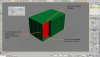
 
Perhaps a picture?

I can't quite understand which erroneous polygons you are referrring to being left behind.

The only similar thing I can think of is when you are extruding a face with a free edge .. the border makes a polygon. Is that what you mean?

Extrusion is good for some "reshaping" but there are many other tools.

Often selecting faces and slicing them gives a more controlled result, depending on what you are trying to achieve.
 
Yes an image worth a million words etc etc. I'm too lazy.
I understand that are the boxes which are in the corners, where you can see those polygons, and give problems, but what keep me confused is that it's a basic operation, don't understand why this. and can't find the answer in other sites. I explain what want achive, I have a building, make the box, but this building have the shape of a cross, so I only should extrude the corners of the box (which have 4 sections) inward, to get this cross shape.but I can't just delet the boxes, I'm working on a blueprint so it's more accurate to work so, with the extrude you see what you are resizing or reshape. I guess I will get the way to make it, but what keep me confused how can be such a problem for simple extruding, and lose a entirely day figuring out this issue.
 

Attachments

  • Extruding.jpg
    Extruding.jpg
    96.1 KB · Views: 956
Last edited:
yes ive seen it but i cant understand what you want to do? are you trying to extrude in a positive number but its meesing up?

Blake
 
Not positive number, negative number; I want to push the polygon inward, reducing so his volume, positive extrusion work as supposed it should work, but is in the opposite direction where not understand the way this work, extrusion left the polygon sides, the polygon side remain there.
Look at the picture again, I've edited the image.thank for your interest.
 
ok just seen your edited image, if you want to get those un needed polygons that your image shows isnt it worth deleting them by selecting polygon and selecting those you want to go and just delete them?

Blake
 
Hi,

That is the way negative extrusion is *supposed to work*. It is supposed to make a box with sides.

If you want that part of the box to be shorter, start with the *entire box* shorter and use positive extrusion to push up *the rest of the box*.

Hope this helps,
 
are you looking for something like this?

helpingjped.jpg


Blake

Yes sir ¡¡ :D
Tgibson you have given a hint, but anyway what confuse me is that I thought this should be a more simple way to work with the extrude tool.
The only I found in the net as a solution was to delete those remaining sides, and remake the polygons again, what I not see very positive.
 
Last edited:
what i did was did what you did and extruded it inwards and then i deleted the polygons you said you didnt want their and theres the resuly :P also if you come acroos a problem where when you select a polygon you want to delete and it selects 2 just delete them together and cap the one you need so there isnt a gap under neath and to the sides. Hope this helps

Blake
 
All right, thanks Blake, it's the only solution I saw in others forums, but I don't think be very good, I tried but even I had problems to highlight the vertex to make the polygons, it's was as they didn't be there, etc. You can't believe this but it have been a serious problem for me.:confused::whiteflag
 
well, max7 , yes I thought that could be a little old but it's perfect for FSX, about the time, I couldn't say I been going in and running away all the time :(:D.
but I assure to you I have knowledge enough to cope with this thing but this was enough. I didnt understood nothing.:whiteflag
 
The polygons have their normals facing inwards.

If you delete them, you will have a gap in your model.

I don't see any problem with picture!

The only polys you might delete are the ones on the ground


Sent from my mobile .. words substituted by iPhone at will.
 
Back
Top