
-
Which the release of FS2020 we see an explosition of activity on the forun and of course we are very happy to see this. But having all questions about FS2020 in one forum becomes a bit messy. So therefore we would like to ask you all to use the following guidelines when posting your questions:
- Tag FS2020 specific questions with the MSFS2020 tag.
- Questions about making 3D assets can be posted in the 3D asset design forum. Either post them in the subforum of the modelling tool you use or in the general forum if they are general.
- Questions about aircraft design can be posted in the Aircraft design forum
- Questions about airport design can be posted in the FS2020 airport design forum. Once airport development tools have been updated for FS2020 you can post tool speciifc questions in the subforums of those tools as well of course.
- Questions about terrain design can be posted in the FS2020 terrain design forum.
- Questions about SimConnect can be posted in the SimConnect forum.
Any other question that is not specific to an aspect of development or tool can be posted in the General chat forum.
By following these guidelines we make sure that the forums remain easy to read for everybody and also that the right people can find your post to answer it.
You are using an out of date browser. It may not display this or other websites correctly.
You should upgrade or use an alternative browser.
You should upgrade or use an alternative browser.
P3D v5 Project Africa for P3Dv4/P3Dv5
- Thread starter MatthiasKNU
- Start date


MatthiasKNU
Resource contributor
- Messages
- 962
- Country

Have you checked the hash sums as described in the manual?
MatthiasKNU
Resource contributor
- Messages
- 962
- Country
You have all files in the same folder, select the first one (.zip.001), right click on it, 7-zip and select Extract here...
That does not work?
That does not work?
MatthiasKNU
Resource contributor
- Messages
- 962
- Country
You don't have to extract each .zip.xxx individually. You have to select the first, which will unzip all the .zip.xxx-files.
You could also try to select ALL .zip.xxx-files, and make a right click -> 7-zip -> Extract Here...
You could also try to select ALL .zip.xxx-files, and make a right click -> 7-zip -> Extract Here...
MatthiasKNU
Resource contributor
- Messages
- 962
- Country
Thanks!
No problem, glad that you got it working!
No problem, glad that you got it working!

- Messages
- 1,637
- Country

Confused as to what does checking the hashtag do? If they don't match they don't match or are you saying you can edit the hashtag to match? I d/l Egypt several times (as you know around 17GB). First zip 001 gives me 12 files (is that correct?). If I use 7-zip and select all 18 zipped files only the first unzips and never starts 002. If I select just the 002 I get "cannot open the file archive". Same with files 2 through 18. 
MatthiasKNU
Resource contributor
- Messages
- 962
- Country
.
Last edited:
- Messages
- 1,637
- Country
Interesting... ok, so I tried another area, Tunisia. 4 zipped files. I selected just 001 and unzipped. Lots of header errors and reported some 56 bad bgl files. I did get 2572 bgl files and 63,408 agn files. So I imagine the hashtags are ok else it would not unzip?
MatthiasKNU
Resource contributor
- Messages
- 962
- Country
Not necessary.
If you get error messages, something is wrong, and I would check the hash sums...
If you get error messages, something is wrong, and I would check the hash sums...
- Messages
- 1,637
- Country
Ok, we'll take a look. I must say what I did see in Tunisia is very nice work. 
- Messages
- 1,637
- Country
Update - Tunisia 003 was corrupt. After four downloads it did finally match.  I do see perhaps an anomaly? A large lake in rectangle form. Is that how it should look like?
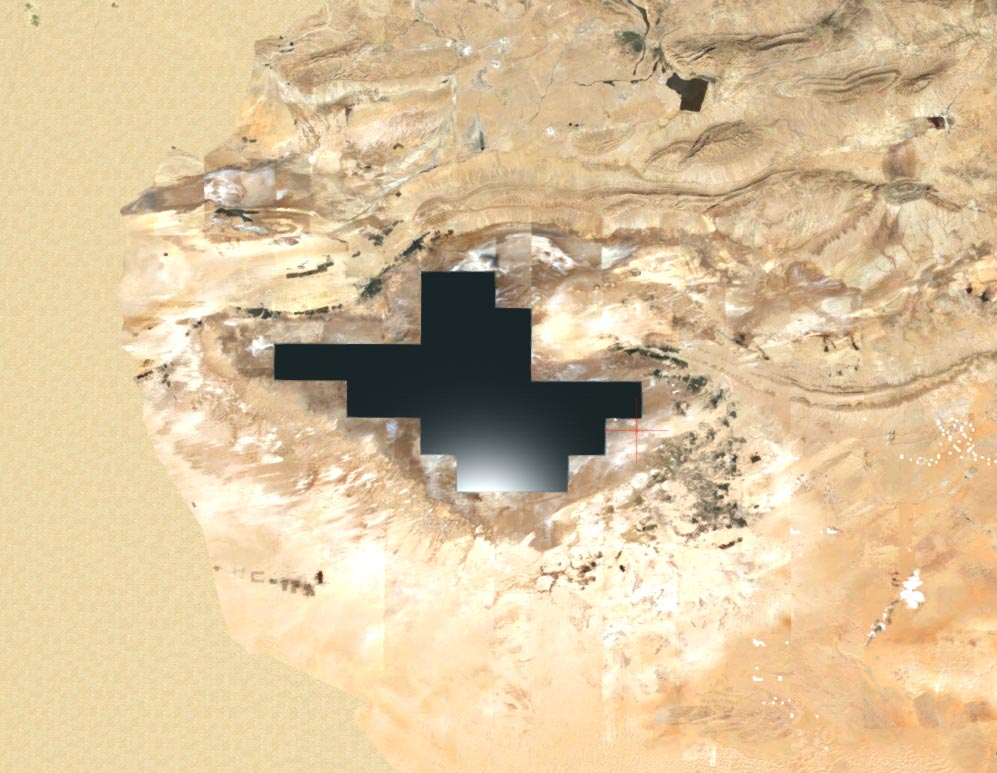
I do see perhaps an anomaly? A large lake in rectangle form. Is that how it should look like?
MatthiasKNU
Resource contributor
- Messages
- 962
- Country
That's indeed a bug...
Thanks for reporting that, I think I already now what I have to change...
By the way, i am currently working on a big update of Morocco and Tunisia, so this problem will be solved with the upcoming update!
Thanks for reporting that, I think I already now what I have to change...
By the way, i am currently working on a big update of Morocco and Tunisia, so this problem will be solved with the upcoming update!
MatthiasKNU
Resource contributor
- Messages
- 962
- Country
Finally there are news here again!
Eritrea and Djibouti are available!
Eritrea and Djibouti are available!
MatthiasKNU
Resource contributor
- Messages
- 962
- Country
.
Last edited:
MatthiasKNU
Resource contributor
- Messages
- 962
- Country
... and the South Sudan is uploaded as well!
MatthiasKNU
Resource contributor
- Messages
- 962
- Country
Uganda is uploaded!


