
this corresponds perfectly to what happens, when I compile some buildings disappearI would try and help if I understood what is going on. It all seems remarkably complicated. I have no idea what a hybrid bgl is - it is not a term I have ever used.
I think that this is about a third party addon airport but I don't see a link to the actual package. I assume the main bgl file for this addon has been loaded into ADE and modified. It seems that models which are custom and part of the main bgl file go missing if the project is compiled after modification. I suspect I know what is going on but need to start from the same place as the

-
Which the release of FS2020 we see an explosition of activity on the forun and of course we are very happy to see this. But having all questions about FS2020 in one forum becomes a bit messy. So therefore we would like to ask you all to use the following guidelines when posting your questions:
- Tag FS2020 specific questions with the MSFS2020 tag.
- Questions about making 3D assets can be posted in the 3D asset design forum. Either post them in the subforum of the modelling tool you use or in the general forum if they are general.
- Questions about aircraft design can be posted in the Aircraft design forum
- Questions about airport design can be posted in the FS2020 airport design forum. Once airport development tools have been updated for FS2020 you can post tool speciifc questions in the subforums of those tools as well of course.
- Questions about terrain design can be posted in the FS2020 terrain design forum.
- Questions about SimConnect can be posted in the SimConnect forum.
Any other question that is not specific to an aspect of development or tool can be posted in the General chat forum.
By following these guidelines we make sure that the forums remain easy to read for everybody and also that the right people can find your post to answer it.
You are using an out of date browser. It may not display this or other websites correctly.
You should upgrade or use an alternative browser.
You should upgrade or use an alternative browser.
scenery objects issue
- Thread starter davide96
- Start date
Hi Jon:
The OP wants to modify a specific freeware add-on package for LIRF cited in my quote above in this thread.
The OP is using a P3Dv4 LIRF scenery by Robert W. Catherall (...IIUC, he was authorized to do an update from FSX by Ray Smith)
https://library.avsim.net/esearch.php?CatID=p3dscen&DLID=204640
That add-on package apparently includes (24) custom 3D models mapped with P3D default textures, and (1) 3D model mapped with a 3rd party texture ('original' source of that latter object and its texture is unknown at this time).
All the above scenery is contained within (1) mixed content "airport" BGL (...what I call a hybrid' BGL).
I recommended he attach his ADE project source code *.AD4 files for LIRF from before- and after- his modifications to LIRF.
Reportedly he ends up with missing buildings at LIRF after he modifies and compiles his ADE project after it is derived from:
[LIRF_P3Dv4_RWC install path]\LIRF_P3Dv4_RWC.bgl
AFAIK, he is using ADE v1.79x in P3Dv4 mode, and has been advised to have the P3Dv4 SDK installed prior to compilation.
Thanks in advance for your input on what may be done to successfully implement changes to LIRF the OP desires for P3Dv4.
GaryGB
Attachments

- Messages
- 34,981
- Country

OK. The first thing to understand is that ADE does not extract library objects from the bgl files. This is a deliberate anti 'pirating' measure so that others are discouraged from extracting the models for use elsewhere with ADE.
The result is what you see. I have only partially tested this since I do not have my full dev setup available. In this case I did the following based on the LIRF_P3Dv4_RWC.bgl file
I loaded it into ADE to create an ADE project file. This results in black box models since information about the models is not in ADE. So I loaded LIRF_P3Dv4_RWC.bgl into the Library Object Manager (LOM)
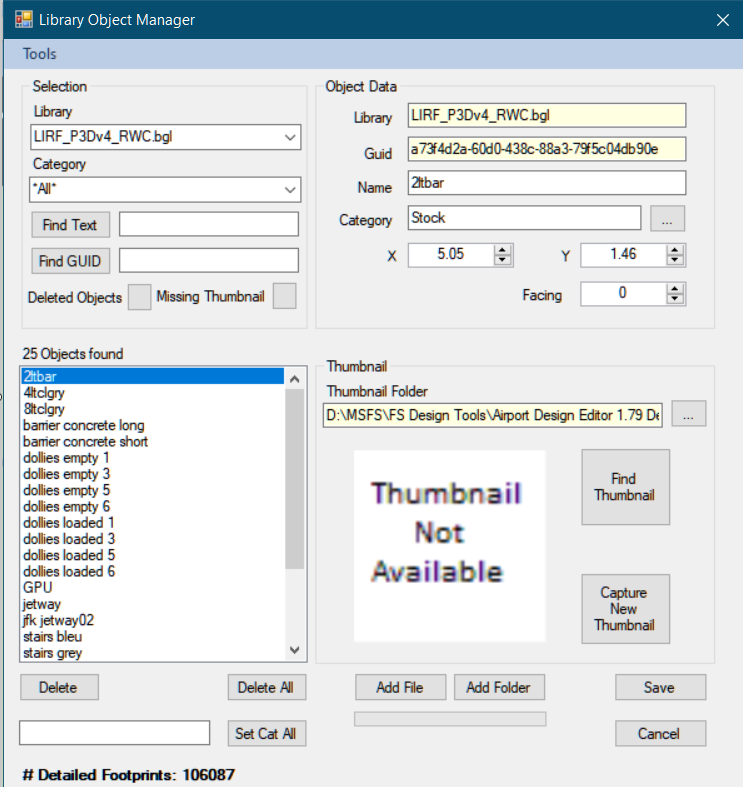
There are 25 custom objects in this bgl file. NOTE that all ADE does when you load models like this is gather information about size, GUID and so on. It does not copy or otherwise extract the actual models.
Saved the LOM. Saved the Project. Closed ADE and reopened it. Loaded the project again
That should get rid of the black boxes. The next issue is actually getting the Sim to recognise the 25 models. For this they have to be in an active scenery folder. The only safe non destructive way to do this is place the original bgl file LIRF_P3Dv4_RWC.bgl in the sim. I added it unaltered into Addon Scenery\scenery. The sim will read them from there. If they are not there then they will not show up and you get missing objects as you found
You could engage in extracting models from the original and placing them in another bgl file but this is probably infringing copyright.
Now I modified the project a bit changing parking and so on and saved the project.
We next need to understand how the sim works. Which files get loaded and how loading order is determined. Please read this article: https://scruffyduck.screenstepslive.com/s/help_docs/m/20268/l/199760-priority-matters
So to summarise last file loaded trumps the others. Since we only placed the original bgl file in sim to get access to the models we need to make sure that anything else gets suppressed by our modified project bgl file. The best way to do this is to make sure it loads last and after the original.
I did this by changing the name of the modified file so it does load last. I put an '_' at the start of the modified file name

Note that the modified bgl file is much smaller than the original and the difference is the models.
This is rough and ready and there may be other ways to do it. Bottom line is that you have to put the actual models from the original third party bgl file into the sim otherwise they are not read and cannot be seen.
The result is what you see. I have only partially tested this since I do not have my full dev setup available. In this case I did the following based on the LIRF_P3Dv4_RWC.bgl file
I loaded it into ADE to create an ADE project file. This results in black box models since information about the models is not in ADE. So I loaded LIRF_P3Dv4_RWC.bgl into the Library Object Manager (LOM)
There are 25 custom objects in this bgl file. NOTE that all ADE does when you load models like this is gather information about size, GUID and so on. It does not copy or otherwise extract the actual models.
Saved the LOM. Saved the Project. Closed ADE and reopened it. Loaded the project again
That should get rid of the black boxes. The next issue is actually getting the Sim to recognise the 25 models. For this they have to be in an active scenery folder. The only safe non destructive way to do this is place the original bgl file LIRF_P3Dv4_RWC.bgl in the sim. I added it unaltered into Addon Scenery\scenery. The sim will read them from there. If they are not there then they will not show up and you get missing objects as you found
You could engage in extracting models from the original and placing them in another bgl file but this is probably infringing copyright.
Now I modified the project a bit changing parking and so on and saved the project.
We next need to understand how the sim works. Which files get loaded and how loading order is determined. Please read this article: https://scruffyduck.screenstepslive.com/s/help_docs/m/20268/l/199760-priority-matters
So to summarise last file loaded trumps the others. Since we only placed the original bgl file in sim to get access to the models we need to make sure that anything else gets suppressed by our modified project bgl file. The best way to do this is to make sure it loads last and after the original.
I did this by changing the name of the modified file so it does load last. I put an '_' at the start of the modified file name
Note that the modified bgl file is much smaller than the original and the difference is the models.
This is rough and ready and there may be other ways to do it. Bottom line is that you have to put the actual models from the original third party bgl file into the sim otherwise they are not read and cannot be seen.
Attachments


Many thanks, Jon, for taking the time to give us this expert analysis and troubleshooting workflow. 
This has clarified something that many ADE users need to keep in mind when working with airport modification in the future.
IMHO, this might be a candidate for another addition to your "ScreenStepsLive" tutorial web page series.
GaryGB
This has clarified something that many ADE users need to keep in mind when working with airport modification in the future.
IMHO, this might be a candidate for another addition to your "ScreenStepsLive" tutorial web page series.
GaryGB
thank you so much man, this was amazing, the "problem" is that now I see both the modified and the original, how can I delete the original (the shorter) jetway in order to visualize only the modified one without compromising the nuildings??OK. The first thing to understand is that ADE does not extract library objects from the bgl files. This is a deliberate anti 'pirating' measure so that others are discouraged from extracting the models for use elsewhere with ADE.
The result is what you see. I have only partially tested this since I do not have my full dev setup available. In this case I did the following based on the LIRF_P3Dv4_RWC.bgl file
I loaded it into ADE to create an ADE project file. This results in black box models since information about the models is not in ADE. So I loaded LIRF_P3Dv4_RWC.bgl into the Library Object Manager (LOM)
View attachment 83376
There are 25 custom objects in this bgl file. NOTE that all ADE does when you load models like this is gather information about size, GUID and so on. It does not copy or otherwise extract the actual models.
Saved the LOM. Saved the Project. Closed ADE and reopened it. Loaded the project again
That should get rid of the black boxes. The next issue is actually getting the Sim to recognise the 25 models. For this they have to be in an active scenery folder. The only safe non destructive way to do this is place the original bgl file LIRF_P3Dv4_RWC.bgl in the sim. I added it unaltered into Addon Scenery\scenery. The sim will read them from there. If they are not there then they will not show up and you get missing objects as you found
You could engage in extracting models from the original and placing them in another bgl file but this is probably infringing copyright.
Now I modified the project a bit changing parking and so on and saved the project.
We next need to understand how the sim works. Which files get loaded and how loading order is determined. Please read this article: https://scruffyduck.screenstepslive.com/s/help_docs/m/20268/l/199760-priority-matters
So to summarise last file loaded trumps the others. Since we only placed the original bgl file in sim to get access to the models we need to make sure that anything else gets suppressed by our modified project bgl file. The best way to do this is to make sure it loads last and after the original.
I did this by changing the name of the modified file so it does load last. I put an '_' at the start of the modified file name
View attachment 83378
Note that the modified bgl file is much smaller than the original and the difference is the models.
This is rough and ready and there may be other ways to do it. Bottom line is that you have to put the actual models from the original third party bgl file into the sim otherwise they are not read and cannot be seen.
in my personal opinion, ade is the best programme but the issue is what you said
"The first thing to understand is that ADE does not extract library objects from the bgl files. This is a deliberate anti 'pirating' measure so that others are discouraged from extracting the models for use elsewhere with ADE"....and if is possible to "bypass" this to work at the best and modify or update an airport.
thanks again so so so so much
Davide
Attachments
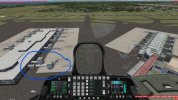
OK, so IIUC, when you install the add-on scenery package to P3D, nothing is missing at LIRF when loaded at run time in P3D ?
And IIUC, some thing(s) go missing after ADE has processed the source code for that LIRF add-on and you have modified it ?
By default, ADE creates a number of very small exclude Rectangles for default FS scenery objects to stop display of the 'original'.
Occasionally, we must add back into the copied airport that ADE has derived, some 'original' scenery objects that were excluded.
You (or I) shall have to study ADE's forums, ADE's online Help site, as well as ADE's user manual to find out why this happens.
See: ADE version 1.65 Manual PDF file - http://www.mediafire.com/download/8rp6jr7en9xwdls
See: https://scruffyduck.screenstepslive...-how-do-i-remove-a-stock-airport-from-the-sim
I suspect that it may have to do with what happens when ADE tries to sort out the XML code contents of "hybrid" airport BGLs.
But, be assured there is more than (1) way to add those scenery objects back into the LIRF that ADE derives from the add-on package and/or default LIRF airport.
First we need to know if the add-on LIRF after loaded by ADE, provides all the objects within ADE's GUI, that you otherwise can see when the add-on is loaded in P3D ...before the airport is modified / compiled by ADE in any way.
What (if any) scenery objects are missing in P3D before the add-on LIRF is modified in any way by ADE ?
What scenery objects (ex: gate number or a taxiway name) are "incorrect" in P3D before the add-on LIRF is modified by ADE ?
After the add-on LIRF derived by ADE is modified, which scenery objects (ex: buildings) go missing ...that normally display in P3D ?
You may need to attach 'before-and-after' screenshots with arrows / text applied in Windows Paint or another graphics application.
As an airline pilot you would have access to on-ground LIRF diagrams, but other would-be helpers may need a reference ex:
https://simmerdream.com/wp-content/uploads/2020/12/LIRF-CHARTS.pdf
https://opennav.com/airport/LIRF
PS: Be sure that P3Dv4 SDK is installed so that ADE can automatically find it and use it ...when compiling BGLs:
P3Dv4 SDK Download Page:
https://www.prepar3d.com/support/sdk/
P3Dv4 SDK (*.MSI Installer) download Link:
https://cloud.prepar3d.com/SDK/Prepar3D_v4_SDK_Setup_4.5.14.34698.msi
P3Dv4.x SDK Documentation:
https://www.prepar3d.com/SDKv4/LearningCenter.php
GaryGB
thank you so much man, this was amazing, the "problem" is that now I see both the modified and the original, how can I delete the original (the shorter) jetway in order to visualize only the modified one without compromising the buildings??
Hi Davide:
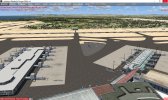
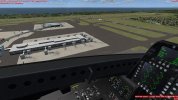
The image immediately below is what I see in P3Dv4 with this airport file loaded (with no other ADE-derived airport loaded.):
[LIRF_P3Dv4_RWC install path]\LIRF_P3Dv4_RWC.bgl
The image immediately above shows what I see in ADE 1.79x with this airport file loaded into ADE via "Open Airport From BGL":
[LIRF_P3Dv4_RWC install path]\LIRF_P3Dv4_RWC.bgl
...if I also import its scenery library format 3D models with placement into ADE 1.79x LOM.
You may be able to place Jetway scenery objects 'imported' to ADE LOM from the original BGL file to populate / configure LIRF.
Also in ADE, you can use very small exclude rectangles to prevent display of "original" Jetway (Library) objects from that file.
See: ADE version 1.65 Manual PDF file - http://www.mediafire.com/download/8rp6jr7en9xwdls
14.12 Exclusion Rectangles - Page 272 / 309
GaryGB
Attachments

Last edited:
You may be able to place Jetway scenery objects 'imported' to ADE LOM from that original file to populate / configure LIRF.
hi gary, as @scruffyduck said, if I modify the original one the building will disappearNote that the modified bgl file is much smaller than the original and the difference is the models.
Last edited:
Hi Davide:
The recommended procedure uses both the original LIRF and ADE-derived LIRF linked via Area layers in P3Dv4 Scenery Library GUI.
The ADE-derived LIRF must in a Area layer located physically above the original LIRF Area layer in P3Dv4 Scenery Library GUI.
ADE Exclusion Rectangles do not directly modify the original BGL; they instruct P3Dv4 to not render scenery from that LIRF BGL.
GaryGB
The recommended procedure uses both the original LIRF and ADE-derived LIRF linked via Area layers in P3Dv4 Scenery Library GUI.
The ADE-derived LIRF must in a Area layer located physically above the original LIRF Area layer in P3Dv4 Scenery Library GUI.
ADE Exclusion Rectangles do not directly modify the original BGL; they instruct P3Dv4 to not render scenery from that LIRF BGL.
GaryGB
Last edited:
I think I have understood, I will try asapHi Davide:
The recommended procedure uses both the original LIRF and ADE-derived LIRF linked via Area layers in P3Dv4 Scenery Library GUI.
The ADE-derived LIRF must in a Area layer located physically above the original LIRF Area layer in P3Dv4 Scenery Library GUI.
ADE Exclusion Rectangles do not directly modify the original BGL; they instruct P3Dv4 to not render scenery from that LIRF BGL.
GaryGB

ok no I did not understand, in the image the longer jetway are the modded, and the shorter are in the original bgl, I have placed the modded one before the original in the scenery folder and created an exclusion in ade, but it is not working.
Hi Davide:
P3D will not detect and load 3D scenery MDLs unless they are packaged inside a BGL.
P3D will not detect and load 3D scenery MDLs unless they are 'placed' via instructions inside a BGL.
P3D will not detect and load 3D scenery in an assigned display priority unless listed and set 'active' via Scenery.Cfg
IMHO, it is not a good idea to simply drop 'mod' BGLs / mapped textures into FS default Addon Scenery folder chain.
It is best, IMHO, to create a 'folder chain' for one's mods / add-ons, and link an Area layer to it in Scenery Library GUI.
The scenery folder chain linked to an Area layer is assigned a display priority by its "stack" position in Scenery.Cfg.
We control BGL load / display priority within a linked \Scenery folder's Area layer via BGL "alphanumeric" file naming.
For a 3D model mod to display in assigned priority, we create a "folder chain":
* A "Top-Folder" with (2) locally paired sub-folders, named:
* Scenery
...and:
* Texture
LIRF_Davide_Mods <-- Top-Folder
...|_Scenery <-- 3D model (MDL) packaged inside 'Scenery Object Library' format & placement BGLs go here
...|_Texture <-- Texture Material(s) mapped onto 3D model go here
.............................(convert copy of original texture to DDS file format for P3D)
For a 3D model mod to display in assigned priority, we must link a "Top-Folder" with (2) locally paired sub-folders to an Area layer in P3D Scenery Library GUI.
Once linked via the P3D Scenery Library, the new Area is positioned at the desired layer position in the "stack".
Area layers higher towards the top of the "stack" of layers, have higher display priority.
Typically we place airport mods near the top of the "stack" of layers to achieve display priority above FS default.
This allows us to exclude- and replace- or add to- the underlying default airport / any add-on airport ...scenery.
Browse / Select ADE target output sub-folder path to your target locally-paired scenery Area layer sub-folder ex:
P3D install path]\Addon Scenery\LIRF_Davide_Mods\Scenery
(...or as previously shown above as a folder chain: )
[P3D install path]
...|_\Addon Scenery
......|_\LIRF_Davide_Mods
......|_\Scenery
After ADE export of your scenery as a (hybrid) FSX Scenery Object Library consisting of (1) 3D model with placement code:
In P3D Scenery Library GUI >Add Area > link your scenery folder chain > position in 'stack' for display priority,
Run P3D and inspect your results.
Hi Davide:
Place this original BGL in a \Scenery sub-folder chain linked as an Area in P3Dv4 Scenery Library GUI as explained in my quote:
[LIRF_P3Dv4_RWC install path]\LIRF_P3Dv4_RWC.bgl
Place your ADE modded BGL in a separate folder chain linked as an Area in P3Dv4 Scenery Library GUI.
NOTE: This folder chain should contain only the ADE Modded BGL.
Position this ADE mod Area layer ABOVE the Area for your original LIRF BGL in P3Dv4 Scenery Library GUI.
Do not combine the (2) sets of files... keep the original and the Mod BGLs in separate folder chains and Area layers.
GaryGB
Last edited:
nothing, not work I will probably give up, I don't know at this point what to do, it seems that I can't update an airport due to adex "protection" as @scruffyduck said
Attachments
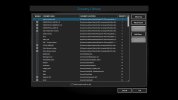
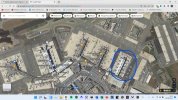
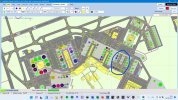
Hi Davide:
Since you now have disclosed that you use multiple OrbX add-ons, this will be more challenging due to how OrbX add-ons work.
But first, we might try a basic procedure required when attempting to modify scenery on a FS computer with a OrbX add-on installed:
Let us remember that we must first create a FTX Central Scenery Library Insertion Point to leave room at the top for our files.
Otherwise, FTX Central keeps automatically positioning OrbX add-ons at the top layer of the Scenery Library ... above your Mod.
Here's an edited excerpt from one of my old posts on the FTX Central "Insertion Point" option for OrbX scenery layers in Scenery Library:
By default, FTX Central utility always re-inserts FTX layers to a position at- / near the top of- P3D Scenery Library GUI stack of layers.
By default, when FTX Central configuration utility runs automatically following installation / configuration of OrbX FTX scenery packages:
* Custom entries are added to the 'active' Terrain.Cfg if they are not already present.
* Several OrbX FTX scenery Area layers are added to the 'top' position of the 'active' FS Scenery Library GUI stack of layers.
Because by default, OrbX FTX scenery Area layers are added to the 'top' position of the P3D Scenery Library GUI, custom scenery may not render properly (if at all), so one should allow for non-OrbX add-on or personally-created custom scenery to be loaded later by placing them above the OrbX FTX scenery Area layers ...at- or nearer to- the 'top' position of the FS Scenery Library GUI.
Each time OrbX FTX Central utility is run OrbX FTX scenery Area layers are again automatically added to the 'top' position of the 'active' FS Scenery Library GUI stack of layers by default.
One can change that default behavior of OrbX FTX Central utility by configuring the OrbX FTX scenery Area layers to be automatically placed at a lower position in the 'active' FS Scenery Library GUI stack of layers by:
OrbX FTX Central Menu > Tools > Scenery Library Configuration > FTX Scenery Library Insertion Points
NOTE: Newer versions of OrbX FTX Central utility may be subject to a different menu / dialog configurations
This results in an assigned position, above which OrbX FTX scenery Area layers will NOT be inserted ...until a new Insertion Point is assigned within that FTX Central utility dialog.
GaryGB
Since you now have disclosed that you use multiple OrbX add-ons, this will be more challenging due to how OrbX add-ons work.
But first, we might try a basic procedure required when attempting to modify scenery on a FS computer with a OrbX add-on installed:
Let us remember that we must first create a FTX Central Scenery Library Insertion Point to leave room at the top for our files.
Otherwise, FTX Central keeps automatically positioning OrbX add-ons at the top layer of the Scenery Library ... above your Mod.
Here's an edited excerpt from one of my old posts on the FTX Central "Insertion Point" option for OrbX scenery layers in Scenery Library:
By default, FTX Central utility always re-inserts FTX layers to a position at- / near the top of- P3D Scenery Library GUI stack of layers.
By default, when FTX Central configuration utility runs automatically following installation / configuration of OrbX FTX scenery packages:
* Custom entries are added to the 'active' Terrain.Cfg if they are not already present.
* Several OrbX FTX scenery Area layers are added to the 'top' position of the 'active' FS Scenery Library GUI stack of layers.
Because by default, OrbX FTX scenery Area layers are added to the 'top' position of the P3D Scenery Library GUI, custom scenery may not render properly (if at all), so one should allow for non-OrbX add-on or personally-created custom scenery to be loaded later by placing them above the OrbX FTX scenery Area layers ...at- or nearer to- the 'top' position of the FS Scenery Library GUI.
Each time OrbX FTX Central utility is run OrbX FTX scenery Area layers are again automatically added to the 'top' position of the 'active' FS Scenery Library GUI stack of layers by default.
One can change that default behavior of OrbX FTX Central utility by configuring the OrbX FTX scenery Area layers to be automatically placed at a lower position in the 'active' FS Scenery Library GUI stack of layers by:
OrbX FTX Central Menu > Tools > Scenery Library Configuration > FTX Scenery Library Insertion Points
NOTE: Newer versions of OrbX FTX Central utility may be subject to a different menu / dialog configurations
This results in an assigned position, above which OrbX FTX scenery Area layers will NOT be inserted ...until a new Insertion Point is assigned within that FTX Central utility dialog.
GaryGB
Last edited:
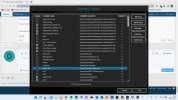
It is possible that our posts crossed on the (sometimes slow) FSDev server.
Did you configure the FTX Scenery Library Insertion Point yet ?
NOTE: This is critically important to do, when working around issues with OrbX (and certain other) add-ons
PS: As mentioned by Jon and me both, there are 'other' ways to configure your BGLs for use ONLY on your own computer.
That would mean you could not release your BGLs to anyone else in the FS Community.
Since you did mention you intended to Mod a number of airports, you may wish to have these LIRF 3D models in their own Library.
That way they can be added once to the Scenery Library and ADE LOM, then 'placed' by ADE as needed at an airport to be Modded.
That would likely be the subject for another separate thread.
I'll refresh my memory on the FS utilities that allow one to do this more easily ...tomorrow morning (Tuesday).
GaryGB
Did you configure the FTX Scenery Library Insertion Point yet ?
NOTE: This is critically important to do, when working around issues with OrbX (and certain other) add-ons
PS: As mentioned by Jon and me both, there are 'other' ways to configure your BGLs for use ONLY on your own computer.
That would mean you could not release your BGLs to anyone else in the FS Community.
Since you did mention you intended to Mod a number of airports, you may wish to have these LIRF 3D models in their own Library.
That way they can be added once to the Scenery Library and ADE LOM, then 'placed' by ADE as needed at an airport to be Modded.
That would likely be the subject for another separate thread.
I'll refresh my memory on the FS utilities that allow one to do this more easily ...tomorrow morning (Tuesday).
GaryGB
Last edited:
yrs I,ve configured the ftx library, the point is this one
I have added the : LIRF_P3Dv4_RWC to the ADE library object manager, and effectively they show up in the ade library object, but when I compile the airpot they won't show up.
and this oneAs mentioned by Jon and me both, there are 'other' ways to configure your BGLs for use ONLY on your own computer.
of course I will use the airport modded by me ONLY and ONLY by me.That would mean you could not release your BGLs to anyone else in the FS Community.
I have added the : LIRF_P3Dv4_RWC to the ADE library object manager, and effectively they show up in the ade library object, but when I compile the airpot they won't show up.
OK, before I begin digging into a parallel work-flow on my computer using the original LIRF and ADE, please attach your most recent LIRF BGL compiled by ADE on your computer (...which reportedly does not display 'some ?' 3D scenery objects after compiled).
I shall compare it with the original LIRF BGL on my computer.
GaryGB
I shall compare it with the original LIRF BGL on my computer.
GaryGB
Last edited:
Hi Davide:
I should have requested you also include the ADE *.AD4 project file that was generated when you compiled the Modded BGL.
Please add that *.AD4 file to your LIRF_ADEP4_ADE.ZIP file along with the LIRF_ADEP4_ADE.bgl; re-attach it in your reply above.
By hovering the Mouse cursor over objects in ADE work-space, please state what 3D models you used for the new terminal.
BTW: Additionally, please attach a list of the 3rd scenery models are used to create your new modified BGL of LIRF Fiumicino.
This list may be captured via:
ADE Menu > Lists > 3rd Party Libraries Used > drag the bottom of that dialog box down to reveal all entries in (1) view.
Press + Hold <Shift> key, then click the top and bottom items in the list to Select / copy all BGL names in Left column.
Press <Ctrl>+V to Paste into Windows NotePad.
Save that list out from NotePad as ex: LIRF-LIB.txt.
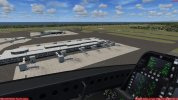
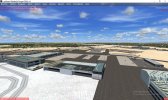
PS: This is what I see in P3Dv4 if I load your latest Modded LIRF_ADEP4_ADE.bgl along with- / on top of- the original LIRF BGL.
NOTE: I have no OrbX scenery installed in P3Dv4.

GaryGB
I should have requested you also include the ADE *.AD4 project file that was generated when you compiled the Modded BGL.
Please add that *.AD4 file to your LIRF_ADEP4_ADE.ZIP file along with the LIRF_ADEP4_ADE.bgl; re-attach it in your reply above.
By hovering the Mouse cursor over objects in ADE work-space, please state what 3D models you used for the new terminal.
BTW: Additionally, please attach a list of the 3rd scenery models are used to create your new modified BGL of LIRF Fiumicino.
This list may be captured via:
ADE Menu > Lists > 3rd Party Libraries Used > drag the bottom of that dialog box down to reveal all entries in (1) view.
Press + Hold <Shift> key, then click the top and bottom items in the list to Select / copy all BGL names in Left column.
Press <Ctrl>+V to Paste into Windows NotePad.
Save that list out from NotePad as ex: LIRF-LIB.txt.
PS: This is what I see in P3Dv4 if I load your latest Modded LIRF_ADEP4_ADE.bgl along with- / on top of- the original LIRF BGL.
NOTE: I have no OrbX scenery installed in P3Dv4.
GaryGB
Attachments
Last edited: