

- Messages
- 34
- Country

Hi all,
I'm new to 3D modelling and texturing; after realising that placing objects into the sim is only a limited portion of scenery development...
A few months ago I completed the doughnut tutorial, then made this hut as my very first ever 3D Model... I think I made it far too detailed but I'm trying to push ahead with texturing it anyway.
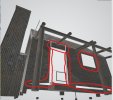
I have run into this issue where some of the pieces aren't accepting the textures like the rest of the building, in the case of the window; the planks that I "removed" are still visible in the export.
Nowhere in Blender can I SEE the problem, only once it's exported (First image)
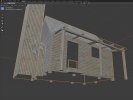
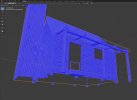
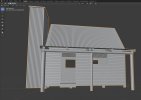
For comparison, this is what I can see in Blender (2nd, 3rd & 4th images)
(I understand the internal/underside components aren't showing textures because of the face orientation and having not modelled them.)
The textures used are just a placeholder until I get more accurate samples.
Any help or feedback would be greatly appreciated!
Warm regards,
Andrew
I'm new to 3D modelling and texturing; after realising that placing objects into the sim is only a limited portion of scenery development...
A few months ago I completed the doughnut tutorial, then made this hut as my very first ever 3D Model... I think I made it far too detailed
but I'm trying to push ahead with texturing it anyway.I have run into this issue where some of the pieces aren't accepting the textures like the rest of the building, in the case of the window; the planks that I "removed" are still visible in the export.
Nowhere in Blender can I SEE the problem, only once it's exported (First image)
For comparison, this is what I can see in Blender (2nd, 3rd & 4th images)
(I understand the internal/underside components aren't showing textures because of the face orientation and having not modelled them.)
The textures used are just a placeholder until I get more accurate samples.
Any help or feedback would be greatly appreciated!
Warm regards,
Andrew


 That's what was causing the issues with the model and textures!