

- Messages
- 150
- Country

Good afternoon gents!
I've been fiddling around with Blender today and I decided to create my first SimObject.
it is a Weather Station
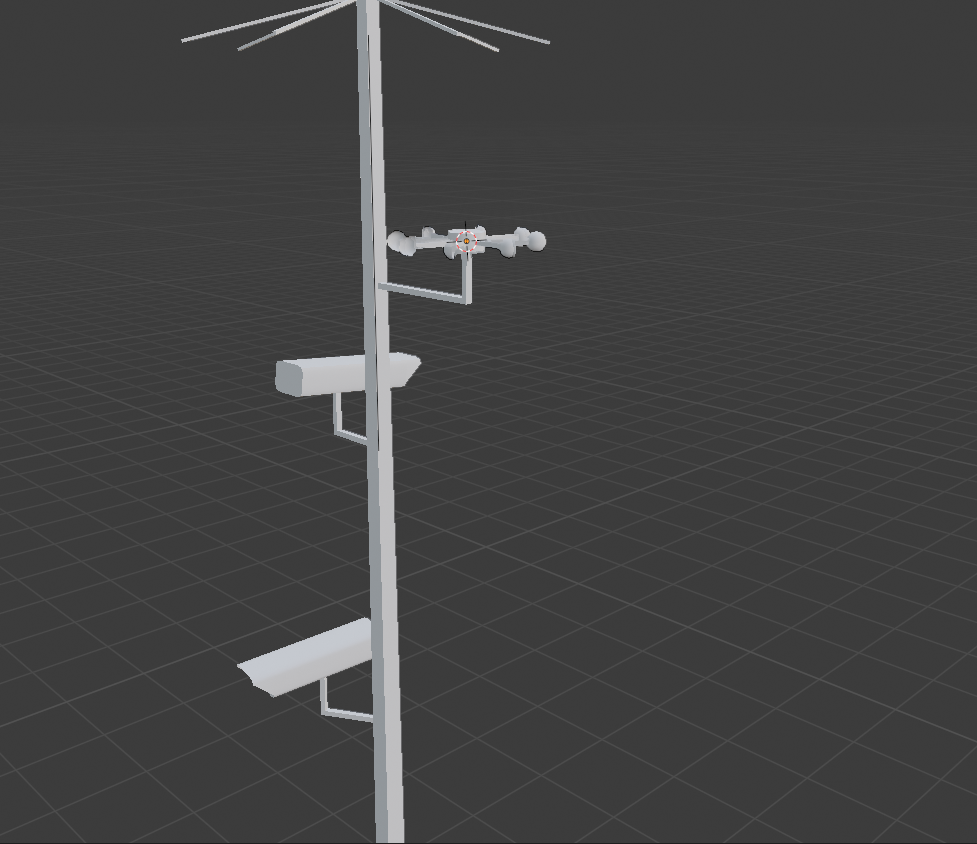
I've looked at the sample Windsock and since I know nothing about programming or XMLs, I got mentally stuck.
I created an NLA track with my Animation (360 degrees rotation on the Z axis) in Blender, it's ready to export and as a scenery object it just works.
Now, if I take the same XML from the windsock which is this:
And I change this to, for instance
So all I did was to use just ONE GUID for all animations but set up different speeds for different wind intensities.
Might this work out or in my code-ignorance I just messed up my mind?
Thanks for the help in anticipation
Chris
I've been fiddling around with Blender today and I decided to create my first SimObject.
it is a Weather Station
I've looked at the sample Windsock and since I know nothing about programming or XMLs, I got mentally stuck.
I created an NLA track with my Animation (360 degrees rotation on the Z axis) in Blender, it's ready to export and as a scenery object it just works.
Now, if I take the same XML from the windsock which is this:
XML:
<?xml version="1.0" encoding="utf-8" ?>
<ModelInfo version="1.1" guid="{ebb99e88-a7b4-43da-b2d0-1d2c7dcc23f2}">

    <LODS>
        <LOD minSize="0" ModelFile="Windsock_LOD00.gltf">
            <!-- <AnimationFileList> -->
                <!-- <AnimationFile>Windsock_Animations.gltf</AnimationFile> -->
            <!-- </AnimationFileList>         -->
        </LOD>
    </LODS>


    <Animation name="Knots_00" guid="0096FD0E-EE60-45AF-968E-6F450DAEF1D0" type="Standard"/>

    <Animation name="Knots_05" guid="62E315C3-B373-4042-A4C8-BFB80A556DB7" type="Standard"/>

    <Animation name="Knots_10" guid="92D6EDCE-7F4B-4AB3-9F9B-91CC7EB462FA" type="Standard"/>

    <Animation name="Knots_15" guid="09E22898-E9EF-4A82-9A61-FF88EA595BB7" type="Standard"/>

    <Animation name="Knots_20" guid="FF244E92-4407-479F-8C3C-FB09254D87CB" type="Standard"/>

    <Animation name="Knots_25" guid="EE3688CA-1F3B-4E6F-AF97-A8E38F0F2905" type="Standard"/>


    <AnimGraph>

        <DefaultState name="Anim"/>

        <BlendTreeState name="Anim">
          <Animations>
            <Animation guid="0096FD0E-EE60-45AF-968E-6F450DAEF1D0" loop ="True" speed="1" threshold="0"/>
            <Animation guid="62E315C3-B373-4042-A4C8-BFB80A556DB7" loop ="True" speed="1" threshold="5"/>
            <Animation guid="92D6EDCE-7F4B-4AB3-9F9B-91CC7EB462FA" loop ="True" speed="1" threshold="10"/>
            <Animation guid="09E22898-E9EF-4A82-9A61-FF88EA595BB7" loop ="True" speed="1" threshold="15"/>
            <Animation guid="FF244E92-4407-479F-8C3C-FB09254D87CB" loop ="True" speed="1" threshold="20"/>
            <Animation guid="EE3688CA-1F3B-4E6F-AF97-A8E38F0F2905" loop ="True" speed="1" threshold="25"/>
          </Animations>
          <Value>(A:AMBIENT WIND VELOCITY, KNOTS)</Value>
        </BlendTreeState>


     </AnimGraph>

</ModelInfo>


<ModelBehaviors>
    <Include Path="Asobo\Misc\SimObjects.xml"/>

    <Component ID="WindSock">
        <UseTemplate Name="ASOBO_WindDirection_Template">
        </UseTemplate>
    </Component>


</ModelBehaviors>
And I change this to, for instance
XML:
<?xml version="1.0" encoding="utf-8" ?>
<ModelInfo version="1.1" guid="{ebb99e88-a7b4-43da-b2d0-1d2c7dcc23f2}">

    <LODS>
        <LOD minSize="0" ModelFile="Windsock_LOD00.gltf">
            <!-- <AnimationFileList> -->
                <!-- <AnimationFile>Windsock_Animations.gltf</AnimationFile> -->
            <!-- </AnimationFileList>         -->
        </LOD>
    </LODS>


    <Animation name="Knots_00" guid="UNIQUE_GUID" type="Standard"/>

    <Animation name="Knots_05" guid="SAME_GUID_AS_ABOVE" type="Standard"/>

    <Animation name="Knots_10" guid="SAME_GUID_AS_ABOVE" type="Standard"/>

    <Animation name="Knots_15" guid="SAME_GUID_AS_ABOVE" type="Standard"/>

    <Animation name="Knots_20" guid="SAME_GUID_AS_ABOVE" type="Standard"/>

    <Animation name="Knots_25" guid="SAME_GUID_AS_ABOVE" type="Standard"/>


    <AnimGraph>

        <DefaultState name="Anim"/>

        <BlendTreeState name="Anim">
          <Animations>
            <Animation guid=""UNIQUE_GUID"" loop ="True" speed="0.1" threshold="0"/>
            <Animation guid="SAME_GUID_AS_ABOVE" loop ="True" speed="0.8" threshold="5"/>
            <Animation guid="SAME_GUID_AS_ABOVE" loop ="True" speed="1.6" threshold="10"/>
            <Animation guid="SAME_GUID_AS_ABOVE" loop ="True" speed="2" threshold="15"/>
            <Animation guid="SAME_GUID_AS_ABOVE" loop ="True" speed="2.4" threshold="20"/>
            <Animation guid="SAME_GUID_AS_ABOVE" loop ="True" speed="3" threshold="25"/>
          </Animations>
          <Value>(A:AMBIENT WIND VELOCITY, KNOTS)</Value>
        </BlendTreeState>


     </AnimGraph>

</ModelInfo>


<ModelBehaviors>
    <Include Path="Asobo\Misc\SimObjects.xml"/>

    <Component ID="WindSock">
        <UseTemplate Name="ASOBO_WindDirection_Template">
        </UseTemplate>
    </Component>


</ModelBehaviors>
So all I did was to use just ONE GUID for all animations but set up different speeds for different wind intensities.
Might this work out or in my code-ignorance I just messed up my mind?
Thanks for the help in anticipation
Chris